
mt20 - Thin client HP - Free user manual and instructions
Find the device manual for free mt20 HP in PDF.


Pick your language and provide your email: we'll send you a specifically translated version.
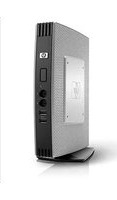
| Product type | Thin client |
| Brand | HP |
| Model | mt20 |
| Power supply | External AC adapter, 100-240V, 50-60Hz |
| Dimensions (approx.) | 200 x 200 x 45 mm |
| Weight (approx.) | 1.4 kg |
| Operating system | Compatible with Windows Embedded or Linux distributions |
| Processor | Energy-efficient low-power dual-core processor |
| Memory | 2 GB RAM, configurable |
| Storage | 4 GB flash storage |
| Networking | Gigabit Ethernet, optional Wi-Fi |
| Ports | USB 2.0/3.0, DisplayPort, VGA, headphone/microphone combo jack |
| Security | TPM support, password protection, secure boot |
| Cooling | Fanless, silent operation |
| Mounting | VESA mountable for flexible placement |
| Maintenance | Easy access to internal components for cleaning and upgrades |
| Repairability | Spare parts available through authorized HP resellers |
| Environmental | Low power consumption, RoHS compliant |
| Package contents | Power adapter, VESA bracket, user manual |
Frequently Asked Questions - mt20 HP
How do I connect the HP mt20 to a monitor?
Use the DisplayPort or VGA port on the back of the device to connect to a monitor. For best results, use a DisplayPort cable if available. Then power on the thin client and monitor.
How do I set up the HP mt20 for the first time?
Connect the power adapter, display, keyboard, and mouse. Press the power button. Follow the on-screen startup wizard to configure network, time zone, and user preferences.
Does the HP mt20 support Wi-Fi?
Yes, the HP mt20 can support Wi-Fi connectivity if the optional Wi-Fi module is installed. Check the network settings in the operating system to connect to a wireless network.
Can I upgrade the RAM or storage on the HP mt20?
The HP mt20 offers accessible internal components. You can upgrade the RAM and replace the flash storage, but ensure compatibility with the system specifications.
How do I clean and maintain the HP mt20?
Use a soft, dry cloth to clean the exterior. Avoid liquids and abrasive cleaners. Keep the ventilation ports dust-free and ensure proper airflow to prevent overheating.
What operating system is preloaded on the HP mt20?
The HP mt20 typically comes with a Linux-based thin client OS or Windows Embedded depending on the configuration. Check the included documentation for your specific model.
How do I connect peripheral devices like keyboard and mouse?
Plug USB keyboards and mice into the USB ports on the front or back of the device. The system will automatically detect and install drivers.
Is the HP mt20 compatible with VMware or Citrix?
Yes, the HP mt20 supports popular virtual desktop environments such as VMware Horizon and Citrix Virtual Apps and Desktops. Install the appropriate client software for remote access.
What should I do if the HP mt20 does not start?
Check that the power adapter is connected securely and the power outlet works. Verify the monitor is on and the video cable is attached. If the issue persists, reset the device by disconnecting power for 30 seconds and retry.
How do I secure my HP mt20 against unauthorized access?
Enable the built-in password protection in the BIOS and operating system. Use the TPM module for hardware-level encryption and secure boot to prevent unauthorized modifications.
User questions about mt20 HP
0 question about this device. Answer the ones you know or ask your own.
Ask a new question about this device
No questions yet. Be the first to ask one.
Download the instructions for your Thin client in PDF format for free! Find your manual mt20 - HP and take your electronic device back in hand. On this page are published all the documents necessary for the use of your device. mt20 by HP.
USER MANUAL mt20 HP


Manual assistant
Powered by Anthropic
Waiting for your message
Product information
Brand : HP
Model : mt20
Category : Thin client