
mt40 - Thin client HP - Free user manual and instructions
Find the device manual for free mt40 HP in PDF.


Pick your language and provide your email: we'll send you a specifically translated version.
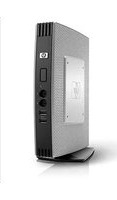
| Product Type | Thin Client |
| Brand | HP |
| Model | mt40 |
| Form Factor | Compact desktop (small form factor) |
| Dimensions (W x D x H) | 19.5 x 19.5 x 3.5 cm |
| Weight | 1.2 kg (2.65 lbs) |
| Power Supply | External 65W AC adapter |
| Processor | AMD Dual-Core GX-212JC (2.2 GHz) |
| Memory | 4 GB DDR4 (expandable to 8 GB) |
| Storage | 16 GB eMMC SSD |
| Operating System | HP ThinPro (Linux-based) or Windows 10 IoT Enterprise |
| Video Ports | 1 x DisplayPort, 1 x VGA |
| USB Ports | 4 x USB 3.0, 2 x USB 2.0 |
| Networking | Gigabit Ethernet, optional Wi-Fi (802.11ac) and Bluetooth |
| Audio | 1 x Headphone/microphone combo jack |
| Security Features | TPM 2.0, Kensington lock slot, optional smart card reader |
| Remote Access Protocols | Citrix, Microsoft RDP, VMware Horizon, HP RGS |
| Cooling | Fanless passive cooling for silent operation |
| Maintenance & Cleaning | Wipe with a soft, dry cloth; avoid liquids and aerosol cleaners |
| Repairability | User-accessible memory and storage; bottom panel removable for upgrades |
| Included Accessories | VESA mount bracket, AC adapter, quick setup guide |
| Warranty | 1-year limited hardware warranty |
Frequently Asked Questions - mt40 HP
How do I connect the HP mt40 thin client to a monitor?
Use the DisplayPort or VGA port on the back of the device. Connect the cable to your monitor, then power on the thin client. The display should be detected automatically.
Can I upgrade the RAM on the HP mt40?
Yes, the HP mt40 has user-accessible memory. Remove the bottom panel to access the SO-DIMM slot. It supports up to 8 GB DDR4 memory.
Does the HP mt40 support connection to a wireless network?
Yes, the device includes Gigabit Ethernet and optional Wi-Fi (802.11ac) with Bluetooth. If your model has Wi-Fi, you can connect through the network settings in the operating system.
What operating system does the HP mt40 run?
The HP mt40 typically runs HP ThinPro (a Linux-based thin client OS) or Windows 10 IoT Enterprise, depending on the configuration. Both support major remote desktop protocols.
How do I set up a remote desktop connection?
Use the pre-installed Citrix Receiver, Microsoft RDP, or VMware Horizon Client. Enter the server address provided by your IT administrator, then log in with your credentials.
Can I watch local video or play multimedia on the HP mt40?
Yes, the device supports local multimedia playback thanks to its accelerator graphics. You can play videos, view images, and use office applications locally, though it is designed primarily for cloud-based workloads.
How do I update the firmware or operating system?
Updates can be applied via the HP ThinPro Update Utility or through Windows Update, depending on your OS. Check the HP Support website for the latest firmware and driver releases.
What security features does the HP mt40 offer?
The device comes with TPM 2.0 for hardware encryption, a Kensington lock slot for physical security, and optional smart card reader support for strong authentication.
Is the HP mt40 fanless?
Yes, the HP mt40 uses fanless passive cooling, which means it operates silently and has lower power consumption. Ensure vents are not blocked to maintain optimal thermal performance.
How do I clean and maintain the HP mt40?
Use a soft, dry cloth to clean the exterior. Do not use water, solvents, or abrasive cleaners. For deep cleaning, power off the unit and gently remove dust from vents using compressed air.
User questions about mt40 HP
0 question about this device. Answer the ones you know or ask your own.
Ask a new question about this device
No questions yet. Be the first to ask one.
Download the instructions for your Thin client in PDF format for free! Find your manual mt40 - HP and take your electronic device back in hand. On this page are published all the documents necessary for the use of your device. mt40 by HP.
USER MANUAL mt40 HP


Manual assistant
Powered by Anthropic
Waiting for your message
Product information
Brand : HP
Model : mt40
Category : Thin client