
H0E49AA - Thin client HP - Free user manual and instructions
Find the device manual for free H0E49AA HP in PDF.
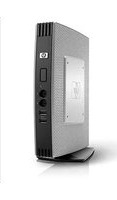


| Product type | Thin client |
| Brand | HP |
| Model | H0E49AA |
| Category | Thin client |
| Processor | AMD GX-217GA dual-core |
| Memory | 4 GB DDR3L |
| Storage | 16 GB Flash |
| Operating system | HP ThinPro |
| Power consumption | 15 W typical |
| Input voltage | 100-240 V AC |
| Dimensions | 274 x 65 x 254 mm |
| Weight | 1.5 kg |
| Ports | 4 x USB 2.0, 2 x USB 3.0, 1 x RJ-45, 1 x COM |
| Wireless connectivity | 802.11 a/b/g/n, Bluetooth 4.0 |
| Display outputs | 2 x DisplayPort, 1 x DVI |
| Main functions | Remote desktop, VDI client, web browsing |
| Maintenance | Keep ventilation slots clear; check for firmware updates |
| Cleaning | Wipe with dry cloth, no solvents |
| Safety | Use approved power adapter, avoid exposure to liquids |
| Spare parts and repairability | User-accessible compartments for RAM and flash; spare parts from HP |
Frequently Asked Questions - H0E49AA HP
User questions about H0E49AA HP
0 question about this device. Answer the ones you know or ask your own.
Ask a new question about this device
Download the instructions for your Thin client in PDF format for free! Find your manual H0E49AA - HP and take your electronic device back in hand. On this page are published all the documents necessary for the use of your device. H0E49AA by HP.
USER MANUAL H0E49AA HP
FRONTFRONT
- Power button (with integrated power indicator light)
- Flash drive activity indicator light
- Audio connector (headphone/speaker out)
- Audio connector (mic in)
- USB connectors (two)
- Removable stand for vertical orientation
- Mounting points for HP Quick Release or other VESA mount
- Secure USB compartment cover
- Cable lock slot (secures unit and secure USB compartment)

BACKBACK
- Cabling exit from secure USB compartment
- WIFI antenna connector (depends on model)
- Ethernet RJ-45 connector
- USB connectors (four)
- DisplayPort monitor connector
- VGA monitor connector
n2unt PS/2 keyboard connector
- PS/2 mouse connector
Ent) Serial connector
10. +19V DC power input
11. Power cable retention slot
12. Mounting location for four (4) horizontal mounting feet
Overview
TOPTOP


- Cable lock slot - secures unit and secure USB compartment Secure USB compartment with cover removed - 2 USB connectors
With With optionPalt57408374055P45e R4/PG4,ExpanspanModule Module Kit

FRONTFRONT

BACKBACK
- Power button (with integrated power indicator light)
- Flash drive activity indicator light
- Audio connector (headphone/speaker out)
- Audio connector (mic in)
- USB connectors (two)
- Removable stand for vertical orientation
- Mounting points for HP Quick Release or other VESA mount PS/2 keyboard connector
- Ethernet RJ-45 connector
- USB connectors (four)
- DisplayPort monitor connector
-
VGA monitor connector
-
Cabling exit from secure USB compartment
- WIFI antenna connection (depends on model)
Overview
-
Secure USB compartment - 2 USB connectors
-
PS/2 mouse connector
-
Cable lock slot (secures unit and secure USB compartment)
(ent) Serial connector
10 +19V DC power input
-
Power cable retention slot
-
Mounting location for four (4) horizontal mounting feet
-
Second serial connector
-
PCIe x4/PCI expansion module slot
-
Parallel connector
At A Glance At A Glance
Hardware features Hardware features
- Intel Atom N280 processor, with Intel GL40 chipsetIntel's numbering is not a measurement of higher performance
• 4 GB flash memory provides ample storage for drivers and applications - 2 GB DDR3/667MHz system memory (64 MB minimum reserved for graphics memory)
- Available empty DDR3 SODIMM slot (and RAM upgrade options) for dual-channel system memory expansion
NOTE: NOTE num of 1GB and a maximum of 4GB* (2 X 2GB) can be supported (*Up to 1 GB may not be available v bit operating systems due to system resource requirements.)
• Built in dual monitor support (VGA and DisplayPort native) - Integrated wireless (802.11 a/b/g/n technology (select models). Wireless access point and Internet required.
- Optional Expansion Module with PCIe x4/PCI slot for installing a wide range of devices (includes a parallel and second port)
- Optional enhanced performance technology
- Optional dual and quad digital monitor support
- Secure USB compartment is ideal for protecting USB wireless and USB Flash devices as well as for protecting USB keyboard and mouse connectors
• Additional SATA II connector for adding optional secondary solid state Flash drive - 8 USB 2.0 ports
- Legacy support includes parallel (via Expansion Module), serial, and PS/2 connections
Software features Software features
- Preinstalled with new Microsoft® Windows® Embedded Standard 7 SP1 with support for Remote FX and local applications
- Excellent rich multimedia experience and enhanced USB device support in VDI environments
- Enhanced Write Filter and File-Based Write Filter provide complete flexibility to protect the entire Flash disk, or configure of the disk for persistent access by local applications
- Microsoft Firewall for enhanced data security
- HP TeemTalk Terminal Emulator enables connection and communication with applications on mainframes and midrange systems
- HP ThinState Tools offers in-box, easy-to-use image deployment and recovery tools
- Enterprise class HP Device Manager lets you remotely manage devices from a central location
- Support for HP Client Automation and Microsoft System Center Configuration Manager for easy management
- HP Universal Print Driver (available as an add-on) provides instant access to a range of HP print devices without download separate drivers. Additional information can be found http://www.hp.com/go/upd.
Warranty Warranty
HP Total Care Warranty and Services: limited three-year hardware warranty in most regions. HP Care Pack Services extend service contracts beyond your standard warranties. For more details http://www.hp.com/go/lookuptool.
Standard Features - Models
Models without integrated WIFI adapterModels without integrated WIFI adapter
| WorldwideXL424AA | ProcessorProcessor | Intel Atom N280 (1.66 GHz)NOTE:NOTE: numbering is not a measurement of higher performance. |
| Americas and EMEAXL424AT(Smart Buy/Top Value) | ChipsetChipset | Intel GL40Operating System Operating System Windows Embedded Standard 7Flash Memory Flash Memory GBMemoryMemory 2 GB DDR3(1 x 2 GB SODIMM)NOTE:NOTE: minimum reserved for graphics memory |
| US onlyXL426AA 1 | GraphicsGraphics | Intel GL40 graphicsKeyboard Keyboard USB or PS/2 (varies by region)MouseMouse USB or PS/2 (varies by region) 1 Product complies with U.S. Trade Agreement (TAA). Available in U.S only. |
Models with integrated WIFI adapterModels with integrated WIFI adapter
| Worldwide:XL425AA | ProcessorProcessor | Intel Atom N280 (1.66 GHz)NOTE:NOTE: numbering is not a measurement of higher performance. | |
| Americas and EMEA XL425AT(Smart Buy/Top Value) | ChipsetChipset | Intel GL40Operating System Operating System Windows Embedded Standard 7Flash Memory Flash Memory GBMemoryMemory 2 GB DDR3(1 x 2 GB SODIMM)NOTE:NOTE:MB minimum reserved for graphics memory | |
| US onlyXL427AA1 | |||
| GraphicsGraphics | Intel GL40 graphicsIntegrated Wireless Integrated Wireless 11 a/b/g/n Wi-Fi adapterKeyboardKeyboard USB or PS/2 (varies by region)MouseMouse USB or PS/2 (varies by region)1 Product complies with U.S. Trade Agreement (TAA). Available in U.S only.2 A standard WLAN (Wi-Fi) infrastructure with wireless access points is required and is not included. | ||
Standard Features - Models
Models with enhanced performance technologyModels with enhanced performance technology
ProcessorProcessor Intel Atom N280 (1.66 GHz) NOTE: Notes: numbering is not a measurement of higher performance.
ChipsetChipset Intel GL40
Operating SystemOperatingMidsystemWindows Embedded Standard 7 preinstalled
Flash memory Flash memory GB
MemoryMemory 2 GB DDR3 SODIMM (1 x 2 GB SODIMM)
NOTE: No 4MB minimum reserved for graphics memory
GraphicsGraphics Varies by model (see below)
Integrated Wireless Integrated Wireless for models shipping with the Broadcom Crystal HD Decoder
KeyboardKeyboard USB or PS/2 (varies by region)
MouseMouse USB or PS/2 (varies by region)
H0E51AAH0E51A45740e with Broadcom Crystal HD Decoder available in Americas & APJ
not available in EMEA
H0E50AAH0E50A45740e with Expansion Module, Broadcom Crystal HD available in Americas & APJ
Decoder, and AMD FirePro™ 2270 Multi-View Professional not available in EMEA
Graphics dual-head graphics card
NOTE: NO740e on-board GL40 graphics and respective
DisplayPort and VGA ports are disabled in this configuration
H0E49AAH0E49A5740e with Expansion Module, Broadcom Crystal HD available in Americas & APJ
Decoder, and AMD FirePro™ 2460 Multi-View Professional not available in EMEA
Graphics quad- head graphics card
NOTE: NO740e on-board GL40 graphics and respective
DisplayPort and VGA ports are disabled in this configuration
A1U70AAA1U70AA5740e with Expansion Module and AMD FirePro™ 2270 available in EMEA
not available in Americas & APJ
head graphics card
NOTE: NO740e on-board GL40 graphics and respective
DisplayPort and VGA ports are disabled in this configuration
A1U69AAA1U69AA5740e with Expansion Module and AMD FirePro™ 2460 available in EMEA
not available in Americas & APJ
quad- head graphics card
NOTE: NOTE 40e on-board GL40 graphics and respective
DisplayPort and VGA ports are disabled in this configuration
Technical Specifications
With support for Remote FX and local applications
PROCESSOR / CHIPSETPROCESSOR / CHIPSET
Intel Atom N280 (1.66 GHz)
Intel GL40
NOTE: Notes: numbering is not a measurement of higher performance.
MEMORYMEMORY
Flash memory Flash memory GB (for boot drive)
System memorySystem memGB DDR3
Maximum system memoryMaxBmDDR3system memory
Memory slots Memory slot2 SODIMM
GRAPHICSGRAPHICS
| Intel GL40 graphics with support for two high-resolution monitors up to 2048 x 1536, or up to 32 bit color depth | ||
| ModeMode | Color depthColor depth | Refresh rate (Hz)Refresh rate (Hz) |
| 640 x 480 | 8/16/32bit | 60, 70, 75, 85 |
| 800 x 600 | 8/16/32bit | 60, 75, 85 |
| 1024 x 768 | 8/16/32bit | 60, 70, 75, 85 |
| 1280 x 720 | 8/16/32bit | 60, 75, 85 |
| 1280 x 768 | 8/16/32bit | 60, 75, 85 |
| 1280 x 1024 | 8/16/32bit | 60, 75, 85 |
| 1400 x 1050 | 8/16/32bit | 60, 75, 85 |
| 1440 x 900 | 8/16/32bit | 60, 75, 85 |
| 1600 x 1200 | 8/16/32bit | 60, 75 ,85 |
| 1680 x 1050 | 8/16/32bit | 60 |
| 1920 x 1080 | 8/16/32bit | 60, 75, 85 |
| 1920 x 1200 | 8/16/32bit | 60, 75 |
| 2048 x 1536 | 8/16/32bit | 60 |
NOTE:NOTE table represents a sample of possible modes that this controller is capable of displaying but various factors such as the capability and EDID information returned by the attached monitor, the interface used (D-SUB/DisplayPort or optional DVI-D with dongle), and dual monitor mode may limit the availability of modes, color depth, and/or refresh r. NOTE:NOTE5740e does not support touch capabilities as the Microsoft Windows Embedded 7E sku does not support Windows Touch functionality.
Technical Specifications
INPUT/OUTPUT (peripheral support) INPUT/OUTPUT (peripheral support)
| KeyboardKeyboard | USB or PS/2 (varies by region) |
| MouseMouse | USB or PS/2 (varies by region) |
| PrinterPrinter | Local and/or network printers (RDP, ICA, LPD) |
| VideoVideo | Intel GL40 graphics |
AUDIOAUDIO
| OutputOutput | Internal amplified speaker1/8-inch mini-jackFull 16-bit stereo44-kHz sample rate. |
| InputInput | 1/8-inch mini-jack microphone |
HARDWARE SECURITY HARDWARE SECURITY
Security lock slot (cable lock sold separately) Secure USB compartment with 2 USB 2.0 ports
NETWORKINGNETWORKING
10/100/1000 Gigabit Ethernet (RJ-45
TCP/IP with DNS and DHCP
Point-to-Point Protocol (PPP)
Direct Connection through RS-232
Point-to-Point over Ethernet (PPPoE)
Point-to-Point Tunneling Protocol (PPTP)
Layer-2 Tunneling Protocol (L2TP)
Wake on LAN (WOL)
PXE
Server Network Time Protocol (SNTP)
WIRELESS LAN (select models) WIRELESS LAN (select models)
AdapterAdapter Atheros 802.11a/b/g/n WIFI Adapter
Form FactorForm Factor PCI-Express Half Mini Card
SecuritySecurity Supports 64- and 128-bit WEP, WPA, WPA2, AES, TKIP, 802.1x authentication types EAP-TLS, EAP-TTLS, EAP-PEAP, EAP-FAST, LEAP.
Technical Specifications
I/O PORTS & CONNECTORS/I/O PORTS & CONNECTORS
8 USB 2.0 (two in front, four in rear, two in secure USB compartment
1 VGA
1 DisplayPort
2 PS/2
1 serial
1 RJ-45
1 optional Expansion Module with x4 PCIe or PCI slot (also includes 1 parallel and second serial port)
ENHANCED PERFORMANCE TECHNOLOGYENHANCED PERFORMANCE TECHNOLOGY
Broadcom Crystal HDBroadcomFaCrystalInsHdled Option
Video AcceleratorVideo AccelerSingle-Chip High Definition Advanced Media Processor
- Half-height mini-PCIe HD multimedia decoder (displaces mini PCIe WIFI adapter)
- Multi-standard high definition video decoding in the following formats:
o H.264/AVC HP at L 4.1 1080p/1080i, 40 Mbps
o SMPTE VC-1 AP at L 3 1080p/1080i, 40 Mbps
o WMV9 (VC-1 SP and MP)
o MPEG-2 MP @ ML and MP @ HL
AMD FirePro™ 2270AMD FireFactory2270alled Option
Multi-View ProfessionalMulti-View Research Expansion Module
GraphicsGraphics • 512MB memory
dual-headgraphics carddual-headgraphics xcard
- DMS-59 (supports dual VGA, dual DVI-I, and dual DisplayPort; ships with 1x dual DVI-dongle)
• Maximum resolution
○ DisplayPort: 2560x1600
○ DVI/VGA: 1920x1200
- OpenGL 4.1
- DirectX 11
AMD FirePro™ 2460AMD FireFactory2460alled Option
Multi-View ProfessionalMulti-ViewReProfessExpansion Module
GraphicsGraphics • 512MB memory
quad-head graphics cardquad-Rede graphics card
- 4x mini-DisplayPort (ships with 4x mini-DP to DVI-D dongles)
o DVI quad output is divided into two pairs (displays 1 and 2, and displays 3 and
The displays in each pair must be identical (with the same manufacturer and model number) and must be identically configured (with the same resolution)
- The pairs do not have to be identical to each other
• Maximum resolution
○ DisplayPort: 2560x1600
○ DVI/VGA: 1920x1200
- OpenGL 4.1
- DirectX 11
NOTE:NOTEof the AMD FirePro™ 2270 or 2460 graphics cards disables the GL40 graphics native to the t5740e motherboard and respective DisplayPort and VGA ports.
Technical Specifications
SERVER OS COMPATIBILITY/SUPPORTSERVER OS COMPATIBILITY/SUPPORT
Citrix XenApp 5 and 6
Citrix XenDesktop 3 and 4
Citrix Presentation Server 4.0
Windows Server 2008 Terminal Services
Windows 2000/2003 Server families, Windows 2000/2003 Server Terminal Services
VMware Virtual Desktop Infrastructure using RDP
SOFTWAREOFTWARE
Operating SystemOperatingSystemWindows Embedded Standard 7 SP1 (preinstalled)
ProtocolsProtocols Microsoft RDP 7.1 (with RemoteFX)
Citrix Online Plugin 13
VMware View 4.6 (supports PCoIP and RDP)
HP TeemTalk Terminal Emulator 7
HP Remote Graphics Software Receiver 5
Microsoft Terminal Services
Citrix HD-X support for XenApp
Citrix HD-X support for XenDesktop
Browser supported Browser Microsoft Internet Explorer 8
SecuritySecurity Configure to use Enhanced Write Filter or File-based Write Filter
Microsoft Firewall
Administrator and user passwords
HP USB Config utility to restrict access to USB storage devices
Session brokersSession brokeinstalled:
Available from HP.com
Citrix Desktop Delivery Controller enabled
VMware View 5.0
through web browser
Available from vendor's website:
VMware View 4.6 (supports PColP and RDP) Leostream Desktop Connection Broker
Provision Networks (Quest) broker
ManagementManagement HP Device Manager agent
HP ThinState for rapid deployment
Microsoft SCCM/EDM agent
HP Easy Tools (avail as add-on) GUI guides you through initial setup and configurations
Additional componentsAddWindowsvaccinePlayer 12
HP Connection Manager
NOTE: NOTh er add-on software available (seew.hp.com/support for latest list of available add-ons)
LANGUAGES (MUI) LANGUAGES (MUI)
English, French, German, Spanish, Dutch, Norwegian, Korean, Simplified Chinese, Traditional Chinese, and Japanese
Technical Specifications
DIMENSIONS (WxDxH)DIMENSIONS (WxDxH)
Without standWithout stand73 x 8.74 x 10.04 in
(4.4 x 22.2 x 25.5 cm)
With standWith stand 1.73 x 8.74 x 10.39 in
(4.4 × 22.2 × 26.67 cm)
With expansion moduleWith exponent xmb04 in
(7.4 × 22.2 × 25.5 cm)
NOTE: NO Tensions are approximate
WEIGHTWEIGHT
Without stand Without sta3d48 lb (1.58 kg)
With standWith stand 4.14 lb (1.88 kg)
NOTE: Notights are approximate
POWERPOWER
65 W
ENERGY STAR® 2.0 qualified
Worldwide auto-sensing 100-240 VAC, 50-60 Hz energy-saving automatic power-down, surge-tolerant
ENVIRONMENTALENVIRONMENTAL
Operating temperature Operating temperature
rangerange 50° to 104° F (10° to 40° C
Using Quick Release with a flat panel monitor
50° to 95° F (10° to 35° C)
Using PCI Expansion Unit
50° to 104° F (10° to 40° C)
Non-operating Non-operating to 140° F (-30° to 60° C)
temperature rangetemperature range
Humidity Humidity Condensing
20% to 80%
Non-condensing
10% to 90% non-condensing
NOTE: Specifications are at sea level with altitude derating of 1° C/300m ( 1.8° F/1000ft) to a maximum of 3 Km (1 ft), with no direct, sustained sunlight. Upper limit may be limited by the type and number of options installed.
Technical Specifications
Ergonomics Ergonomics German ZH1/618; EN29241-3, approved
SafetySafety UL 1950, CSA 950; TÜV-GS (EN60 950) approved
RF Interference RF Interference Class B; CE Mark; EN55022B; VCCI
EMULATIONSEMULATIONS
| EmulationEmulation | Terminal IDTerminal ID |
| ADDS A2 | |
| AIXTerm | |
| ANSI BBS | |
| AT 386 | |
| ATT4410 | |
| HP 700-92/96 | 70092, 70094, 70096, 2392A, 2622A |
| HZ1500 | |
| IBM3151 | Mod11, Mod31 |
| IBM3270 | 3278-2 (24x80), 3278-3 (32x80), 3278-4 (43x80), 3278-5 (27x132), 3278-2-E (24x80), 3278-3-E (32x80), 3278-4-E (43x80), 3278-5-E (27x132), 3279-2 (24x80), 3279-3 (32x80), 3279-4 (43x80), 3279-5 (27x132), 3287-1 |
| IBM5250 | 5291-1, 5292-2, 5251-11, 3179-2, 3196-A1, 3180-2, 3477-FC (27x132), 3477-FG (24x80), 3486-BA, 3487-HA, 3487-HC, 3812-1 |
| SCO Console | |
| Stratus V102 | |
| TA6530 | |
| TVI910 | |
| TVI920 | |
| TVI925 | |
| TVI950 | |
| TVI955 | |
| VT52, VT100, VT100+, VT500 (7- or 8-bit) | VT100, VT101, VT102, VT125, VT131, VT132, M2200, VT220, VT240, VT320, VT340, VT420, VT510, VT520, VT525 |
| VT HP220, VT UTF8 | VT100, VT101, VT102, VT125, VT220, VT240, VT320, VT340, VT420, VT131, VT132, M2200, VT510, VT520, VT525 |
| VT PCTerm | |
| Wyse PCTerm | |
| WY50 | |
| WY50+ | |
| WY60 |
NOTE: Notless features, performance and support may vary depending on environmental variables such placement, settings and firmware of your access points. Please contact your wireless vendor for support of your wireless environment
Technical Specifications – Environmental Data
ECO-LABEL CERTIFICATIONS & DECLARATIONSECO-LABEL CERTIFICATIONS & DECLARATION
This product has received or is in the process of being certified to the following approvals and may be labeled with a more of these markets:
• ENERGY STAR® Category B
- EPEAT® registered where applicable/supported, see www.epeat.net for registration status by country
- Enhanced performance models using either the AMD FirePro™ 2270 or 2460 graphics cards do not meet ENERSTAR® or EPEAT® requirements.
ENERGY CONSUMPTIONENERGY CONSUMPTION
115 VAC (60Hz)1230VACC(60Hz)VAC (50Hz)2300VACC(50Hz)VAC (60Hz)100 VAC (6
Standard ModelsStandard Models
| Idle State: | 10.70 W 10.80 W 10.80 W |
| Off Mode: | 0.51 W 0.30 W 0.51 W |
Enhanced Performance Models Enhanced Performance Models
H0E51AAH0E51AA
| Idle State: | 13.75 W 13.87 W 13.74 W |
| Off Mode: | 1.69 W 1.75 W 1.69 W |
H0E50AAH0E50AA
| Idle State: | 20.32 W 20.81 W 19.85 W |
| Off Mode: | 1.71 W 1.77 W 1.70 W |
H0E49AAH0E49AA
| Idle State: | 25.04 W 24.98 W 25.17 W |
| Off Mode: | 1.725 W 1.762 W 1.705 W |
A1U70AAA1U70AA
| Idle State: | 20.45 W 21.43 W 20.35 W |
| Off Mode: | 0.42 W 0.41 W 0.42 W |
A1U69AAA1U69AA
| Idle State: | 25.34 W 25.52 W 25.13 W |
| Off Mode: | 0.41 W 0.42 W 0.40 W |
NOTE: NOTE product is in compliance with US executive order 13221, WOL (wake on LAN) disabled. Off Mode measurements are made with WOL disabled.
NOTE: NoteActual power consumption at your location could vary and is dependent on many factors including but no limited to software load on the thin client, attached peripherals, and environmental factors.
HEAT DISSAPATIONHEAT DISSAPATION
115 VAC (60Hz)1230VXAC(488Hz)VAC (50Hz)2300VXAC(568Hz)VAC (60Hz)100 VAC (6
Standard ModelsStandard Models
| Idle State: | 36.51 BTU/hr | 36.85 BTU/hr | 36.85 BTU/hr |
| Off Mode: | 1.74 BTU/hr | 1.02 BTU/hr | 1.74 BTU/hr |
Enhanced Performance Models Enhanced Performance Models
Technical Specifications – Environmental Data
| H0E51AAH0E51AA | ||
| Idle State: | 46.92 BTU/hr 47.33 BTU/hr 46.88 BTU/hr | |
| Off Mode: | 5.77 BTU/hr 5.97 BTU/hr 5.77 BTU/hr | |
| H0E50AAH0E50AA | ||
| Idle State: | 69.33 BTU/hr 71.01 BTU/hr 67.73 BTU/hr | |
| Off Mode: | 5.83 BTU.hr | 6.04 BTU/hr 5.80 BTU/hr |
| H0E49AAH0E49AA | ||
| Idle State: | 85.44 BTU/hr 85.24 BTU/hr | 85.88 BTU hr |
| Off Mode: | 5.89 BTU/hr 6.01 BTU/hr 5.82 BTU/hr | |
| A1U70AAA1U70AA | ||
| Idle State: | 69.78 BTU/hr 73.12 BTU/hr | 69.44 BTU.hr |
| Off Mode: | 1.43 BTU/hr 1.40 BTU/hr 1.43 BTU/hr | |
| A1U69AAA1U69AA | ||
| Idle State: | 86.46 BTU/hr 87.08 BTU/hr 85.75 BTU/hr | |
| Off Mode: | 1.40 BTU/hr 1.43 BTU/hr 1.36 BTU/hr | |
NOTE: NOEF: dissipation is calculated based on the measured watts, assuming the service level is attained for one hour
BATTERIESBATTERIES
This product complies with ISO standards:
• EU Directive 91/ 157/ EEC
• EU Directive 93/ 86/ EEC
• EU Directive 98/101/EEC
Batteries used in the product do not contain:
• Mercury greater the 5ppm by weight
• Cadmium greater than 10ppm by weight
- Lead greater than 4000ppm by weight.
- Battery size: CR2032 (coin cell)
Battery type: Lithium
RECYCLED MATERIALRECYCLED MATERIAL
ProductProduct
PackagingPackaging
- This product contains 0% recycled materials (by weight).
- This product is over 95% (by weight) recyclable when disposed of properly at end of lif
- The EPE foam packaging material contains at least 5% (by weight) post-consumer recycled content.
- The corrugated paper packaging materials contains at least 80% (by weight) post-consumer recycled content.
- The packaging for this product is 100% (by weight) recyclable when disposed of properly.
RoHS COMPLIANCERoHS COMPLIANCE
Technical Specifications – Environmental Data
Hewlett-Packard is committed to compliance with all applicable environmental laws and regulations, including the European Union Restriction of Hazardous Substances (RoHS) Directive. HP's goal is to exceed compliance obligations by meeting the requirements of the RoHS Directive on a worldwide basis.
MATERIAL USAGEMATERIAL USAGE
This product does not contain any of the following substances in excess of regulatory limits (refer to the HP General Specification for the Environment dhttp://www.hp.com/hpinfo/globalcitizenship/environment/supplychain/gen_specifications.html):
- Asbestos
• Certain Azo Colorants - Certain Brominated Flame Retardants - may not be used as flame retardants in plastics
- Cadmium
• Chlorinated Hydrocarbons
• Chlorinated Paraffins - Formaldehyde
• Halogenated Diphenyl Methanes - Lead carbonates and sulfates
- Lead and Lead compounds
• Mercuric Oxide Batteries - Nickel - finishes must not be used on the external surface designed to be frequently handled or carried by the
• Ozone Depleting Substances
• Polybrominated Biphenyls (PBBs)
• Polybrominated Biphenyl Ethers (PBBEs)
• Polybrominated Biphenyl Oxides (PBBOs)
• Polychlorinated Biphenyl (PCB)
• Polychlorinated Terphenyls (PCT) - Polyvinyl Chloride (PVC) - except for wires and cables, and certain retail packaging has been voluntarily removed from most applications.
• Radioactive Substances
• Tributyl Tin (TBT), Triphenyl Tin (TPT), Tributyl Tin Oxide (TBTO)
PackagingPackaging
HP follows these guidelines to decrease the environmental impact of product packaging:
- Eliminate the use of heavy metals such as lead, chromium, mercury and cadmium in packaging materials.
- Eliminate the use of ozone-depleting substances (ODS) in packaging materials.
- Design packaging materials for ease of disassembly.
- Maximize the use of post-consumer recycled content materials in packaging materials.
- Use readily recyclable packaging materials such as paper and corrugated materials.
- Reduce size and weight of packages to improve transportation fuel efficiency.
Plastic packaging materials are marked according to ISO 11469 and DIN 6120 standards.
End-of-life Management and Recycling End-of-life Management and Recycling
Hewlett-Packard offers end-of-life HP product return and recycling programs in many geographic areas. To recycle your product, please go to http://www.hp.com/recycle or contact your nearest HP sales office. Products returned to HP will be recycled, recovered or disposed of in a responsible manner.
Technical Specifications – Environmental Data
The EU WEEE directive (2002/95/EC) requires manufacturers to provide treatment information for each product type for use by treatment facilities. This information (product disassembly instructions) is posted on the Hewlett Packard web site http://www.hp.com/go/recyclers.
These instructions may be used by recyclers and other WEEE treatment facilities as well as HP OEM customers who integrate and re-sell HP equipment.
Hewlett-Packard Corporate Environmental Information Hewlett-Packard Corporate Environmental Information
For more information about HP's commitment to the environment:
Global Citizenship Report:
http://www.hp.com/hpinfo/globalcitizenship/gcreport/index.html
Eco-label certifications:
http://www.hp.com/hpinfo/globalcitizenship/environment/productdesign/ecolabels.html
ISO 14001 certificates:
http://www.hp.com/hpinfo/globalcitizenship/environment/operations/envmanagement.html
Options and Accessories (sold separately)
| Part Number Part N | ||
| Accessories | HP t5740/t5745 PCIe x4/PCI Expansion Module | AZ551AA |
| HP Quick Release Kit | EM870AA | |
| HP Integrated Work Center Stand | GN783AA | |
| HP Cable Lock | PC766A | |
| 65 Watt External Power Supply replacement | AZ552AA | |
| Communications | Cotton Aironet 802.11a/b/g Wireless PCI Adapter | AIR-PI21AG-A-K9 |
| Allied Telesis PCIe x1 Fast Ethernet Fiber Network Interface Card | AT-2711FX | |
| Allied Telesis PCIe x1 Gigabit Fiber Network Interface Card | AT-2972SX | |
| Input Devices | HP PS/2 Standard Keyboard | DT527A |
| HP USB Standard Keyboard | DT528A | |
| HP USB Smartcard Keyboard | ED707AA | |
| HP USB CCID Smartcard Keyboard (BFR/PVC free) | BV813AA | |
| HP PS/2 2-Button Optical Mouse | EY703AA | |
| HP USB 2-Button Optical Scroll Mouse | DC172B | |
| Graphics | HP DisplayPort to DVI-D Adapter | FH973AA |
| FH973AT | ||
| HP DMS-59 to dual VGA Adapter(for use with dual-head enhanced technology models only) | GS567AA | |
| HP DMS-59 to dual DVI-I Adapter(for use with dual-head enhanced technology models only) | DL139A | |
| HP DMS-59 to dual DisplayPort Adapter(for use with dual-head enhanced technology models only) | XP688AA | |
| Storage | HP USB External CD/DVD R/RW Drive (read only support) | FS943AA |
| FS934UT | ||
| Apacer 4GB AH522 USB 2.0 Flash Drive | 91.HDE2S.HP00C | |
| Apacer 8GB AH522 USB 2.0 Flash Drive | 91.HDF2S.HP00C | |
| Apacer 16GB AH522 USB 2.0 Flash Drive | 91.HDG2S.HP00C | |
| Security | HP USB Smartcard Keyboard | ED707AA |
| HP USB CCID Smartcard Keyboard (BFR/PVC free) | BV813AA | |
| Gemalto PC USB-TR Card Reader | HWP117685 | |
| Gemalto .NET v2+ Smart Card | HWP115303B | |
| HWP115647C | ||
| SCM SCR331 USB Smart Card Reader | 904054 | |
| HP Keyed Cable Lock (BFR/PVC free) | BV411AA | |
| Care Pack Services | Pack Next-Business-Day Advanced Exchange - 3 Years | 331653-001;U4847E |
| 9x5 Next-Business-Day On-Site Coverage - 3 Years | 331655-001;U4849E | |
Options and Accessories (sold separately)
Hardware Installation
331686-001;
U4865E
1 The PCIe/PCI Expansion Module should not be used if the HP 16GB SATA module is installed.
2 Option, drivers, warranty, and support are available directly from third party.
3 Wireless access point and Internet access required. Availability of public wireless access points limited.
4 Service levels and response times for HP Care Pack Services may vary depending on your geographic location. Restrictions and limitations apply. For details, visitv.hp.com/go/carepack.
5 U4847E is available in all regions; U4849E is available in Americas and Asia-Pacific/Japan.
© 2011 Hewlett-Packard Development Company, L.P. The information contained herein is subject to change without notice and provided "as is" without warranty of any kind. The warranties for HP products and services are set forth in the express limited v statements accompanying such products and services. Nothing herein should be construed as constituting an additional warranty. HP shall not be liable for technical or editorial errors or omissions contained herein. Microsoft and Windows are trademarks of Microsoft Group of Companies. ENERGY STAR is a registered mark owned by the U.S. government.


- OVERVIEW
- AT A GLANCE AT A GLANCE
- SOFTWARE FEATURES SOFTWARE FEATURES
- WARRANTY WARRANTY
- PROCESSOR / CHIPSETPROCESSOR / CHIPSET
- MEMORYMEMORY
- TECHNICAL SPECIFICATIONS
- HARDWARE SECURITY HARDWARE SECURITY
- NETWORKINGNETWORKING
- WIRELESS LAN (SELECT MODELS) WIRELESS LAN (SELECT MODELS)
- I/O PORTS & CONNECTORS/I/O PORTS & CONNECTORS
- ENHANCED PERFORMANCE TECHNOLOGYENHANCED PERFORMANCE TECHNOLOGY
- SERVER OS COMPATIBILITY/SUPPORTSERVER OS COMPATIBILITY/SUPPORT
- SOFTWAREOFTWARE
- LANGUAGES (MUI) LANGUAGES (MUI)
- DIMENSIONS (WXDXH)DIMENSIONS (WXDXH)
- WEIGHTWEIGHT
- POWERPOWER
- ENVIRONMENTALENVIRONMENTAL
- ECO-LABEL CERTIFICATIONS & DECLARATIONSECO-LABEL CERTIFICATIONS & DECLARATION
- ENERGY CONSUMPTIONENERGY CONSUMPTION
- HEAT DISSAPATIONHEAT DISSAPATION
- BATTERIESBATTERIES
- RECYCLED MATERIALRECYCLED MATERIAL
- ROHS COMPLIANCEROHS COMPLIANCE
- TECHNICAL SPECIFICATIONS – ENVIRONMENTAL DATA
- MATERIAL USAGEMATERIAL USAGE
- PACKAGINGPACKAGING
- OPTIONS AND ACCESSORIES (SOLD SEPARATELY)
Brand : HP
Model : H0E49AA
Category : Thin client