
XP3340 Sentinel Z1 - Smartphone SONIM - Free user manual and instructions
Find the device manual for free XP3340 Sentinel Z1 SONIM in PDF.


Pick your language and provide your email: we'll send you a specifically translated version.
| Type of product | Rugged smartphone |
| Brand | Sonim |
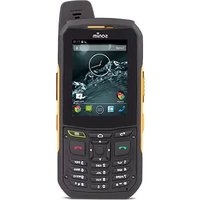
| Model | XP3340 Sentinel Z1 |
| Category | Smartphone |
| Dimensions (H × W × D) | 152 × 74 × 18 mm (6.0 × 2.9 × 0.7 in) |
| Weight | 260 g (9.2 oz) |
| Battery capacity | 4000 mAh |
| Power source | Rechargeable lithium-ion battery |
| Operating system | Proprietary rugged OS |
| Display | 2.4" QVGA TFT screen |
| Camera | 2 MP rear camera |
| Connectivity | 4G LTE, Bluetooth 4.0, GPS |
| Water resistance | IP68 (1.5 m for 30 minutes) |
| Shock resistance | MIL-STD-810G certified |
| Speaker | 105 dB loudspeaker |
| Flashlight | Built-in LED torch |
| Memory card | MicroSD up to 32 GB |
| Charging port | Micro USB |
| Audio jack | 3.5 mm |
| SOS button | Dedicated programmable SOS key |
| Maintenance and cleaning | Wipe with soft dry cloth; avoid solvents |
| Safety | Do not use while charging; keep away from children |
| Spare parts and repairability | Batteries, chargers, and cases available; user-replaceable battery |
| General information | For full instructions, refer to the official Sonim support page |
Frequently Asked Questions - XP3340 Sentinel Z1 SONIM
How do I turn on the XP3340 Sentinel Z1?
Press and hold the power button located on the top or side of the device until the screen illuminates. The phone will then boot up.
How do I insert the SIM card?
Turn off the phone, remove the back cover and battery. Insert the Nano SIM into the slot, then replace the battery and cover.
Is the phone waterproof?
Yes, the phone has an IP68 rating, meaning it is protected against dust and can be submerged in up to 1.5 meters of water for 30 minutes. Do not charge it while wet.
How long does the battery last?
The 4000 mAh battery provides up to 12 hours of talk time and up to 240 hours of standby time, depending on usage and network conditions.
Can I expand the storage?
Yes, you can insert a microSD card up to 32 GB in the card slot to store additional photos, videos, and media files.
How do I use the SOS button?
The SOS button can be programmed to send an immediate alert and your GPS location to preset emergency contacts. Press and hold it to activate.
How do I clean the device?
Use a soft dry cloth to wipe the surfaces. Avoid using water, solvents, or abrasive cleaners. Ensure the charging port is dry before charging.
What should I do if the phone gets wet?
The phone is waterproof, but if it gets wet, dry it thoroughly with a cloth and do not charge until completely dry. Do not attempt to disassemble the device.
How do I reset the device to factory settings?
Go to Settings > Backup & Reset > Factory Data Reset, or contact support. This will erase all data, so back up important files first.
Where can I find the full user manual?
The full user manual is available for free download on the Sonim official website or from the notice-facile.com page. It contains detailed instructions on safety and usage.
User questions about XP3340 Sentinel Z1 SONIM
0 question about this device. Answer the ones you know or ask your own.
Ask a new question about this device
No questions yet. Be the first to ask one.
Download the instructions for your Smartphone in PDF format for free! Find your manual XP3340 Sentinel Z1 - SONIM and take your electronic device back in hand. On this page are published all the documents necessary for the use of your device. XP3340 Sentinel Z1 by SONIM.
USER MANUAL XP3340 Sentinel Z1 SONIM
Manual assistant
Powered by Anthropic
Waiting for your message
Product information
Brand : SONIM
Model : XP3340 Sentinel Z1
Category : Smartphone