
XP3340-E Sentinel - Smartphone SONIM - Free user manual and instructions
Find the device manual for free XP3340-E Sentinel SONIM in PDF.


Pick your language and provide your email: we'll send you a specifically translated version.
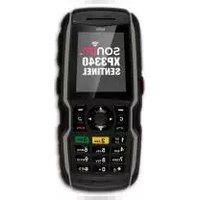
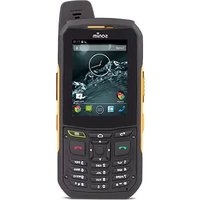
| Product Type | Rugged Smartphone |
| Brand | Sonim |
| Model | XP3340-E Sentinel |
| Display | 2.0-inch color TFT display |
| Resolution | 240 x 320 pixels |
| Dimensions | 127 x 60 x 25 mm (H x W x D) |
| Weight | 180 g |
| Battery | Rechargeable Li-ion |
| Talk Time | Up to 4 hours |
| Standby Time | Up to 400 hours |
| GPS | Yes, with A-GPS |
| Camera | 2 MP with LED flash |
| Bluetooth | Yes |
| USB | Micro-USB 2.0 |
| Water Resistance | IP67 certified |
| Dust Resistance | IP6X certified |
| Drop Protection | MIL-STD-810G compliant |
| Push-to-Talk | Supports PTT functionality |
| Care and Cleaning | Wipe with soft dry cloth; do not use solvents |
| Safety | Do not use while driving; use authorized accessories |
| Spare Parts | Available via authorized Sonim service centers |
| General | Operating frequency GSM 850/900/1800/1900 MHz |
Frequently Asked Questions - XP3340-E Sentinel SONIM
Is the Sonim XP3340-E Sentinel waterproof?
Yes, the Sonim XP3340-E Sentinel is rated IP67, meaning it is protected against dust and can be immersed in water up to 1 meter for 30 minutes.
How long does the battery last?
The device features a rechargeable Li-ion battery with a stand-by time of up to 400 hours and a talk time of up to 4 hours, depending on network conditions.
Can I use the GPS without a SIM card?
Yes, GPS reception does not require a SIM card. The built-in GPS receiver can determine your location independently, but network-assisted features (A-GPS) may use the mobile network when available.
What type of SIM card does it require?
It uses a standard SIM card. Remove the battery compartment cover to access the SIM slot.
How do I clean and maintain the device?
Use a soft, dry cloth to wipe the exterior. Do not use solvents or abrasive cleaners, and keep the charging contacts dry.
Is the phone dustproof?
Yes, with an IP6X rating, the device is fully protected against dust ingress.
Can I charge it via USB?
Yes, the phone supports charging via the Micro-USB 2.0 port using the supplied USB cable and power adapter.
What is the operating temperature range?
The rugged design allows operation in extreme temperatures, typically from -20°C to +60°C. Consult the manual for exact limits.
Does it support Bluetooth headphones?
Yes, the device has Bluetooth connectivity for compatible wireless headphones, handsfree sets, and data transfer.
How do I reset the device to factory settings?
To perform a factory reset, turn off the device and press and hold the PTT button and the power key simultaneously until the reset menu appears. Use volume keys to select 'Reset' and press OK.
User questions about XP3340-E Sentinel SONIM
0 question about this device. Answer the ones you know or ask your own.
Ask a new question about this device
No questions yet. Be the first to ask one.
Download the instructions for your Smartphone in PDF format for free! Find your manual XP3340-E Sentinel - SONIM and take your electronic device back in hand. On this page are published all the documents necessary for the use of your device. XP3340-E Sentinel by SONIM.
USER MANUAL XP3340-E Sentinel SONIM
Manual assistant
Powered by Anthropic
Waiting for your message
Product information
Brand : SONIM
Model : XP3340-E Sentinel
Category : Smartphone