
TS-RDS1 - Memory card reader TRANSCEND - Free user manual and instructions
Find the device manual for free TS-RDS1 TRANSCEND in PDF.


| Product Type | Memory Card Reader |
| Brand | Transcend |
| Model | TS-RDS1 |
| Interface | USB 2.0 |
| Supported Memory Cards | SD, SDHC, SDXC, microSD, microSDHC, microSDXC, CompactFlash (Type I/II), MS, MS PRO, MS Duo, M2 |
| Dimensions | 55 x 20 x 10 mm |
| Weight | 15 g |
| Power Supply | Via USB port (5V, 500mA) |
| Compatible Operating Systems | Windows 10/8/7/Vista/XP, Mac OS X 10.4+, Linux 2.6+ |
| Transfer Speed | Up to 480 Mbit/s (USB 2.0) |
| Main Functions | Read and write memory cards, plug-and-play, hot swap support |
| Maintenance and Cleaning | Disconnect before cleaning, use a soft dry cloth, avoid solvents |
| Safety | Do not expose to moisture, extreme temperatures, avoid shocks |
| Spare Parts and Repairability | Product not repairable, no spare parts available |
| General Information | 2-year warranty, compatible with USB 2.0/1.1, operating LED indicator |
Frequently Asked Questions - TS-RDS1 TRANSCEND
User questions about TS-RDS1 TRANSCEND
0 question about this device. Answer the ones you know or ask your own.
Ask a new question about this device
Download the instructions for your Memory card reader in PDF format for free! Find your manual TS-RDS1 - TRANSCEND and take your electronic device back in hand. On this page are published all the documents necessary for the use of your device. TS-RDS1 by TRANSCEND.
USER MANUAL TS-RDS1 TRANSCEND
Package Contents 1
Features 2
System Requirements 2
Safety Precautions 4
General Use 4
Transferring Data 4
Product Overview 5
Driver Installation 7
Driver Installation for Windows® 98SE 7
Driver Installation for Windows® Me, 2000, XP and Vista™ 8
Driver Installation for MacTM OS 9.0, or Later 9
Driver Installation for LinuxTM Kernel 2.4.2, or Later 9
Connecting to a Computer 10
Disconnecting from a Computer 11
Removing the Compact Card Reader in Windows® 98SE 11
Removing the Compact Card Reader in Windows® Me, 2000, XP and Vista™ 11
Removing the Compact Card Reader in MacTM OS 9.0, or Later 12
Remove the Compact Card Reader in Linux™ Kernel 2.4.2, or Later 12
Troubleshooting 13
Compact Card Reader S1 Specifications 14
Ordering Information 14
microSD Card Reader S2 Specifications 15
Ordering Information 15
Compact Card Reader S5 Specifications 16
Ordering Information 16
Compact Card Reader S6 Specifications 17
Ordering Information 17
Transcend Limited Warranty 18
Terminology 19
Introduction
Thank you for purchasing Transcend's Compact Card Reader, a small device specifically designed for fast, easy data transfer and exchange using many different types of Memory Cards and without the need for an adapter. Transcend Compact Card Readers plug into the USB port on your Desktop, or Notebook computer and accept the direct input of the most popular Memory Cards. In addition, Transcend's Portable Compact Card Readers also accept the input of a large number of reduced sized memory cards when they are combined with their adapter. Transcend's Portable Compact Card Readers use a Hi-Speed USB 2.0 connection for extremely fast data transfer speeds and their small compact design will enhance your Photo, Music and Data transfer experience.
Package Contents
The Compact Card Reader package includes the following items:
- Fully Compliant with the Hi-Speed USB 2.0 specification
Hi-Speed Data transfer rates up to 480Mb/s - USB powered (no external power or battery needed)
- Compatible with the New SDHC™ Memory Card standard
Supports the most popular Memory Cards:
| TS-RDS1 | TS-RDS2 | TS-RDS5 | TS-RDS6 | |
| Without Adapter | ○ Secure Digital (SDTM) | ○ microSDTM/TransFlashTM | ○ Secure Digital (SDTM) | ○ Secure Digital (SDTM) |
| ○ Secure Digital High Capacity (SDHCTM) | ○ Secure Digital High Capacity (SDHCTM) | ○ Secure Digital High Capacity (SDHCTM) | ||
| ○ miniSDTM | ○ MultiMediaCard (MMCTM) | ○ MultiMediaCard (MMCTM) | ||
| ○ miniSDHCTM | ○ MMCplusTM | ○ MMCplusTM | ||
| ○ MultiMediaCard (MMCTM) | ○ RS-MMC | ○ Memory Stick | ||
| ○ MMCplusTM | ○ MMCmobileTM | ○ Memory Stick PRO | ||
| ○ RS-MMC | ○ xD card | |||
| ○ MMCmobileTM | ||||
| With Adapter | ○ microSDTM/TransFlashTM | N/A | ○ miniSDTM | ○ miniSDTM |
| ○ MMCmicroTM | ○ miniSDHCTM | ○ miniSDHCTM | ||
| ○ microSDTM/TransFlashTM | ○ microSDTM/TransFlashTM | |||
| ○ microSDHCTM | ○ microSDHCTM | |||
| ○ MMCmicroTM | ○ RS-MMC | |||
| ○ MMCmobile | ||||
| ○ MMCmicroTM | ||||
| ○ Memory Stick Duo | ||||
| ○ Memory Stick PRO Duo | ||||
| ○ Memory Stick Micro (M2) |
System Requirements
Desktop or notebook computer with a working USB port.
One of the following Operating Systems (OS):
- Windows® ME
- Windows® 2000
-
Windows® XP
-
Windows Vista™
Mac™ OS 9.0, or later
LinuxTM Kernel 2.4.2, or later
Safety Precautions
These usage and safety guidelines are IMPORTANT! Please follow them carefully.
General Use
- Carefully unpack the contents of the Compact Card Reader package.
- Do not allow your Compact Card Reader to become damp or wet from water or any other liquids.
- Do not use a damp/wet cloth to wipe or clean the exterior case.
- Do not use or store your Compact Card Reader in any of the listed environments:
Direct sunlight
o Next to an air conditioner, electric heater, or other heat sources
In a closed car that is in direct sunlight
Transferring Data
- Transcend does NOT take any responsibility for data loss, or damage during operation.
Reminders
- Follow the procedures in the "Disconnecting from a Computer" section to remove your Compact Card Reader from a computer.

To avoid damage to your Reader and Memory Cards. Do NOT attempt to insert an SD/MMC and miniSD card into your Compact Card Reader TS-RDS1 at the same time.
Product Overview
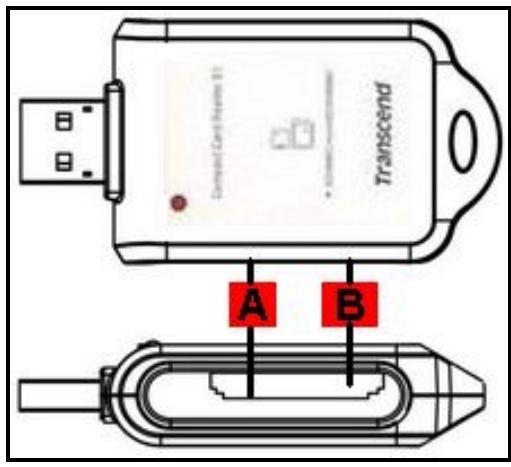
Figure 1. Compact Card Reader S1
| (A (direct insertion) | B (direct insertion) |
| Secure Digital (SD™) | miniSD™ |
| SDHCTM | miniSDHCTM |
| MultiMediaCard (MMC™) | |
| MMCplusTM | |
| RS-MMC | |
| MMCmobileTM | |
| A (adapter required) | |
| microSDTM / TransFlashTM | |
| MMCmicroTM |
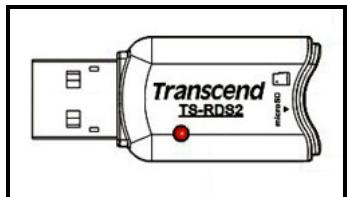
Figure 2. microSD Card Reader S2
| direct insertion |
| microSD™ / TransFlash™ |
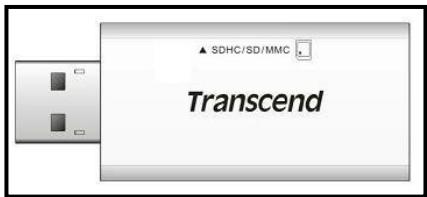
Figure 3. Compact Card Reader S5
| (direct insertion) | (adapter required) |
| Secure Digital (SDTM) | miniSDTM |
| SDHCTM | miniSDHTM |
| MultiMediaCard (MMCTM) | microSDTM/TransFlashTM |
| MMCplusTM | microSDHCTM |
| RS-MMC | MMCmicroTM |
| MMCmobileTM |
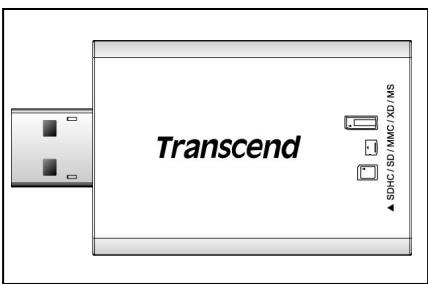
Figure 4. Compact Card Reader S6
| (direct insertion) | (adapter required) |
| Secure Digital (SDTM) | miniSDTM |
| SDHCTM | miniSDHCTM |
| MultiMediaCard (MMCTM) | microSDTM/TransFlashTM |
| MMCplusTM | microSDHCTM |
| Memory Stick | MMCmobile |
| Memory Stick PRO | RS-MMCMicroTM |
| xD card | Memory Stick Duo |
| Memory Stick PRO Duo | |
| Memory Stick Micro(M2) |
Driver Installation
Driver Installation for Windows® 98SE
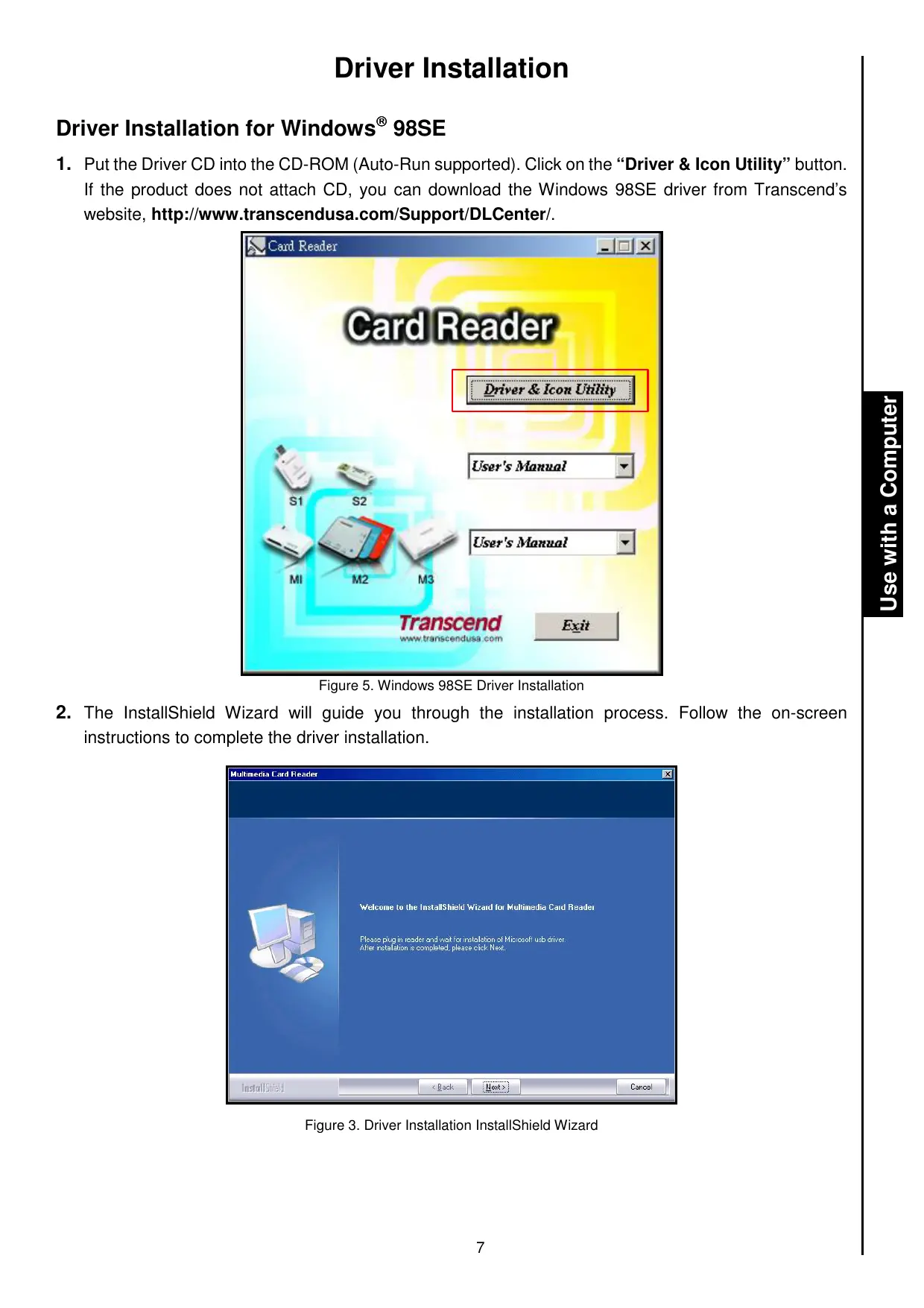
- Put the Driver CD into the CD-ROM (Auto-Run supported). Click on the "Driver & Icon Utility" button. If the product does not attach CD, you can download the Windows 98SE driver from Transcend's website, http://www.transcendusa.com/Support/DLCenter/.
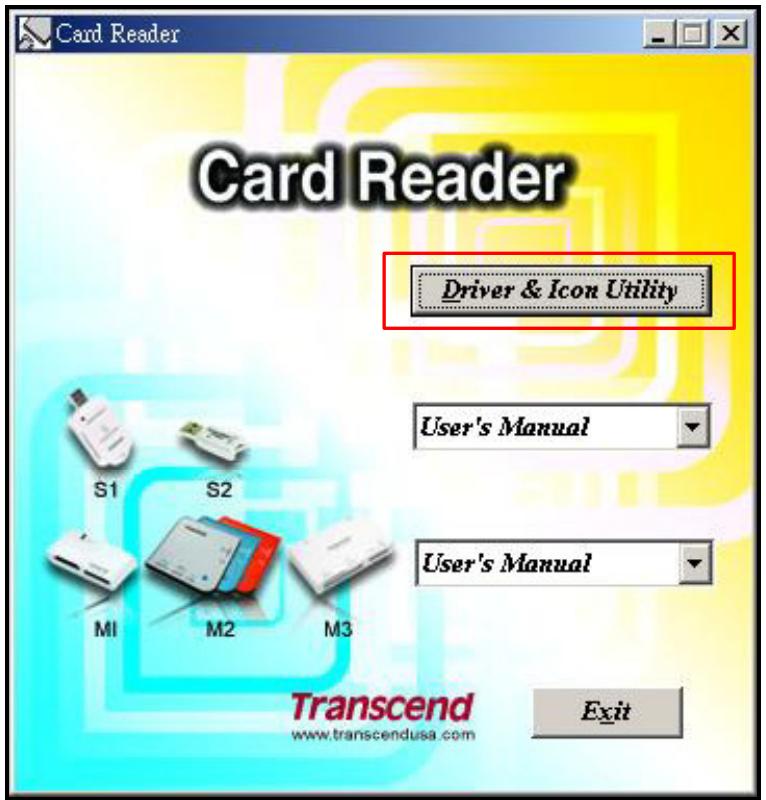
Figure 5. Windows 98SE Driver Installation
- The InstallShield Wizard will guide you through the installation process. Follow the on-screen instructions to complete the driver installation.
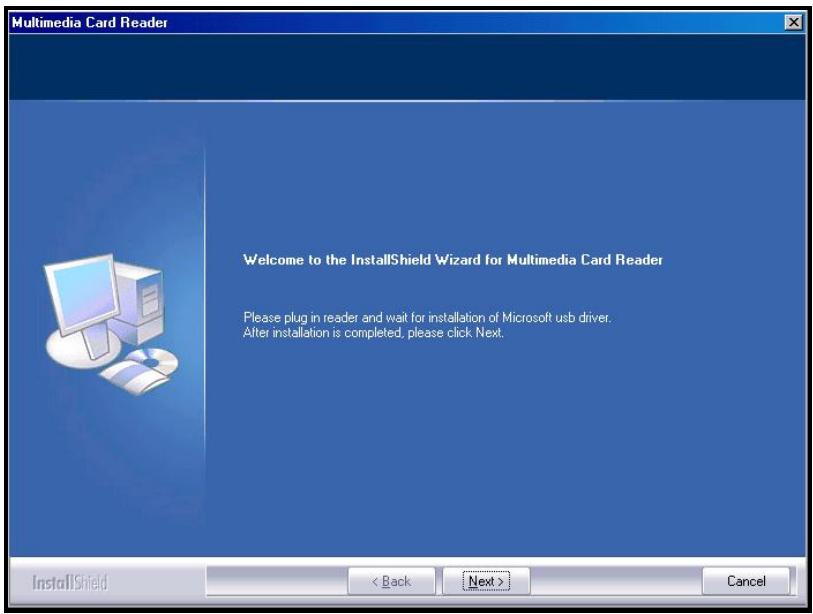
Figure 3. Driver Installation InstallShield Wizard
- After the drivers are installed onto the computer, plug the Compact Card Reader into an available USB port, the "New Hardware Found" dialogue boxes will appear.
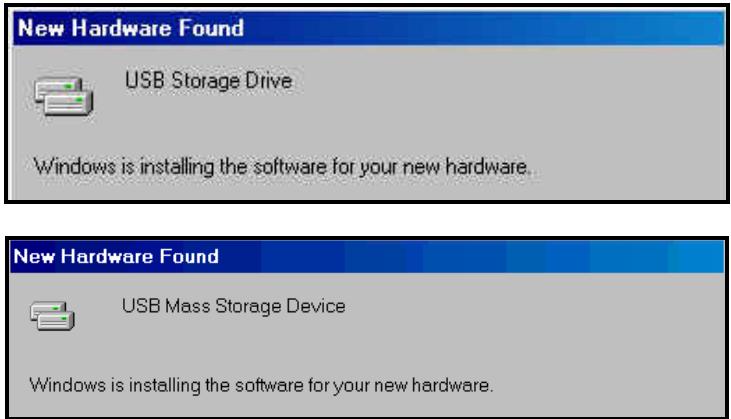
Figure 6. Found New Hardware
- The computer will automatically detect the Compact Card Reader and a Removable Disk* drive with a newly assigned drive letter representing the readers' card slots will appear in the My Computer window.
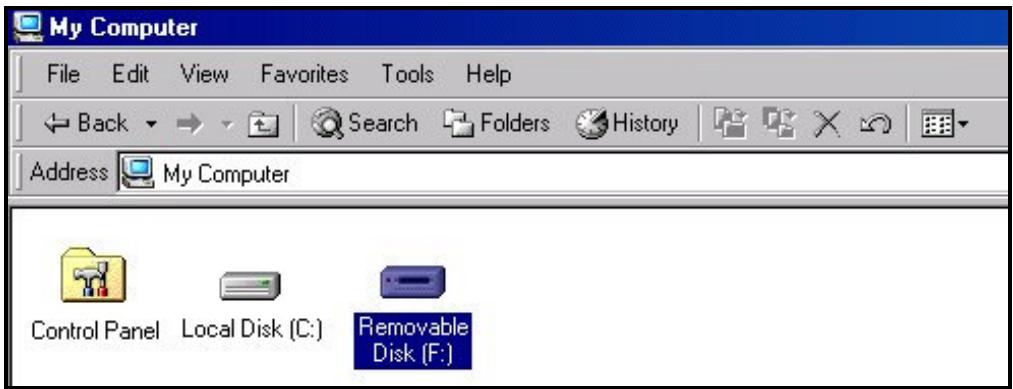
Figure 7. *F is an example drive letter, the letter in your "My Computer" window may differ
Driver Installation for Windows® Me, 2000, XP and Vista™
No drivers are required. These Windows® Operating Systems have built-in drivers to support the Compact Card Reader. Plug your Compact Card Reader into an available USB port and Windows® will install the necessary files. A Removable Disk drive with a newly assigned drive letter representing the readers' card slots will appear in the My Computer window.
Driver Installation for Mac™ OS 9.0, or Later
No drivers are required. Plug your Compact Card Reader into an available USB port, insert a compatible Memory Card and your Mac™ will automatically detect it.
Driver Installation for Linux™ Kernel 2.4.2, or Later
No drivers are required. Plug your Compact Card Reader into a USB port and mount it.
- First create a directory for the Compact Card Reader.
Example: mkdir /mnt/CardReader
- Then, mount the Compact Card Reader.
Example: mount -a -t mdos /dev/sda1 /mnt/CardReader

NEVER Remove a Flash Memory Card from the Compact Card Reader without first Unmounting the device.
Connecting to a Computer
Plug the Compact Card Reader directly into an available USB port on your desktop, or notebook computer.
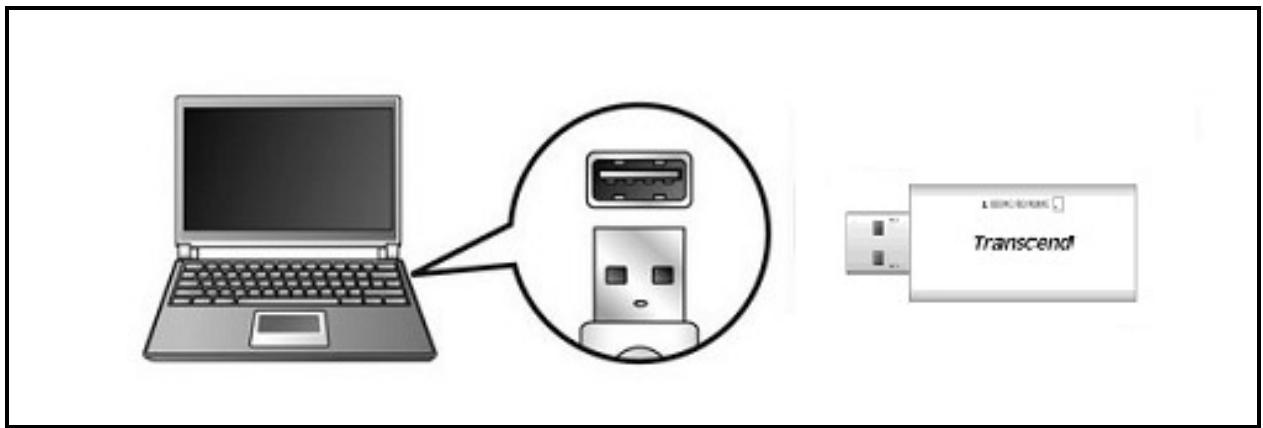
Figure 8. Connecting to a computer

NEVER disconnect the Compact Card Reader from a computer when data is being transferred, or you may damage the Reader and your Card(s).
Removing the Compact Card Reader in Windows® 98SE
Unplug your Compact Card Reader from your system directly when data is not transferring.
Removing the Compact Card Reader in Windows® Me, 2000, XP and Vista™
- Select the Hardware icon on the system tray.
- The Safely Remove Hardware pop-up window will appear. Select it to continue.

Figure 9. Safely Remove Hardware
- A message window will appear stating, "The 'USB Mass Storage Device' device can now be safely removed from the system." Unplug the Multi-Card Reader.
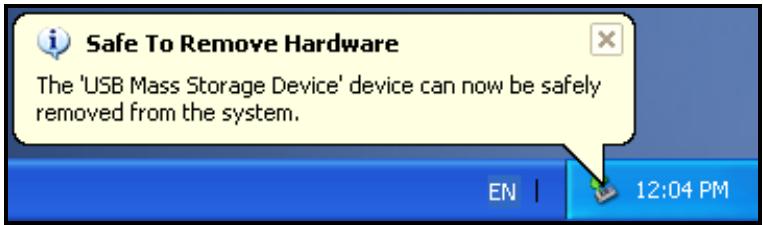
Figure 10. Safe to Remove Hardware
- If the Hardware icon isn't display on the system tray, please follow below procedure to remove your memory card from card reader first.
a. Right click the Removable Disk in the My Computer window.
b. Select Eject
c. Then remove your memory card and unplug your Card Reader from your system directly.
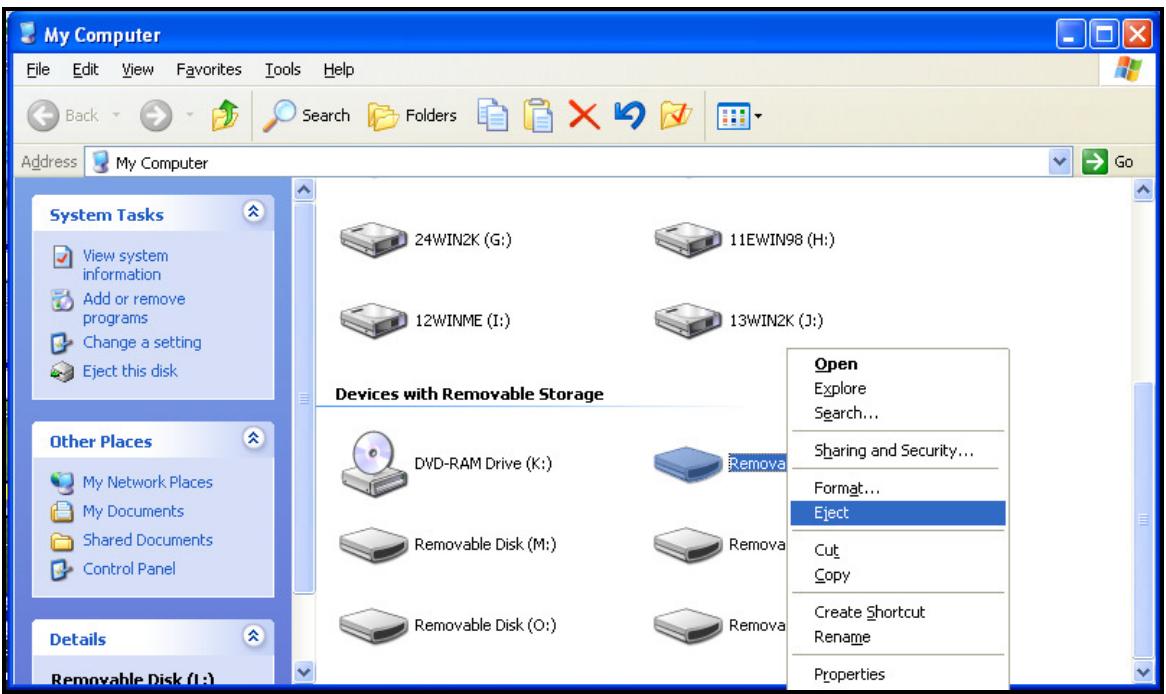
Figure 11. Eject
Removing the Compact Card Reader in Mac OS 9.0, or Later
Drag and drop the Disk icon corresponding to your Compact Card Reader into the trashcan. Then unplug your Compact Card Reader from the USB port.
Remove the Compact Card Reader in Linux™ Kernel 2.4.2, or Later
Execute umount /mnt/CardReader to un-mount the device. Then unplug your Compact Card Reader from the USB port.
Troubleshooting
If a problem occurs with your Compact Card Reader, please first check the information listed below before taking your Compact Card Reader for repair. If you are unable to remedy a problem from the following hints, please consult your dealer, service center, or local Transcend branch office. We also have FAQ and Support services on our websites.
Driver CD cannot auto-run in Windows®
Go to the Device Manager in the Control Panel and enable the Auto-Insert function for the CD-ROM drive.
Operating system cannot detect the Compact Card Reader
Check the following:
- Is your Compact Card Reader properly connected to the USB port? If not, unplug it and plug it in again.
- Is your Compact Card Reader connected to the Mac keyboard? If yes, unplug it and plug it into an available USB port on your Mac Desktop.
- Is the USB port enabled? If not, refer to the user's manual of your computer (or motherboard) to enable it.
- Is the necessary driver installed? If your computer is using Windows® 98SE, you must insert the Driver CD into the CD-ROM and refer to the "Driver Installation for Windows® 98SE" section to complete the driver installation before using your Compact Card Reader. A driver is not required for Windows® ME/2000/XP/Vista™, Mac™ OS 9.X, or later and Linux™ Kernel 2.4, or later.
Why won't the Compact Card Reader recognize my Memory Card?
First check that the Memory Card is compatible with the Card Reader, then check that you inserted the Memory Card correctly with the appropriate side facing up/down.
When I plug my Compact Card Reader into a Mac™ the Reader does NOT appear?
Check the following:
A compatible Memory Card must be inserted into the Compact Card Reader before the Reader will appear on the Mac's screen.
Cannot find the file that was just copied using the Compact Card Reader
You should always open a transferred file in its new location to ensure it transferred successfully. Re-copy the file and refer to the "Disconnecting from a Computer" section to remove the Reader after the copying process is completed.
A File that was just deleted still appears
- Re-delete the file and refer to the "Disconnecting from a Computer" section to remove the Reader after the delete process is completed.
Compact Card Reader S1 Specifications
Size (L x W x H): 69 mm × 35 mm × 15 mm
Weight: 20g
- Max. Transfer Speed: 480Mb (60MB) per second
- Operating Voltage: 5V DC from USB Port
- Operating Temperature: 0^ C ( 32^ F ) to 70^ C ( 158^ F )
Storage Temperature: -40°C (-40°F) to 85°C (185°F)
- Certificates: CE, FCC, BSMI
| Memory Cards | |
| Secure Digital (SDTM): | Secure Digital (SDTM), SDHCTM, miniSDTMminiSDHCTM |
| MultiMediaCard (MMCTM): | MMCTM, MMCplusTM, RS-MMC, MMCmobileTM |
| Memory Cards w/Adapter | |
| Secure Digital (SDTM): | microSDTM / TransFlashTM |
| MultiMediaCard (MMCTM): | MMCmicroTM |
Ordering Information
Device Description Transcend P/N
microSD Card Reader S2 Specifications
Size (L x W x H): 44 mm × 19 mm × 11 mm
Weight: 7g
- Max. Transfer Speed: 480Mb (60MB) per second
- Operating Voltage: 5V DC from USB Port
- Operating Temperature: 0^ C ( 32^ F ) to 70^ C ( 158^ F )
Storage Temperature: -40°C (-40°F) to 85°C (185°F)
- Certificates: CE, FCC, BSMI
| Memory Cards | |
| Secure Digital (SD™): | microSD™ / TransFlash™ |
Ordering Information
Device Description
Transcend P/N
Transcend microSD Card Reader S2
TS-RDS2
Compact Card Reader S5 Specifications
Size (L x W x H): 57.9 mm × 23.2 mm × 7 mm
Weight: 10g
- Max. Transfer Speed: 480Mb (60MB) per second
- Operating Voltage: 5V DC from USB Port
- Operating Temperature: 0^ C ( 32^ F ) to 70^ C ( 158^ F )
Storage Temperature: -40°C (-40°F) to 85°C (185°F)
- Certificates: CE, FCC, BSMI
| Memory Cards | |
| Secure Digital (SD™): | Secure Digital (SD™), SDHC™, |
| MultiMediaCard (MMC™): | MMC™, MMCplus™, RS-MMC, MMCmobile™ |
| Memory Cards w/Adapter | |
| Secure Digital (SD™): | miniSD™, miniSDHC™, microSD™/TransFlash™, microSDHC™ |
| MultiMediaCard (MMC™): | MMCmicro™ |
Ordering Information
| Device Description | Transcend P/N |
| Transcend Compact Card Reader S5 | TS-RDS5W |
Compact Card Reader S6 Specifications
Size (L x W x H): 61.5 mm × 33 mm × 9.2 mm
Weight: 16g
- Max. Transfer Speed: 480Mb (60MB) per second
- Operating Voltage: 5V DC from USB Port
- Operating Temperature: 0^ C ( 32^ F ) to 70^ C ( 158^ F )
Storage Temperature: -40°C (-40°F) to 85°C (185°F)
- Certificates: CE, FCC, BSMI
| Memory Cards | |
| Secure Digital (SD™): | Secure Digital (SD™), SDHCTM |
| MultiMediaCard (MMC™): | MMC™, MMCplus™ |
| Memory Stick | Memory Stick, Memory Stick PRO |
| xD | xD Card |
| Memory Cards w/Adapter | |
| Secure Digital (SD™): | miniSD™, miniSDHCTM, microSD™/TransFlash™, microSDHCTM |
| MultiMediaCard (MMC™): | RS-MMC, MMCmobile™, MMCmicro™ |
| Memory Stick | Memory Stick Duo, Memory Stick PRO Duo, Memory Stick Micro (M2) |
Ordering Information
Device Description Transcend P/N
Transcend Compact Card Reader S6 TS-RDS6W
Transcend Limited Warranty
"Above and Beyond" is the standard we set ourselves for customer service at Transcend. We consistently position ourselves to be significantly above the industry norm, which is all part of our commitment to Customer Satisfaction.
All Transcend information, Inc. (Transcend) products are warranted and tested to be free from defects in material and workmanship and to conform to the published specifications. During the warranty period should your Transcend Compact Card Reader fail under normal use in the recommended environment due to improper workmanship or materials, Transcend will repair the product or replace it with a comparable one. This warranty is subject to the conditions and limitations set forth herein.
Duration of Warranty: The Transcend Compact Card Reader is covered by this warranty for a period of two (2) years from the date of purchase. Proof of purchase including the date of purchase is required to collect on the warranty. Transcend will inspect the product and decide whether to repair or replace it. Transcend reserves the right to provide a functional equivalent product, or a refurbished replacement product.
Limitations: This warranty does not apply to product failure caused by accidents, abuse, mishandling, improper installation, alteration, acts of nature, improper usage, or problems with electrical power. In addition, opening or tampering with the product casing, or any physical damage, abuse or alteration to the product's surface, including all warranty or quality stickers, product serial or electronic numbers will also void the product warranty. Transcend is not responsible for recovering any data lost due to the failure of a hard drive or flash memory device. Transcend's Compact Card Reader must be used with devices that conform to the recommended industry standards. Transcend will not be liable for damages resulting from a third party device that causes the Transcend Compact Card Reader to fail. Transcend shall in no event be liable for any consequential, indirect, or incidental damages, lost profits, lost business investments, lost goodwill, or interference with business relationships as a result of lost data. Transcend is also not responsible for damage or failure of any third party equipment, even if Transcend has been advised of the possibility. This limitation does not apply to the extent that it is illegal or unenforceable under applicable law.
Disclaimer: The foregoing limited warranty is exclusive. There are no other warranties, including any implied warranty of merchantability or fitness for a particular purpose. This warranty is not affected in any part by Transcend providing technical support or advice. Please read Transcend's Warranty Policy in full to understand your rights.
Transcend Warranty Policy: http://www.transcendusa.com/Warranty
Online Registration: To expedite the warranty service, please register your Transcend Product within 30 days of purchase.
Register online at http://www.transcendusa.com/productregister
The specifications mentioned above are subject to change without notice.
Transcend
Exceeding Your Expectations
Transcend Information, Inc.
www.transcendusa.com
*The Transcend logo is a registered trademark of Transcend Information, Inc.
*All logos and marks are trademarks of their respective companies.
Terminology
adapter. 1, 2, 4, 12, 13
Device that is used to connect one hardware device to another without a loss in function.
CD-ROM 5, 11
Compact Disk-Read Only Memory is a compact disk format that can store music, text and graphics.
1, 2, 8, 11
This is a single user stationary computer running the Window®, Mac™, or Linux™ Operating System.
Driver 5, 6, 7, 11
A software program that allows a hardware device to communicate with a computer operating system.
FAQ 11
Frequently Asked Question.
Flash 7, 14
A rewritten type of solid-state memory storage.
Linux 2,7,10,11
An open source computer Operating System.
Mac 2,5,7,10,11
MACintosh is a computer operating system used in Apple computers.
SDHC 2,4,12
Secure Digital High Capacity is the latest SD Memory Card standard that guarantees min. transfer speeds.
USB. 1, 2, 6, 7, 8, 9, 10, 11, 12
Universal Serial Bus is a hardware interface found on all modern computers for connecting peripherals.
USB 2.0 1,2
Hi-Speed Data Transfer rate of 480Mbit/sec.
USB port 1,2,6,7,8,10,11,12,13
This is the interface on a computer to which a USB device is connected.
Windows 2,5,6,9,10,11
Computer Operating System developed by Microsoft.
Wizard 5
A computer program that guides a user through a procedure for setting up a new application, or device.