
DDX4015DAB - Car radio KENWOOD - Free user manual and instructions
Find the device manual for free DDX4015DAB KENWOOD in PDF.


Pick your language and provide your email: we'll send you a specifically translated version.
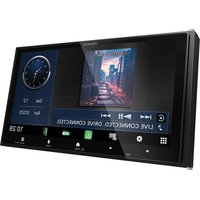
| Product Type | Car Multimedia Receiver |
| Brand | Kenwood |
| Model | DDX4015DAB |
| Display Type | 6.2" TFT LCD touchscreen (800 x 480) |
| Tuner Bands | DAB / DAB+ / FM / AM |
| Disc Playback | DVD, CD, MP3, WMA, JPEG discs |
| Bluetooth Function | Hands-free calls and wireless audio streaming via Bluetooth |
| USB Ports | One rear USB 2.0 port for iPod/iPhone and USB memory devices |
| Preamp Outputs | 3 independent 4V preouts (front, rear, subwoofer) |
| Rear Camera Input | Compatible with rear-view camera, automatic video switch when engaging reverse gear |
| Steering Wheel Control Ready | Yes, with optional Kenwood steering wheel remote adapter |
| Audio Playback Formats | MP3, WMA, AAC |
| Audio Processing | Built-in 3-band parametric equalizer with 12 preset curves |
| Maximum Power Output | 50 W x 4 (max output) |
| Operating Voltage | 12 V DC (11-16 V allowed, negative ground) |
| Dimensions (W x H x D) | 178 x 100 x 160 mm (double-DIN from main unit) |
| Weight | 1.9 kg (approx.) |
| Detachable Face Panel | Yes, detachable front face for theft deterrence |
| Maintenance & Cleaning | Clean the front panel and screen with a dry silicone cloth or a soft dry cloth. Do not use alcohol or abrasives. |
| Repairability & Support | Repairs and spare parts must be done by authorised Kenwood service centres. To maintain performance, ensure clean ventilation and protect from moisture. |
Frequently Asked Questions - DDX4015DAB KENWOOD
How do I reset the DDX4015DAB receiver?
To reset the unit, turn off the power, then press the reset button located near the front panel (or behind the detachable face) using a pointed object. If the device freezes, disconnect the car battery for a minute and reconnect. After resetting, you may need to set the clock and radio presets again.
How can I pair my mobile phone via Bluetooth?
Press the HOME button, then select Bluetooth or Phone. Activate Bluetooth on your phone and search for "KENWOOD" in the available devices. Select it and enter the PIN code "0000" if required. The receiver will announce pairing status, and you can sync contacts.
How do I adjust the clock automatically using RDS?
If you are in an area with RDS stations, activate the ART (auto time activation) in the setup menu. The unit will synchronise the time via the FM RDS signal. Alternatively, you can set the time manually by pressing the settings icon and selecting Clock.
What to do if the DAB radio has poor reception?
Check if the DAB antenna is connected properly and positioned away from metal parts. Use a certified DAB antenna (sold separately) if you're using a splitter. You can also perform a DAB auto scan in the tuner menu to refresh the station list.
Can I watch video from my phone on the screen?
Yes, connect an auxiliary device via the AV-IN jack or use the USB port to play video files from a flash drive. Note that video playback is only available when the parking brake is engaged.
How do I use the steering wheel remote control?
The receiver is compatible with steering wheel audio controls. You need to install a compatible steering wheel interface (like iDatalink Maestro) and then assign the buttons in the SW menu under Settings. Press the actual steering wheel button and the unit will map it.
How to set up the rear view camera?
Connect the RCA jack of the camera to the REAR IN connector on the back of the unit. Then go to Settings > Camera, enable Rear Camera and choose the guidance grid type. The screen automatically selects the camera input when you shift into reverse.
What can I do to improve bass sound?
Use the built-in 3-band parametric equalizer (Controls: Bass, Mid, Treble) or select one of the 12 preset curves. You can also adjust the subwoofer level and crossover in the Audio Setup menu if your system includes a sub.
Is it necessary to detach the faceplate every time?
No, but detaching the face panel is recommended as a theft-deterrent. To detach, press the RELEASE button and lift off the unit. Store it in the supplied case to protect it from dust and scratches.
How do I download the user manual for this device?
You can download the free PDF manual from Notice-Facile.com by clicking the Download button on the DDX4015DAB page. The manual contains 64 pages of illustrated instructions in English and other languages.
User questions about DDX4015DAB KENWOOD
0 question about this device. Answer the ones you know or ask your own.
Ask a new question about this device
No questions yet. Be the first to ask one.
Download the instructions for your Car radio in PDF format for free! Find your manual DDX4015DAB - KENWOOD and take your electronic device back in hand. On this page are published all the documents necessary for the use of your device. DDX4015DAB by KENWOOD.
USER MANUAL DDX4015DAB KENWOOD



Manual assistant
Powered by Anthropic
Waiting for your message
Product information
Brand : KENWOOD
Model : DDX4015DAB
Category : Car radio