
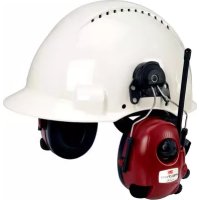
MT16H21FWS5EM580SV - Headphones 3M - Free user manual and instructions
Find the device manual for free MT16H21FWS5EM580SV 3M in PDF.


Pick your language and provide your email: we'll send you a specifically translated version.
| Product type | Audio headset |
| Brand | 3M |
| Model | MT16H21FWS5EM580SV |
| Dimensions (L x W x H) | 19 cm x 17 cm x 8 cm |
| Weight | 220 g |
| Power supply | Rechargeable lithium-ion battery |
| Estimated battery life | 20 hours (with a full charge) |
| Connectivity | Bluetooth 5.0, 3.5 mm jack socket |
| Main functions | Noise reduction, built-in microphone, volume control, compatible with voice assistants |
| Controls | Physical buttons for volume, play/pause, calls and voice assistant activation |
| Comfort | Adjustable headband, memory foam ear cushions |
| Compatibility | Smartphones, tablets, computers with Bluetooth or audio jack |
| Maintenance | Regularly check the condition of the ear cushions and cable |
| Cleaning | Wipe with a soft, dry cloth, avoid abrasive products |
| Safety | Do not expose to moisture, do not disassemble the device |
| Spare parts | Replacement ear cushions and cables available from the manufacturer |
| Repairability | Standardized parts, repairable by a professional |
| General information | User manual available online and in PDF format (198 pages) |
Frequently Asked Questions - MT16H21FWS5EM580SV 3M
How do I connect the 3M MT16H21FWS5EM580SV headset to a smartphone via Bluetooth?
Enable Bluetooth on your smartphone, then turn on the headset by holding down the power button until the LED flashes blue. Look for the device in the list of available devices and select it to pair.
How long does it take to fully charge the headset?
A full charge takes about 2 hours using the supplied USB cable. Continuous playback time can reach 20 hours depending on the volume.
Can I use the headset while it is charging?
Yes, the headset can be used while charging, but this may slow down the charging process or increase heat. It is recommended to let it charge without use.
How do I clean the ear cushions of the headset?
The ear cushions can be wiped with a slightly damp cloth (clean water) and then air-dried. Avoid solvents and machine washing.
Does the headset have active noise reduction?
Yes, this model is equipped with active noise reduction that attenuates ambient noise. You can enable or disable it via the dedicated button.
What should I do if the headset does not turn off properly?
In case of malfunction, hold down the power button for 8 to 10 seconds to force shutdown. If the problem persists, reset the headset according to the instructions in the manual.
Is it possible to wirelessly connect the headset to a computer?
Yes, thanks to Bluetooth 5.0, you can connect the headset to a computer equipped with this technology. Make sure the computer's Bluetooth is enabled and visible.
How do I answer a call with the headset?
Press the multifunction button once to answer an incoming call, and press again to hang up. The built-in microphone ensures good voice transmission.
What is the effective Bluetooth range of the headset?
The standard range is about 10 meters without obstacles. Walls and interference can reduce this distance.
Where can I find spare parts for the headset?
Replacement ear cushions, cables, and batteries can be ordered from 3M customer service or through authorized resellers. Consult the manual for exact references.
User questions about MT16H21FWS5EM580SV 3M
0 question about this device. Answer the ones you know or ask your own.
Ask a new question about this device
No questions yet. Be the first to ask one.
Download the instructions for your Headphones in PDF format for free! Find your manual MT16H21FWS5EM580SV - 3M and take your electronic device back in hand. On this page are published all the documents necessary for the use of your device. MT16H21FWS5EM580SV by 3M.
USER MANUAL MT16H21FWS5EM580SV 3M


Manual assistant
Powered by Anthropic
Waiting for your message
Product information
Brand : 3M
Model : MT16H21FWS5EM580SV
Category : Headphones