
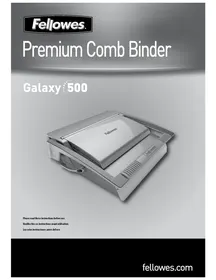
GALAXY 500 - Laminator FELLOWES - Free user manual and instructions
Find the device manual for free GALAXY 500 FELLOWES in PDF.


User questions about GALAXY 500 FELLOWES
0 question about this device. Answer the ones you know or ask your own.
Ask a new question about this device
Download the instructions for your Laminator in PDF format for free! Find your manual GALAXY 500 - FELLOWES and take your electronic device back in hand. On this page are published all the documents necessary for the use of your device. GALAXY 500 by FELLOWES.
USER MANUAL GALAXY 500 FELLOWES
Please read these instructions before use.

Comb storage and Document measure

Removable platform (binding cassette)
CAPABILITIES
Punching Capacity
| Paper sheets | |
| 70-80g / 20lb | 25 sheet |
| Transparent Covers | |
| 100-200 micron / 4-8 mil | 4 sheet |
| 200+ micron / 8+ mil | 3 sheet |
| Other Standard Covers | |
| 160-270g / 40-60lb | 4 sheet |
| 270+g / 60+ lb | 3 sheet |
| Binding Capacity | |
| Max comb size | 2"/51mm |
| Max document (80g / 20lb) | c. 500 sheet |
Technical Data
| Paper dimensions | A4, A5, US letter, US cover |
| Punching slots | 21 |
| Releasable dies | 3 dies (15, 20, 21) |
| Adjustable back margin | yes - 2 positions (min = .098", max = .179") |
| Slot pitch | 14.28mm / 9/16" |
| Adjustable edge guide | yes- rotary |
| Waste tray capacity | c. 3000 sheets |
| Net weight | 9.8 kg / 21.6 lb |
| Dimensions (LxDxH) | 530 x 450 x 165mm / 20.9" x 17.7" x 6.5" |
IMPORTANT SAFETY INSTRUCTIONS — Read Before Using!

CAUTION
Please read before use. Please keep for future reference
When punching;
- always ensure the machine is on a stable surface
- test punch scrap sheets and set the machine before punching final documents
- remove staples and other metal articles prior to punching
- never exceed the machines quoted performance
When binding;
- the removable binding platform can be used away from the punch unit
- always ensure the removable binding platform is on a stable surface
Keep the machine away from heat and water sources.
Never attempt to open or otherwise repair the machine.
COMB DIAMETER & DOCUMENT SIZES
Comb diameter sizes
| mm | inch | number of sheets | Set back margin |
| 6mm | 1/4" | 2-20 | 1-150 |
| 8mm | 5/16" | 21-40 | |
| 10mm | 3/8" | 41-55 | |
| 12mm | 1/2" | 56-90 | |
| 16mm | 5/8" | 91-120 | |
| 18mm | 11/16" | 121-150 | |
| 22mm | 7/8" | 151-180 | +150 |
| 25mm | 1" | 181-200 | |
| 32mm | 1 1/4" | 201-240 | |
| 38mm | 1 1/2" | 241-340 | |
| 45mm | 1 3/4" | 341-410 | |
| 51mm | 2" | 411-500 |
Need Help?
Customer Service....www.fellowes.com
Let our experts help you with a solution.
Always call Fellowes before contacting your
place of purchase.
SET UP

1. Ensure the machine is on a stable surface.

2. Check waste tray is empty and correctly fitted. The tray can be accessed from the left and right sides. The tray has a 'burst feature' that operates when the chip tray is 'over-full'.


3. Ensure the binding platform is located correctly in the machine

4. Ensure the comb-opening lever is pushed backwards.
STEPS TO BIND

1. Select the correct comb diameter using the storage tray.

2. Select the correct punch profile for the sheet size. Select releasable dies as appropriate (holes 15, 20, 21).

3. To cancel a punch, press the switch down at the back. Test punch a sheet.

4. Select the correct back margin depth for number of sheets.


5. Insert the plastic comb into the opening mechanism. Pull comb-opening lever forward to open the comb.

6. Test punch scrap sheets to check edge guide setting.

7. Load punched sheets directly onto the open comb.

8. Empty waste tray regularly - ideally after each use.
DOCUMENT BINDING

1. Punch front and back covers first.

2. Punch sheets in small batches that do not overload the machine or the user.

3. Load punched sheets directly onto the opened comb. Starting with the front of the document.

4. When all punched sheets are loaded onto the comb, push the comb lever backwards to close the comb and remove the bound document.
REMOVABLE BINDING PLATFORM
Galaxy has a unique mobile binding platform. The platform can be lifted from the base and used on a stable surface to bind documents using the normal binding procedure and also allows different users to work together. When not in use, the platform should be stored safely in the punch machine.


CORRECTING A BOUND DOCUMENT
Additional sheets may be included or removed at any time by opening and then dosing the comb as previously described.
REMOVAL OF WASTE CLIPPINGS
The waste tray is located under the machine and is accessed from each side. For best results empty the tray regularly. The tray should be emptied after every 50 operations to ensure no blockages occur.
STORAGE
Lower the lid and punch handle. The Galaxy comb binder is designed to be stored horizontally on the desk.
TROUBLESHOOTING
| Problem | Cause | Solution |
| Punched holes are not central | Edge guide not set | Adjust edge guide until hole pattern is correct |
| Machine will not punch | Blockage | Check waste tray in empty. Check for blockage to paper entry |
| Punch holes are not parallel to edge | Debris is stuck below dies | Take stiff cardboard and slide into the paper entry. Move the cardboard sideways to release any stray clippings into the waste tray |
| Partial holes | Sheets not correctly aligned to punch pattern | Adjust edge guide and test punch scrap sheets until correct |
| Missing holes | Selectable dies are not selected to punch | Check the correct dies are selected to punch holes. To select a die, push selector switch down at the front |
| Sheets will not turn on the bound document | Back margin is too large for a smaller comb | Select the smaller margin depth for combs up to 18mm (11/16") in diameter (2-150 sheets) Select the larger margin depth for combs larger than 18mm (11/16") in diameter (151-500 sheets) |
| Damaged hole edges | Possibly overloading the machine | Punch plastic covers with paper sheets. Reduce number of sheets being punched |
| Waste tray leaks | Waste tray is not correctly inserted or 'burst feature' has activated | Check waste tray is empty and 'burst feature' is closed |
WORLDWIDE WARRANTY
Fellowes warrants all parts of the binder to be free of defects in material and workmanship for 2 years from the date of purchase by the original consumer. If any part is found to be defective during warranty period, your sale and exclusive remedy will be repair or replacement, at Fellowes' option and expense, of the defective part. This warranty does not apply in cases of abuse, mishandling or unauthorised repair. Any implied warranty, including that of merchantability or fitness for particular purpose, is hereby limited in duration to the appropriate
warranty period set forth above. In no event shall Fellowes be liable for any consequential damages attributable to this product. This warranty gives you specific legal rights. You may have other legal rights that vary from this warranty. The duration, terms and conditions of this warranty are valid worldwide, except where different limitations, restrictions or conditions may be required by local law. For more details or to obtain services under this warranty, please contact Fellowes or your dealer.
Help Line
| Australia | + 1-800-33-11-77 |
| Canada | + 1-800-665-4339 |
| Europe | 00-800-1810-1810 |
Fellowes
| Australia | + 61-3-8336-9700 |
| Benelux | + 31-(0)-76-523-2090 |
| Canada | + 1-905-475-6320 |
| Deutschland | + 49-(0)-5131-49770 |
| España | + 34-91-748-05-01 |
| France | + 33-(0)-1-30-06-86-80 |
| Italia | + 39-071-730041 |
| México | + 1-800-234-1185 |
| United States | + 1-800-955-0959 |
| Japan | + 81-(0)-3-5496-2401 |
| Korea | + 82-2-3462-2884 |
| Malaysia | + 60-(0)-35122-1231 |
| Polska | + 48-(0)-22-771-47-40 |
| Singapore | + 65-6221-3811 |
| United Kingdom | + 44-(0)-1302-836836 |
| United States | + 1-630-893-1600 |

Brand : FELLOWES
Model : GALAXY 500
Category : Laminator