YT-82291 - Screwdriver Yato - Free user manual and instructions
Find the device manual for free YT-82291 Yato in PDF.


Pick your language and provide your email: we'll send you a specifically translated version.
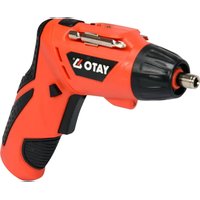
| Product type | Cordless screwdriver |
| Brand | Yato |
| Model | YT-82291 |
| Power supply | Rechargeable built-in lithium-ion battery (3.6 V) |
| Tool holder | 1/4" hex quick-release chuck |
| No-load speed | 200 RPM |
| Max torque | 4 Nm |
| Rotation direction | Switchable clockwise / counterclockwise |
| Gearbox | Single-speed planetary gear |
| Charging input | USB charging cable / charging station |
| Charging time | Approx. 4 to 5 hours |
| Work light | Integrated LED work area light |
| Handle | Soft-grip ergonomic handle |
| Housing | Impact-resistant plastic housing |
| Safety | Charging indicator and overcharge protection |
| Included accessories | Screwdriver bit set, USB cable, user manual |
| Weight | Approx. 0.45 kg |
| Dimensions | Approx. 230 x 180 x 50 mm |
| Maintenance | Wipe with a soft dry cloth; do not use aggressive cleaners |
| Storage | Keep in a clean, dry place away from moisture |
| Spare parts and repairability | Use genuine Yato spare parts and authorized service centers |
| General information | Free PDF manual available in multiple languages on notice-facile.com |
Frequently Asked Questions - YT-82291 Yato
How do I charge the Yato YT-82291 screwdriver?
Connect the supplied USB cable to the charging port and plug it into a USB charger. The charging indicator lights up, and a full charge takes about 4 to 5 hours. Unplug the cable when charging is complete.
What type of battery does the YT-82291 use?
It uses a built-in 3.6 V lithium-ion rechargeable battery. The battery is not removable, so you charge it through the integrated USB port with the included cable.
Which screwdriver bits fit the YT-82291?
The tool has a 1/4 inch hex quick-release chuck, so it accepts standard 1/4 inch hex bits with a 6.35 mm shank. Most common screwdriver bits and bit sets are compatible.
How do I change the rotation direction?
Use the direction switch located above the trigger. Slide it forward for clockwise rotation (driving screws in) and backward for counterclockwise rotation (removing screws). Do not change direction while the motor is running.
Can I use the YT-82291 to drill holes?
No, the YT-82291 is a cordless screwdriver, not a drill. It is designed for light screwdriving applications. For drilling, use a cordless drill driver with a chuck suitable for drill bits.
How should I clean and maintain the screwdriver?
Clean the housing with a soft dry cloth. Never use water, solvents, or spray cleaners. Keep the ventilation slots free of dust and store the screwdriver in a dry place after use.
Why does my YT-82291 not turn on?
First check that the battery is charged. Inspect the USB cable and charging port for damage. Make sure the direction switch is not in the middle locked position. If the screwdriver still does not start, contact a Yato authorized service center.
Can I use the screwdriver while it is charging?
No, do not operate the screwdriver while it is connected to the charger. The charging circuit is designed only to recharge the built-in battery, and running the motor during charging may damage the tool.
How do I attach or remove bits?
Insert a standard 1/4 inch hex bit into the chuck until it clicks into place. To remove the bit, pull the chuck sleeve forward, then slide the bit out. The quick-release mechanism allows one-handed bit changes.
Where can I find the user manual for the YT-82291?
You can download the free PDF user manual from notice-facile.com by searching for the model YT-82291. The manual includes operating instructions, safety warnings, and maintenance advice in several languages.
User questions about YT-82291 Yato
0 question about this device. Answer the ones you know or ask your own.
Ask a new question about this device
No questions yet. Be the first to ask one.
Download the instructions for your Screwdriver in PDF format for free! Find your manual YT-82291 - Yato and take your electronic device back in hand. On this page are published all the documents necessary for the use of your device. YT-82291 by Yato.
USER MANUAL YT-82291 Yato


Manual assistant
Powered by Anthropic
Waiting for your message
Product information
Brand : Yato
Model : YT-82291
Category : Screwdriver