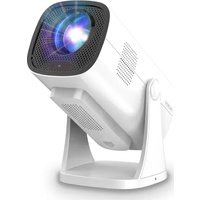
NeoPix 444 NPX444 - Projector PHILIPS - Free user manual and instructions
Find the device manual for free NeoPix 444 NPX444 PHILIPS in PDF.


Pick your language and provide your email: we'll send you a specifically translated version.
| Type of product | Video projector |
| Brand | Philips |
| Model | NeoPix 444 NPX444 |
| Projection technology | DLP LED |
| Native resolution | 1920 x 1080 pixels (Full HD) |
| Brightness | 500 ANSI lumens |
| Contrast ratio | 1000:1 |
| Lamp life | 30 000 hours |
| Projection screen size | 30 - 100 inches |
| Throw ratio | 1.3:1 |
| Aspect ratio | 16:9 |
| Keystone correction | +/- 15° |
| Built-in speakers | 2 x 3 W |
| Connectivity | HDMI, USB, VGA, AV, Audio out |
| Power consumption | 65 W |
| Power supply | 100-240 V AC, 50/60 Hz |
| Dimensions (W x D x H) | 190 x 130 x 90 mm |
| Weight | 1.0 kg |
| Cleaning and maintenance | Clean the lens with a soft dry cloth. Ensure the ventilation slots are never blocked. |
| Safety warnings | Never look directly into the light beam. Do not expose the device to water or heat sources. |
| Repairability and spare parts | Spare parts and accessories available from authorized Philips service centers. |
| Included in the box | Power cord, remote control, user manual |
Frequently Asked Questions - NeoPix 444 NPX444 PHILIPS
How do I connect my laptop to the NeoPix 444?
Use an HDMI cable to connect your laptop to the projector's HDMI port. Select the correct input source using the Source button on the remote or the device panel. If your laptop has only USB-C, you may need a USB-C to HDMI adapter.
How can I adjust the focus of the image?
Turn the focus ring located on the lens barrel until the image appears sharp. For small adjustments, move the projector slightly closer to or farther from the screen.
What is the ideal distance for a 100-inch screen?
With a throw ratio of 1.3:1, place the projector approximately 3.4 meters away from the screen to achieve a 100-inch diagonal image. The exact distance may vary slightly with size.
How do I clean the projector lens?
Turn off the projector and wait for it to cool down. Use a soft dry microfiber cloth to gently wipe the lens in a circular motion. Do not use any liquid or abrasive cleaner.
Why doesn't my projector turn on?
Check that the power cord is firmly connected to both the projector and the wall socket. Ensure the socket is live. Press the Power button on the projector or remote and wait for the LED to turn green. If it still doesn't work, check the fuse or contact support.
How to use keystone correction?
Press the Keystone button on the remote control, then use the arrow keys to adjust the vertical and horizontal distortion until the picture is rectangular. The correction range is +/- 15 degrees.
Can I play videos from a USB stick?
Yes, insert a USB drive into the USB port and navigate to the Media player menu. The projector supports common formats like MP4, AVI, and MKV. For best compatibility, keep resolutions below 1080p.
How do I replace the LED lamp?
The NeoPix 444 uses a long-life LED lamp (30 000 hours). It is not user-replaceable; contact a Philips service center for lamp replacement if needed. Avoid dismantling the projector yourself.
Is the built-in speaker powerful enough?
The built-in 2 x 3 W speakers are adequate for small rooms. For larger audiences, connect external speakers via the Audio out jack or use HDMI audio output for better sound.
How to reset the projector to factory settings?
Go to the Settings menu, select System, then choose Reset. Confirm the operation. This will restore default picture and sound settings, but will not remove any connected devices.
User questions about NeoPix 444 NPX444 PHILIPS
0 question about this device. Answer the ones you know or ask your own.
Ask a new question about this device
No questions yet. Be the first to ask one.
Download the instructions for your Projector in PDF format for free! Find your manual NeoPix 444 NPX444 - PHILIPS and take your electronic device back in hand. On this page are published all the documents necessary for the use of your device. NeoPix 444 NPX444 by PHILIPS.
USER MANUAL NeoPix 444 NPX444 PHILIPS

Manual assistant
Powered by Anthropic
Waiting for your message
Product information
Brand : PHILIPS
Model : NeoPix 444 NPX444
Category : Projector