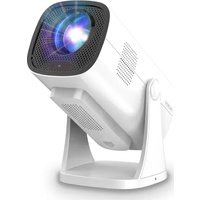
NeoPix Ultra One+ NPX646 - Projector PHILIPS - Free user manual and instructions
Find the device manual for free NeoPix Ultra One+ NPX646 PHILIPS in PDF.


Pick your language and provide your email: we'll send you a specifically translated version.
| Product Type | Home Theater Projector |
| Brand | Philips |
| Model | NeoPix Ultra One+ NPX646 |
| Resolution | Full HD (1920 x 1080) |
| Brightness | 1500 ANSI Lumens |
| Contrast Ratio | 1000:1 |
| Aspect Ratio | 16:9 |
| Light Source | LED, up to 30,000 hours |
| Projection Size | 40 to 200 inches |
| Throw Ratio | 1.5:1 |
| Keystone Correction | Automatic and manual, ±15° vertical |
| Focus | Manual |
| Built-in Speakers | 2 x 5W |
| Connectivity | 2x HDMI, 2x USB, Wi-Fi, Bluetooth, Audio Out |
| Wireless Screen Mirroring | Miracast, AirPlay, Chromecast support |
| Power Consumption | 110W (max) |
| Power Supply | AC 100-240V, 50/60Hz |
| Dimensions (W x D x H) | 310 x 250 x 115 mm |
| Weight | 1.5 kg |
| Operating Noise | Below 30 dB |
| Mounting Type | Tabletop or tripod mount (standard screw) |
| Cleaning and Maintenance | Wipe lens with a soft dry microfiber cloth; ensure ventilation slots are dust-free |
| Safety Features | Overheat protection, automatic shutoff |
| Spare Parts and Repairability | LED light source and other parts serviceable through authorized centers |
| Included in Box | Projector, power cable, remote control, user manual |
Frequently Asked Questions - NeoPix Ultra One+ NPX646 PHILIPS
How do I connect my smartphone to the NeoPix Ultra One+?
You can mirror your smartphone screen wirelessly using Miracast (Android) or AirPlay (iPhone). Ensure both devices are on the same Wi-Fi network and select the screen mirroring option on your phone. Alternatively, connect via an HDMI cable using an adapter.
Can I watch 4K content on this Full HD projector?
Yes, the projector supports 4K input and downscales it to its native 1080p resolution. You will still get a sharp, detailed image, but not true 4K detail.
What is the lifespan of the LED light source?
The built-in LED light source is rated for up to 30,000 hours of use. This equals roughly 3,400 nights of a full movie, reducing the need for frequent replacements.
How do I adjust the keystone correction?
The NeoPix Ultra One+ has automatic keystone correction that detects the projector angle and adjusts the picture accordingly. You can also manually adjust the vertical keystone using the on-screen settings menu if needed.
Does the projector have built-in speakers?
Yes, it includes two 5W built-in speakers delivering a combined 10W output. This is sufficient for small rooms, but for better sound you can connect an external speaker via Bluetooth or the audio-out jack.
How should I clean the projector lens?
Use a soft, dry microfiber cloth to gently wipe the lens. Do not use any liquid cleaners or abrasive materials, as they may damage the coated lens. Clean only when the projector is turned off and cooled down.
What power supply does this projector need?
The projector accepts AC 100-240V, 50/60Hz, so it is worldwide compatible. It consumes up to 110W during operation. Always use the provided power cable and avoid extension cords unless rated for the power.
How can I connect my gaming console to the projector?
Connect your console to one of the HDMI ports using a high-speed HDMI cable. Select the corresponding HDMI input on the projector using the remote. The low input lag makes it suitable for casual gaming.
Can I mount the projector on a ceiling?
The projector is primarily designed for tabletop placement or can be mounted on a standard tripod using the screw hole at the bottom. Ceiling mounting is not recommended as the ventilation is optimized for horizontal placement.
Is it safe to leave the projector on for long periods?
The projector has overheat protection and is designed for extended use. However, to prolong its life, it is advisable to let it cool down after long sessions and ensure the ventilation slots are not blocked.
User questions about NeoPix Ultra One+ NPX646 PHILIPS
0 question about this device. Answer the ones you know or ask your own.
Ask a new question about this device
No questions yet. Be the first to ask one.
Download the instructions for your Projector in PDF format for free! Find your manual NeoPix Ultra One+ NPX646 - PHILIPS and take your electronic device back in hand. On this page are published all the documents necessary for the use of your device. NeoPix Ultra One+ NPX646 by PHILIPS.
USER MANUAL NeoPix Ultra One+ NPX646 PHILIPS

Manual assistant
Powered by Anthropic
Waiting for your message
Product information
Brand : PHILIPS
Model : NeoPix Ultra One+ NPX646
Category : Projector