V4K PRO 120 - Camera Ipevo - Free user manual and instructions
Find the device manual for free V4K PRO 120 Ipevo in PDF.


Pick your language and provide your email: we'll send you a specifically translated version.
| Product Type | Document Camera / Webcam |
| Brand | IPEVO |
| Model | V4K PRO 120 |
| Resolution | 4K Ultra HD (3840 x 2160) |
| Sensor | 12 Megapixel CMOS |
| Focus | Auto-focus |
| Video Modes | 4K @ 30fps, 1080p @ 60fps, 720p @ 60fps |
| Capture Area | Up to A3 / Letter size documents |
| Built-in Microphone | Yes, stereo |
| Lighting | Built-in LED light bar |
| Interface | USB 2.0 / USB-C (with adapter) |
| Compatibility | Windows, macOS, Chrome OS, Android |
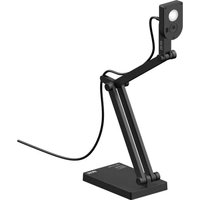
| Mounting | Flexible gooseneck arm with adjustable base |
| Dimensions (LxWxH) | 3.5 x 4.5 x 12.0 inches (folded) |
| Weight | 1.5 lbs (680 g) |
| Power Source | USB powered (5V/500mA) |
| Included Accessories | Document camera, USB cable, quick start guide |
| Maintenance | Wipe lens with microfiber cloth; keep in dry environment |
| Safety | CE, FCC compliant |
| Repairability | Modular design; parts available from manufacturer |
Frequently Asked Questions - V4K PRO 120 Ipevo
How do I connect the IPEVO V4K PRO 120 to my computer?
Connect the included USB cable to the camera and then to your computer's USB port. The camera should be automatically recognized as a webcam and document camera without installing extra drivers on most systems.
Can I use the V4K PRO 120 with video conferencing apps like Zoom or Teams?
Yes, the V4K PRO 120 works as a standard UVC webcam, so it is compatible with Zoom, Microsoft Teams, Google Meet, and other video conferencing software. Simply select it as your camera input.
How do I switch between document camera mode and webcam mode?
The V4K PRO 120 does not have a dedicated switch. When connected via USB, it functions as both a document camera and a webcam simultaneously. You can rotate the camera to face you for webcam use or point it down at documents.
What should I do if my computer does not detect the camera?
First, try a different USB port and cable. Ensure your operating system is up to date. If the issue persists, test the camera on another computer. If it still isn't detected, contact IPEVO support for further assistance.
How do I clean the lens of the V4K PRO 120?
Use a soft, dry microfiber cloth to gently wipe the lens. Avoid using liquids or abrasive materials. If needed, slightly dampen the cloth with lens cleaning solution. Make sure the camera is off during cleaning.
Can I use the V4K PRO 120 with a Chromebook?
Yes, the V4K PRO 120 is compatible with Chrome OS. It is a UVC device and works plug-and-play with Chromebooks for online classes and video recording.
How do I adjust the focus on the V4K PRO 120?
The camera has auto-focus. Simply press the autofocus button on the camera body or use the provided software (if installed) to refocus. Ensure there is enough light for the autofocus to function properly.
What is the maximum document size I can capture?
The V4K PRO 120 can capture documents up to A3 size or standard letter size (8.5 x 11 inches) full width. For larger items, you can move the camera back to fit more in the frame.
Does the V4K PRO 120 have built-in lighting?
Yes, it features a built-in LED light bar that provides consistent illumination for capturing documents in low-light conditions. You can turn the LED light on or off with the button on the camera.
What is the warranty period for the IPEVO V4K PRO 120?
IPEVO offers a standard one-year warranty on the V4K PRO 120, covering defects in materials and workmanship. Contact IPEVO support for warranty claims and repair options.
User questions about V4K PRO 120 Ipevo
0 question about this device. Answer the ones you know or ask your own.
Ask a new question about this device
No questions yet. Be the first to ask one.
Download the instructions for your Camera in PDF format for free! Find your manual V4K PRO 120 - Ipevo and take your electronic device back in hand. On this page are published all the documents necessary for the use of your device. V4K PRO 120 by Ipevo.
USER MANUAL V4K PRO 120 Ipevo
Manual assistant
Powered by Anthropic
Waiting for your message
Product information
Brand : Ipevo
Model : V4K PRO 120
Category : Camera