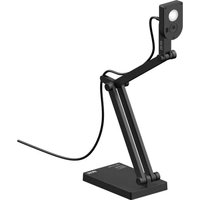
V4K ULTRA - USB Camera Ipevo - Free user manual and instructions
Find the device manual for free V4K ULTRA Ipevo in PDF.


Pick your language and provide your email: we'll send you a specifically translated version.
| Product Type | Document Camera / Webcam |
| Resolution | 4K Ultra HD (3840 x 2160) |
| Sensor | 8 Megapixel |
| Frame Rate | 30 fps |
| Focus | Autofocus |
| Built-in Microphone | Yes |
| Connection | USB 2.0 / 3.0 |
| Cable Length | 1.5 m |
| Dimensions (L x W x H) | 26 x 12 x 5 cm |
| Weight | 400 g |
| Power Supply | USB powered |
| Field of View | 90° |
| Compatible Operating Systems | Windows, macOS, Chrome OS |
| Warranty | 1 year |
| Package Contents | V4K ULTRA Camera, USB Cable, User Manual |
| Cleaning Instructions | Use a soft, dry cloth. Do not use liquids. |
| Mounting | Compatible with tripod (1/4-20 thread) |
Frequently Asked Questions - V4K ULTRA Ipevo
How do I install the Ipevo V4K ULTRA?
It is a plug-and-play device. Simply connect it to your computer via USB and it will be recognized instantly. No additional drivers are required for most operating systems.
Is the V4K ULTRA compatible with Zoom, Teams, or other video conferencing apps?
Yes, it works with all major video conferencing software like Zoom, Microsoft Teams, Google Meet, etc. Just select it as your camera in the app settings.
What is the maximum resolution and frame rate?
The camera supports 4K (3840 x 2160) at 30 frames per second for smooth video quality.
Does it have autofocus?
Yes, the V4K ULTRA features built-in autofocus to keep your subject sharp at various distances.
Is there a built-in microphone?
Yes, it includes a built-in microphone for capturing audio, making it ideal for presentations and video calls.
Can I use the V4K ULTRA with a Mac?
Absolutely. It is compatible with macOS (10.12 or later) as well as Windows (7, 8, 10, 11) and Chrome OS.
Can I use it as a webcam for streaming?
Yes, it can be used as a high-quality webcam for streaming, recording, or video calls. The 4K resolution provides excellent detail.
Does it have a tripod mount?
Yes, the camera has a standard 1/4-20 tripod mount on the bottom, allowing you to attach it to a tripod for stable positioning.
What is the warranty period?
The Ipevo V4K ULTRA typically comes with a one-year limited warranty. Check with your retailer for exact terms.
How should I clean the lens?
Use a soft, lint-free cloth to gently wipe the lens. Avoid using any liquids or harsh chemicals to prevent damage.
User questions about V4K ULTRA Ipevo
0 question about this device. Answer the ones you know or ask your own.
Ask a new question about this device
No questions yet. Be the first to ask one.
Download the instructions for your USB Camera in PDF format for free! Find your manual V4K ULTRA - Ipevo and take your electronic device back in hand. On this page are published all the documents necessary for the use of your device. V4K ULTRA by Ipevo.
USER MANUAL V4K ULTRA Ipevo
Manual assistant
Powered by Anthropic
Waiting for your message
Product information
Brand : Ipevo
Model : V4K ULTRA
Category : USB Camera