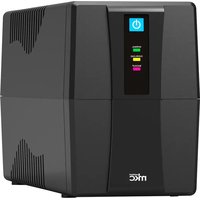
MK-2000UPS - Uninterruptible power supply MKC - Free user manual and instructions
Find the device manual for free MK-2000UPS MKC in PDF.


Pick your language and provide your email: we'll send you a specifically translated version.
| Product Type | Uninterruptible Power Supply |
| Brand | MKC |
| Model | MK-2000UPS |
| Power Capacity (VA) | 2000 VA |
| Power Capacity (Watts) | 1200 W |
| Input Voltage | 220–240 V AC |
| Output Voltage | 220–240 V AC |
| Frequency Range | 50/60 Hz auto-sensing |
| UPS Topology | Line-interactive |
| Battery Type | Sealed lead-acid, maintenance-free |
| Typical Backup Time | 5–10 minutes at full load; 20–30 minutes at half load |
| Surge Protection | Yes, built-in |
| Outlet Quantity | 4 total (2 battery backup, 2 surge-only) |
| Dimensions (W x H x D) | 145 x 215 x 360 mm |
| Weight | 13.5 kg |
| User Interface | LED indicators and audible alarms |
| Communication Port | USB and RS-232 |
| Noise Level | < 45 dBA at 1 m |
| Operating Temperature | 0°C to 40°C |
| Cooling | Intelligent variable-speed fan |
| Safety Protection | Overload, short-circuit, and battery low protection |
| Cleaning & Maintenance | Wipe with dry cloth; keep vents clear; test monthly |
| Spare Parts & Repair | Replacement battery; service by authorized technicians |
| Included Accessories | User manual, power cord, USB cable |
Frequently Asked Questions - MK-2000UPS MKC
How long does the battery provide backup power?
The backup time depends on the load. At full load, it typically provides 5 to 10 minutes, while at half load it can last 20 to 30 minutes.
Can I replace the battery myself?
Yes, the UPS is designed with a user-replaceable battery. Refer to the manual for the correct replacement procedure. Use a sealed lead-acid battery with identical voltage and rating.
Can I connect a laser printer to the UPS?
Laser printers draw high peak power. It is recommended to connect only the PC and essential peripherals to the battery-backed outlets. Connect the printer to a surge-protected outlet only, if available.
What does the beeping sound mean?
The UPS emits different beeps: a continuous beep indicates battery mode (power outage), low battery warning when battery is low, and a solid tone may indicate an overload. See the manual for details.
How do I know if the UPS is protecting my equipment?
The UPS has LED indicators showing line mode, battery mode, and fault conditions. When powered from the wall outlet, you are in normal mode and the output is protected.
What is the typical lifespan of the battery?
The battery lasts approximately 2 to 3 years under normal conditions. High temperatures and frequent power outages can shorten its life.
Does the UPS provide surge protection?
Yes, it includes built-in surge protection for both the battery and surge-only outlets, protecting your equipment from voltage spikes.
How do I maintain the UPS?
Keep the ventilation openings clean and unobstructed. Wipe the exterior with a dry cloth. Perform a self-test every month and replace the battery as needed.
Can the UPS be connected to a computer for automatic shutdown?
Yes, it has a USB/RS-232 communication port. Use the included cable and monitoring software to enable unattended shutdown during extended power outages.
What should I do if the UPS is overloaded?
The UPS will sound an alarm and may shut down. Disconnect surplus devices from the battery outlets. The maximum output is 1200W. Plug in only essential equipment.
User questions about MK-2000UPS MKC
0 question about this device. Answer the ones you know or ask your own.
Ask a new question about this device
No questions yet. Be the first to ask one.
Download the instructions for your Uninterruptible power supply in PDF format for free! Find your manual MK-2000UPS - MKC and take your electronic device back in hand. On this page are published all the documents necessary for the use of your device. MK-2000UPS by MKC.
USER MANUAL MK-2000UPS MKC


Manual assistant
Powered by Anthropic
Waiting for your message
Product information
Brand : MKC
Model : MK-2000UPS
Category : Uninterruptible power supply