 ManualGo.com
 URC 7721 - Télécommande universelle ONEFORALL - Free user manual and instructions
Find the device manual for free URC 7721 ONEFORALL in PDF.


Download the instructions for your Télécommande universelle in PDF format for free! Find your manual URC 7721 - ONEFORALL and take your electronic device back in hand. On this page are published all the documents necessary for the use of your device. URC 7721 by ONEFORALL.
USER MANUAL URC 7721 ONEFORALL
INSTALLATION SETTING UP THE ONE FOR ALL 2
About Your ONE FOR ALL 2
Congratulations on your purchase of the ONE FOR ALL 2 Universal Remote Control. By choosing the ONE FOR ALL 2 remote you have opted for the User Friendly remote control solution. Made according to the highest quality, the ONE FOR ALL 2 will provide you with long-term satisfaction. Please read these enclosed instructions carefully before putting your ONE FOR ALL 2 to use. Your ONE FOR ALL 2 Remote Package contains: • Your ONE FOR ALL 2 Remote • Your ONE FOR ALL 2 Manual Your Manual is divided into two parts: the set-up instructions and the device codes. PLEASE DO NOT DISCARD THIS MANUAL AS YOU MAY NEED IT AGAIN IN THE FUTURE! Your ONE FOR ALL 2 can operate two devices: a Television and a DVD Player / DVD-R.
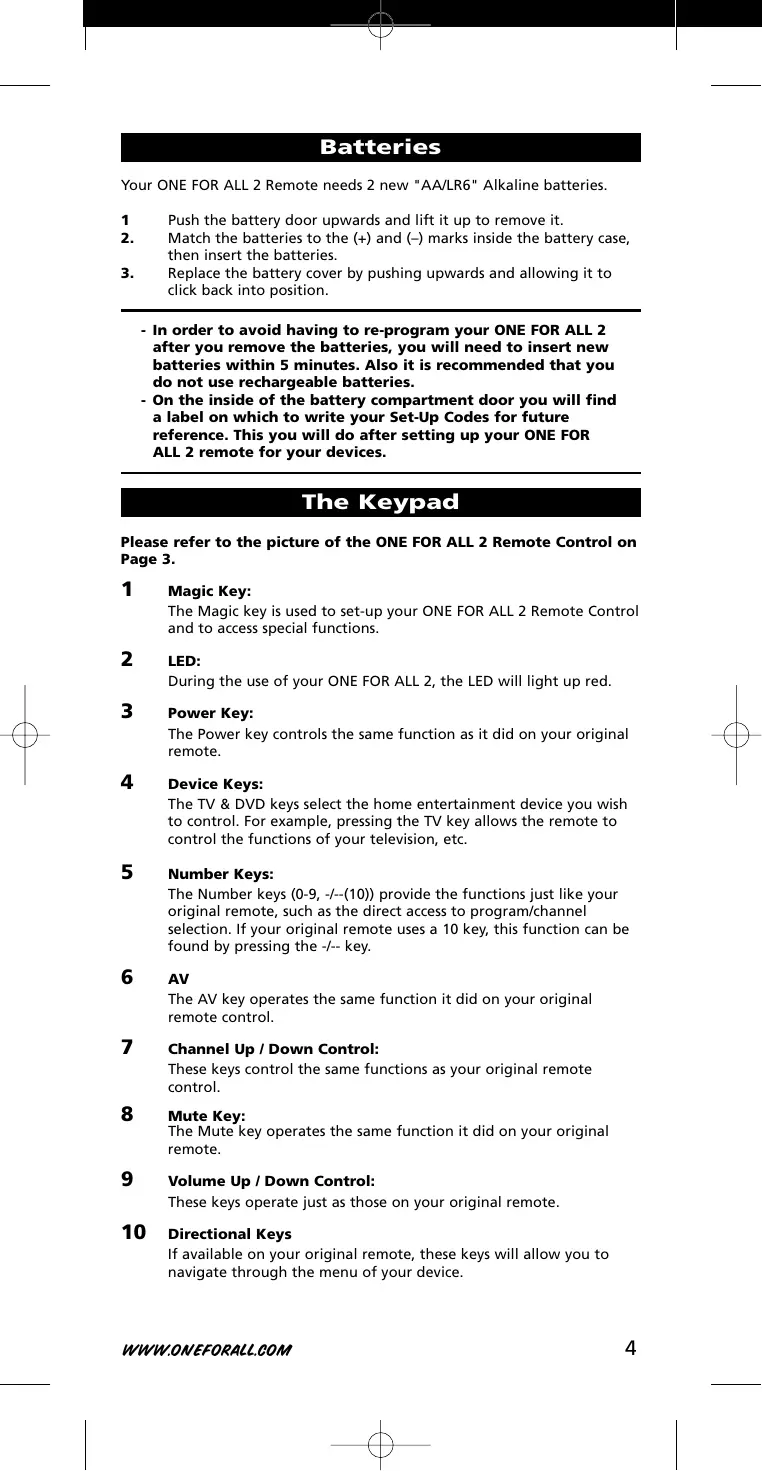
Your ONE FOR ALL 2 Remote needs 2 new "AA/LR6" Alkaline batteries. 1 2.
Push the battery door upwards and lift it up to remove it.
Match the batteries to the (+) and (–) marks inside the battery case, then insert the batteries. Replace the battery cover by pushing upwards and allowing it to click back into position.
- In order to avoid having to re-program your ONE FOR ALL 2 after you remove the batteries, you will need to insert new batteries within 5 minutes. Also it is recommended that you do not use rechargeable batteries.
- On the inside of the battery compartment door you will find a label on which to write your Set-Up Codes for future reference. This you will do after setting up your ONE FOR ALL 2 remote for your devices.
Please refer to the picture of the ONE FOR ALL 2 Remote Control on Page 3.
The Magic key is used to set-up your ONE FOR ALL 2 Remote Control and to access special functions.
During the use of your ONE FOR ALL 2, the LED will light up red.
The Power key controls the same function as it did on your original remote.
The TV & DVD keys select the home entertainment device you wish to control. For example, pressing the TV key allows the remote to control the functions of your television, etc.
The Number keys (0-9, -/--(10)) provide the functions just like your original remote, such as the direct access to program/channel selection. If your original remote uses a 10 key, this function can be found by pressing the -/-- key.
AV The AV key operates the same function it did on your original remote control.
Channel Up / Down Control:
These keys control the same functions as your original remote control.
The Mute key operates the same function it did on your original remote.
Volume Up / Down Control:
These keys operate just as those on your original remote.
If available on your original remote, these keys will allow you to navigate through the menu of your device.
If your original remote control required that you press an “OK” or “ENTER” key during Menu operation, this key can be used for this function.
Controls the same function as it did on your original remote control.
The Exit key will exit the Menu.
In TV mode this key allows you to access the wide screen (16:9) view option of your television (if available on your original remote). In DVD mode it obtains the TV/DVD function.
DVD keys (PLAY, STOP, REW etc.)
After pressing the DVD mode key, the Playback keys operate the same functions of your DVD Player/DVD-R Keys. To prevent accidental recording, the RECORD key must be pressed twice. In DVD mode: the SOURCE key will (if you have a DVD / Hard Disc recorder) allow you to view recorded programs (if available on your original remote). The FUNCT key allows you to return to DVD viewing (if available on your original remote).
After pressing the TV key, the transport keys (REW, PLAY, FF, PAUSE) are used to operate the main Teletext functions. The symbols below the keys are for Teletext. The text keys are used to access the Teletext functions of your television. Of course, your television must have Teletext capability. TEXT ON:
Puts your television in the teletext mode.
Stops the television changing text pages.
Shows the top half of the teletext page in larger letters. By pressing again, you can see the bottom half of the teletext page enlarged. To return to the regular teletext viewing, press the Expand key again, or press the Text key, depending on your television.
Switches the television back to regular viewing mode. On some televisions, this may be done by pressing the TEXT key several times.
After pressing the TV key and accessing the text mode, the bottom row of the DVD Player/DVD-R keys marked red, green, yellow and blue, allow you to access the Fastext functions of your television. If on your original remote control these keys are used for Menu navigation, the ONE FOR ALL Fastext keys may operate in the same way.
- For a more detailed explanation of the Teletext and Fastext functions, please refer to the manual of your television. Remember, different televisions control Teletext and Fastext in different ways. Not all
Teletext functions may be available for your particular model.
Setting up the ONE FOR ALL 2
(How to set-up the ONE FOR ALL 2 to control your devices)
Example: To set up the ONE FOR ALL 2 for your television:
Make sure your device (television) you wish to operate is switched on (not in standby).
ALL FOR ONE Find the code for your device in the Code List
(page 103 - 113). The device codes are listed per device type and brand name. Also the most popular code for each brand is listed first. If your brand is not listed at all, try the Search Method on page 7.
Press the device mode key (TV) on the ONE FOR ALL 2 remote for the device you wish to set up.
Press and hold down MAGIC until the red light blinks twice (the red light will blink once then twice).
Enter your four-digit device code using the number keys. The red light will blink twice.
Now aim the ONE FOR ALL 2 remote at your device (television) and press POWER. If your device switched off, the ONE FOR ALL 2 is ready to operate your device.
- Most TV’s do not switch back on pressing the POWER key, please try pressing a “number” key or the “TV-text off” key to switch your TV back on.
- If your device does not respond, follow steps 1 through 6 with each code listed for your brand. If none of the codes listed for your brand operate your device, then try the Search Method described on page 7, even if your brand is not listed at all. - Some codes are quite similar. If your device does not respond or is not functioning properly with one of the codes, try another code listed under your brand. - If the original remote control from your DVD Player/DVD-R did not have a POWER key, press PLAY instead of POWER during step 6. - To set up your other devices, follow the same instructions above, only press the appropriate device key during step 3. - Remember to press the correct device key before operating your device. Only one device can be assigned to a device key. - Write your device code in the applicable four digit boxes provided in the battery compartment and on page 8 for future reference. Devices can be found under the following keys:
DVD DVD Player/DVD-R To set up for a second TV or DVD (See mode re-assignment,
Setting up the ONE FOR ALL 2
Search method --> If your device does not respond to the ONE FOR ALL 2 after you have tried all the codes listed for your brand. --> If your brand is not listed at all. The Search Method allows you to scan through all the codes contained in the memory of the ONE FOR ALL 2. Example: To search for your television code:
Switch your television on (not in standby).
Press the TV key on the ONE FOR ALL 2.
Press and hold down MAGIC until the ONE FOR ALL
2 red light blinks twice (the red light will blink once then twice).
Press 9 9 1. The red light will blink twice.
Aim the ONE FOR ALL 2 at your Television. Now press
CH+ over and over, until your Television turns off (every time you press the CH+ key the ONE FOR ALL 2 will send out a POWER signal from the next code contained in the memory). You may have to press this key many times (up to 150 times) so please be patient.
CH If you skip past a code, you can go to the previous code(s) by pressing the CH- key. Remember to keep pointing the ONE FOR ALL 2 at your Television while pressing this key.
As soon as your television turns off, press MAGIC to store the code.
- Most TV’s do not switch on pressing the POWER key. Please try pressing a “number” key or the “TV-text off” key to switch your TV back on.
- If you cannot control your Television properly, please continue the Search Method, you may be using the wrong Code. - To search for the code for another device follow the instructions above only press the appropriate device key instead of TV during step 2. - If the original remote control of your DVD Player/DVD-R does not have a POWER key, press PLAY instead of POWER during step 5.
(To find out which code is currently programmed) Once you have Set-Up your ONE FOR ALL 2, you can blink back your Set-up Code for future reference. Example: to blink out your television code:
Press the TV key once.
Press and hold down MAGIC until the ONE FOR ALL
2 red light blinks twice (the red light will blink once then twice).
Press 9 9 0. The red light will blink twice.
For the first digit of your four-digit code, press 1 and count all the red blinks. If there are no blinks, the digit is „0“.
For the second digit of your four-digit code, press 2 and count all the red blinks. If there are no blinks, the digit is „0“.
For the third digit of your four-digit code, press 3 and count all the red blinks. If there are no blinks, the digit is „0“.
For the fourth digit of your four-digit code, press 4 and count all the red blinks. If there are no blinks, the digit is „0“. Now you have your four-digit code.
- To blink back the code for your other devices, press the appropriate device key during step 1.
Quick Code Reference
Make sure you write down the codes for your devices in the boxes below and in the battery compartment for future easy reference. Device Type 1
■■■■ WWW.ONEFORALL.COM
Mode re-assignment (Changing a device mode)
It is possible to change the mode of any device key. This is useful if you want to set up two of the same devices on the ONE FOR ALL 2. The code can be set up using “Direct code set up” (p. 6) or “Search method” (p. 7).
To change a device key, see the three examples below. Example
1 if you like to program a second TV on the DVD key.
2 if you like to program a second DVD on the TV key.
To program a second Television on the DVD key (for example), you need to change the DVD key into a TV key, so press: (*)
The DVD key has now become a second TV key.
Now enter the Set-Up code for your second TV by pressing: (*)
To program a second DVD Player/DVD-R on the TV key (for example), you need to change the TV key into a DVD key, so press: (*)
DVD The TV key has now become a second DVD key.
Now enter the Set-Up code for your second DVD by pressing: (*)
Resetting a Device key
Example: To reset the TV key to its original mode, press: (*)
Example: To reset the DVD key to its original mode, press:
Press and hold down the MAGIC key until the red light (LED) blinks twice.
The red light (LED) will blink once then twice.
Colour and Brightness Depending on the functions of your original remote control, the ONE FOR ALL 2 may operate the colour and brightness settings of your television. Colour (+) = Press and release MAGIC then hold Volume (+) Colour (-) = Press and release MAGIC then hold Volume (-) Brightness (+) = Press and release MAGIC then hold Channel (+) Brightness (-) = Press and release MAGIC then hold Channel (-)
Volume Punch Through
You may be able to use some functions of your Television, DVD Player/DVDR at the same time. For example: if you are watching a program on your DVD Player/DVD-R, you can adjust the volume (a TV function) without pressing the TV mode key on your ONE FOR ALL 2. The table below lists some of the possibilities. Last Device Mode Key Pressed:
DVD You Can Control:
TV volume up and down, mute
To punch through to TV volume while in DVD mode:
Press and hold MAGIC until the red light blinks twice.
Then press the TV key and the red light will blink twice.
To cancel the “Volume Punch Through” per mode:
(Example: to cancel the “Volume Punch Through” for the DVD mode)
Press and hold down the MAGIC key until the red light blinks twice.
Then press the Volume (-) key and the red light will blink four times.
VOL Example: being in DVD mode, you will be able to control VOL+/- or MUTE functions of your DVD Player/DVD-R (provided it has volume control).
To cancel the „Volume Punch Through“: 1.
Press and hold MAGIC until the red light blinks twice.
Press the Volume (+) key and the red light will blink four times.
Problem & Solution Problem:
Your brand is not listed in the code section?
Try the search method on page 7.
The ONE FOR ALL 2 does not operate your device(s)?
A) Try all the codes listed for your brand.
B) Try the search method on page 7.
The ONE FOR ALL 2 is not performing commands properly?
You may be using the wrong code. Try repeating the Direct
Set-Up using another code listed under your brand or start the search method over again to locate the proper code.
Problems changing channels?
Enter the program number exactly as you would on your original remote.
DVD-R not recording?
As a safety feature on your ONE FOR ALL 2, you must press the
The ONE FOR ALL 2 does not respond after pressing a key?
Make sure you are using new batteries and are aiming the ONE FOR ALL 2 at your device.
The red light (LED) does not blink when you press a key?
Replace batteries with 2 fresh, new “AA/LR6” alkaline batteries.
Customer Service If you still have questions about the operation of your ONE FOR ALL 2 universal remote and could not find the answer(s) in the TroubleShooting section, you may want to contact the customer service department for assistance. You may care to visit our Internet-site:
Our internet-site has many advantages:
- 24 hours access - no waiting time - page for Frequently Asked Questions - info about the ONE FOR ALL product range Before contacting us, by Fax, E-mail or Phone, make sure you have the required information available by filling in the table below. What do we need to know before you contact us: 1
That you have the ONE FOR ALL 2 URC-7721
The date of purchase (//).
A list of your equipment/models: (see example below).
Type/model numbers can often be found in your equipment owner’s manual or on the factory plate behind the device.
(***) Just send a blank message, you’ll get auto-reply.
DVD Player/DVD-R INSTALACJA USTAWIANIE ONE FOR ALL 2
DVD Player/DVD-R DVD Player/DVD-R
1163 1149 0009 0264 0009 0264 0037 0556 0282 0370 0037 0556 0009 0668 0374 0163 0411 0247 1437 AOC 0009 0060 0093 0108 0178 Aolingpike 0264 0412 Apollo 0473 Arc en Ciel 0109 0196 Arcam 0216 Ardem 0486 0714 0037 0633 0556 Aristona 0556 0037 WWW.ONEFORALL.COM
0556 0556 0216 0264 0282 0556 0216
0037 0374 0820 0109 0556 0714
0370 0264 0218 0486 1308 0370 0264
0011 0036 0374 0412 0037 0556 0606 0108 0264 1376
0009 0374 0661 0343 0192 0073 0208 1196 0087 0412
1037 0706 0264 0512 0535 0195 0544
0208 0226 0264 0374 0412
0821 0035 0486 0715 0037 0418 0606 0808
A.R. Systems Abex Accent Acer Action Acura Adcom Addison ADL Admiral Adyson AEA AEG Agashi Agef Aiko
Caihong Caishi Canton Capsonic Carad Carena Carrefour Carver Cascade Casio Cathay CCE CE Celestial Centrex Centrum Centurion Century CGE Changcheng Changfei Changfeng Changhai Changhong Chengdu Ching Tai Chun Yun Chunfeng Chung Hsin ChungFeng Chunsun Cimline Cinema Cinex Citizen City Clarivox Clatronic
Mustang CS Electronics CTC CTX Curtis Mathes CWN Cybertron Cytronix D-Vision Daewoo
Daitsu Danichi Dansai Dansette Dantax Datsura
0009 0087 0009 0487 0339
0037 0074 0712 0714 1037
0216 0247 1756 0060 0655 0218 1298 0037 0634 0556 0170 0865 0218 1267 0218 0037 0036 0412 0370 0208
0698 0009 0009 0374 0208 0795 0037 0037 0264 0037 0037 0037 0264 0820 Digatron 0037 Digihome 1149 Digiline 0037 DigiLogic 0037 Digitex 0820 Digitor 0037 Digivision 0361 DigiX 0880 DiK 0037 Dixi 0009 DL 0891 DMTECH 1964 Domeos 0668 Domland 0394 Dongda 0009 Donghai 0009 Dream Vision 1704 DSE 0861 DTS 0009 Dual 0519 0163 Dumont 0087 Dunai 0544 Durabrand 0037 Dux 0037 DVX 0891 Dynatron 0037 e:max 0606 Easy Living 1248 Ecco 0773 ECE 0037 EdisonMinerva 0487 Elbe 0435 0191 Elcit 0087 Elekta 0009 Elfunk 1208 ELG 0037 Elin 0037 0009 Elite 0218 Elta 0009 Emco 0247 Emerson 0178 0070 0163 Emperor 0282 Enzer 0753 Erae 1371 Erres 0037 ESC 0037 Estèle 0163 Ether 0009 Etron 0001 Eurofeel 0264 EuroLine 0037 Euroman 0216 Europa 0037 Europhon 0037 Evesham 1248 Evolution 1756 Excel 0037 Expert 0163 Exquisit 0037 Fagor 0037 Family Life 0037
1207 1207 0374 0661 0548 0860 0272 0556 0556 0556 0556 0698 0672 0556
0706 1376 0672 0264 0037 0556 0163 0363 0891 0556 1137 0621 1908 0374 0218 0606 1189 0587 0009 0087 0009 0825 0216 0371 0860 0896
0037 0556 0247 0087 0780 0037 0587 0865 1338
0544 0343 0037 0556 0352 0394 1137 0631 1149 1037 0070 0163 0178 1437 0556 0556 0556 1259 0706 0698 1046 0556 0780
0411 0247 0037 1037 0556 0216
Conic Conrac Conrad Conrowa Contec Continental Edison Cosmel Crosley Crown
CMS Cobolt Combitech Concorde Condor
0009 0891 0218 0264 0610 0455 0036 0170 0009 0037 0037 0037 1046 0819 0780 1037 0037 0087 0074 0001 0009 0264 0009 0819 0009 0009 0009 0009 0108 0412 0009 0009 0672 0648 0060 0009 0037 0037 0556 1037 0216 0891 1908 0009 0037 0418 0754 0032 0808 0037 0009 0009
0370 0163 0037 0556 0218
0610 0361 0163 0556 0264 0282
0548 0556 0105 0361 0163
0264 0216 0714 0087 0247 0037 0556 0371 0282 0361 0624 1909 0486 0370 0321 0668 0773 0860 0556 0556
0009 0037 0556 0820 0163
0556 0163 0556 0247 0216 1259 0556 0556 0247 0556 0556
Feilu Feiyan Feiyue Fenner Ferguson
Flint Fonda Force Formenti FormentiPhoenix Fortress Fraba Friac Frontech Fujimaro Fujitsu
0093 0037 0009 0163 0865 0683 0361
0009 0073 0560 0443 0216 0371 0346 0045 0105 0715 0418 0037 0714 0208 1612 0208
0556 1037 0512 0412 0548
0035 1916 0361 0264 0361
0653 1908 0363 1908 0163
0108 0361 0037 0544 0363 0287
0070 0556 0714 0346 0411
0087 0631 0492 0480 1556 0606 0621 0808 0216 0556 0374 0247 0668 0624 0163 1909 0411 0544 0361 1037 0808 1363 1163 0370 0544 0045 0087 0361
0455 0556 0610 0218 0264
0163 0556 0486 0216 0087
0556 0370 0037 0556 0370 0499 0655 0610 0247 0264 0363 0009 0853 0163 0009 0352 0037 0556
1259 1248 1163 0808 1666 0264 0412 1666 0412 0795 0860 0698 0556 0556 0361 0163 0418 0037 0556
0178 0282 0560 0287 0109 0335
0247 0363 0163 0374 0287 0287
0218 0037 0556 0412 0009 1298 1217 0880
0037 0009 0178 0370 0032 0377
0556 0216 0163 0361 0109 0363 0714 0715 0455 1259 0556 0374 0032 1308
0714 0361 0371 0037 0339 0556
WWW.ONEFORALL.COM Hyundai
Iberia ICE Ices Ict Igo IISonic Iiyama Imperial Imperial Crown Indiana InFocus Ingelen Ingersoll Inno Hit Innova Innovation Innowert Inotech Interactive
1598 0037 0264 0218 0037 1224 1376 1217 0037 0556
0371 0009 0556 0218 0216
0074 0163 0247 0370 0418 0084 0411 0361 0196 0009 0264 0374 0412 0661 0556 0487 0610 0714 0361 0037 0556 0218 0247 0282 1163 0037 1298 0820 0556 0109 0037 0163 0370 0556
0411 0264 0556 0109 0624
0247 0512 0556 0247 0087 0361 0512 0200 0499 0374 1909
0282 0455 0264 0371 0377 0519
0370 0394 0487 0218 0163 0247 0556 0037 0556 0218 0247 0371 0037 0556 0282 0455 0371 0218 0282 0264 0216 0009 0361 0208 0548 0606 0037
0473 0480 0346 0208 0631 0363 0247 0374
0264 0226 0264 0264 0556 0499
0264 0361 0556 0714 0037
0412 0412 0037 0264 0698 0821 0634 0374 0556 0443 1908
1053 0371 0508 0606 0683
0418 0093 0650 0412 0216 0282 0037 0556 0455
0412 0370 0610 0163 0282 0264 1556 0606
0610 0235 0362 0556 0163 0519
0370 0377 0363 0411 0247 0648 1437 0486 0435
Kiton KLL Kneissel Kobra Kolin Kolster Kongque Konichi Konka
0556 0037 0037 0435 1467 0108 0037 0009 0009 0037 0754 0487 0037 0087 0037 0412 0009 0009 0163
Korpel Korting Kosmos Kotron Koyoda Kuaile Kuba Kuba Electronic 0163 Kulun 0009 Kunlun 0208 Kyoshu 0412 Kyoto 0032 L&S Electronic 0865 LaSAT 0486 Lavis 1037 Leader 0009 Lecson 0037 Legend 0009 Lemair 0411 Lenco 0037 Lenoir 0009 Lesa 0247 Levis Austria 0037 Lexsor 1196 Leyco 0037 LG 0178 1265 0060 1637 Liesenk & Tter 0037 Liesenkotter 0037 Lifetec 0037 1037 1259 Lloyd's 0001 Lloytron 0032 Local Calcutta TV 1417 Local Chennai TV 0371 1412 Local Delhi TV 1442 Local Malaysia TV 0698 Lodos 1037 Loewe 0512 0087 Logik 0001 0371 Logix 0668 Longjiang 0264 Luker 1982 Luma 0037 0362 Lumatron 0363 0073 Lux May 0037 Luxor 1163 0163 LXI 0178 Madison 0037 Magnadyne 0087 Magnafon 0216 Magnavox 0037 Magnum 0648 Mandor 0264 Manesth 0037 Manhattan 0037
0370 0610 0411 0374 0499 0556 0362 1908 0036 0556 0247 0218 0264 0556 0371 0714 0418 0218 0587 0894 0795 0606 0556 0370 0556 0264 0264 0412
0418 0163 0714 0370 0037
0032 0009 0163 0374 0556 0587 1037
0264 0001 0032 0163 1305 0327 0327 0009 1137 0714 0009
0037 0556 0108 0247 0556 0328 0519 0556
0216 0644 0698 0715 1664
0556 0706 0860 0753 0698
0037 1164 0163 0009 0009 0037 0519 0865 0773 0037 0370 Interbuy 0009 Interfunk 0037 0327 Internal 0037 International 0216 Intervision 0037 0486 0009 Irradio 0009 IRT 0698 Isukai 0218 ITS 0037 0556 ITT 0163 0339 ITT Nokia 0361 0339 ITV 0264 JDV 1982 Jean 0036 JEC 0035 Jialicai 0009 Jinfeng 0208 Jinque 0009 Jinta 0009 Jinxing 0009 JMB 0037 JNC 1964 Jocel 0712 Jubilee 0556 Juhua 0264 JVC 0653 0192 Kaige 0009 Kaisui 0009 Kambrook 0377 Kamp 0216 Kanghua 0896 Kangli 0001 Kangyi 0009 Kapsch 0163 Karcher 0037 0778 Kathrein 0556 Kawa 0371 Kawasho 0216 KB Aristocrat 0163 Kendo 0037 0512 1037 Kennedy 0163 Kennex 1037 Kenwood 0105 Khind 0896 KIC 0329 Kingsley 0216 Kiota 0001 Kioto 0556
1556 0556 0037 0216 1137
0374 0668 0512 0655 0218 0264 0683 1248
1239 1432 1242 0208 1046
1417 1046 0264 0602 1418 1239 1236 1425 0009 0508 1473 1417 1046 1418 1239
0633 0790 0037 0556 0655 0370 0362 0011 0060 0698 0773 0009 0264 0880 1217 1037 0519 0412 0363 0163 0411 0556 0374 0009 0037 0556 0362 0163 0361 0264 0009 0556 0361 0363 0480 0492 0208 0548 0346 0473 1037 0631 0556 0247 0544 0163 0073 0556 0036 0706 0780 0714 0037 0556 0715 1289 0235 0556 0264 0035 0163 0363 0556 0668 1037 1267 0163 0778
Master's Mastro Masuda Matsui
0499 0780 0218 0009 0235 0544 0335 Matsushita 0650 Matsuviama 0587 Maxam 0264 Maxdorf 0773 Maxim 1982 MCE 0009 ME 1046 Meck 0891 Mediator 0037 Medion 0037 0512 1259 Megas 0610 Megatron 0178 MEI 1037 Meile 0264 Melectronic 0009 0247 0411 0661 Memorex 0009 Memphis 0009 Mercury 0001 0706 Mermaid 0037 Merritt 0548 Metronic 0625 Metz 0388 0191
0037 0698 0371 0037 0208 0363 0714
Musikland MyCom Myryad NAD Naiko Nakimura Nanbao Nansheng Naonis Narita NAT National
0216 0009 0037 0093 0060 0272 0714 0009 0037 0009 0247 0216 0037 1376 0556 0166 0037 0374 0009 0264 0363 1982 0226 0226
0216 0374 0009 0714 0715
1556 0009 0011 0272 0455 1908
0487 0036 0443 0433 0195 0191
0412 0346 0105 0556 0714 0178
0714 1037 0808 0519 0556
0698 1908 1437 1900 1248 1289 1916
0037 0512 0109 0343 0163
0287 0374 0480 0492 0216 0624 0634 0361 0191 0195 1037 0650 0060
0037 0009 0698 0264 0556 0329
0060 0361 0163 0535 0447 0746 0087 1163 0195 0037 0556 0587 0668 1037 1533
General Mivar Monaco Morgan's Motorola MTC MTEC MTlogic Mudan Multitec Multitech
0037 0808 0820 0032 1149 0037 0070 0412 1666 1900 0108 0036
0487 0535 0195 0191 0108 0037 0556
0093 0512 0037 0178 0354 0087
0535 0556 0208 1037 1393
0556 0370 0032 1308 0208 0556 0363 0264 0163 0218 0178 0037 0178 1982 0037 0264 0412 0163
0486 0668 1037 1556 0216 0486 0037 0370 0556
0455 0508 Neckermann 0037 0327 NEI 0037 Neovia 0865 Nesco 0247 Netsat 0037 Network 0032 Neufunk 0037 New Tech 0037 New World 0218 Newave 0009 Nfren 0800 Nicam 0544 Nicamagic 0216 Nikkai 0032 0009 Nikkei 0714 Nikko 0178 Nippon 1239 Nobliko 0070 Nogamatic 0109 Nokia 0361 0631 Nordmende 0109 0195 Norfolk 0163 Normerel 0037 Novak 0037 Novatronic 0037 NU-TEC 0455 Nurnberg 0163 Oceanic 0163 Odeon 0264 Okano 0370 Olidata 1376 Omega 0264 Omni 0780 Onida 1046 Onwa 0371 Opera 0037 Optimus 0650 Optonica 0093 Orbit 0037 ORcom 1504 Orion 0037 0321 1908 Orline 0037 Ormond 0668 Orson 0036 Osaki 0032 0556 Osio 0037 Oso 0218 Osume 0032 Otto Versand 0036 0556 0226 Pace 1908 Pacific 0037 Pael 0216 Palladium 0370 0191 0163 Palsonic 0264 0556 Panama 0009 Panashiba 0001 Panasonic 0650 0208 0853 Panavision 0037 Panda 0009 0891 Papouw 0037 Pathe Cinema 0163 Pathe Marconi 0109 Pausa 0009
0374 1704 0191 0418 0556 1964 1908 0556
0037 0499 0370 0087 0371 1371
0556 0653 0556 0247 0163 1376
0009 0556 0610 0218 0282 0714
0009 0556 0343 0178 0093
0035 0218 0037 0556 0216 0264
0196 0163 0339 0714 0037
0556 0105 0374 0556 0698 0820 0037 0556 0361 0361 0208 0473 0548 0480 0037 0556 0264 0009
1231 1224 1253 0653 0602 0218 0433 0556 0166
0443 0011 0880 0218 1037
0235 0556 1954 0714 0655
0009 0544 0264 0412 1916 1196 0556 0037 0556
0218 0264 0412 0037 0272 0374
0556 0036 1505 0195 0247
0093 0512 0535 0361 0235 0109 0519
0556 1137 0714 1037 0443
0037 1505 0519 0412 0001 0264
0200 0363 0773 0418 0216
0361 0178 0411 0780 0508 0556 0216
0508 0060 0556 0208 0698
0896 0548 1310 0001 1636
0778 1196 1269 0037 0556 0247
Phoenix Phonola Pilot Pioneer
Plantron Playsonic Policom Polytron Poppy Portland Powerpoint PrandoniPrince Premier President Prima Princess Prinston Prinz Profex Profi Profitronic Proline
0032 0163 0037 0032 0087 0163 0163 0037 0374 0361 1289 0037 0037 0556 0760 0679 0486 0370 0037 0714 0109 0087 0282 0009 0374 0487
0556 0191 0087 0343 0178 0108
0032 0772 0009 0200 1756 1506 1308 0556 0556 0037 0011 0556 0512 0486 0556 0037 0196 0535
0370 0087 0712 0166 0287
0216 0706 0037 0109 0170 0163 1260 0370 0343 0361
Save Saville SBR Schaub Lorenz Schneider
0714 0087 0037 0036 0037 0587 0418 0370 0556 0109 0087 0610 0009 0009 0544 0037 0163 0455 0163 0480 0335 0009 0618 0556 0032 0226 1632 0216 0264 0037 0861 0009 0208 0216 0108 0009 0037 1908 0037
0037 0544 0163 1916 Scotch 0178 Scotland 0163 Scott 1189 Sears 0178 Seaway 0634 Seelver 0556 SEG 0036 0487 1163 SEI 0087 Sei-Sinudyne 1505 Seitech 1217 Seleco 0163 0346 Sencora 0009 Sentra 0035 Serino 0610 Shancha 0264 Shanghai 0009 Sharp 0093 0200 Shen Ying 0009 Shencai 0009 Sheng Chai 0009 Sheng Chia 0009 Shenyang 0009 Sherwood 0009 Shinco 1990 Shintoshi 0037 Shivaki 0037 Show 0418 Siarem 0163 Siemens 0037 0032
1037 0218 0264 0418 0037 0556
0668 0282 1916 1189 1900 0556 0877 0264 0556 0825 0412 0037 0625 0361
0698 0009 0712 0216 0706
0606 0335 0163 0287 0560 0335 0343 0498 0196 0548 0650 0714
0235 0634 0011 0374 0264 0354 0163 1982 0556 1163 0668 0712 1037
0361 0548 0672 0363 0339 0208
0621 0032 0644 1249 0264 0625
0655 0729 0556 0706 1412 0371 1236 0602 0455 0753 1371 1208 0011 0036 0045 0370 0339 0412 0009 0508 0544 0163 0037 0556 0486 0170 0093 0556 0556 0548 1137 0668 0648 0070
0084 0074 0418 0247 0037 0556
0370 0032 0178 0519 0481
0037 Siesta 0370 Signal 1955 Silva 0037 Silva Schneider 1556 Silver 0036 SilverCrest 1037 Singer 0009 0335 Sinotec 0773 Sinudyne 0087 0556 Sky 0037 Skymaster 0105 Skysonic 0753 Skyworth 0037 Sliding 0865 SLX 0668 Smaragd 0487 Soemtron 0865 Solavox 0032 Sonawa 0218 Songba 0009 Soniko 0037 Soniq 1467 Sonitron 0208 Sonneclair 0037 Sonoko 0009 Sonolor 0163 Sontec 0037 Sony 1505 0353 Sound & Vision 0218 Soundesign 0178 Soundwave 0037 Sowa 0060 Soyea 0773 Spectra 0009 Ssangyong 0032 Stag 0032 Staksonic 0009 Standard 0009 Starlite 0009 Stenway 0282 Stern 0163 Stevison 1982 Strato 0037 Strong 1163 Sunic Line 0037 Sunkai 0321 0487 Sunstar 0371 Sunwatt 0455 Sunwood 0037 Superla 0216 Supersonic 0009 SuperTech 0009 Supervision 0698 Supra 0178 Susumu 0218 Sutron 0009 SVA 0587 Svasa 0805 Swissline 0247 Swisstec 1504 Sydney 0216 Synco 0036 Sysline 0037 Sytong 0216 T+A 0447 Tacico 0178 Tactus 0272 Tai Yi 0009 Taishan 0009 Tandberg 0411 Tandy 0218 Targa 1371 Tashiko 0036 Tatung 1556 0011 TCL 0706
0556 0009 0105 0374 0371
1248 1298 0037 1259 0556
0808 0668 0865 1137 0714 0374 0009 0287 0216 0037 1505 0011 0101
0109 0073 0225 0074 0192 0084 0499 0512 0335 0036 0272 0045
0343 0109 0192 0361 0335 0499
0556 0668 0163 0374 0009 1037 0035 0218 0412 0587 0668 0773 0060 0093 0618 0698 1704 0371 0264
0788 1228 1728 1165 1224 0641 0790 0713 Akashi 0838 AKI 1005 Akira 0699 Akura 1171 Alba 0717 0539 Alize 1151 All-Tel 0790 Amitech 0770 Amoi 0852 Amoisonic 0835 Amstrad 0713 AMW 0872 Ansonic 0759 Apex Digital 0672 Arena 0852 Aria 0893 Arianet 0893 Aristona 0539 ASCOMTEC 1923 Asono 1224 ATACOM 1224 Audiosonic 1923 Audioworld 0790 Audix 1104 Autovox 0713 Auvio 0843 Avious 1165 AWA 0730 Axion 0730 Base 1451 Basic Line 0713 Baze 1165 BBK 0862 Beep 1163 Bellagio 0872 Belson 1923 Best Buy 0857 Binatone 1923 Black Diamond 0713 Blaupunkt 0717 Blu:sens 1489 Blue Parade 0571 Blue Sky 0713 0769
0770 0790 1434 1152 1923 0699 1321 0695 0779 0852
2020 0898 0716 0884 1233 1350
0698 0556 0712 0455 0587 0512 0418 0009
Boman Bose Brainwave Brandt Bush
Eclipse Electrohome Elfunk Elin Ellion Elta
0723 0770 0850 0770 0850 0770
Emerson Energy Sistem ENG Enzer EuroLine Ferguson Finlux
0591 1350 1571 0665 0788 0651 0741 1884 0713 0869 1919 0695 0893 0717 1051 1224
1446 0770 1228 0831 0714 0716 1115 0872 0833 0872 Dalton 1036 Dansai 0770 Dantax 0723 Daytek 0872 Dayton 0872 DCE 0831 DEC 0699 Decca 0770 Denon 0490 Denver 0699 1923 Denzel 0665 Diamond 0651 0770 Digihome 0713 DigiLogic 0713 digiRED 0717 Digital i 0893 Digitech 1421 Digitor 1005 Digitrex 0672 Digix Media 0826 DiK 0831 Dinamic 0788 DiViDo 0705 DK digital 0831 DMTECH 0783 Dragon 0831 DSE 1730 Dual 0831 0790 Durabrand 1003 DVX 0768 E-Boda 0723 E-Dem 1224 e:max 1233 EagleTec 0714
Coby Codex Compacks Conia Contel Continental Edison CrossWood Crown Crypto Cybercom CyberHome Cytron D-Vision Daenyx Daewoo
1004 0783 2023 0770 0651 0713 0717 1436 0768
1695 2046 1004 1350 1832 1233 1421
0843 0779 1920 1994 0665 0573 0857 1923 0831 1004 1224 0770
0850 1156 1228 2021 2046 0788
1115 1224 1233 0869 0770
0558 1901 1164 0539 0503 0867 1860 1275 1597
Phonotrend Pioneer Playgo Plu2 Pointer Portland Powerpoint Prima Prinz Prism Pro2 ProCaster Proline Proscan Proson Prosonic Provision Pye QONIX Radionette Raite RCA REC Red Star Relisys Reoc Revoy Rex Richmond Rimax Roadstar
0751 0723 1223 1254 1156 1367 1004
Sanyo Scan ScanMagic ScanSonic SCE Schaub Lorenz Schneider
1036 2014 1233 1451 0768 0884 0872 0763 1994
2024 0713 0695 2015 1256 1419
1152 0716 0770 1140 0672 1003 0730 0898 1115 0770 0533 0730 0705 0716 0788 1156 0533 1903 1233 0768 0768 0783 0872 0651 0768 1005 0818 1367 0713 0857 0770 0831 0788 1187 0730 0893 0672 0675 0768 1156 0713 1321 0741 0770 0741 0741 0717 1006 1224 0898 1367 0490 0770
0768 0723 0751 0768 1115 1254 1316
1633 0772 1070 1824 1981 2020
1227 1152 0893 1224 1005
0713 1004 0790 1483 Teletech 0713 Tensai 0651 Tevion 0651 1347 Theta Digital 0571 Thomson 0551 Tiny 1489 Tokai 0665 Tokiwa 0705 Tom-Tec 0789 Top Suxess 1224 Toshiba 0503 Trans Continens 0826 TRANScontinents 0872 Transonic 0672 Tredex 0843 Trio 0770 TruVision 0857 TSM 1224 Umax 1151 United 0788 1115 0713 Universal Multimedia 0768 Universum 0741 1530 Uptek 0763 upXus 1345 Venturer 0790 Vestel 0713 Victor 1241 Vieta 0705 Viewmaster 0862 Voxson 0730 VTrek 1228 Waitec 1224 Walkvision 0717 Waltham 1530 Welkin 0831 Wellington 0713 Weltstar 0713 Wesder 0699 Wharfedale 0686 0652 Wilson 0831 Windy Sam 0573 Wintech 1187 Woxter 1151 XBox 0522 XLogic 0770 XMS 0788 Xoro 1183 Yakumo 1004 Yamada 1004 0652 Yamaha 0539 Yamakawa 0665 Yukai 0730 Zenith 0503 Zennox 1265
2021 0768 0770 1152 0788 1228 1923 1832 0833 0770
1036 1382 0768 2014 1227 0833 1730 0652 0522 1254 0898 0788 0716
0730 0790 1228 0672 1165 0695
0699 0768 1233 1446 1489 2021 0884 1152 0826 1832 1367 0675
0713 0591 0779 1913 1227 0790
1597 1265 1224 0831 2007 1917
Soundmaster Soundmax Soundwave Spectra Standard Star Clusters StarLogic Starmedia Stevison Strong Sunfly Sunkai Sunstech Sunwood SuperDigital Supervision Supratech SVA Sylvania Synn T.D.E. Systems Tandberg Tangent Targa Tatung Tchibo TCM Teac
DVD Universal Electronics BV Europe & International
P.O. Box 3332 7500 DH, Enschede The Netherlands