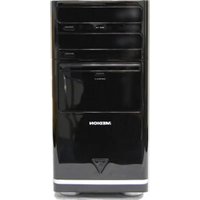
AKOYA P7316 D - Desktop computer MEDION - Free user manual and instructions
Find the device manual for free AKOYA P7316 D MEDION in PDF.


Pick your language and provide your email: we'll send you a specifically translated version.
| Product Type | Desktop Computer |
| Brand | Medion |
| Model | AKOYA P7316 D |
| Form Factor | Tower |
| Processor | Intel Core i3 (3rd Generation) Dual-Core |
| RAM | 4 GB DDR3 (Expandable to 8 GB) |
| Storage | 500 GB SATA Hard Drive (7200 RPM) |
| Optical Drive | DVD±RW Writer |
| Operating System | Windows 8 (Upgradeable to Windows 10) |
| Video Output | HDMI and VGA ports |
| USB Ports | 4 x USB 3.0, 2 x USB 2.0 |
| Networking | Gigabit Ethernet, Wi-Fi 802.11 b/g/n |
| Card Reader | Multi-format 6-in-1 Card Reader |
| Audio | Realtek HD Audio with 3.5mm jacks |
| Power Supply | Internal 300W Power Supply |
| Dimensions (H x W x D) | 420 mm x 175 mm x 380 mm |
| Weight | Approximately 8 kg |
| Maintenance | Clean vents and fan with a soft cloth regularly |
| Safety Features | Kensington Lock Slot, Overheat Protection |
| Repairability | Tool-free access to interior; easily upgradeable RAM and storage |
| General Information | Designed for everyday computing, multimedia, and office tasks |
Frequently Asked Questions - AKOYA P7316 D MEDION
How do I connect the desktop computer to a Wi-Fi network?
Click on the Wi-Fi icon in the system tray, select your network, and enter the password. If the Wi-Fi is not enabled, press the physical wireless switch on the front panel if available.
Can I upgrade the RAM on the Medion AKOYA P7316 D?
Yes, the computer has two DIMM slots that support up to 8 GB of DDR3 RAM. Open the side panel, gently push the retaining clips, and insert a new module at a 45-degree angle.
How do I perform a factory reset?
Restart the computer and press F11 during startup to access the recovery menu. Follow the on-screen instructions to restore the system to its original state. Backup important files first.
The computer does not power on. What should I check?
Ensure the power cord is plugged into a working outlet and the power switch on the back is turned on. Try a different cable and test the wall socket with another device.
How do I clean the inside of the desktop computer?
Turn off and unplug the computer. Remove the side panel and use a can of compressed air to blow out dust from the fans, heatsinks, and power supply. Avoid touching components directly.
Can I use the HDMI port to connect to a TV?
Yes, the HDMI port outputs audio and video. Connect an HDMI cable from the computer to your TV, then select the correct input source on the TV.
How do I replace the hard drive?
Disconnect all cables and open the case. Unscrew the drive cage, remove the old drive, and install a SATA hard drive. Reconnect the SATA data and power cables, then secure the cage.
The computer is beeping during startup. What does it mean?
Beep codes indicate hardware issues. A single short beep usually means normal startup. Repeated beeps may indicate memory or graphics card problems. Consult the manual for a detailed code list.
How do I access the BIOS setup?
Repeatedly press F2 or Delete immediately after turning on the computer to enter BIOS. Use the arrow keys to navigate and make changes.
What is the maximum supported storage capacity?
The system supports up to 3 TB SATA drives. For best performance, use a 7200 RPM drive or an SSD with the same form factor.
User questions about AKOYA P7316 D MEDION
0 question about this device. Answer the ones you know or ask your own.
Ask a new question about this device
No questions yet. Be the first to ask one.
Download the instructions for your Desktop computer in PDF format for free! Find your manual AKOYA P7316 D - MEDION and take your electronic device back in hand. On this page are published all the documents necessary for the use of your device. AKOYA P7316 D by MEDION.
USER MANUAL AKOYA P7316 D MEDION
Manual assistant
Powered by Anthropic
Waiting for your message
Product information
Brand : MEDION
Model : AKOYA P7316 D
Category : Desktop computer