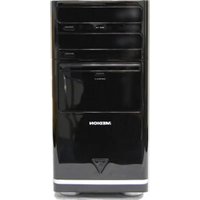
Akoya E7001 D - Desktop computer MEDION - Free user manual and instructions
Find the device manual for free Akoya E7001 D MEDION in PDF.


Pick your language and provide your email: we'll send you a specifically translated version.
| Product Type | Desktop Computer |
| Brand | MEDION |
| Model | Akoya E7001 D |
| Processor | Intel Core i5 (4th Gen, typical) |
| RAM | 8 GB DDR3 |
| Storage | 1 TB SATA HDD (7200 rpm) |
| Operating System | Windows 10 Home (pre-installed) |
| Graphics | Integrated Intel HD Graphics or optional dedicated GPU |
| Optical Drive | DVD±RW |
| Connectivity | USB 3.0, USB 2.0, HDMI, VGA, Ethernet, Audio jacks |
| Wireless | Wi-Fi 802.11 b/g/n, Bluetooth 4.0 |
| Dimensions (W x D x H) | Approx. 180 x 360 x 400 mm |
| Weight | Approx. 8 kg |
| Power Supply | 300 W internal PSU |
| Power Consumption | Typical 150 W, max 250 W |
| Audio | High-definition audio, 7.1 channel output |
| Expansion Slots | 2x PCIe x1, 1x PCIe x16 |
| Memory Card Reader | Multi-card reader (SD, MMC, etc.) |
| Included Peripherals | Keyboard, mouse |
| Warranty | 2 years (limited) |
Frequently Asked Questions - Akoya E7001 D MEDION
How do I connect the Akoya E7001 D to a monitor?
Use the HDMI or VGA port on the back of the computer. Connect the monitor cable and ensure the monitor is set to the correct input source.
The computer does not power on. What should I check?
First, ensure the power cord is securely plugged into both the computer and a working outlet. Check the power switch on the back of the PSU (if available) is set to '1'. Try a different power cable or outlet.
How can I reset my Windows password?
If you have a password reset disk, use it. Otherwise, boot from a Windows installation media and use the 'Repair your computer' option to access command prompt and reset the password with net user commands.
Why is my Akoya E7001 D running slowly?
Common causes include too many startup programs, insufficient RAM, or a fragmented hard drive. Run Disk Cleanup, disable unnecessary startups, and consider upgrading to an SSD.
How do I upgrade the RAM?
Open the side panel. Locate the RAM slots on the motherboard. Gently push the clips outward to remove old modules, and insert new ones firmly until they click. Ensure compatibility (DDR3, 1.5V).
The computer beeps repeatedly on startup. What does that mean?
Beep codes indicate hardware issues. One long and two short beeps often signal a graphics card problem. Check that the GPU is properly seated and power connectors are attached.
How do I enter the BIOS setup?
Press F2 or Del repeatedly during the initial boot screen (before Windows starts). The exact key may vary; try F1, F10, or Esc if F2 doesn't work.
Can I connect wireless devices?
Yes, the computer has Wi-Fi and Bluetooth built-in. For Bluetooth, enable it in Windows settings and pair your device. For Wi-Fi, connect to your network via the network tray.
How to clean the inside of the computer?
Power off and unplug the computer. Use compressed air to blow dust from fans, heatsinks, and components. Avoid touching circuit boards. Do not use a vacuum cleaner.
Where can I download drivers for the Akoya E7001 D?
Visit the MEDION support website and enter the model number. Alternatively, use Windows Update or the manufacturer's driver tool to automatically install updates.
User questions about Akoya E7001 D MEDION
0 question about this device. Answer the ones you know or ask your own.
Ask a new question about this device
No questions yet. Be the first to ask one.
Download the instructions for your Desktop computer in PDF format for free! Find your manual Akoya E7001 D - MEDION and take your electronic device back in hand. On this page are published all the documents necessary for the use of your device. Akoya E7001 D by MEDION.
USER MANUAL Akoya E7001 D MEDION
Manual assistant
Powered by Anthropic
Waiting for your message
Product information
Brand : MEDION
Model : Akoya E7001 D
Category : Desktop computer