
Cook Control 9000 Waterproof - Kitchen scales CECOTEC - Free user manual and instructions
Find the device manual for free Cook Control 9000 Waterproof CECOTEC in PDF.


User questions about Cook Control 9000 Waterproof CECOTEC
0 question about this device. Answer the ones you know or ask your own.
Ask a new question about this device
Download the instructions for your Kitchen scales in PDF format for free! Find your manual Cook Control 9000 Waterproof - CECOTEC and take your electronic device back in hand. On this page are published all the documents necessary for the use of your device. Cook Control 9000 Waterproof by CECOTEC.
USER MANUAL Cook Control 9000 Waterproof CECOTEC
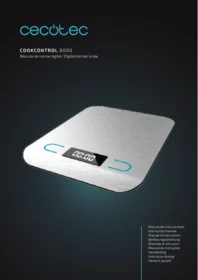
CookControl 9000 Waterproof
Báscula de cocina digital /Digital kitchen scale
cecòtec





ÍNDICE
- Safety instructions
- Device
- Before use
- Operation
- Cleaning and maintenance
- Technical specifications
- Disposal of old electrical appliances
- Technical support service and warranty
INDICE

1. SAFETY INSTRUCTIONS
Read these instructions thoroughly before using the appliance. Keep this instruction manual for future reference or new users.
• This device is for personal use only and is not intended for commercial purposes.
- Do not operate this appliance if there are any visible signs of damage. Always check for damage before each use and in case of malfunction, contact the Technical Support Service of Cecotec.
- Keep the device away from heat sources.
• Do not use the device outdoors.
Battery instructions
Safety


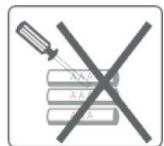
- If the scale is not going to be used for a long period of time, remove the batteries to avoid damage to the product.
- Keep batteries away from the reach of children and animals.
- Do not mix old and new batteries or batteries with different compositions to avoid possible leakage.
- Batteries must not be recharged or reactivated, dismantled, thrown into fire, immersed in fluids or short-circuited.
- Do not dispose of batteries together with household waste or rubbish.
• Follow battery recycling advices.
Replacement
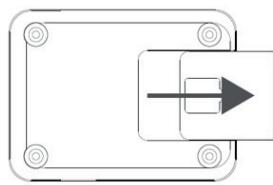
- Open the battery compartment and remove the plastic protection before use.
- Take out the used battery with the aid of a sharp object and replace it by a new one.
- Place the cover back in its position.
2. DEVICE
Features
• Equipped with a system composed of 4 precision strain gauge sensors
• On/Auto off/Manual off
- Tare function
• 2 weight units: g, lb
• 2 volume units: ml, fl' oz
• Low battery/overload indicator
• 1XCR2032 3V lithium battery
Parts
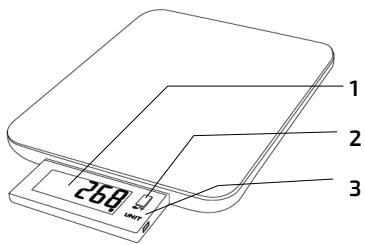
- LCD display
- Power/Tare button
- Unit setting button
LCD display
- First, take out the LCD display, which is stored in the base of the product's body.
- The display shows different information:


-: Negative value
T: tare weight
g: weight unit
lb/oz.: weight unit
fl'oz: volume unit
ml: volume unit
3. BEFORE USE
• Take the device out of its package and remove all packaging materials.
- Check carefully if there is any damage, and if there is, immediately notify the Technical Support Service of Cecotec.
ENGLISH
4. OPERATION


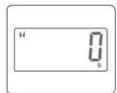
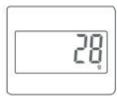

- Place the scale on a flat, stable surface. Place a container or bowl (if used) on the scale before operating it.
- Gently press the On/Tare button to activate the device.
- The display will turn on and will show 00000.
- Wait until the LCD display shows "0".
- Place the item to be weighed on the scale (or in a bowl if required). The LCD will show the results.
- Once you have finished weighing, press the On/Tare button to turn the device off. The device will turn of automatically after 2 minutes of no operation.
Button functions


-
On/Manual off/Zero/Tare.
-
Unit conversion.
Unit conversion
While the scale is on, press repeatedly the unit button to select the desired measuring unit until the desired unit is shown.

Tare function

This function allows you to weigh a second item consecutively after weighing the first one without removing it from the scale.
- Gently press the On/Tare button to activate the device.
- The display will turn on and will show 00000.
- Wait until the LCD display shows "0" and place the container on the scale's platform.
- The LCD display will show the steady weight of the container.
- Press the On/Tare button to clear the weight of the container and will reset to 0.
- The top left corner will show "TARE", indicating the tare function is activated. Do not remove the container.
- Place the ingredients inside the container.
- The LCD will show the weight of the ingredients only. Press again the On/Tare button to weigh new different ingredients.
Negative value

The display will show negative values when an element has been removed from the scale. To clear it, press the On/Tare button and the display will show "0" again.
Error indications

The battery is too low. Please insert new battery.
The scale is overloaded. Please remove excess weight to avoid product damage.
COOKCONTROL 9000 WATERPROOF
ENGLISH
5. CLEANING AND MAINTENANCE

- Place the scale on a flat and stable surface before use.
- Avoid hitting or dropping the scale to prevent damages.
• Do not overload the scale or put heavy things on it.

• Do not immerse the product in water or any other liquid.
• Make sure the surface is always dry.
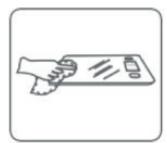
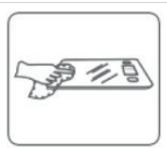
- Use a soft, damp cloth to clean the surface. Do not use chemical or harsh abrasive cleaning agents.
6. TECHNICAL SPECIFICATIONS
Model: CookControl 9000 Waterproof
Product reference: 04098
Made in China | Designed in Spain
7. DISPOSAL OF OLD ELECTRICAL APPLIANCES

The European directive 2012/19/EU on Waste Electrical and Electronic Equipment (WEEE), specifies that old household electrical appliances must not be disposed of with the normal unsorted municipal waste. Old appliances must be collected separately, in order to optimize the recovery and recycling of the materials they contain, and reduce the impact on human health and the environment.
The crossed out “wheeled bin” symbol on the product reminds you of your obligation to dispose of the appliance correctly. If the product has a built-in battery or uses batteries, they should be removed from the appliance and disposed of appropriately. Consumers must contact their local authorities or retailer for information concerning the correct disposal of old appliances and/or their batteries.
8. TECHNICAL SUPPORT SERVICE AND WARRANTY
This product is under warranty for 2 years from the date of purchase, as long as the proof of purchase is submitted, the product is in perfect physical condition, and it has been given proper use, as explained in this instruction manual.
The warranty will not cover the following situations:
ENGLISH
- The product has been used for purposes other than those intended for it, misused, beaten, exposed to moisture, immersed in liquid or corrosive substances, as well as any other fault attributable to the customer.
- The product has been disassembled, modified, or repaired by persons, not authorised by the official Technical Support Service of Cecotec.
• Faults deriving from the normal wear and tear of its parts, due to use.
The warranty service covers every manufacturing defects of your appliance for 2 years, based on current legislation, except consumable parts. In the event of misuse, the warranty will not apply. If at any moment you detect any problem with your product or have any doubt, do not hesitate to contact Cecotec Technical Support Service at +34 963 210 728.
COOKCONTROL 9000 WATERPROOF
FRANÇAIS
1. INSTRUCTIONS DE SÉCURITÉ





- COOKCONTROL 9000 WATERPROOF
- ÍNDICE
- INDICE
- SAFETY INSTRUCTIONS
- BATTERY INSTRUCTIONS
- SAFETY
- REPLACEMENT
- DEVICE
- FEATURES
- LCD DISPLAY
- BEFORE USE
- ENGLISH
- OPERATION
- BUTTON FUNCTIONS
- UNIT CONVERSION
- TARE FUNCTION
- NEGATIVE VALUE
- ERROR INDICATIONS
- CLEANING AND MAINTENANCE
- TECHNICAL SPECIFICATIONS
- DISPOSAL OF OLD ELECTRICAL APPLIANCES
- TECHNICAL SUPPORT SERVICE AND WARRANTY
- FRANÇAIS
- INSTRUCTIONS DE SÉCURITÉ
Brand : CECOTEC
Model : Cook Control 9000 Waterproof
Category : Kitchen scales