PRM-4P600 - Receiver BOSCH - Free user manual and instructions
Find the device manual for free PRM-4P600 BOSCH in PDF.


Pick your language and provide your email: we'll send you a specifically translated version.
| Type of product | Professional audio receiver |
| Brand | Bosch |
| Model | PRM-4P600 |
| Category | Receiver |
| Mounting | 19-inch rackmount, 1U |
| Dimensions (W x H x D) | 483 x 44 x 210 mm |
| Weight | 2.1 kg |
| Power supply | 100-240 V AC, 50/60 Hz |
| Power consumption | 20 W |
| Audio inputs | 2x balanced line input (XLR) |
| Audio outputs | 2x balanced line output (XLR), 1x digital S/PDIF |
| Frequency response | 20 Hz - 20 kHz ±1 dB |
| Signal-to-noise ratio | >90 dB |
| Total harmonic distortion | <0.01% |
| Remote control | RS-232, TCP/IP |
| Operating temperature | 0 to 45 °C |
| Storage temperature | -20 to 70 °C |
| Safety features | Overload, short circuit and overheat protection |
| Maintenance and cleaning | Wipe with a soft dry cloth; avoid liquids and abrasive cleaners |
| Spare parts and repairability | Modular internals; replacement cards available for up to 10 years |
| Certifications | CE, UL |
Frequently Asked Questions - PRM-4P600 BOSCH
What is the Bosch PRM-4P600?
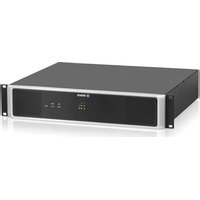
The Bosch PRM-4P600 is a professional receiver used in commercial audio systems. It receives audio signals from a network or control unit and delivers high-quality sound to amplifiers. The device is designed for rack mounting and offers reliable performance.
How do I connect the receiver to an amplifier?
Connect the balanced line output of the PRM-4P600 to the input of your amplifier using XLR cables. Ensure the amplifier is powered off during connection. The receiver also provides a digital output for compatible amplifiers.
How do I set the input sensitivity?
The input sensitivity can be adjusted via the device menu or software. The typical range is from -10 dBV to +10 dBV to match your audio source. Refer to the manual for configuration steps.
How do I perform a factory reset?
To reset the PRM-4P600, press and hold the reset button on the rear panel for 10 seconds while powering on. Alternatively, use the web interface to restore factory settings. All custom settings will be lost.
How do I update the firmware?
Connect to the device via the network interface and access the built-in web page. Navigate to the firmware section and upload the latest file provided by Bosch. Keep the device powered during the update to avoid damage.
What are the supported audio formats?
The receiver supports uncompressed PCM audio at sample rates from 44.1 kHz to 192 kHz with 24-bit resolution. It can handle Dante or standard network audio streams when configured properly.
How do I set the IP address for network control?
Use the front panel display to enter the network menu, or connect via the RS-232 port. Set a static IP or use DHCP. The default IP is 192.168.1.100. Consult the manual for network setup.
What are the dimensions and mounting options?
The PRM-4P600 is a standard 19-inch rack unit, occupying 1U height (44 mm) and 210 mm depth. It ships with rack ears for mounting in a server cabinet or audio rack. Ensure proper ventilation around the device.
How do I clean and maintain the device?
Clean the exterior with a soft, dry cloth. Never use liquid cleaners or sprays. Periodically check connections and ensure the ventilation slots are free from dust. The device requires minimal maintenance.
What should I do if there is no audio output?
First, check the input source and ensure it is active. Verify the output connections to the amplifier. Check the LED status indicators: a green Power LED should be lit, and the Signal LED should flash with audio. If everything is connected, perform a factory reset or contact support.
User questions about PRM-4P600 BOSCH
0 question about this device. Answer the ones you know or ask your own.
Ask a new question about this device
No questions yet. Be the first to ask one.
Download the instructions for your Receiver in PDF format for free! Find your manual PRM-4P600 - BOSCH and take your electronic device back in hand. On this page are published all the documents necessary for the use of your device. PRM-4P600 by BOSCH.
USER MANUAL PRM-4P600 BOSCH


Manual assistant
Powered by Anthropic
Waiting for your message
Product information
Brand : BOSCH
Model : PRM-4P600
Category : Receiver