TA 7340 - Toaster GRUNDIG - Free user manual and instructions
Find the device manual for free TA 7340 GRUNDIG in PDF.


Pick your language and provide your email: we'll send you a specifically translated version.
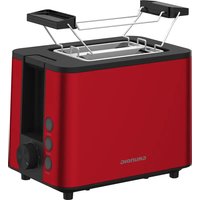
| Product Type | Toaster |
| Brand | Grundig |
| Model | TA 7340 |
| Color | Silver/Black |
| Housing Material | Stainless steel and plastic |
| Number of Slices | 2 slices |
| Power Consumption | 850 W |
| Voltage | 220-240 V |
| Frequency | 50/60 Hz |
| Dimensions (W x H x D) | 25.0 x 19.5 x 18.5 cm |
| Weight | 1.15 kg |
| Browning Control | 9 levels, adjustable |
| Functions | Cancel, Defrost, Reheat |
| Automatic Pop-up | Yes |
| Crumb Tray | Removable, easy to clean |
| Cord Storage | Yes |
| Safety Features | Cool-touch housing, overheat protection |
| Cleaning and Maintenance | Wipe with damp cloth, empty crumb tray regularly |
| Spare Parts | Replacement crumb tray and heating elements available |
| Repairability Index | High - repairable parts designed for easy replacement |
| Compliance | CE marked |
| Warranty | 2 years |
Frequently Asked Questions - TA 7340 GRUNDIG
How do I adjust the browning level on my Grundig TA 7340 toaster?
Use the browning control knob on the front of the toaster. Turn it clockwise for darker toast or counterclockwise for lighter toast. There are 9 levels to choose from, allowing you to achieve your preferred toast darkness.
Can I toast frozen bread with the TA 7340?
Yes, the TA 7340 has a defrost function. Simply insert frozen bread, press the defrost button, and the toaster will automatically adjust the toasting time to thaw and toast evenly.
How do I clean the crumb tray?
The crumb tray is located at the bottom of the toaster. Pull it out, empty the crumbs, and wash it with warm soapy water. Dry it completely before placing it back. For best performance, clean the crumb tray regularly.
What should I do if the toaster doesn't pop up?
If the carriage doesn't lift, first ensure the toaster is plugged in and the bread is not stuck. Unplug the toaster and gently remove any obstructions. If the problem persists, contact Grundig customer service for assistance.
Can I reheat toast with this toaster?
Yes, the TA 7340 features a reheat function that warms up previously toasted bread without further browning. Simply place the toast, press the reheat button, and the toaster will warm it to perfection.
Is the exterior of the toaster hot during use?
The TA 7340 is designed with a cool-touch housing, so the outer surfaces remain cool to the touch during operation. However, avoid touching the top openings where heat escapes.
What is the power consumption of the TA 7340?
The toaster consumes 850 watts at an operating voltage of 220-240 V. This provides efficient and even toasting for quick breakfast preparation.
Does the toaster have a cancel button?
Yes, the TA 7340 is equipped with a cancel button that allows you to stop the toasting cycle at any time. This is useful if you want to prevent over-browning or end the cycle early.
Can I purchase spare parts for the TA 7340?
Yes, common spare parts such as the crumb tray and heating elements are available through Grundig authorized service centers. For a complete list of parts, please refer to the official website or contact support.
How do I store the power cord?
The TA 7340 includes a cord storage feature. At the bottom of the toaster, you can wrap the excess power cord around the cord winding posts to keep it tidy and save counter space.
User questions about TA 7340 GRUNDIG
0 question about this device. Answer the ones you know or ask your own.
Ask a new question about this device
No questions yet. Be the first to ask one.
Download the instructions for your Toaster in PDF format for free! Find your manual TA 7340 - GRUNDIG and take your electronic device back in hand. On this page are published all the documents necessary for the use of your device. TA 7340 by GRUNDIG.
USER MANUAL TA 7340 GRUNDIG

Manual assistant
Powered by Anthropic
Waiting for your message
Product information
Brand : GRUNDIG
Model : TA 7340
Category : Toaster