M4250-16XF - Switch NETGEAR - Free user manual and instructions
Find the device manual for free M4250-16XF NETGEAR in PDF.


Pick your language and provide your email: we'll send you a specifically translated version.
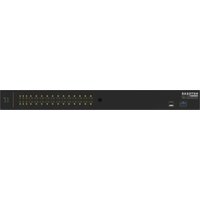
| Product type | Managed 10G AV-over-IP switch |
| Brand | Netgear |
| Model | M4250-16XF |
| Port configuration | 16 x 10G SFP+ ports, plus RJ-45 out-of-band management port and console port |
| Switching capacity | 320 Gbps |
| Forwarding rate | 238 Mpps |
| MAC address table | 32,000 entries |
| VLAN support | Up to 4,096 VLANs, port-based and IEEE 802.1Q tag-based |
| AV multicast features | IGMP snooping, fast leave, multicast filtering and AV-over-IP profiles |
| Management | Web GUI, CLI, Telnet and SSH, SNMP, DHCP or static IP, factory reset button |
| Power supply | Internal AC power supply, 100-240V AC, 50/60Hz |
| Power consumption | Maximum 55 W |
| Dimensions (W x D x H) | 440 x 350 x 44 mm (17.3 x 13.8 x 1.7 in) |
| Weight | 5.2 kg (11.5 lb) |
| Cooling | Fanless passive cooling for silent operation |
| Operating temperature | 0 to 50°C (32 to 122°F) |
| Rack mounting | 19-inch rack mount kit included, 1U height |
| LED indicators | Power, system, port link/activity, port speed and management status LEDs |
| Safety | Use a grounded power outlet, keep ventilation clear, do not open the chassis, disconnect power before cleaning |
| Cleaning and maintenance | Wipe with a soft dry cloth, do not use liquids or sprays, keep vents free of dust |
| Repairability and spare parts | No user-serviceable parts, contact NETGEAR support for diagnostics and repair |
| Package contents | Switch, rack mount kit, power cord, rubber footpads and quick start guide |
Frequently Asked Questions - M4250-16XF NETGEAR
What is the default IP address and login for the NETGEAR M4250-16XF?
The factory default IP is 192.168.0.239 with username admin and password password. After logging in through a web browser, you can change these settings for better security.
Can I use 1G SFP modules in the 10G SFP+ ports?
Many 1G SFP modules are compatible with the 10G SFP+ slots, but use a module from the NETGEAR supported list to ensure correct link speed and monitoring. When needed, set the port speed explicitly to 1G in the management interface.
Does the M4250-16XF support PoE?
No. The M4250-16XF is a pure SFP+ fiber switch and does not provide Power over Ethernet. If you need PoE for cameras, phones or access points, choose a PoE model from the M4250 series.
Is the M4250-16XF suitable for AV-over-IP installations?
Yes, it is specifically designed for AV-over-IP. It supports IGMP snooping, multicast filtering, rapid spanning tree and optimized profiles for Dante, AES67 and other AV protocols.
How do I reset the switch to factory defaults?
Press and hold the Factory Reset button on the front panel for about 5 seconds using a paperclip. The switch restarts and returns to the default IP and login, erasing all current configuration.
Is the switch silent?
Yes, the M4250-16XF uses fanless passive cooling, so it operates without moving parts. This makes it ideal for recording studios, auditoriums or open office environments where noise matters.
What is the switching capacity and forwarding rate?
The switch provides 320 Gbps switching capacity and approximately 238 Mpps forwarding rate, allowing all 16 ports to run at line-rate 10G simultaneously.
How to update the firmware?
Download the latest firmware from the NETGEAR support website, then go to Maintenance > File Management > Firmware Upgrade in the web GUI. Upload the image file and wait for the switch to reboot.
Can the switch be rack-mounted?
Yes, it is a 1U 19-inch rack-mount device. The included rack mount kit lets you install it in a standard server cabinet; rubber footpads are provided for desktop use.
Does it support VLANs and QoS?
It supports up to 4096 VLANs with 802.1Q tagging and multiple Priority Queues for QoS, including strict priority and weighted round robin scheduling. This helps prioritize video, audio and control traffic.
User questions about M4250-16XF NETGEAR
0 question about this device. Answer the ones you know or ask your own.
Ask a new question about this device
No questions yet. Be the first to ask one.
Download the instructions for your Switch in PDF format for free! Find your manual M4250-16XF - NETGEAR and take your electronic device back in hand. On this page are published all the documents necessary for the use of your device. M4250-16XF by NETGEAR.
USER MANUAL M4250-16XF NETGEAR

Manual assistant
Powered by Anthropic
Waiting for your message
Product information
Brand : NETGEAR
Model : M4250-16XF
Category : Switch