
TUNETALK POUR IPOD #F8Z029EA - Audio accessory BELKIN - Free user manual and instructions
Find the device manual for free TUNETALK POUR IPOD #F8Z029EA BELKIN in PDF.


User questions about TUNETALK POUR IPOD #F8Z029EA BELKIN
0 question about this device. Answer the ones you know or ask your own.
Ask a new question about this device
Download the instructions for your Audio accessory in PDF format for free! Find your manual TUNETALK POUR IPOD #F8Z029EA - BELKIN and take your electronic device back in hand. On this page are published all the documents necessary for the use of your device. TUNETALK POUR IPOD #F8Z029EA by BELKIN.
USER MANUAL TUNETALK POUR IPOD #F8Z029EA BELKIN
Let your iPod double as a digital voice recorder
User Manual
F8Z029ea
EN FR DE ES IT


BELKIN®
www.belkin.com
Belkin Ltd.
Express Business Park, Shipton Way
Rushden, NN10 6GL, United Kingdom
+44 (0) 1933 35 2000
+44 (0) 1933 31 2000 fax
Belkin B.V.
Boeing Avenue 333
1119 PH Schiphol-Rijk, The Netherlands
+31 (0) 20 654 7300
+31 (0) 20 654 7349 fax
Belkin GmbH
Hanebergstraße 2,
80637 Munich, Germany
+49 (0) 89 143405 0
+49 (0) 89 143405 100 fax
Belkin SAS
130 rue de Silly
92100 Boulogne-Billancourt, France
+33 (0) 1 41 03 14 40
+33 (0) 1 41 31 01 72 fax
Belkin Tech Support
Europe: 00 800 223 55 460

© 2005 Belkin Corporation. All rights reserved.
All trade names are registered trademarks of respective manufacturers listed.
iPod is a trademark of Apple Computer, Inc., registered in the U.S. and other countries.
F8Z029ea
P74852ea

BELKIN®

Made for
iPod
TuneTalk™ for iPod®
Let your iPod double as a digital voice recorder
EN
User Manual
F8Z029ea

Introduction
Congratulations and thank you for purchasing TuneTalk, one of Belkin's advanced innovations for iPod mobile digital devices. Now you'll be able to record memos, lectures, interviews, or conversations—simply by plugging the TuneTalk into your iPod. The iPod's abundant storage capacity lets you store hundreds of hours of audio and you can easily review your audio notes later, with headphones or on your computer. Please review this User Manual carefully to get the most from your TuneTalk, virtually anywhere you go.
EN
Setup Instructions
To record:
- Connect the TuneTalk and select "Extras > Voice Memos > Record Now".
- Press "Play/Pause" to begin recording. The RED LED on the TuneTalk will turn on when recording has begun. To pause recording, press "Play/Pause" again.
- When you're finished recording, press "Menu". Your recording is saved and listed by date and time recorded.
NOTE: For personal voice dictation, hold the iPod with the TuneTalk attached 6 to 18 inches from your mouth, and speak in a normal tone. Holding the device too close, or speaking too loudly may result in static on playback of your recording.
To play a recording:
Select "Extras > Voice Memos" and choose the recording. Recordings are listed by date and time recorded. Recordings are saved in a Recordings folder on iPod in the WAV file format (16-bit 8kHz).
NOTE: The "Voice Memos" menu does not appear unless you connect the TuneTalk.
To transfer recordings to your computer:
Connect the iPod to your computer and open the application you use to transfer WAV files from your audio device. Photos are stored in a Recordings folder on your iPod. You can also transfer recordings to your computer by opening this folder and dragging them to the desktop. Your iPod must be enabled for use as a hard disk.

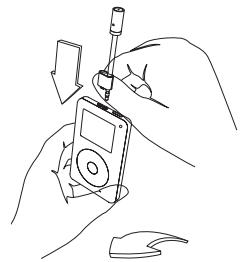
natural_image
Line drawing of hands assembling or adjusting a device with a tool (no text or symbols)Insert mic in headphone jack to switch to recording mode.
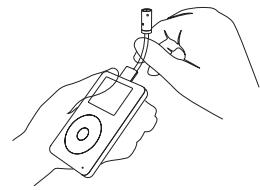
natural_image
Line drawing of hands holding a device with a key inserted (no text or symbols)Bend mic into desired position.

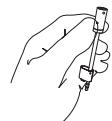
Attach optional foam cover to reduce wind noise.
EN

Information
Belkin Corporation Limited Lifetime Product Warranty
Belkin Corporation warrants this product against defects in materials and workmanship for its lifetime. If a defect is discovered, Belkin will, at its option, repair or replace the product at no charge provided it is returned during the warranty period, with transportation charges prepaid, to the authorized Belkin dealer from whom you purchased the product. Proof of purchase may be required. This warranty does not apply if the product has been damaged by accident, abuse, misuse, or misapplication; if the product has been modified without the written permission of Belkin; or if any Belkin serial number has been removed or defaced.
THE WARRANTY AND REMEDIES SET FORTH ABOVE ARE EXCLUSIVE IN LIEU OF ALL OTHERS, WHETHER ORAL OR WRITTEN, EXPRESSED OR IMPLIED. BELKIN SPECIFICALLY DISCLAIMS ANY AND ALL IMPLIED WARRANTIES, INCLUDING, WITHOUT LIMITATION, WARRANTIES OF MERCHANTABILITY AND FITNESS FOR A PARTICULAR PURPOSE.
No Belkin dealer, agent, or employee is authorized to make any modification, extension, or addition to this warranty.
BELKIN IS NOT RESPONSIBLE FOR SPECIAL, INCIDENTAL, OR CONSEQUENTIAL DAMAGES RESULTING FROM ANY BREACH OF WARRANTY, OR ANY OTHER LEGAL THEORY, INCLUDING BUT NOT LIMITED TO, LOST PROFITS, DOWNTIME, GOODWILL, DAMAGE TO OR REPROGRAMMING OR REPRODUCING, ANY PROGRAM OR DATA STORED IN OR USED WITH BELKIN PRODUCTS.
Some states do not allow the exclusion or limitation of incidental or consequential damages or exclusion of implied warranties, so the above limitations or exclusions may not apply to you. This warranty gives you specific legal rights, and you may also have other rights that vary from state to state.
FCC Statement
DECLARATION OF CONFORMITY WITH FCC RULES FOR ELECTROMAGNETIC COMPATIBILITY
We, Belkin Corporation, of 501 West Walnut Street, Compton, CA 90220, declare under our sole responsibility that the product: F8Z029 to which this declaration relates: Complies with Part 15 of the FCC Rules. Operation is subject to the following two conditions: (1) this device may not cause harmful interference, and (2) this device must accept any interference received, including interference that may cause undesired operation.
CE Declaration of Conformity
We, Belkin Corporation, declare under our sole responsibility that the product F8Z029, to which this declaration relates, is in conformity with Emissions Standard EN55022 and with Immunity Standard EN55024, LVP EN61000-3-2, and EN61000-3-3.
ICES
Express Business Park, Shipton Way
Rushden, NN10 6GL, United Kingdom
+44 (0) 1933 35 2000
+44 (0) 1933 31 2000 fax
Belkin B.V.
Boeing Avenue 333
1119 PH Schiphol-Rijk, The Netherlands
+31 (0) 20 654 7300
+31 (0) 20 654 7349 fax
Belkin GmbH
Hanebergstraße 2,
80637 Munich, Germany
+49 (0) 89 143405 0
+49 (0) 89 143405 100 fax
Belkin SAS
130 rue de Silly
92100 Boulogne-Billancourt, France
+33 (0) 1 41 03 14 40
+33 (0) 1 41 31 01 72 fax
Belkin Tech Support
Europe: 00 800 223 55 460

© 2005 Belkin Corporation. All rights reserved.
All trade names are registered trademarks of respective manufacturers listed.
iPod is a trademark of Apple Computer, Inc., registered in the U.S. and other countries.
F8Z029ea
P74860ea

BELKIN®
natural_image
Line drawing of hands assembling a CD or DVD device with a screwdriver (no text or symbols)natural_image
Line drawing of hands connecting a device to a small object (no text or symbols)Express Business Park, Shipton Way
Assistance technique Belkin
Europe: 00 800 223 55 460

natural_image
Line drawing of hands assembling or adjusting a device with a tool (no text or symbols)natural_image
Line drawing of hands holding a device with a key inserted (no text or symbols)Express Business Park, Shipton Way
natural_image
Line drawing of hands assembling a CD or DVD device with a screwdriver (no text or symbols)natural_image
Line drawing of hands holding a handheld electronic device with a small component (no text or symbols)Express Business Park, Shipton Way
Rushden, NN10 6GL, Reino Unido
+44 (0) 1933 35 2000
+44 (0) 1933 31 2000 fax
Belkin B.V.
Boeing Avenue 333
natural_image
Line drawing of hands assembling a CD or DVD device with a screwdriver (no text or symbols)natural_image
Line drawing of hands connecting a device to a clip (no text or symbols)Express Business Park, Shipton Way