
TUNESTAGE 2 POUR IPOD® #F8Z919EA - Audio accessory BELKIN - Free user manual and instructions
Find the device manual for free TUNESTAGE 2 POUR IPOD® #F8Z919EA BELKIN in PDF.


User questions about TUNESTAGE 2 POUR IPOD® #F8Z919EA BELKIN
0 question about this device. Answer the ones you know or ask your own.
Ask a new question about this device
Download the instructions for your Audio accessory in PDF format for free! Find your manual TUNESTAGE 2 POUR IPOD® #F8Z919EA - BELKIN and take your electronic device back in hand. On this page are published all the documents necessary for the use of your device. TUNESTAGE 2 POUR IPOD® #F8Z919EA by BELKIN.
USER MANUAL TUNESTAGE 2 POUR IPOD® #F8Z919EA BELKIN
TuneStage 2 provides a stylish, easy way to play your iPod tunes through your home stereo—without wires. Setup takes only minutes and requires no software or custom configuration. Just plug it in and enjoy your music.
TuneStage 2 from Belkin delivers the pristine, CD-quality sound that iPod users demand. Featuring advanced Bluetooth 2.0 technology for enhanced audio quality, TuneStage 2 transmits wirelessly from up to 10 metres away from your stereo, even through walls. TuneStage 2 is compatible with the following: iPod mini, iPod 4th generation, iPod 4th generation (color display), iPod nano 1st generation, iPod nano 2nd generation (aluminum) and iPod 5th generation (video).
Package Includes

TuneStage 2 Bluetooth™ Transmitter
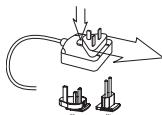
12V/1.0A AC Power Adapter
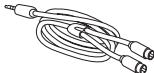
6 Ft. Dual RCA-to-3.5mm Stereo Cable

TuneStage 2 Bluetooth Receiver
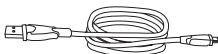
3 Ft. USB A-to-Mini-B Cable
STEP 1: TuneStage 2 Receiver Setup
- Power off your stereo system.
- Plug the TuneStage 2 Receiver into one of your home-stereo, audio-source inputs using the supplied audio cable, usually the "aux" input is a good choice. Do not connect TuneStage 2 to your receiver's "phono" input.
- Plug the included power adapter into the TuneStage 2 Receiver and then plug the other end into an AC outlet.
- Press in the power button located at the back of the TuneStage 2 Receiver.
- Power on your home stereo and select the audio-source input to which the TuneStage 2 Receiver is connected.
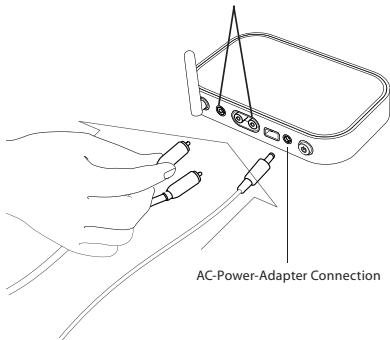
2 RCA or 3.5mm Mini-Jack Stereo Connections
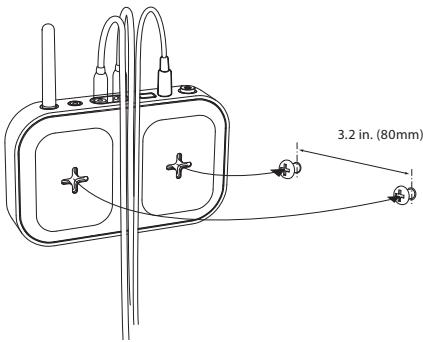
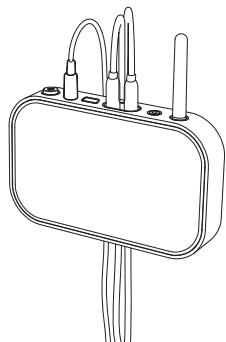
Wall-Mounting the TuneStage 2 Receiver (Optional)
- Make sure the antenna is pointed upward.
- You can hang the Receiver on a wall using two screws (not included).
- The cables should run through the channel on the bottom of the Receiver, so they are held securely to the wall.
STEP 2: TuneStage 2 Transmitter Setup
- For best results, the Transmitter should be close to the Receiver when first making the wireless connection.
- Power on your iPod, and then insert the TuneStage 2 Transmitter into the bottom of the iPod.
- The Transmitter will power on automatically, and the blue LED will begin to blink rapidly while it searches for the Receiver with which to pair. The Receiver LED will also blink rapidly during this search mode.
- The Transmitter and Receiver will pair with each other within 60 seconds. When the devices are paired and ready, the LED on the Receiver will remain on and the LED on the Transmitter will blink slowly. NOTE: The next time you start up the TuneStage 2, it will pair much faster as the Receiver remembers the last device with which it paired. This will usually happen in less than 10 seconds.
- You can now play any song on your iPod through your stereo. For the best audio quality, adjust the volume level on your stereo to less than 50-percent full, and use just the iPod to change the volume up or down. NOTE: Volume control through the click wheel is supported only on the iPod 5th generation (video), iPod nano 1st generation, and iPod nano 2nd generation (aluminum).
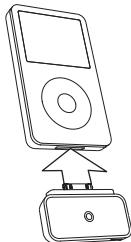
iPod 5^ generation (video) 30GB
STEP 3: TuneStage 2 Setup for Use with Headphones Enabled with Bluetooth Technology (Optional)
NOTE: TuneStage 2 will only pair with stereo headphones enabled with Bluetooth technology that have a pairing code of 0000. Consult your headphones' manual for the pairing code.
- Make sure the TuneStage 2 Receiver's power button is in the off position.
- Put your headphones enabled with Bluetooth technology into pairing mode. Consult your headphones' user manual on how this is done.
- For best results, the Transmitter should be close to the headphones when first making a wireless connection.
- Power on your iPod, and then insert the TuneStage 2 Transmitter into the bottom of the iPod.
- The Transmitter will power on automatically, and the blue LED will begin to blink rapidly while it searches for your headphones to which to pair.
- Your headphones' LED indicator should also blink during pairing. Consult your headphones' user manual on how the LED-indicator light works.
- The TuneStage 2 Transmitter and your headphones should pair within 60 seconds. You will be able to hear music through your headphones if your iPod is in play mode.
- You can now play any song on your iPod through your headphones. You can control the volume and track change features through your iPod or through the headphones if they feature these controls. NOTE: Volume control through the click wheel is supported only on the iPod 5th generation (video), iPod nano 1st generation, and iPod nano 2nd generation (aluminum).
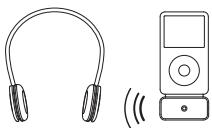
Operating Instructions 06
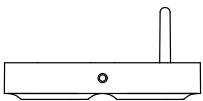
| TuneStage 2 Receiver Status | LED Behavior |
| Power off | Off |
| Power switched on | Blinks on/off in 0.5-second intervals for 20 seconds, then turns off (Note: Receiver remains in standby mode, ready to detect a Transmitter.) |
| Pairing with Transmitter | LED blinks rapidly for 60 seconds (LED will turn OFF after 60 seconds, but the Receiver will remain detectable) |
| Paired/receiving signal | On |
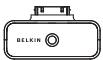
| TuneStage II Transmitter Status | LED Behavior |
| Power off | Off |
| Searching for Receiver | Blinks on/off rapidly for up to 60 seconds* |
| Paired/receiving signal | Blinks once every 2 seconds |
*Universal Paining Sequence: The Belkin Transmitter will automatically search for the last device that is available to the receiver device first. If no device is detected, it will then search for a new Receiver with a security code of 0000. This sequence will be used to detect if any devices. If no connection is made, the Receiver will return to standby mode and the Transmitter will continue to search for "PLAY" on the iPod. Pairs will automatically begin again.
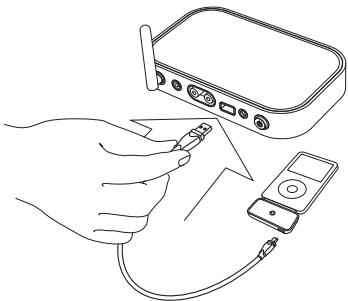
The Receiver and Transmitter are equipped with USB ports to allow charging while still allowing you to play your music through your stereo.
- Plug the larger, A-type connector on the included USB cable into the USB port on the back of the Receiver.
- Plug the small, mini-B-type connector into the bottom of the Transmitter.
- Your iPod is now charging.
- Remove the USB cable from the Transmitter when your iPod is charged.
NOTE: The USB power-out feature is for charging the iPod device only. The TuneStage 2 Receiver will get warm when in charging mode; do not place the iPod on top of the Receiver while charging.
Transmitter is not powering on when plugged into the iPod.
- Remove the Transmitter and reinstall it into the bottom of your iPod.
- Ensure that your iPod is charged and powered on, and then press "PLAY" on the iPod scroll wheel.
Receiver is not powering on.
- Ensure that the Receiver's power switch is in the ON position. Ensure that the AC power adapter is connected to a powered wall outlet and that the plug is properly inserted into the TuneStage Receiver's power jack.
The Transmitter and Receiver are connected, but there is no sound.
- Select a song on the iPod and press "PLAY".
- Make sure that the audio cable is correctly plugged into the back of the Receiver as well as the back of the stereo system.
- Ensure that the stereo system is set to the correct input source.
- Make sure that both the iPod and your stereo receiver are powered on.
- Repeat STEP 1 from the setup instructions.
While listening, I notice the sound quality diminishing or hear noticeable interference.
- If there is a 2.4-gigahertz cordless phone or a microwave oven within six feet of the Receiver and/or Transmitter, this may cause interference. Make sure that the Receiver and/or Transmitter are not within this range to ensure the best sound quality.
Another device is pairing with the TuneStage 2, and the music from the iPod cannot be heard.
- Turn off the other Receiver or Transmitter that is in the area of the TuneStage 2.
- Repeat STEP 1 from the setup instructions.
Bluetooth Compliance:
Bluetooth v2.0-compliant
Supported Profiles: A2DP, AVRCP
Operating Frequency: 2.4 to 2.4835GHz
Spread Spectrum: FHSS
(Frequency Hopping Spread Spectrum)
Modulation: GFSK
(Gaussian Frequency Shift Keying)
Radio Characteristics
RF Output: +2.0 dBm
Sensitivity: < 0.1% BER at -81 dBm
Operating Range: 33 ft. (10m)*
Bluetooth Pairing Code of Receiver
required if attempting to use another
Transmitter to connect with the TuneStage 2
Receiver):0000
Bluetooth Pairing Code of Transmitter
required if attempting to use another Receiver
to connect with the TuneStage 2 Transmitter):
0000
*33-foot range is dependent upon
environment, number of users, and presence
or absence of other wireless devices within
immediate proximity.
Audio-Input Performance
SNR: >80 dBc
Distortion: -80 dB at 1kHz
Audio-Output Performance
Power: 10mW into 100 Ohms
THD: -80 dBc
Run time of Transmitter on a fully charged iPod 5th generation (video) 80GB: up to 5 hours; other models' run times will vary depending on battery capacity
Standby time of Transmitter on a fully charged iPod 5^th generation (video) 80GB: up to 150 hours; other models' standby times will vary depending on battery capacity
Power Requirements for Receiver
12V@1.0A
USB port provides up to 500mA @ 5V
Physical
Receiver Dimensions: 6.5'' × 4.5'' × 1.2''
Transmitter Dimensions: 2.4'' × 1.5'' × .375''
You can find additional support information on our website www.belkin.com through the tech-support area. If you want to contact technical support by phone, please call the number you need from the list below*.
*Local rates apply
| Country | Number | Internet adress |
| AUSTRIA | 08 - 20 20 07 66 | http://www.belkin.com/uk |
| BELGIUM | 07 07 00 073 | http://www.belkin.com/nl |
| CZECH REPUBLIC | 23 900 04 06 | http://www.belkin.com/uk |
| DENMARK | 701 22 403 | http://www.belkin.com/uk |
| FINLAND | 00800 - 22 35 54 60 | http://www.belkin.com/uk |
| FRANCE | 08 - 25 54 00 26 | http://www.belkin.com/fr |
| GERMANY | 0180 - 500 57 09 | http://www.belkin.com/de |
| GREECE | 00800 - 44 14 23 90 | http://www.belkin.com/uk |
| HUNGARY | 06 - 17 77 49 06 | http://www.belkin.com/uk |
| ICeland | 800 8534 | http://www.belkin.com/uk |
| IRELAND | 0818 55 50 06 | http://www.belkin.com/uk |
| ITALY | 02 - 69 43 02 51 | http://www.belkin.com/it/support/tech |
| LUXEMBOURG | 34 20 80 8560 | http://www.belkin.com/uk |
| NETHERLANDS | 0900 - 040 07 90 €0.10 per minute | http://www.belkin.com/nl |
| NORWAY | 815 00 287 | http://www.belkin.com/uk |
| POLAND | 00800 - 441 17 37 | http://www.belkin.com/uk |
| PORTUGAL | 707 200 676 | http://www.belkin.com/uk |
| RUSSIA | 495 580 9541 | http://www.belkin.com/uk |
| SOUTH AFRICA | 0800 - 99 15 21 | http://www.belkin.com/uk |
| SPAIN | 902 - 02 43 66 | http://www.belkin.com/es/support/tech |
| SWEDEN | 07 - 71 40 04 53 | http://www.belkin.com/se/support/tech |
| SWITZERLAND | 08 - 48 00 02 19 | http://www.belkin.com/uk |
| UNITED KINGDOM | 0845 - 607 77 87 | http://www.belkin.com/uk |
| OTHER COUNTRIES | +44 - 1933 35 20 00 | |
European Standards Compliance Statement
This product complies with the following standards: EN 60950, EN 300 328 and EN 300 489. For the full Declaration of Conformity please follow the following link: www.belkin.com/doc
This product complies to the WEEE directive. For recycling information please follow the following link: www.belkin.com/environmental"
C€0673 ①
What this warranty covers.
Belkin International, Inc., warrants to the original purchaser of this Belkin product that the product shall be free of defects in design, assembly, material, or workmanship.
What the period of coverage is.
Belkin International, Inc., warrants the Belkin product for three years.
What will we do to correct problems?
Product Warranty.
Belkin will repair or replace, at its option, any defective product free of charge (except for shipping charges for the product).
What is not covered by this warranty?
All above warranties are null and void if the Belkin product is not provided to Belkin International, Inc., for inspection upon Belkin's request at the sole expense of the purchaser, or if Belkin International, Inc., determines that the Belkin product has been improperly installed, altered in any way, or tampered with. The Belkin Product Warranty does not protect against acts of God (other than lightning) such as flood, earthquake, war, vandalism, theft, normal-use wear and tear, erosion, depletion, obsolescence, abuse, damage due to low voltage disturbances (i.e. brownouts or sags), unauthorized program, or system equipment modification or alteration.
How to get service.
To get service for your Belkin product you must take the following steps:
- Contact Belkin Customer Service (see details on page 11), within 15 days of occurrence. Be prepared to provide the following information:
a. The part number of the Belkin product.
b. Where you purchased the product.
c. When you purchased the product.
d. Copy of original receipt.
- Your Belkin Customer Service Representative will then instruct you on how to forward your receipt and Belkin product and how to proceed with your claim.
Belkin International, Inc., reserves the right to review the damaged Belkin product. All costs of shipping the Belkin product to Belkin International, Inc., for inspection shall be borne solely by the purchaser. If Belkin determines, in its sole discretion, that it is impractical to ship the damaged equipment to Belkin International, Inc., Belkin may designate, in its sole discretion, an equipment repair facility to inspect and estimate the cost to repair such equipment. The cost, if any, of shipping the equipment to and from such repair facility and of such estimate shall be borne solely by the purchaser. Damaged equipment must remain available for inspection until the claim is finalized. Whenever claims are settled, Belkin International, Inc., reserves the right to be subrogated under any existing insurance policies the purchaser may have.
How state law relates to the warranty.
THIS WARRANTY CONTAINS THE SOLE WARRANTY OF BELKIN INTERNATIONAL, INC., THERE ARE NO OTHER WARRANTYES, EXPRESSED OR, EXCEPT AS REQUIRED BY LAW, IMPLIED, INCLUDING THE IMPLIED WARRANTY OR CONDITION OF QUALITY, MERCHANTABILITY OR FITNESS FOR A PARTICULAR PURPOSE, AND SUCH IMPLIED WARRANTY, IF ANY, ARE LIMITED IN DURATION TO THE TERM OF THIS WARRANTY.
Some states do not allow limitations on how long an implied warranty lasts, so the above limitations may not apply to you.
IN NO EVENT SHALL BELKIN INTERNATIONAL, INC., BE LIABLE FOR INCIDENTAL, SPECIAL, DIRECT, INDIRECT, CONSEQUENTIAL OR MULTIPLE DAMAGES SUCH AS, BUT NOT LIMITED TO, LOST BUSINESS OR PROFITS ARISING OUT OF THE SALE OR USE OF ANY BELKIN PRODUCT, EVEN IF ADJISSED OF THE POSSIBILITY OF SUCH DAMAGES.
This warranty gives you specific legal rights, and you may also have other rights, which may vary from state to state. Some states do not allow the exclusion or limitation of incidental, consequential, or other damages, so the above limitations may not apply to you.
EN
www.belkin.com
Belkin Tech Support
US:310-898-1100 ext.2263
800-223-5546 ext. 2263
UK:08456077787
Australia: 1800 235 546
501 West Walnut Street
Los Angeles, CA 90220, USA
310-898-1100
310-898-1111 fax
Belkin Ltd.
Express Business Park, Shipton Way
Rushden, NN10 6GL, United Kingdom
+44 (0) 1933 35 2000
+44 (0) 1933 31 2000 fax
Belkin B.V.
Boeing Avenue 333
1119 PH Schiphol-Rijk, The Netherlands
+31 (0) 20 654 7300
+31 (0) 20 654 7349 fax
Belkin Ltd.
4 Pioneer Avenue
Tuggerah Business Park
Tuggerah, NSW 2259, Australia
+61(0)243504600
+61 (0) 24350 4700 fax
BELKIN
Modulation: GFSK (Gaussian Frequency Shift
Keying)
Specifications de la radio
SortieRF:+2.0dBm
Assistance Technique Belkin
501 West Walnut Street
Express Business Park, Shipton Way
Tuggerah, NSW 2259, Australia
+61(0)243504600
+61 (0) 24350 4700 fax
501 West Walnut Street
Los Angeles, CA 90220, USA
310-898-1100
310-898-1111 Fax
Belkin Ltd.
Express Business Park, Shipton Way
Rushden, NN10 6GL, GroBbritannien
+44 (0) 1933 35 2000
+44 (0) 1933 31 2000 Fax
Belkin B.V.
Boeing Avenue 333
1119 PH Schiphol-Rijk, Niederlande
+31 (0) 20 654 7300
+31 (0) 20 654 7349 Fax
Belkin Ltd.
4 Pioneer Avenue
Tuggerah Business Park
Tuggerah, NSW 2259,Australia
+61(0)243504600
+61 (0) 24350 4700 Fax
© 2007 Belkin International, Inc., All Rechte vorhaben. Alle Produktnamen sind eintragtragsige Marker der angebene Hersteller; Pod is eine Marke der Apple Companies Limited, Inc., and the use of this designation does not mean that the Company has a License to Use the Bluetooth Marking Device.
BELKIN
Manual del usuario
TuneStage® 2 para iPod
501 West Walnut Street
Los Angeles, CA 90220, USA
310-898-1100
310-898-1111 fax
Belkin Ltd.
Express Business Park, Shipton Way
Rushden, NN10 6GL, Reino Unido
+44 (0) 1933 35 2000
+44 (0) 1933 31 2000 fax
Belkin B.V.
Boeing Avenue 333
1119 PH Schiphol-Rijk, Paises Bajos
+31 (0) 20 654 7300
+31 (0) 20 654 7349 fax
Belkin Ltd.
4 Pioneer Avenue
Tuggerah Business Park
Tuggerah, NSW 2259, Australia
+61(0)243504600
+61 (0) 24350 4700 fax
BELKIN
Manuale d'uso
TuneStage® 2 per iPod
Distorsione: -80 dB at 1kHz
501 West Walnut Street
Los Angeles, CA 90220, USA
310-898-1100
310-898-1111 fax
Belkin Ltd.
Express Business Park, Shipton Way
Tuggerah, NSW 2259, Australia
+61(0)243504600
+61 (0) 24350 4700 fax