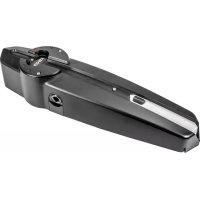
ELVOX EAM2 - Garage door Vimar - Free user manual and instructions
Find the device manual for free ELVOX EAM2 Vimar in PDF.


Pick your language and provide your email: we'll send you a specifically translated version.
| Product Type | Garage door operator control unit |
| Brand | Vimar |
| Model | ELVOX EAM2 |
| Compatibility | Sectional and up-and-over garage doors |
| Technology | Electromechanical with electronic control |
| Power Supply | 230 V AC, 50/60 Hz |
| Motor Power Rating | Up to 500 W |
| Standby Power Consumption | < 1 W |
| Remote Control Frequency | 433.92 MHz |
| Number of Remote Controls | Up to 10 programmable codes |
| Operating Temperature | -20°C to +50°C |
| Protection Class | IP20 (indoor installation) |
| Dimensions (H x W x D) | 150 x 120 x 80 mm |
| Weight | 0.5 kg |
| Main Functions | Automatic close, partial opening for pedestrians, safety beam input |
| Safety Features | Obstacle detection and force sensing |
| Maintenance | Periodic inspection of cables and mechanical parts |
| Spare Parts and Reparability | Available through certified Vimar/Elvox service centers |
| Certifications | CE marked |
| Manual Languages | English, Italian |
Frequently Asked Questions - ELVOX EAM2 Vimar
How do I pair a new remote control with the ELVOX EAM2?
To pair a new remote, press and hold the P1 button on the control unit until the LED flashes. Then press the remote button you wish to use within 10 seconds. The LED will stay on to confirm successful pairing.
What should I do if the garage door does not close automatically?
Check if the safety sensors are aligned and free from obstruction. Also verify that the limit switches are correctly set. If the issue persists, perform a reset by disconnecting power for 30 seconds and then restoring it.
Can the ELVOX EAM2 be integrated with smart home systems?
Yes, the EAM2 supports connection to external modules via its dry contact input, allowing integration with smart home controllers or third-party relays for remote operation.
What is the maximum motor power the EAM2 can handle?
The control unit is designed for motors with a maximum power rating of 500 W. Using a motor with higher power may damage the unit.
How often should I perform maintenance on the garage door system?
It is recommended to inspect the cables, springs, and mechanical guides every 6 months. Additionally, test the safety functions and check the control unit connections at least once a year.
What does the 'partial opening' feature do?
The partial opening feature allows the door to open to a preset intermediate position, useful for pedestrian access without fully opening the garage. It is activated by a dedicated remote control button or an external command.
Is the ELVOX EAM2 suitable for outdoor installation?
The EAM2 has an IP20 protection class, meaning it is only suitable for indoor installation in a dry location. For outdoor use, install it inside a weatherproof enclosure with an appropriate IP rating.
How do I reset the ELVOX EAM2 to factory settings?
To reset the unit, press and hold the SET button for approximately 10 seconds until the LED flashes rapidly. This will erase all programmed remote controls and restore default parameters. Refer to the manual for detailed steps.
What are the recommended operating temperatures for the EAM2?
The unit operates reliably in a temperature range of -20°C to +50°C. Extreme temperatures may affect performance, so ensure proper ventilation and protection from direct weather.
Where can I find spare parts or get repairs for the ELVOX EAM2?
Spare parts and repairs are available through authorized Vimar/Elvox service centers. You can contact your local distributor or check the official Vimar website for a certified service provider near you.
User questions about ELVOX EAM2 Vimar
0 question about this device. Answer the ones you know or ask your own.
Ask a new question about this device
No questions yet. Be the first to ask one.
Download the instructions for your Garage door in PDF format for free! Find your manual ELVOX EAM2 - Vimar and take your electronic device back in hand. On this page are published all the documents necessary for the use of your device. ELVOX EAM2 by Vimar.
USER MANUAL ELVOX EAM2 Vimar
Manual assistant
Powered by Anthropic
Waiting for your message
Product information
Brand : Vimar
Model : ELVOX EAM2
Category : Garage door