BATTERIE DE RECHANGE RECHARGEABLE TUNEPOWER #F8E490EA - Battery BELKIN - Free user manual and instructions
Find the device manual for free BATTERIE DE RECHANGE RECHARGEABLE TUNEPOWER #F8E490EA BELKIN in PDF.


User questions about BATTERIE DE RECHANGE RECHARGEABLE TUNEPOWER #F8E490EA BELKIN
0 question about this device. Answer the ones you know or ask your own.
Ask a new question about this device
Download the instructions for your Battery in PDF format for free! Find your manual BATTERIE DE RECHANGE RECHARGEABLE TUNEPOWER #F8E490EA - BELKIN and take your electronic device back in hand. On this page are published all the documents necessary for the use of your device. BATTERIE DE RECHANGE RECHARGEABLE TUNEPOWER #F8E490EA by BELKIN.
USER MANUAL BATTERIE DE RECHANGE RECHARGEABLE TUNEPOWER #F8E490EA BELKIN
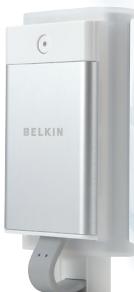
Rechargeable Battery Pack
Keep your iPod running anytime, anywhere
Quick Installation Guide Guide d'Installation Rapide Installationsanleitung Guia de Instalacion Rapa Guida di installatione rapida
F8E490ea

C

Contents
English 1
Français 11
Deutsch 21
Espanol 31
Italiano 41
Introduction
Congratulations and thank you for purchasing the TunePower Rechargeable Battery Pack (the TunePower) from Belkin. Now you can power your iPod even when the internal battery is drained, and keep the music playing anytime, anywhere. Please be sure to read all the instructions in this Quick Installation Guide so that you can get the most from your Belkin product.
Se
The fouger
1

Setup Instructions
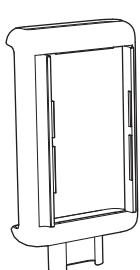
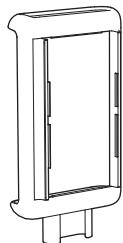
There are three sleeve sizes included: iPod mini, third- and fourth-generation iPod small, and third- and fourth-generation iPod large. Select the appropriate size for your iPod.
En
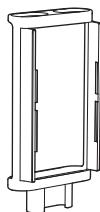
40GB 3G/4G iPod
2

Setup Instructions
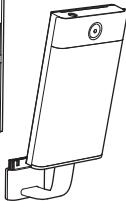
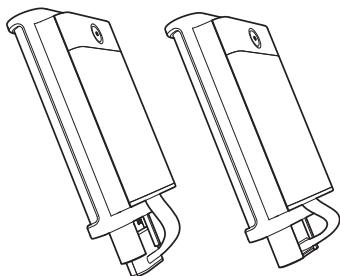
- Attach the TunePower's dock connector to the slot on the bottom of the iPod sleeve.
Se
- A
t

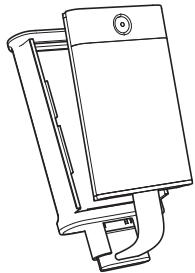
- Securely attach the battery to the iPod sleeve. Make sure the tabs on the top and bottom of the battery pack securely latch into the sleeve.

1 + u7 = 40
t t C k
3

Setup Instructions
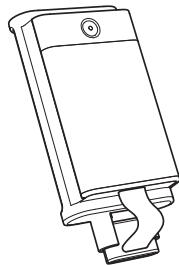
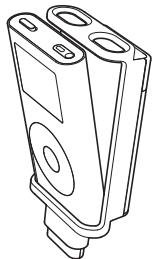
- Attach the form-fitted sleeve to the iPod by sliding the iPod in bottom to top.
En

- Connect the TunePower to the iPod by plugging the TunePower's dock connector into the bottom of the iPod.
4

Operating the Belkin TunePower
Once the Belkin TunePower is connected to the iPod, the iPod will run off the battery pack instead of the internal iPod battery (as long as there is enough power in the battery pack).
The TunePower will provide 8-10 hours of additional play time*
*Performance may vary based on Apple® iPod firmware version in use. Visit belkin.com for details.

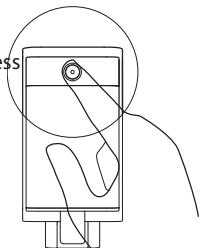
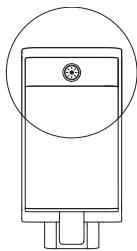
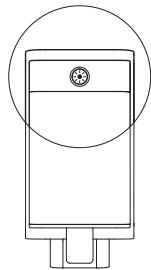
To check the remaining battery power level, press the button on the top end of the TunePower and let go. The button will light up to indicate the battery status:
Op
Tim ma
Gre
Am
Rec

Noi bat will hou be app of a
*Pe in u
5

Operating the Belkin TunePower
Time periods listed are for the 3G iPod. Other iPod models may have slight time variances.
Green: The battery is fully charged.
Amber: The battery is partially charged.
The transition from green to red is gradual indicating the charge status of the battery.
Red: Less than 20 minutes remain.

Note: iPod mini and 4G iPod players will recharge their internal battery from the TunePower device*, though the charging icon will not be displayed on the iPod screen. After three to four hours, the TunePower will be completely discharged and can be removed from the iPod (while the internal iPod battery is approximately 75% charged). TunePower provides 8-10 hours of additional play time.
*Performance may vary based on Apple iPod firmware version in use. Visit belkin.com for details.
Charging the Belkin TunePower
For additional power and charging, connect the DC plug end of the included cable into the DC jack on the top of the TunePower. Connect the FireWire® end into the AC wall charger that ships with your iPod, or to any FireWire port on a laptop or desktop computer.
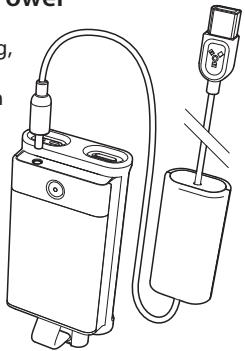
The LED charge indicator will illuminate when the Belkin TunePower is charging. This indicator will turn off when the battery has been charged to approximately 90% . To maximize charge, leave the battery pack connected for 10 minutes after the indicator turns off. Disconnecting the Belkin TunePower before this time, or leaving it connected for longer periods, will not damage the TunePower.
While the iPod is connected to the TunePower, both the iPod and the TunePower can be charged simultaneously. After the TunePower is completely charged, the charging cycle will continue to charge the iPod.
Ch
Charging the Belkin TunePower
Approximate charging times are as follows:
TunePower (whether connected to iPod or not): 2 hours
iPod fast-charge time (while connected to the TunePower): 2 hours for iPod and 1 hour for iPod mini (charges up to 80% of battery capacity)
Full-charge time (for iPod and iPod mini): 4 hours
If the LED charge indicator flashes at any time during charging, a FAULT has occurred. Simply disconnect the Belkin TunePower from the supplied cable for approximately 30 seconds, and reconnect the cable. Charging should begin automatically.
Notes: The Belkin TunePower will supply power to the iPod whenever it is connected. When not in use, it is helpful to disconnect the Belkin TunePower from the iPod, or make sure that the iPod is in the OFF and LOCKED position to conserve power.
The iPod can be charged at the same time as the Belkin TunePower. Doing so should not increase the length of time that it takes to charge the iPod.
Helpful Hints
As with all rechargeable lithium-ion batteries, the TunePower will slowly discharge over time, even when not connected to the iPod. High temperatures will increase the rate that the Belkin TunePower will self-discharge.
When storing the Belkin TunePower for more than one month, Belkin recommends:
- The TunePower should be discharged—the LED indicator should be red. If stored in any other state (including no LED), the Belkin TunePower may lose some of its capacity, which may or may not be recoverable in the future. The Belkin TunePower should NEVER be stored for long periods of time when fully charged.
- Store the TunePower in a cool dry location. The best temperature range for storage is -20-40 degrees Celsius.
- It is recommended that the TunePower be charged for 10-15 minutes every six months (being stored) to decrease the risk of lost capacity.
He
The Terrecde
The disc Tured red

9

Helpful Hints
ver
he
The Belkin Battery Pack has a life cycle of 400-500 cycles.
Temperature can reduce the life cycle of this product. Belkin recommends 0-30 degrees Celsius for charging and 0-50 degrees Celsius for discharge (storage above 40 degrees Celsius can reduce life cycle).
En
or
y,
The Belkin TunePower does not have to be completely discharged (LED red or off) before charging. The Belkin
TunePower can be charged at any charge level. This will not reduce the life cycle of the TunePower.

0-
10

Introduction
We, Belkin Corporation, of 501 West Walnut Street, Compton, CA 90220, declare under our sole responsibility that the product:
F8E490
to which this declaration relates:
Complies with Part 15 of the FCC Rules. Operation is subject to the following two conditions: (1) this device may not cause harmful
interference, and (2) this device must accept any interference received, including interference that may cause undesired operation.
CE Declaration of Conformity
We, Belkin Corporation, declare under our sole responsibility that the product F8E490, to which this declaration relates, is in conformity with Emissions Standard EN55022 and with Immunity Standard EN55024, LVP EN61000-3-2, and EN61000-3-3.
ICES
Belkin Corporation Limited Three-Year Product Warranty
Belkin Corporation warrants this product against defects in materials and workmanship for its warranty period. If a defect is discovered, Belkin will, at its option, repair or replace the product at no charge provided it is returned during the warranty period, with transportation charges prepaid, to the authorized Belkin dealer from whom you purchased the product. Proof of purchase may be required.
THE WARRANTY AND REMEDIES SET FORTH ABOVE ARE EXCLUSIVE IN LIEU OF ALL OTHERS, WHETHER ORAL OR WRITTEN, EXPRESSED OR IMPLIED. BELKIN SPECIFICALLY DISCLAIMS ANY AND ALL IMPLIED WARRANTYES, INCLUDING, WITHOUT LIMITATION, WARRANTYES OF MERCHANTABILITY AND FITNESS FOR A PARTICULAR PURPOSE.
No Belkin dealer, agent, or employee is authorized to make any modification, extension, or addition to this warranty.
BELKIN IS NOT RESPONSIBLE FOR SPECIAL, INCIDENTAL, OR CONSEQUENTIAL DAMAGES RESULTING FROM ANY BREACH OF WARRANTY, OR ANY OTHER LEGAL THEORY, INCLUDING BUT NOT LIMITED TO, LOST PROFITS, DOWNTIME, GOODWILL, DAMAGE TO OR REPROGRAMMING OR REPRODUCING, ANY PROGRAM OR DATA STORED IN OR USED WITH BELKIN PRODUCTS.
Some states do not allow the exclusion or limitation of incidental or consequential damages or exclusion of implied warranties, so the above limitations or exclusions may not apply to you. This warranty gives you specific legal rights, and you may also have other rights that vary from state to state.
52

BELKIN
belkin.com
Belkin Corporation
501 West Walnut Street
Compton · CA · 90220 · USA
Tel: 310.898.1100
Fax: 310.898.1111
Belkin Ltd.
Express Business Park · Shipton Way
Rushden · NN10 6GL · United Kingdom
Tel: +44 (0) 1933 35 2000
Fax: +44 (0) 1933 31 2000
Belkin B.V.
Boeing Avenue 333
1119 PH Schiphol-Rijk · The Netherlands
Tel: +31 (0) 20 654 7300
Fax: +31 (0) 20654 7349
Belkin GmbH
Hanebergstrasse 2
80637 Munich · Germany
Tel: +49 (0) 89 143405 0
Fax: +49 (0) 89 143405 100
Tech Support
US: 310.898.1100 ext. 2263
800.223.5546 ext. 2263
Europe: 00 800 223 55 460
© 2004 Belkin Corporation. All rights reserved. All trade names are registered trademarks of respective manufacturers listed. Apple, FireWire, and iPod are trademarks of Apple Computer, Inc., registered in the U.S. and other countries.
P74665ea