
PWFY-P72NMU-E-AU - Air-conditioner MITSUBISHI - Free user manual and instructions
Find the device manual for free PWFY-P72NMU-E-AU MITSUBISHI in PDF.


| Product Type | Reversible heat pump (heating/cooling) with hot water production |
| Brand | MITSUBISHI |
| Model | PWFY-P72NMU-E-AU |
| Power Supply | Single-phase 208-230 V, 60 Hz |
| Heating Capacity | 80,000 BTU/h (23.4 kW) |
| Cooling Capacity | 72,000 BTU/h (21.2 kW) |
| Sound Level | 29 dB(A) |
| Dimensions (H x W x D) | 800 x 450 x 300 mm |
| Net Weight | 38 kg (84 lb) |
| Water Flow Rate | 1.2 to 4.3 m³/h (20 to 70 L/min) |
| Operating Modes | Heating, Cooling, Hot Water, Anti-freeze |
| Remote Controller | With LCD display, temperature setting and timer |
| Available Timers | Weekly, simple, auto stop (30 min to 4 h) |
| Temperature Range - Hot Water | 30 °C to 71 °C |
| Temperature Range - Heating | 30 °C to 46 °C |
| Temperature Range - Cooling | 10 °C to 30 °C |
| Maintenance | Regular cleaning of the strainer (filter); do not use water on electrical parts |
| Safety | Error shutdown, protection against refrigerant gas leaks, automatic shutdown in case of fault |
| Included Accessories | Strainer, thermal insulation, connector set × 2, washer × 2, expansion joint × 2 |
| Installation and Repairs | Must be carried out by a qualified professional |
Frequently Asked Questions - PWFY-P72NMU-E-AU MITSUBISHI
User questions about PWFY-P72NMU-E-AU MITSUBISHI
0 question about this device. Answer the ones you know or ask your own.
Ask a new question about this device
Download the instructions for your Air-conditioner in PDF format for free! Find your manual PWFY-P72NMU-E-AU - MITSUBISHI and take your electronic device back in hand. On this page are published all the documents necessary for the use of your device. PWFY-P72NMU-E-AU by MITSUBISHI.
USER MANUAL PWFY-P72NMU-E-AU MITSUBISHI
INDOOR UNIT OF CITY MULTI R410A SERIES
PWFY-P36NU-E-BU
PWFY-P36NU-E-AU
PWFY-P72NMU-E-AU
OPERATION MANUAL
For safe and correct use, please read this operation manual thoroughly before operating the indoor unit.
MODE D'EMPLOI
- For purposes of this explanation, all parts of the display are shown as lit. During actual operation, only the relevant items will be lit.
① Identifies the current operation
Shows the operating mode, etc.
- Multilanguage display is supported.
② “Centrally Controlled” indicator
Indicates that operation of the remote controller has been prohibited by a main controller.
③ "Timer Is Off" indicator
Indicates that the timer is off.
④ Temperature Setting
Shows the target temperature.
⑤ Water Temperature Display
Shows the water temperature during water temperature display operation.
(6) (Power On indicator)
Indicates that the power is on.
⑦ Error indicator
- Comes on when error occurs
⑧ Timer indicators
The indicator comes on if the corresponding timer is set.
⑨ “Locked”indicator
Indicates that remote controller buttons have been locked.
10 Day-of-Week
Shows the current day of the week.
⑪ Time/Timer Display
Shows the current time, unless the simple or Auto Off timer is set.
If the simple or Auto Off timer is set, shows the time remaining.
1.1. Installation 5
1.2.During operation 5
1.3.Disposing of the unit 6
- How to operate 6
2.1. Using the Remote Controller 6
2.2. Water temperature adjustment 7
2.3. Setting the Day of the Week and Time 7
2.4. Using the Timer 7
- Function Selection 11
4.Caring for the machine 13 - Troubleshooting 13
- Installation, transferring works, and checking 14
- Specifications 14
1. Safety precautions
Before operating the unit, make sure you read all the "Safety precautions".
"Safety precautions" lists important points about safety. Please be sure to follow them.
Symbols used in the text
Warning:
Describes precautions that should be observed to avoid the risk of injury or death to the user.
Caution:
Describes precautions that should be observed to prevent damage to the unit.
Symbols used in the illustrations
:Indicates an action that must be avoided.
: Indicates that important instructions must be followed.
Indicates a part which must be grounded.
: Beware of electric shock. (This symbol is displayed on the main unit label.)
: Beware of hot surface.
Warning:
Carefully read the labels affixed to the main unit.
1.1. Installation
After you have read this manual, keep it and the Installation Manual in a safe place for easy reference whenever a question arises. If the unit is going to be operated by another person, make sure that this manual is given to him or her.
Warning:
- The unit should not be installed by the user. Ask the dealer or an authorized company to install the unit. If the unit is installed improperly, water leakage, electric shock or fire may result.
- Use only accessories authorized by Mitsubishi Electric and ask your dealer or an authorized company to install them. If accessories are installed improperly, water leakage, electric shock or fire may result.
- Do not touch the unit. The unit surface can be hot.
- Do not install the unit where corrosive gas is generated.
- The Installation Manual details the suggested installation method. Any structural alteration necessary for installation must comply with local building code requirements.
- Never repair the unit or transfer it to another site by yourself. If repair is performed improperly, water leakage, electric shock or fire may result. If you need to have the unit repaired or moved, consult your dealer.
- Keep the electric parts away from water (washing water) etc.
It might result in electric shock, catching fire or smoke.
Note1: When washing the Heat Exchanger and Drain Pan, ensure the Control Box, Motor and LEV remain dry, using a water proof covering.
Note2: Never drain the washing water for the Drain Pan and the Heat Exchanger using the Drain Pump. Drain separately.
- The appliance is not intended for use by young children or infirm persons without supervision.
- Young children should be supervised to ensure that they do not play with the appliance.
- Do not use a leak detection additive.
1) Outdoor unit
Warning:
- The outdoor unit must be installed on a stable, level surface, in a place where there is no accumulation of snow, leaves or rubbish.
- Do not stand on, or place any items on the unit. You may fall down or the item may fall, causing injury.
Caution:
The outdoor unit should be installed in a location where air and noise emitted by the unit will not disturb the neighbours.
2) Indoor unit
Warning:
The indoor unit should be securely installed. If the unit is loosely mounted, it may fall, causing injury.
3) Remote controller
Warning:
The remote controller should be installed in such a way that children cannot play with it.
4) Drain hose
Caution:
Make sure that the drain hose is installed so that drainage can go ahead smoothly. Incorrect installation may result in water leakage, causing damage to furniture.
5) Power line, fuse or circuit breaker
Warning:
- Make sure that the unit is powered by a dedicated supply. Other appliances connected to the same supply could cause an overload.
Make sure that there is a main power switch. - Be sure to adhere to the unit's voltage and fuse or circuit breaker ratings. Never use a piece of wire or a fuse with a higher rating than the one specified.
6) Grounding
Caution:
- The unit must be properly grounded. Never connect the grounding wire to a gas pipe, water pipe, lightning conductor or telephone grounding wire. If the unit is not grounded properly, electric shock may result.
- Check frequently that the ground wire from the outdoor unit is properly connected to both the unit's ground terminal and the grounding electrode.
1.2. During operation
Caution:
- Do not use any sharp object to push the buttons, as this may damage the remote controller.
- Do not twist or tug on the remote controller cord as this may damage the remote controller and cause malfunction.
- Never remove the upper case of the remote controller. It is dangerous to remove the upper case of the remote controller and touch the printed circuit boards inside. Doing so can result in fire and failure.
- Never wipe the remote controller with benzene, thinner, chemical rags, etc. Doing so can result in discoloration and failure. To remove heavy stains, soak a cloth in neutral detergent mixed with water, wring it out thoroughly, wipe the stains off, and wipe again with a dry cloth.
- Never block or cover the indoor or outdoor unit's intakes or outlets. Tall items of furniture underneath the indoor unit, or bulky items such as large boxes placed close to the outdoor unit will reduce the unit's efficiency.

Warning:
- Do not splash water over the unit and do not touch the unit with wet hands. An electric shock may result.
- Do not spray combustible gas close to the unit. Fire may result.
- Do not place a gas heater or any other open-flame appliance where it will be exposed to the air discharged from the unit. Incomplete combustion may result.

Warning:
- Do not remove the front panel or the fan guard from the outdoor unit when it is running. You could be injured if you touch rotating, hot or high-voltage parts.
- Never insert fingers, sticks etc. into the intakes or outlets, otherwise injury may result, since the fan inside the unit rotates at high speed. Exercise particular care when children are present.
- If you detect odd smells, stop using the unit, turn off the power switch and consult your dealer. Otherwise, a breakdown, electric shock or fire may result.
- When you notice exceptionally abnormal noise or vibration, stop operation, turn off the power switch, and contact your dealer.
- Do not over-cool. The most suitable inside temperature is one that is within 5^ of the outside temperature.
- Do not leave handicapped people or infants sitting or standing in the path of the airflow from the air-conditioner. This could cause health problems.

Caution:
- Do not direct the airflow at plants or caged pets.
- Ventilate the room frequently. If the unit is operated continuously in a closed room for a long period of time, the air will become stale.
2. How to operate
2.1. Using the Remote Controller
How to Start, Stop, Change the Mode, and Adjust the Water Temperature
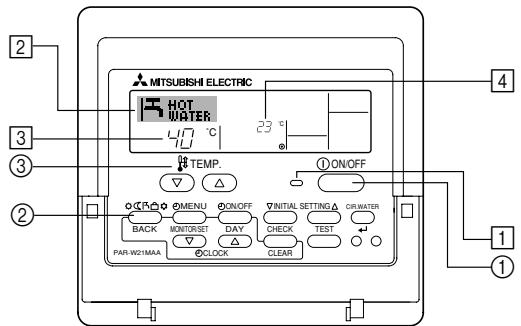
To Start Operation
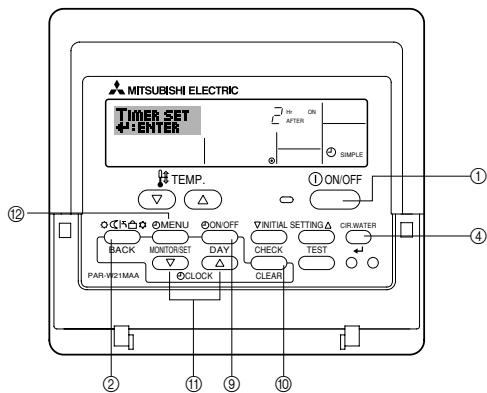
- Press the ON/OFF button ①.
The ON lamp and the display area come on.
Note:
- When the unit is restarted, initial settings are as follows.
| Remote Controller settings | |
| Mode | Last operation mode |
| Temperature setting | Last set temperature |
In case of failure

Warning:
- Never remodel the air conditioner. Consult your dealer for any repair or service. Improper repair work can result in water leakage, electric shock, fire, etc.
- If the remote controller displays an error indication, the air conditioner does not run, or there is any abnormality, stop operation and contact your dealer. Leaving the unit as it is under such conditions can result in fire or failure.
- If the power breaker is frequently activated, get in touch with your dealer. Leaving it as it is can result in fire or failure.
- If the refrigeration gas blows out or leaks, stop the operation of the air conditioner, thoroughly ventilate the room, and contact your dealer. Leaving the unit as it is can result in accidents due to oxygen deficiency.
When the air conditioner is not to be used for a long time
- If the air conditioner is not to be used for a long time due to a seasonal change, etc., run it for 4 - 5 hours with the air blowing until the inside is completely dry. Failing to do so can result in the growth of unhygienic, unhealthy mold in scattered areas throughout the room.
- When it is not to be used for an extended time, keep the [power supply] turned OFF.
If the power supply is kept on, several watts or several tens of watts will be wasted. Also, the accumulation of dust, etc., can result in fire.
- Keep the power switched ON for more than 12 hours before starting operation. Do not turn the power supply OFF during seasons of heavy use. Doing so can result in failure.
- When not operating the unit for a long time during the winter season, remove the water inside the water pipe to prevent freeze.
1.3. Disposing of the unit

Warning:
When you need to dispose of the unit, consult your dealer. If pipes are removed incorrectly, refrigerant (fluorocarbon gas) may blow out and come into contact with your skin, causing injury. Releasing refrigerant into the atmosphere also damages the environment.
To Stop Operation
- Press the ON/OFF button ① again.
The ON lamp 1 and the display area go dark.
Selecting the Mode
-
With the unit running, press the Mode button ② as many times as necessary.
-
Each press switches operation to the next mode, in the sequence shown below.
The currently selected mode is shown at 2.
PWFY-P36Nmu-E-BU
Hot water only
PWFY-P36/P72NU-M-E-AU
Heating Cooling

To Change the Temperature Setting...
- To lower the temperature: Press the Set Temperature button ③.
- To raise the temperature: Press the Set Temperature button ③.
Each press changes the setting by 1^ (1°F). The current setting is displayed at 3.
The available ranges are as follows. 1, 2
| Hot Water | Heating | Cooling |
| 30 °C - 71 °C | 30 °C - 46 °C | 10 °C - 30 °C |
| 86 °F - 160 °F | 86 °F - 115 °F | 50 °F - 86 °F |
Note:
1 Available ranges vary according to the type of unit connected.
2 If temperature range limits have been set at Function Selection of remote controller, the available ranges will be narrower than shown above. If you attempt to set a value outside of the restricted range, the display will show a message indicating that the range is currently restricted.
For information about how to set and clear these range limits, refer to section 3, item [3]-2 (3).
*3 If Function Selection of remote controller are set to display the temperature in Fahrenheit. For information about how to select ^ C or ^ F , refer to section 3, item [3]-4 (1).
2.2. Water temperature adjustment
To change water temperature
Press the ① [water temperature adjustment] button and set the water temperature of your choice.
Pressing or once changes the setting by 1^ (1^) .
If the pressing is continued, the setting continues to change by 1^ (1^)
- Indoor temperature can be set within the following range.
| Hot Water | Heating | Cooling |
| 30 °C - 71 °C | 30 °C - 46 °C | 10 °C - 30 °C |
| 86 °F - 160 °F | 86 °F - 115 °F | 50 °F - 86 °F |
- It is impossible to set the water temperature by the Inlet Water Temp. or Outlet Water Temp.
- The range of water temperature display is 0^ (32°F) to 100^ (212°F). Outside this range, the display flashes either 0^ (32°F) or 100^ (212°F) to inform you if the water temperature is lower or higher than the displayed temperature.
2.3. Setting the Day of the Week and Time
Use this screen to change the current day of the week and time setting.
Note:
The day and time will not appear if clock use has been disabled at Function Selection of remote controller.
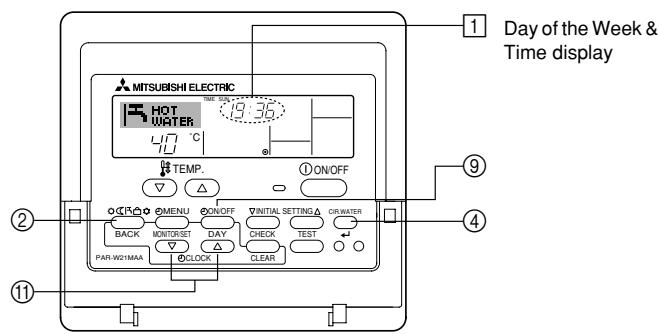
How to Set the Day of the Week and Time...
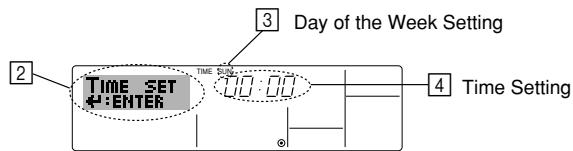
- Press the or Set Time button 1 to show display 2
- Press the TIMER ON/OFF (SET DAY) button ⑨ to set the day. * Each press advances the day shown at 3: Sun Mon ... Fri Sat.
- Press the appropriate Set Time button ① as necessary to set the time.
- As you hold the button down, the time (at 4) will increment first in minute intervals, then in ten-minute intervals, and then in one-hour intervals.
- After making the appropriate settings at Steps 2 and 3, press the CIR.WATER button ④ to lock in the values.
Note:
Your new entries at Steps 2 and 3 will be cancelled if you press the Mode (Return) button ② before pressing the CIR.WATER button ④
5. Press the Mode (Return) button ② to complete the setting procedure. This will return the display to the standard control screen, where will now show the newly set day and time.
2.4. Using the Timer
This section explains how to set and use the timer. You can use Function Selection of remote controller to select which of three types of timer to use: ① Weekly timer, ② Simple timer, or ③ Auto Off timer.
For information about how to set the Function Selection of remote controller, refer to section 3, item [3]-3 (3).
Using the Weekly Timer
-
The weekly timer can be used to set up to six operations for each day of the week.
-
Each operation may consist of any of the following: ON/OFF time together with a temperature setting, or ON/OFF time only, or temperature setting only.
-
When the current time reaches a time set at this timer, the unit carries out the action set by the timer.
-
Time setting resolution for this timer is 1 minute.
Note:
1. Weekly Timer/Simple Timer/Auto Off Timer cannot be used at the same time.
2. The weekly timer will not operate when any of the following conditions is in effect.
The timer feature is off; the system is in an malfunction state; a test run is in progress; the remote controller is undergoing self-check or remote controller check; the user is in the process of setting a function; the user is in the process of setting the timer; the user is in the process of setting the current day of the week or time; the system is under central control. (Specifically, the system will not carry out operations (unit on, unit off, or temperature setting) that are prohibited during these conditions.)
Operation No.
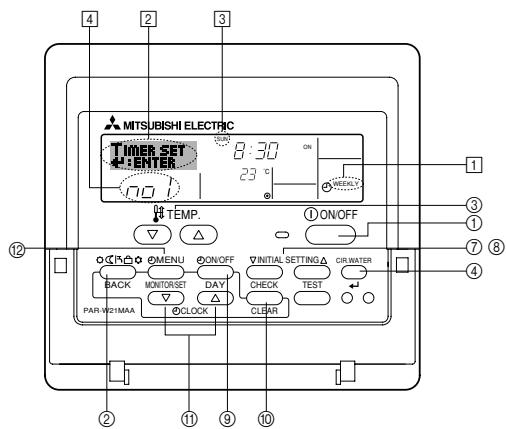
How to Set the Weekly Timer
- Be sure that you are at a standard control screen, and that the weekly timer indicator is shown in the display.
- Press the TIMER MENU button ⑫ , so that the "Set Up" appears on the screen (at 2). (Note that each press of the button toggles the display between "Set Up" and "Monitor".)
- Press the TIMER ON/OFF (SET DAY) button ⑨ to set the day. Each press advances the display at ③ to the next setting, in the following sequence: "Sun Mon Tues Wed Thurs Fri Sat" → "Sun" → ... → "Fri" → "Sat" → "Sun Mon Tues Wed Thurs Fri Sat"...
-
Press the or INITIAL SETTING button (⑦ or ⑧) as necessary to select the appropriate operation number (1 to 6) [4].
-
Your inputs at Steps 3 and 4 will select one of the cells from the matrix illustrated below.
(The remote-controller display at left shows how the display would appear when setting Operation 1 for Sunday to the values indicated below.)
Setup Matrix
| Op No. | Sunday | Monday | ... | Saturday |
| No. 1 | 8:30ON23°C(73°F) | |||
| No. 2 | 10:00OFF | 10:00OFF | 10:00OFF | 10:00OFF |
| ... | ||||
| No. 6 |
Note:
By setting the day to "Sun Mon Tues Wed Thurs Fri Sat", you can set the same operation to be carried out at the same time every day.
(Example: Operation 2 above, which is the same for all days of the week.)
Setting the Weekly Timer
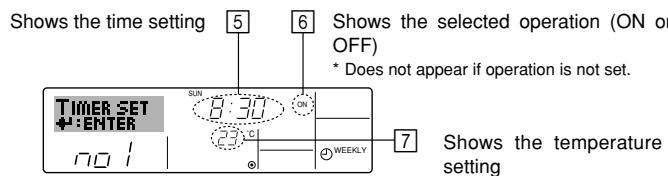
-
Does not appear if temperature is not set.
-
Press the appropriate Set Time button ⑪ as necessary to set the desired time (at 5).
- As you hold the button down, the time first increments in minute intervals, then in ten-minute intervals, and then in one-hour intervals.
- Press the ON/OFF button ① to select the desired operation (ON or OFF), at 6.
Each press changes the next setting, in the following sequence: No display (no setting) "ON" "OFF"
-
Press the appropriate Set Temperature button ③ to set the desired temperature (at ⑦).
-
Each press changes the setting, in the following sequence: No display (no setting) 5 (41) 6 (43) ... 89 (192) 90 (194) No display.
(Available range: The range for the setting is 5^ ( 41^ ) to 90^ ( 194^ ). The actual range over which the temperature can be controlled, however, will vary according to the type of the connected unit.) - To clear the currently set values for the selected operation, press and quickly release the CHECK (CLEAR) button ⑩ once.
- The displayed time setting will change to “—:—”, and the ON/OFF and temperature settings will all disappear.
(To clear all weekly timer settings at once, hold down the CHECK (CLEAR) button ⑩ for two seconds or more. The display will begin flashing, indicating that all settings have been cleared.) - After making the appropriate settings at Steps 5, 6, and 7, press the CIR.WATER button to lock in the values.
Note:
Your new entries will be cancelled if you press the Mode (Return) button ② before pressing the CIR.WATER ← button ④.
If you have set two or more different operations for exactly the same time, only the operation with the highest Operation No. will be carried out.
- Repeat Steps 3 to 8 as necessary to fill as many of the available cells as you wish.
- Press the Mode (Return) button ② to return to the standard control screen and complete the setting procedure.
-
To activate the timer, press the TIMER ON/OFF button ⑨, so that the "Timer Off" indication disappears from the screen. Be sure that the "Timer Off" indication is no longer displayed.
-
If there are no timer settings, the "Timer Off" indication will flash on the screen.
How to View the Weekly Timer Settings
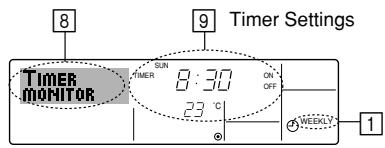
- Be sure that the weekly timer indicator is visible on the screen (at 1).
- Press the TIMER MENU button ② so that "Monitor" is indicated on the screen (at [8]).
- Press the TIMER ON/OFF (SET DAY) button ⑨ as necessary to select the day you wish to view.
- Press the or INITIAL SETTING (⑦ or ⑧) as necessary to change the timer operation shown on the display (at [9]).
- Each press will advance to the next timer operation, in order of time setting.
- To close the monitor and return to the standard control screen, press the Mode (Return) button ②.
To Turn Off the Weekly Timer
Press the TIMER ON/OFF button ⑨ so that "Timer Off" appears at 10.
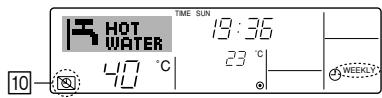
To Turn On the Weekly Timer
Press the TIMER ON/OFF button ⑨ so that the "Timer Off" indication (at 10) goes dark.
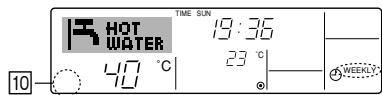
Using the Simple Timer
-
You can set the simple timer in any of three ways.
-
Start time only : The unit starts when the set time has elapsed.
- Stop time only : The unit stops when the set time has elapsed.
-
Start & stop times: The unit starts and stops at the respective elapsed times.
-
The simple timer (start and stop) can be set only once within a 72-hour period.
The time setting is made in hour increments.
Note:
1. Weekly Timer/Simple Timer/Auto Off Timer cannot be used at the same time.
2. The simple timer will not operate when any of the following conditions is in effect. The timer is off; the system is in malfunction state; a test run is in progress; the remote controller is undergoing self-check or remote controller check; the user is in the process of selecting a function; the user is in the process of setting the timer; the system is under central control. (Under these conditions, ON/OFF operation is prohibited.)
How to Set the Simple Timer
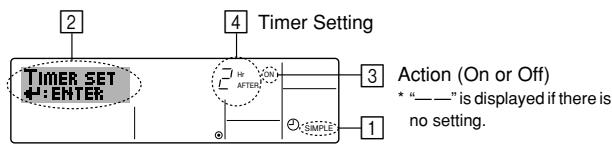
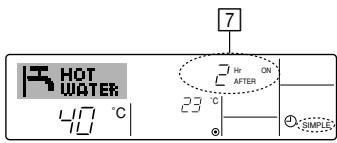
- Be sure that you are at a standard control screen, and that the simple timer indicator is visible in the display (at [T]).
When something other than the Simple Timer is displayed, set it to SIMPLE TIMER using the function selection of remote controller (see 3.[3]-3 (3)) timer function setting.
2. Press the TIMER MENU button ② , so that the "Set Up" appears on the screen (at ② ). (Note that each press of the button toggles the display between "Set Up" and "Monitor".)
3. Press the ON/OFF button ① to display the current ON or OFF simple timer setting. Press the button once to display the time remaining to ON, and then again to display the time remaining to OFF. (The ON/OFF indication appears at 4).
- "ON" timer: The unit will start operation when the specified number of hours has elapsed.
-
"OFF" timer: The unit will stop operation when the specified number of hours has elapsed.
-
With "ON" or "OFF" showing at 3: Press the appropriate Set Time button ① as necessary to set the hours to ON (if "ON" is displayed) or the hours to OFF (if "OFF" is displayed) at 4.
Available Range: 1 to 72 hours - To set both the ON and OFF times, repeat Steps 3 and 4.
- Note that ON and OFF times cannot be set to the same value.
- To clear the current ON or OFF setting: Display the ON or OFF setting (see step 3) and then press the CHECK (CLEAR) button ⑩ so that the time setting clears to “—” at ④ . (If you want to use only an ON setting or only an OFF setting, be sure that the setting you do not wish to use is shown as “—.”.)
- After completing steps 3 to 6 above, press the CIR.WATER button ④ to lock in the value.
Note:
Your new settings will be cancelled if you press the Mode (Return) button ② before pressing the CIR.WATER ← button ④.
- Press the Mode (Return) button ② to return to the standard control screen.
- Press the TIMER ON/OFF button ⑨ to start the timer countdown. When the timer is running, the timer value is visible on the display. Be sure that the timer value is visible and appropriate.
Viewing the Current Simple Timer Settings
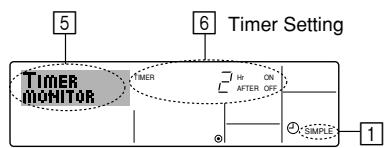
- Be sure that the simple timer indicator is visible on the screen (at 1).
- Press the TIMER MENU button ② , so that the "Monitor" appears on the screen (at [5] ).
- If the ON or OFF simple timer is running, the current timer value will appear at [6].
- If ON and OFF values have both been set, the two values appear alternately.
- Press the Mode (Return) button ② to close the monitor display and return to the standard control screen.
To Turn Off the Simple Timer...
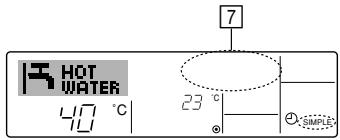
Press the TIMER ON/OFF button ⑨ so that the timer setting no longer appears on the screen (at 7).
To Turn On the Simple Timer...
Press the TIMER ON/OFF button ⑨ so that the timer setting becomes visible at ⑦.
Examples
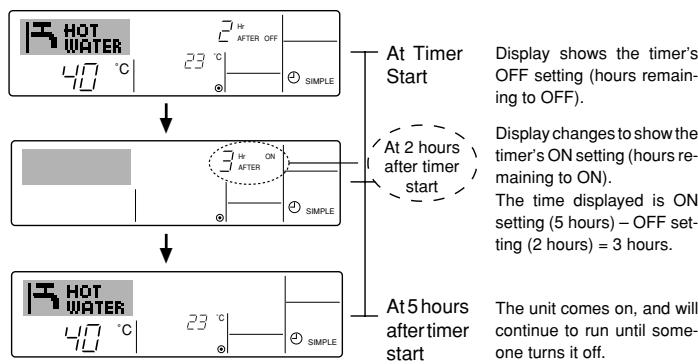
If ON and OFF times have both been set at the simple timer, operation and display are as indicated below.
Example 1:
Start the timer, with ON time set sooner than OFF time
ON Setting: 3 hours
OFF Setting: 7 hours
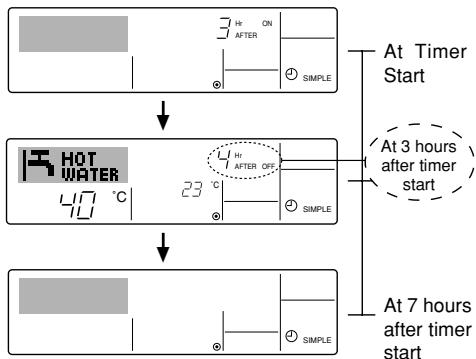
Display shows the timer's ON setting (hours remaining to ON).
Display changes to show the timer's OFF setting (hours remaining to OFF). The time displayed is OFF setting (7 hours) - ON setting (3 hours) = 4 hours.
The unit goes off, and will remain off until someone restarts it.
Example 2:
Start the timer, with OFF time is sooner than ON time
ON Setting: 5 hours
OFF Setting: 2 hours
Using the Auto Off Timer
- This timer begins countdown when the unit starts, and shuts the unit off when the set time has elapsed.
- Available settings run from 30 minutes to 4 hours, in 30-minute intervals.
Note:
1. Weekly Timer/Simple Timer/Auto Off Timer cannot be used at the same time.
2. The Auto Off timer will not operate when any of the following conditions is in effect.
The timer is off; the system is in malfunction state; a test run is in progress; the remote controller is undergoing self-check or remote controller check; the user is in the process of selecting a function; the user is in the process of setting the timer; the system is under central control. (Under these conditions, ON/OFF operation is prohibited.)
How to Set the Auto Off TIMER
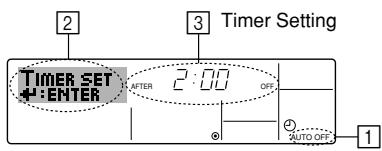
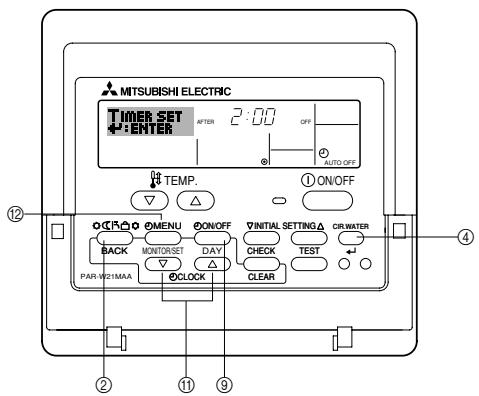
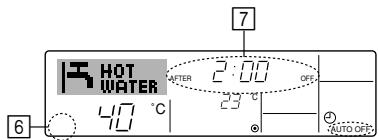
- Be sure that you are at a standard control screen, and that the Auto Off timer indicator is visible in the display (at 1 ).
When something other than the Auto Off Timer is displayed, set it to AUTO OFF TIMER using the function selection of remote controller (see 3.[3]-3 (3)) timer function setting. - Hold down the TIMER MENU button ② for 3 seconds, so that the "Set Up" appears on the screen (at ② ).
(Note that each press of the button toggles the display between "Set Up" and "Monitor".) - Press the appropriate Set Time button ① as necessary to set the OFF time (at ③).
- Press the CIR.WATER button ④ to lock in the setting.
Note:
Your entry will be cancelled if you press the Mode (Return) button ② before pressing the CIR.WATER ← button ④.
- Press the Mode (Return) button ② to complete the setting procedure and return to the standard control screen.
- If the unit is already running, the timer starts countdown immediately. Be sure to check that the timer setting appears correctly on the display.
Checking the Current Auto Off Timer Setting
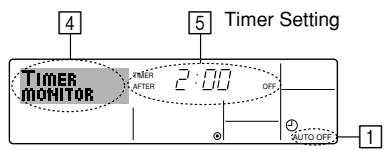
- Be sure that the "Auto Off" is visible on the screen (at 1).
- Hold down the TIMER MENU button ⑫ for 3 seconds, so that "Monitor" is indicated on the screen (at 4).
- The timer remaining to shutdown appears at 5 .
- To close the monitor and return to the standard control screen, press the Mode (Return) button ②.
To Turn Off the Auto Off Timer...
- Hold down the TIMER ON/OFF button ⑨ for 3 seconds, so that "Timer Off" appears (at 6) and the timer value (at 7) disappears.
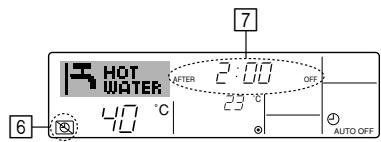
- Alternatively, turn off the unit itself. The timer value (at 7 ) will disappear from the screen.
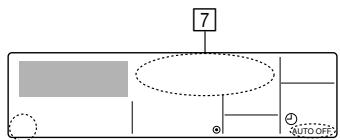
To Turn On the Auto Off Timer...
- Hold down the TIMER ON/OFF button ⑨ for 3 seconds. The "Timer Off" indication disappears (at 6), and the timer setting comes on the display (at 7).
- Alternatively, turn on the unit. The timer value will appear at 7.
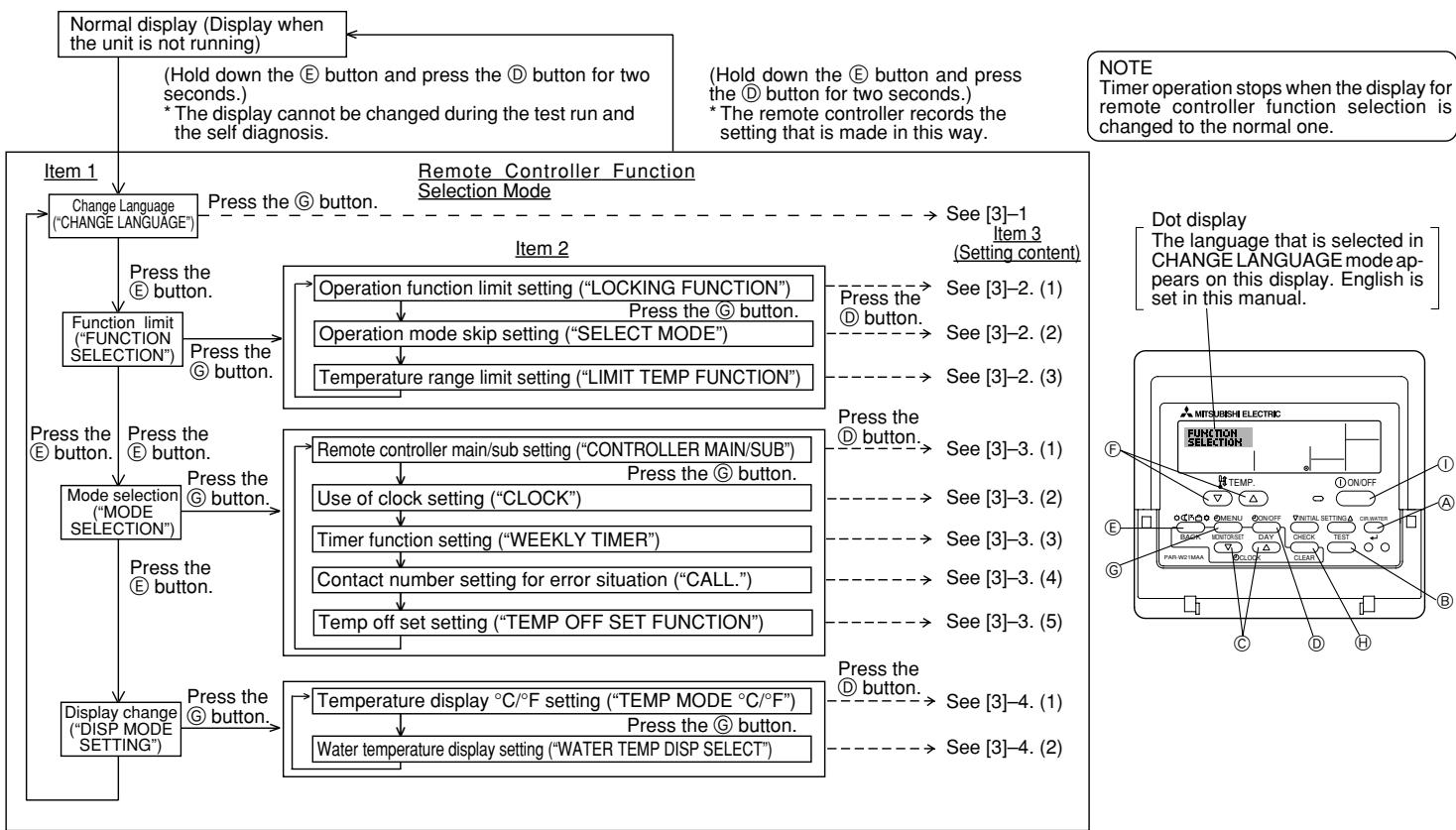
Function selection of remote controller
The setting of the following remote controller functions can be changed using the remote controller function selection mode. Change the setting when needed.
| Item 1 | Item 2 | Item 3 (Setting content) |
| 1. Change Language ("CHANGE LANGUAGE") | Language setting to display | • Display in multiple languages is possible |
| 2. Function limit ("FUNCTION SELECTION") | (1) Operation function limit setting (operation lock) ("LOCKING FUNCTION") | • Setting the range of operation limit (operation lock) |
| (2) Operation mode skip setting ("SELECT MODE") | • Setting the use or non-use of each operation mode | |
| (3) Temperature range limit setting ("LIMIT TEMP FUNCTION") | • Setting the temperature adjustable range (maximum, minimum) | |
| 3. Mode selection ("MODE SELECTION") | (1) Remote controller main/sub setting ("CONTROLLER MAIN/SUB") | • Selecting main or sub remote controller * When two remote controllers are connected to one group, one controller must be set to sub. |
| (2) Use of clock setting ("CLOCK") | • Setting the use or non-use of clock function | |
| (3) Timer function setting ("WEEKLY TIMER") | • Setting the timer type | |
| (4) Contact number setting for error situation ("CALL.") | • Contact number display in case of error • Setting the telephone number | |
| (5) Temp off set setting ("TEMP OFF SET FUNCTION") | • Setting the use or non-use of setback amount setting | |
| 4. Display change ("DISP MODE SETTING") | (1) Temperature display °C/°F setting ("TEMP MODE °C/°F") | • Setting the temperature unit (°C or °F) to display |
| (2) Water temperature display setting ("WATER TEMP DISP SELECT") | • Setting the use or non-use of the display of water temperature |
Function selection flowchart
[1] Stop the unit to start remote controller function selection mode. [2] Select from item 1. [3] Select from item 2. [4] Make the setting. (Details are specified in item
3) [5] Setting completed. [6] Change the display to the normal one. (End)
Detailed setting
[3]-1. CHANGE LANGUAGE setting
The language that appears on the dot display can be selected.
Press the [MENU] button to change the language.
① English (GB), ② German (D), ③ Spanish (E), ④ Russian (RU),
⑤ Italian (I), ⑥ French (F), ⑦ Swedish
[3]-2. Function limit
(1) Operation function limit setting (operation lock)
- To switch the setting, press the [ON/OFF] button.
① no1: Operation lock setting is made on all buttons other than the [①ON/OFF] button.
② no2: Operation lock setting is made on all buttons.
③ OFF (Initial setting value): Operation lock setting is not made.
- To make the operation lock setting valid on the normal screen, it is necessary to press buttons (Press and hold down the [CIR.WATER] and [① ON/OFF] buttons at the same time for two seconds.) on the normal screen after the above setting is made.
(2) Operation mode skip setting
After setting is changed, the operation mode can not be changed within the changed range.
- To switch the following settings, press the [ON/OFF] button.
① Heating mode
: Sets the use or non-use of the Heating mode.
Heating ECO mode
: Sets the use or non-use of the Heating ECO mode.
③ Hot Water mode
: Sets the use or non-use of the Hot Water mode.
④ Anti-freeze mode
: Sets the use or non-use of the Anti-freeze mode.
⑤ Cooling mode
: Sets the use or non-use of the Cooling mode.
⑥ OFF (Initial setting value) : Operation mode skip is not executed.
When the setting, other than OFF, is made, the skip settings of the Heating, Heating ECO, Hot Water, Anti-freeze, and Cooling modes are executed at the same time.
A mode that is not available on the unit to connect cannot be used even if the setting is "AVAILABLE."
(3) Temperature range limit setting
After this setting is made, the temperature can be changed within the set range.
- To switch the setting, press the [ON/OFF] button.
① LIMIT TEMP HEATING MODE:
The temperature range can be changed on heating mode.
(2) LIMIT TEMP HOT WATER MODE:
The temperature range can be changed on heating/hot water mode.
③ LIMIT TEMP ANTI-FREEZE MODE:
The temperature range can be changed on anti-freeze mode.
④ LIMIT TEMP COOLING MODE:
The temperature range can be changed on cooling mode.
⑤ OFF (Initial setting): The temperature range limit is not active.
- When the setting, other than OFF, is made, the temperature range limit setting on hot water, anti-freeze and cooling mode is made at the same time. However, the range cannot be limited when the set temperature range has not changed.
To increase or decrease the temperature, press the [TEMP. or ] button. - Settable range
Hot Water mode: Lower limit: 30 71^ C (86~160°F)
Upper limit: 71 30^ (160 86^)
Heating mode: Lower limit: 30 45^ C (86~115°F)
Upper limit: 45 30^ (115 86^)
Cooling mode : Lower limit: 10 30^ (50 86^)
Upper limit: 30 10^ C (86 ~ 50°F)
- The settable range varies depending on the unit to connect.
[3]-3. Mode selection setting
(1) Remote controller main/sub setting
- To switch the setting, press the [ON/OFF] button.
① Main : The controller will be the main controller.
② Sub : The controller will be the sub controller.
(2) Use of clock setting
To switch the setting, press the [ON/OFF] button.
① ON : The clock function can be used.
② OFF: The clock function cannot be used.
(3) Timer function setting
- To switch the setting, press the [ON/OFF] button (Choose one of the followings.).
① WEEKLY TIMER (Initial setting value): The weekly timer can be used.
② AUTO OFF TIMER : The auto off timer can be used.
③ SIMPLE TIMER : The simple timer can be used.
④ TIMER MODE OFF : The timer mode cannot be used.
- When the use of clock setting is OFF, the "WEEKLY TIMER" cannot be used.
(4) Contact number setting for error situation
- To switch the setting, press the [ON/OFF] button.
① CALL OFF : The set contact numbers are not displayed in case of error.
② CALL * * : The set contact numbers are displayed in case of error.
CALL_
: The contact number can be set when the display is as shown on the left.
- Setting the contact numbers
To set the contact numbers, follow the following procedures.
Move the flashing cursor to set numbers. Press the [TEMP. or
] button to move the cursor to the right (left). Press the [CLOCK
or ] button to set the numbers.
(5) Temp off see: setting
- To switch the following settings, press the [ON/OFF] button.
① ON : The setback amount setting is displayed under the water temperature initial setting mode.
② OFF : The setback amount setting is not displayed under the water temperature initial setting mode.
[3]-4. Display change setting
(1) Temperature display ^ C / ^ F setting
- To switch the setting, press the [ON/OFF] button.
① ^ C : The temperature unit ^ C is used.
② F:The temperature unit ^ is used.
(2) Water temperature display setting
To switch the setting, press the [ON/OFF] button.
① ON : The water temperature is displayed.
② OFF : The water temperature is not displayed.
4. Caring for the machine
Always have strainer maintenance performed by a service person. Before care-taking, turn the power supply OFF.
Caution:
- Before you start cleaning, stop operation and turn OFF the power supply. Remember that the fan is rotating inside at high speed, posing a serious risk of injury.
- Indoor units are equipped with strainer to remove the dust of sucked-in air. Clean the strainer using the methods shown in the following sketches.
- The life of the strainer depends on where the unit is installed and how it is operated.
How to clean
- When washing the strainer, remove the cover and scrub the strainer inside with brush.
Caution:
- Do not dry the strainer by exposing it to direct sunlight or warming it using fire, etc. Doing so can result in the deformation of the strainer.
Caution:
Never pour water or flammable sprays onto the air conditioner. Cleaning using these methods can result in the failure of the air conditioner, electric shock, or fire.
5. Troubleshooting
Before you ask for repair service, check the following points:
| State of Machine | Remote Controller | Cause | Troubleshooting |
| It does not run. | “◎” display is not lit up No display appears even when the [ON/OFF] but- ton is pressed. | Power failure | Press the [ON/OFF] button after power restoration. |
| The power supply is turned OFF. | Turn the power supply ON. | ||
| The fuse in the power supply is gone. | Replace fuse. | ||
| The earth leakage breaker is gone. | Put in the earth leakage breaker. | ||
| Water out but it does not cool enough or heat enough. | The liquid crystal display shows that it is in the state of operation. | Improper temperature adjustment | After checking the set temperature and inlet temperature on the liquid crystal display, refer to [Water temperature adjustment], and operate the adjustment button. |
| Cool water or warm water does not come out. | The liquid crystal display shows that it is in operation. | The restart-preventing circuit is in operation for 3 minutes. | Wait for a while. (To protect the compressor, a 3-minute restart-preventing circuit is built into the indoor unit. Therefore, there are occasions sometimes when the compressor does not start running immediately. There are cases when it does not run for as long as 3 minutes.) |
| Indoor unit operation was restarted during the heating and defrosting operation. | Wait for a while. (Heating operation starts after ending defrosting operation.) | ||
| It runs briefly, but soon stops. | The “CHECK” and check code flashes on the liquid crystal display. | There are some obstacles at the air inlet and outlet of the indoor and outdoor units. | Rerun after removal |
| The strainer is filled with dust and dirt. | Rerun after cleaning the strainer. (Refer to [Caring for the machine].) |
If operation stops due to a power failure, the [restart-preventing circuit at power failure] operates and disables unit operation even after power restoration. In this case, press the [ON/OFF] button again and start operation.
If malfunctions persist after you have checked the above, turn the power supply OFF and contact your dealer with information about the product name, the nature of the malfunction, etc. If the display of "CHECK" and (4 digit) check code flashes, tell the dealer contents of the display (check code). Never attempt to repair by yourself.
The following symptoms are not air conditioner failures:
The air blown out from the air conditioner can sometimes give off odors. This is due to cigarette smoke contained in the air of the room, the smell of cosmetics, the walls, furniture, etc., absorbed in the air conditioner.
- A hissing noise can be heard immediately after the air conditioner is started or stopped. This is the sound of the refrigeration flowing inside the air conditioner. This is normal.
- The air conditioner sometimes snaps or clicks at the beginning or end of cooling/heating operation. This is the sound of friction on the front panel and other sections due to expansion and contraction caused by temperature change. This is normal.
Regarding place for installation
Consult with your dealer for details on installation and transferring the installation.
Caution:
Never install the air conditioner where there is a risk of leakage of flammable gas.
If gas leaks and accumulates around the unit, fire can result.
Never install the air conditioner at the following place:
where there is a lot of machine oil
- near the ocean and beach areas where there is salt air.
where humidity is high
where there are hot springs nearby
where there is sulphurous gas
- where there is a high-frequency processing machinery (a high-frequency welder, etc.)
where acid solution is frequently used
where special sprays are frequently used
Install the indoor unit horizontally. Otherwise, water leakage can result.
- Take sufficient measures against noise when installing the air conditioners at hospitals or communication-related businesses.
If the air conditioner is used in any of the above-mentioned environments, frequent operational failure can be expected. It is advisable to avoid these types of installation sites.
For further details, consult with your dealer.
Regarding electrical work
Caution:
-
The electrical work must be undertaken by a person who is qualified as an electrical engineer according to the [technical standard respecting electrical installation], [internal wiring rules], and the installation instruction manual with the absolute use of exclusive circuits. The use of other products with the power source can result in burnt-out breakers and fuses.
-
Never connect the grounding wire to a gas pipe, water pipe, arrester, or telephone grounding wire. For details, consult with your dealer.
- In some types of installation sites, the installation of an earth leakage breaker is mandatory. For details, consult with your dealer.
Regarding water pipe installation
- Do not use steel pipes as water pipes. Copper pipes are recommended.
The water circuit should be a closed circuit.
Regarding transfer of installation
- When removing and reinstalling the air conditioner when you enlarge your home, remodel, or move, consult with your dealer in advance to ascertain the cost of the professional engineering work required for transferring the installation.
Caution:
When moving or reinstalling the air conditioner, consult with your dealer. Defective installation can result in electric shock, fire, etc.
Regarding noise
- In installing work, choose a place that can fully bear the weight of the air conditioner, and where noise and vibration can be reduced.
- Choose a place where cool or warm air and noise from the outdoor air outlet of the air conditioner does not inconvenience the neighbors.
- If any alien object is placed near the outdoor air outlet of the air conditioner, decreased performance and increased noise can result. Avoid placing any obstacles adjacent to the air outlet.
If the air conditioner produces any abnormal sound, consult with your dealer.
Maintenance and inspection
- If the air conditioner is used throughout several seasons, the insides can get dirty, reducing the performance.
Depending upon the conditions of usage, foul odors can be generated and drainage can deteriorate due to dust and dirt, etc.
7. Specifications
| Model | PWFY-P36NMU-E-BU | PWFY-P36NMU-E-AU | PWFY-P72NMU-E-AU | |
| Power source | 1-phase 208-230V 60Hz | |||
| Heating capacity | BTU/h | 40000 *1 | 40000 *2 | 80000 *4 |
| kW | 11.7 *1 | 11.7 *2 | 23.4 *4 | |
| Cooling capacity | BTU/h | - | 36000 *3 | 72000 *5 |
| kW | - | 10.6 *3 | 21.2 *5 | |
| Noise level | 44 dB<A> | 29 dB<A> | 29 dB<A> | |
| Net weight | 133 lb (60 kg) | 78 lb (35 kg) | 84 lb (38 kg) | |
| Dimension | Height mm [in] | 800 | ||
| Width mm [in] | 450 | |||
| Depth mm [in] | 300 | |||
| Accessory | Strainer, Heat insulation material, Connector sets × 2, Washer × 2, Expansion joint × 2 (PWFY-P72NMU-E-AU) | |||
| Water Flow rate | m³/h | 0.6-2.15 | 0.6-2.15 | 1.2-4.3 |
| gal/min | 2.6-9.5 | 2.6-9.5 | 5.3-18.9 | |
| L/min | 10-35 | 10-35 | 20-70 | |
*1 Nominal heating conditions
Outdoor Temp.: 7^ DB/6 ^ C WB (45^ DB/43 ^ F WB)
Pipe length: 7.5 m (24-9/16 ft)
Level difference: 0m (0 ft)
Inlet water Temp 65^
Water flow rate 2.15m^3 /h 35 L/min 9.5 G/min
*3 Nominal cooling conditions
Outdoor Temp.: 35^ C DB (95°F DB)
Pipe length: 7.5 m (24-9/16 ft)
Level difference: 0m (0 ft)
Inlet water Temp 23 °C
Water flow rate 1.93m^3 /h 32 L/min 8.5 G/min
*5 Nominal cooling conditions
Outdoor Temp.: 35^ C DB (95°F DB)
Pipe length: 7.5 m (24-9/16 ft)
Level difference: 0m (0 ft)
Inlet water Temp 23 °C
Water flow rate 3.86m^3 /h 64 L/min 17.0 G/min
*2 Nominal heating conditions
Outdoor Temp.: 7^ DB/6 ^ C WB (45^ DB/43 ^ F WB)
Pipe length: 7.5 m (24-9/16 ft)
Level difference: 0m (0 ft)
Inlet water Temp 30^
Water flow rate 2.15m^3 /h 35 L/min 9.5 G/min
*4 Nominal heating conditions
Outdoor Temp.: 7^ C DB/6 ^ C WB (45 ^ F DB/43 ^ F WB)
Pipe length: 7.5 m (24-9/16 ft)
Level difference: 0m (0 ft)
Inlet water Temp 30^
Water flow rate 4.30m^3 /h 70 L/min 18.9 G/min
| N° d'op. | Sunday | Monday | ... | Saturday |
| No. 1 | 8:30ON23°C (73°F) | |||
| No. 2 | 10:00OFF | 10:00OFF | 10:00OFF | 10:00OFF |
| ... | ||||
| No. 6 |
Remarque:
This product is designed and intended for use in the residential, commercial and light-industrial environment.
Please be sure to put the contact address/telephone number on this manual before handing it to the customer.
- INDOOR UNIT OF CITY MULTI R410A SERIES
- OPERATION MANUAL
- MODE D'EMPLOI
- Safety precautions
- Symbols used in the text
- Warning:
- Caution:
- Symbols used in the illustrations
- Installation
- 1) Outdoor unit
- 2) Indoor unit
- 3) Remote controller
- 4) Drain hose
- 5) Power line, fuse or circuit breaker
- 6) Grounding
- During operation
- How to operate
- Using the Remote Controller
- How to Start, Stop, Change the Mode, and Adjust the Water Temperature
- To Start Operation
- Note:
- In case of failure
- When the air conditioner is not to be used for a long time
- Disposing of the unit
- To Stop Operation
- Selecting the Mode
- To Change the Temperature Setting...
- Water temperature adjustment
- To change water temperature
- Setting the Day of the Week and Time
- How to Set the Day of the Week and Time...
- Using the Timer
- Using the Weekly Timer
- Operation No.
- How to Set the Weekly Timer
- Setting the Weekly Timer
- How to View the Weekly Timer Settings
- To Turn Off the Weekly Timer
- To Turn On the Weekly Timer
- Using the Simple Timer
- How to Set the Simple Timer
- Viewing the Current Simple Timer Settings
- To Turn Off the Simple Timer...
- To Turn On the Simple Timer...
- Examples
- Example 1:
- Example 2:
- Using the Auto Off Timer
- How to Set the Auto Off TIMER
- Checking the Current Auto Off Timer Setting
- To Turn Off the Auto Off Timer...
- To Turn On the Auto Off Timer...
- Function selection of remote controller
- Function selection flowchart
- Detailed setting
- [3]-1. CHANGE LANGUAGE setting
- [3]-2. Function limit
- Operation mode skip setting
- Temperature range limit setting
- [3]-3. Mode selection setting
- Use of clock setting
- Timer function setting
- Contact number setting for error situation
- Temp off see: setting
- [3]-4. Display change setting
- Caring for the machine
- How to clean
- Troubleshooting
- The following symptoms are not air conditioner failures:
- Never install the air conditioner at the following place:
- Regarding electrical work
- Regarding water pipe installation
- Regarding transfer of installation
- Regarding noise
- Maintenance and inspection
- Specifications
- Remarque:
Brand : MITSUBISHI
Model : PWFY-P72NMU-E-AU
Category : Air-conditioner