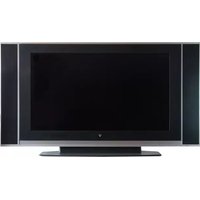
LTV20H - Television V7 - Free user manual and instructions
Find the device manual for free LTV20H V7 in PDF.


Pick your language and provide your email: we'll send you a specifically translated version.
| Product Type | LED Television |
| Brand | V7 |
| Model | LTV20H |
| Screen Size | 20 inches |
| Display Resolution | HD Ready (1366 x 768) |
| Refresh Rate | 60 Hz |
| Aspect Ratio | 16:9 |
| Contrast Ratio | 1000:1 (typical) |
| Brightness | 200 cd/m² |
| Built-in Speakers | 2 x 3W |
| HDMI Ports | 2 x HDMI |
| USB Ports | 1 x USB 2.0 |
| Composite Input | 1 x AV (Composite) |
| Tuner | DVB-T/T2 |
| VESA Mount | 100 x 100 mm |
| Power Supply | AC 100-240V, 50/60Hz |
| Power Consumption | 30W (typical), Standby < 0.5W |
| Dimensions (without stand) | 470 x 290 x 40 mm |
| Dimensions (with stand) | 470 x 320 x 150 mm |
| Weight | 2.5 kg (with stand) |
| Cleaning Instructions | Wipe with a soft dry cloth; avoid liquid cleaners |
| Safety Instruction | Keep away from water and do not block ventilation slots |
| Spare Parts & Repairability | Remote control and stand available; consult certified service center |
Frequently Asked Questions - LTV20H V7
How do I connect external devices to my V7 LTV20H TV?
Use the HDMI ports for HD devices such as streaming sticks, game consoles, or Blu-ray players. For older devices, connect them via the composite AV input.
Can I mount the TV on a wall?
Yes, the TV is compatible with a VESA 100x100 mm wall mount. See the manual for mounting instructions.
How do I clean the screen safely?
Use a soft, dry microfiber cloth. Do not spray liquids directly onto the screen; lightly dampen the cloth if needed.
What should I do if the remote control stops working?
Replace the batteries, ensure there are no obstructions, and point the remote directly at the IR receiver on the TV.
How do I access the menu settings?
Press the Menu button on the remote to access picture, sound, and channel settings. Use the arrow keys to navigate.
Does the TV support USB media playback?
Yes, connect a USB drive to the USB 2.0 port to play compatible photos, music, and video files via the media player.
How can I improve the picture quality?
Adjust the picture mode (Standard, Movie, Dynamic) and set the resolution to match the source device. Ensure the HDMI cable is high-speed.
Is the TV energy efficient?
The TV has a typical power consumption of 30W and a standby power of less than 0.5W, making it energy efficient for a 20-inch LED TV.
Can I watch free-to-air channels?
Yes, connect an antenna and use the built-in DVB-T/T2 tuner to scan and store free-to-air channels.
What is the warranty on the V7 LTV20H?
The standard warranty is typically 1 year from the date of purchase. Contact the retailer or V7 support for details.
User questions about LTV20H V7
0 question about this device. Answer the ones you know or ask your own.
Ask a new question about this device
No questions yet. Be the first to ask one.
Download the instructions for your Television in PDF format for free! Find your manual LTV20H - V7 and take your electronic device back in hand. On this page are published all the documents necessary for the use of your device. LTV20H by V7.
USER MANUAL LTV20H V7
Manual assistant
Powered by Anthropic
Waiting for your message
Product information
Brand : V7
Model : LTV20H
Category : Television