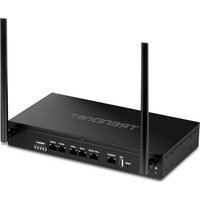
TEW-830MDR2K - Router TRENDNET - Free user manual and instructions
Find the device manual for free TEW-830MDR2K TRENDNET in PDF.


Pick your language and provide your email: we'll send you a specifically translated version.
| Product Type | AC2600 Dual-Band Wi-Fi Router |
| Wi-Fi Standard | IEEE 802.11a/b/g/n/ac |
| Frequency Band | Dual-Band (2.4 GHz + 5 GHz) |
| Max Wi-Fi Speed | 800 Mbps (2.4 GHz) + 1733 Mbps (5 GHz) |
| Ports | 1 Gigabit WAN, 4 Gigabit LAN |
| USB Ports | 1 x USB 3.0 |
| Antennas | 4 x 5 dBi external antennas |
| Dimensions | Approx. 275 x 165 x 48 mm |
| Weight | Approx. 700 g |
| Power Supply | 12V DC, 2.5A adapter |
| Security | WPA/WPA2, WPA2-PSK, SSID broadcast control, MAC address filter |
| Network Features | MU-MIMO, beamforming, QoS, VPN pass-through, parental controls |
| Management | Web-based interface, mobile app (TRENDnet), firmware upgradeable |
| Maintenance & Cleaning | Keep ventilated; wipe with dry soft cloth; do not use liquids |
| Spare Parts | Replacement adapter and antennas available via TRENDnet support |
| Repairability | Limited; contact authorized service centers |
| General Information | Wall-mountable, LED indicators, 3-year warranty |
Frequently Asked Questions - TEW-830MDR2K TRENDNET
What is the default IP address and login credentials for the TEW-830MDR2K?
The default IP address is 192.168.10.1, with username admin and password admin.
How do I reset the router to factory defaults?
Press and hold the Reset button on the back of the router for about 10 seconds using a paperclip until the power LED blinks, then release.
How can I change the Wi-Fi password?
Log in to the router's web interface, go to Wireless Settings, and update the Pre-Shared Key under WPA2-PSK security, then save the settings.
Does the TEW-830MDR2K support MU-MIMO?
Yes, it supports MU-MIMO (Multi-User Multiple Input Multiple Output) technology, which improves performance when multiple devices are connected simultaneously.
Can I connect a USB drive to share files over the network?
Yes, the router has a USB 3.0 port that supports storage sharing. Connect a USB drive, then access files via SAMBA or FTP from the network.
How do I update the firmware?
Download the latest firmware from TRENDnet's website, log into the router, go to Maintenance > Firmware Upgrade, upload the file, and wait for the process to complete.
What is the typical coverage range of this router?
Coverage varies by environment, but it typically provides up to 250 m² with its four external 5 dBi antennas and beamforming technology.
How do I set up the router using the TRENDnet mobile app?
Download the TRENDnet Router Setup app, connect to the router's default Wi-Fi, and follow the step-by-step instructions in the app to configure your internet connection.
Is the router compatible with Gigabit internet plans?
Yes, the router has gigabit WAN and LAN ports, so it can handle internet speeds up to 1 Gbps, though Wi-Fi speeds may be lower depending on distance.
How do I enable parental controls on this router?
Log into the web interface, navigate to Access Control or Parental Controls, and set up filter rules by MAC address or IP range to block or restrict internet access.
User questions about TEW-830MDR2K TRENDNET
0 question about this device. Answer the ones you know or ask your own.
Ask a new question about this device
No questions yet. Be the first to ask one.
Download the instructions for your Router in PDF format for free! Find your manual TEW-830MDR2K - TRENDNET and take your electronic device back in hand. On this page are published all the documents necessary for the use of your device. TEW-830MDR2K by TRENDNET.
USER MANUAL TEW-830MDR2K TRENDNET
Manual assistant
Powered by Anthropic
Waiting for your message
Product information
Brand : TRENDNET
Model : TEW-830MDR2K
Category : Router