PIGEON - Mouse Natec - Free user manual and instructions
Find the device manual for free PIGEON Natec in PDF.


Pick your language and provide your email: we'll send you a specifically translated version.
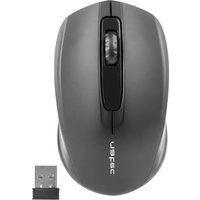
| Product Type | Computer mouse |
| Brand | Natec |
| Model | PIGEON |
| Interface | USB 2.0 |
| Sensor Type | Optical |
| Resolution | 1000 DPI |
| Number of Buttons | 3 (left, right, scroll wheel) |
| Dimensions (L x W x H) | 120 x 70 x 40 mm |
| Cable Length | 1.5 m |
| Weight | 100 g |
| Compatibility | Windows, macOS, Linux |
| Power Supply | USB powered |
| Main Functions | Plug and play, smooth scrolling, ergonomic design |
| Cleaning & Maintenance | Wipe with a soft dry cloth; avoid liquids |
| Safety | Keep away from heat and moisture |
| Spare Parts | No user-replaceable parts |
| Repairability | Do not disassemble; contact support if faulty |
| General Information | Includes 1-year manufacturer's warranty |
Frequently Asked Questions - PIGEON Natec
Is the Natec PIGEON mouse wired or wireless?
It is a wired USB mouse, providing a reliable connection and no need for batteries. The USB cable is 1.5 meters long.
Does the mouse work with Mac computers?
Yes, it is plug and play and works with Windows, macOS, and Linux without installing additional drivers.
Can I adjust the DPI of this mouse?
The Natec PIGEON features a fixed optical sensor at 1000 DPI, which is ideal for standard office and everyday use.
How do I clean the mouse?
Use a soft, dry cloth to wipe the exterior. Do not use water, liquids, or abrasive cleaning agents.
Is the mouse suitable for left-handed users?
Yes, the design is symmetrical, making it comfortable for both left-handed and right-handed users.
How many buttons does it have?
It has 3 buttons: left click, right click, and a clickable scroll wheel.
Does it require any software installation?
No, it is plug and play. Simply plug it into a free USB port and start using it right away.
What should I do if the cursor moves erratically?
First, clean the sensor lens with a dry cloth. Make sure you are using it on a non-reflective surface. If the problem continues, restart your computer.
Is the mouse compatible with gaming?
It is designed for office and everyday tasks, not for high-performance gaming, so it may lack advanced gaming features.
What is the warranty coverage?
Natec offers a 1-year warranty against manufacturing defects. Keep your receipt for service.
User questions about PIGEON Natec
0 question about this device. Answer the ones you know or ask your own.
Ask a new question about this device
No questions yet. Be the first to ask one.
Download the instructions for your Mouse in PDF format for free! Find your manual PIGEON - Natec and take your electronic device back in hand. On this page are published all the documents necessary for the use of your device. PIGEON by Natec.
USER MANUAL PIGEON Natec



Manual assistant
Powered by Anthropic
Waiting for your message
Product information
Brand : Natec
Model : PIGEON
Category : Mouse