ROBIN - Mouse Natec - Free user manual and instructions
Find the device manual for free ROBIN Natec in PDF.


Pick your language and provide your email: we'll send you a specifically translated version.
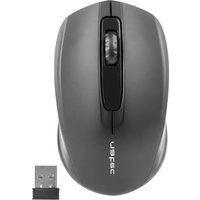
| Product Type | Wireless Mouse |
| Brand | Natec |
| Model | ROBIN |
| Connectivity | Wireless (2.4 GHz) |
| Wireless Technology | 2.4 GHz radio frequency |
| Receiver | Included USB nano receiver |
| Operating Range | Up to 10 m (33 ft) |
| Sensor Type | Optical |
| Resolution | 1000 DPI |
| Buttons | 3 buttons (left, right, middle/scroll wheel) |
| Scrolling Wheel | Yes, with middle click function |
| Power Supply | 1 x AA battery (not included) |
| Battery Life | Up to 12 months (depending on usage) |
| Compatibility | Windows, macOS, Linux |
| Dimensions (L x W x H) | Approx. 100 x 58 x 35 mm |
| Weight | Approx. 60 g (without battery) |
| Colour | Black |
| Operating Temperature | 0°C to 40°C |
| Storage Temperature | -20°C to 60°C |
| Humidity Range | 5% to 85% (non-condensing) |
| Cleaning Instructions | Wipe with a soft, dry cloth; clean the optical sensor gently with a cotton swab |
| Safety Warnings | Do not expose to water, extreme heat, or drop; do not disassemble |
| Spare Parts & Repairability | No user-serviceable parts; contact authorized service for repairs |
Frequently Asked Questions - ROBIN Natec
How do I connect the Natec ROBIN to my computer?
Insert the included nano receiver into a USB port of your computer. Move the mouse to wake it up. The device will automatically pair using 2.4 GHz wireless. If pairing fails, remove the receiver and insert it again while keeping the mouse within 20 cm of the receiver.
How do I install the battery?
Slide the battery cover, located on the bottom of the mouse, in the direction of the arrow. Insert one AA battery with the correct polarity, then slide the cover back into place. The mouse switches on automatically when a battery is installed.
Why isn't the mouse working?
First, check the battery: replace it if needed. Then ensure the USB receiver is firmly plugged into a working port. Move the mouse closer to the receiver and try again. If the issue persists, restart your computer or try a different USB port.
How should I clean the mouse?
Unplug the USB receiver (or switch off the computer) before cleaning. Use a soft, dry cloth to wipe the outer surfaces. For the optical sensor on the bottom, gently remove dust with a cotton swab. Do not use cleaning agents, water, or submerge the mouse.
Which operating systems are compatible?
The mouse is compatible with Windows, macOS and Linux. No dedicated drivers are required; the system will recognise it as a standard mouse. Plug in the receiver and it should work immediately.
What is the wireless range?
The wireless transmission range is up to 10 meters (33 feet) in an open environment when using 2.4 GHz technology. Actual range may be shorter due to obstacles such as desks, walls, or interference from other devices.
Does the mouse have a DPI button or adjustable sensitivity?
No, this model has a fixed sensor resolution of 1000 DPI. It does not feature a DPI switch button or adjustable sensitivity settings. It is optimised for everyday office and browsing tasks.
How can I save battery?
The mouse enters sleep mode automatically after a few minutes of inactivity. To extend battery life, remove the AA battery if you won't be using the mouse for a long period. Also avoid placing the receiver near metal surfaces that may consume extra power.
Is there warranty and what about repairs?
The mouse is covered by a standard 24-month warranty. There are no user-replaceable parts inside. Contact your point of purchase or Natec support for any repairs. Opening the device automatically voids the warranty.
What are the physical dimensions and weight?
The dimensions are approximately 100 x 58 x 35 mm (length x width x height) and it weighs about 60 g without the battery. These small measurements make it easy to carry and use with laptops.
User questions about ROBIN Natec
0 question about this device. Answer the ones you know or ask your own.
Ask a new question about this device
No questions yet. Be the first to ask one.
Download the instructions for your Mouse in PDF format for free! Find your manual ROBIN - Natec and take your electronic device back in hand. On this page are published all the documents necessary for the use of your device. ROBIN by Natec.
USER MANUAL ROBIN Natec




Manual assistant
Powered by Anthropic
Waiting for your message
Product information
Brand : Natec
Model : ROBIN
Category : Mouse