
SA-IF100 - Home Theater System SONY - Free user manual and instructions
Find the device manual for free SA-IF100 SONY in PDF.


| Type of Product | Home Theater System |
| Brand | Sony |
| Model | SA-IF100 |
| Colour | Black |
| Main Unit Dimensions (W x H x D) | 430 x 158 x 365 mm |
| Main Unit Weight | 8.5 kg |
| Power Supply | AC 120V 60Hz |
| Power Consumption | 120 W |
| Output Power | 5 x 100 W RMS |
| Supported Audio Formats | Dolby Digital, DTS, Dolby Pro Logic II |
| Audio Features | Surround sound modes, digital sound field processor |
| FM/AM Tuner | Yes, 30 station presets |
| Connectivity | 2 optical audio inputs, 1 coaxial input, 4 analog audio inputs |
| Speaker Impedance | 6 ohms |
| Remote Control | Supplied with batteries |
| Display | Fluorescent display |
| Maintenance | Wipe with a soft, dry cloth |
| Safety | Do not expose to rain or moisture |
| Spare Parts and Repairability | Genuine Sony parts available at authorized service centers |
| Included Accessories | Remote controller, FM wire antenna, AM loop antenna |
Frequently Asked Questions - SA-IF100 SONY
User questions about SA-IF100 SONY
0 question about this device. Answer the ones you know or ask your own.
Ask a new question about this device
Download the instructions for your Home Theater System in PDF format for free! Find your manual SA-IF100 - SONY and take your electronic device back in hand. On this page are published all the documents necessary for the use of your device. SA-IF100 by SONY.
USER MANUAL SA-IF100 SONY
For use with the SA-VA100
Operating Instructions
When you use this wireless speaker system with the SA-VA100, the procedures in this operation manual for connection and oper For details about each piece of equipment in this wireless speaker system, refer to the individual operation manual.
SA-IF100
Sony Corporation ©1997 Printed in Malaysia
CAUTION
You cannot use this wireless speaker system by connecting the wireless transmitter to the WIRELESS OUT jack of the SA-VA100. Connect the input adaptor to the rear speaker terminals on the rear panel of the SA-VA100.
Unpacking
• Wireless speaker SA-IF70S (2)
• Wireless transmitter EMT-70 (1)
• Input adaptor IAD-IF70 (1)
- Speaker cords (2)
Hookups
1 Connect the wireless transmitter to the TRANSMITTER terminal on the rear panel of the input adaptor.

2 Connect the INPUT B speaker terminals on the rear panel of the input adaptor to the rear speaker terminals on the SA-VA100 using the supplied speaker cords.

3 Connect the AC power cords of the input adaptor, wireless speakers, and the SA-VA100 separate wall outlets.
Setting up the wireless speaker system
Place the L-wireless speaker on the left and the R-wireless speaker on the right facing each about 2 to 3 feet (1 m) above your listening position within the effective range.

Effective range of the infrared ray
The approximate effective range of the infrared ray emitted from the wireless transmitter in feet (10 m).


Adjust the position, direction, and angle of the wireless transmitter so the wireless speaker (ON/STANDBY indicator and infrared receptor) are within the effective range.
You can place the wireless transmitter on the top of the TV, another component, or hang it wall.
![graph TD A["Wireless transmitter"] --> B["(L)"] A --> C["(R)"]](/content/2026/08/1584896/images/69d6cba079dc1ac7b427fa7c4554ad241850cb71a04f26236bf07bc49360d30c.jpg)

Using the speaker system
1 Turn on the SA-VA100.
2 Press POWER on the input adaptor to turn it on.
The indicator on the input adaptor lights up green.
The power for the wireless transmitter is supplied by the input adaptor.
When you turn on the input adaptor, the wireless transmitter starts emitting infrared rays, the infrared receptors on the wireless speakers. When the speakers receive signals, the infrared receptors light up green. If the infrared receptor lights up red, the signal is not reaching the receptor. Adjust an angle of the transmitter.

When sound is not heard
Adjust the position, direction, and angle of the wireless transmitter so the wireless speakers are within the effective range.
You can also adjust the level using LEVEL on the front panel of the input adaptor. You make of the maximum level.
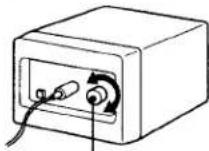
LEVEL
Notes
- The infrared ray will not penetrate walls or opaque glass. Therefore, the transmitter must be placed "is sight" of the wireless speakers.
- Placing the wireless transmitter too far away from the wireless speakers may cause noise.
- Do not block the path between the wireless speakers and wireless transmitter. Otherwise, the speakers be noisy and enter stand by mode.
- Use only this transmitter. If you use some transmitters at the same time, interference occurs.
- If the sound from the wireless speakers is very soft or not clear, turn the wireless speakers towards the wireless transmitter.
- If you use this transmitter for a long time, it may become warm. This is not a malfunction.
Troubleshooting
No sound or only a very low sound level is heard from the speakers.
- Make sure the transmitter is securely connected to the input adaptor.
- Check that the speaker cords are connected properly.
- Check that the surround sound is turned on.
- Adjust the level of the rear speakers on the SA-VA100.
- Make use of the high level using LEVEL on the front panel of the input adaptor.
- Check the sound image balance with the TEST TONE feature (on the SA-VA100).
• The transmitter is too far from, or not aimed at the wireless speakers. - Remove any obstructions between the transmitter and the wireless speakers.



Brand : SONY
Model : SA-IF100
Category : Home Theater System