NMPRO-C32 - Flat Screen Mount Newstar - Free user manual and instructions

Find the device manual for free NMPRO-C32 Newstar in PDF.
Newstar NMPRO-C32 - Flat Screen Mount
📄 11 pages English EN Download 💬 AI Question 10 questions ⚙️ Specs
Notice Newstar NMPRO-C32 - page 1
Pick your language and provide your email: we'll send you a specifically translated version.
Product Type Flat screen wall mount
Brand Newstar
Model NMPRO-C32
Color Matte black
Construction Material Heavy-duty cold rolled steel
Compatible Screen Sizes 32 to 55 inches
VESA Mounting Patterns 75x75 mm, 100x100 mm, 200x100 mm, 200x200 mm
Weight Capacity 35 kg (77 lb)
Tilt Range -15° to +5°
Swivel Range 90° swivel
Wall Distance 2.5 to 5 cm low profile
Wall Plate Dimensions 40 x 30 cm
Product Depth 5 cm
Net Weight 2.1 kg (4.6 lb)
Power Supply None - passive mechanical mount
Cable Management Integrated cable clips and channels
Installation Type Fixed wall plate with sliding screen brackets
Security Features Locking latches and safety stop screws
Maintenance and Cleaning Wipe with dry cloth and tighten bolts periodically
Replacement Parts Spare VESA brackets and hardware kits available
Package Contents Wall plate, screen brackets, hardware kit, manual
Warranty 2-year limited warranty

Frequently Asked Questions - NMPRO-C32 Newstar

What screen sizes are compatible with the Newstar NMPRO-C32?
The Newstar NMPRO-C32 fits flat screens from 32 to 55 inches and supports VESA patterns up to 200x200 mm.
Can I tilt or swivel the mounted screen?
Yes, the mount offers -15° to +5° tilt to reduce glare and up to 90° swivel for flexible viewing angles.
Does the NMPRO-C32 include VESA adapter plates?
It includes sliding screen brackets that adapt to common VESA patterns including 75x75, 100x100, 200x100, and 200x200 mm. No extra adapter plates are needed.
What is the maximum weight capacity?
The mount safely supports up to 35 kg (77 lb). Always verify that your screen weighs less than this limit.
Can I install this mount on drywall?
Yes, use the supplied drywall anchors and follow the installation manual. For masonry or concrete, use suitable wall plugs.
How far from the wall will the TV sit?
The low profile design places the screen 2.5 to 5 cm (1 to 2 inches) from the wall, giving a clean, modern look.
Does the mount help with cable management?
Yes, integrated cable clips and channels keep HDMI and power cables organized behind the screen.
What tools do I need for assembly?
You will need a drill, socket wrench, spirit level, pencil, and drill bits. The hardware kit is included in the package.
How should I clean and maintain the mount?
Clean with a dry soft cloth and periodically check that all bolts remain tight and secure. Do not use abrasive cleaners.
Are replacement parts available for this mount?
Yes, Newstar offers replacement VESA brackets and hardware kits. Contact Newstar support with model NMPRO-C32.

User questions about NMPRO-C32 Newstar

0 question about this device. Answer the ones you know or ask your own.

Ask a new question about this device

Your email remains private: it is only used to notify you if someone answers your question.

No questions yet. Be the first to ask one.

Download the instructions for your Flat Screen Mount in PDF format for free! Find your manual NMPRO-C32 - Newstar and take your electronic device back in hand. On this page are published all the documents necessary for the use of your device. NMPRO-C32 by Newstar.

USER MANUAL NMPRO-C32 Newstar

NEOMOUNTS PRO

BY NEWSTAR

Technical line drawing of four mechanical assembly configurations with mounting brackets and vertical supports (no text or symbols)

MULTIPLE CEILING MOUNT

NMPRO-C12 (With fixed arms) (With fixed arm) NMPRO-C22
Technical line drawing of a mechanical assembly with two parallel plates and a central mounting bracket (no text or symbols)

Technical line drawing of a multi-tiered structural framework with vertical supports and mounting brackets (no text or symbols)

NMPRO-C32 NMPRO-C33 (With fixed arms)
Technical line drawing of a multi-layered mechanical assembly with mounting brackets and vertical supports (no text or symbols)

Pure diagram of three parallel rows of vertical supports with mounting brackets, no text or symbols present

WARNING

  • Be sure to read this entire manual thoroughly and you fully understand all the instructions and warning before attempting to begin your installation.
  • This products should only be installed by someone who has a basic knowledge of building construction installations and fully undestnd these instructions.
    • Always have someone assit you to lift and position your equipment.
  • Tighten screws and bolts firmly, but do not over tighten. Over tightening can damage the item and greatly reduce their ability to hold. Please refer to suggested torque values where applicable in these instructions.

Parts list (NMPRO-C12)

A1A2 A3A4
M5X15[IMAGE]X4M6X15[IMAGE]X4M8X15[IMAGE]X4∅6X∅6.2X1.5[IMAGE]X4

X2

B1B2B3B4B5B6
Open-wrenchX15mmX16mmX1M8X12X8∅16X∅8.2X1.5X8X8

X1

C1C2 C3C4 C5C6
M8x70X3∅6x∅8.2x1.5X12M8x60X1M8X4Lag boltX6AnchorX6

X1

Technical line drawing of a mechanical component with mounting holes and a central square feature (no text or symbols)

D3 X2 D4 X2 D5 680mm*2 D6 800mm*4 D7 X3 D8 X2 D9 M5 X4 D10 X4 D11 X1

Parts list (NMPRO-C22)

A1 A2A3 A4
M5X15M6X15M8X15
X4X4X4

X4

B1B2B3B4B5B6
Open-wrenchX15mm 3mmX1 X16mmM8X12X16∅16X38.2X1.5X16 X1X16 X16

X1

C1C2 C3C4 C5C6
M8x70X3∅6x∅8.2x1.5X12M8x60X1M8X4Lag boltX6AnchorX6

X2

Technical line drawing of a mechanical component with labeled sections D2 and X2 (no text or symbols beyond labels)

D8 D4 D6D5D3 D9 D10 D11 D12 X4 800mm*81000mm*2+480mm*4 X4X6X4 X4 X8 X2 X16 M5

Parts list (NMPRO-C32)

A1 A2A3 A4
M5X15M6X15M8X15∅6X06.2X1.5
X4X4X4X4

X6

B1B2B3B4B5B6
Open-wrenchX15mm 3mmX1 X16mmM8X12X24∅16X∅8.2X1.5X24 X24

X1

C1C2 C3C4 C5C6
M8x70X3∅6x∅8.2x1.5X12M8x60X1M8X4Lag boltX6AnchorX6

X3

Technical line drawing of a mechanical component labeled D2 and X3 (no text or symbols on the diagram itself)

D8 D4 D6D5D3 D9 D10 D11 D12 1000mm*6+480mm*2 X6X9X6X80mm*12 X3 X24 M5

Parts list (NMPRO-C33)

A1 A2 A3 A4
M5X15 M6X15 M8X15X4 X4 X4 X4∅6X∅ 2X1.5

X9

B1 B2B3B4B5 B6
Open-wrenchX1 X15mm3mm6mmM8X12X38 X38∅16X∅8.2X1.5X38

X1

C1C2C3C4C5C6
M8x70∅6x∅8.2x1.5M8x60M8Lag boltAnchor
X3X12X1 X4 X6 X6

X3

Technical line drawing of a mechanical bracket or mounting component (no text or symbols)

D4 X9 D5 D9 D10 1000mm*9+480mm*3 D6 800mm*12 D7 D8 X9 X9 M5 X6 X18 D11 X3 D12 X36

Installation

1 B6 D5

D12

3 3mm 1000mm 480mm 1000mm D9 D9 B6 D12 Lock on

D9 4 UP

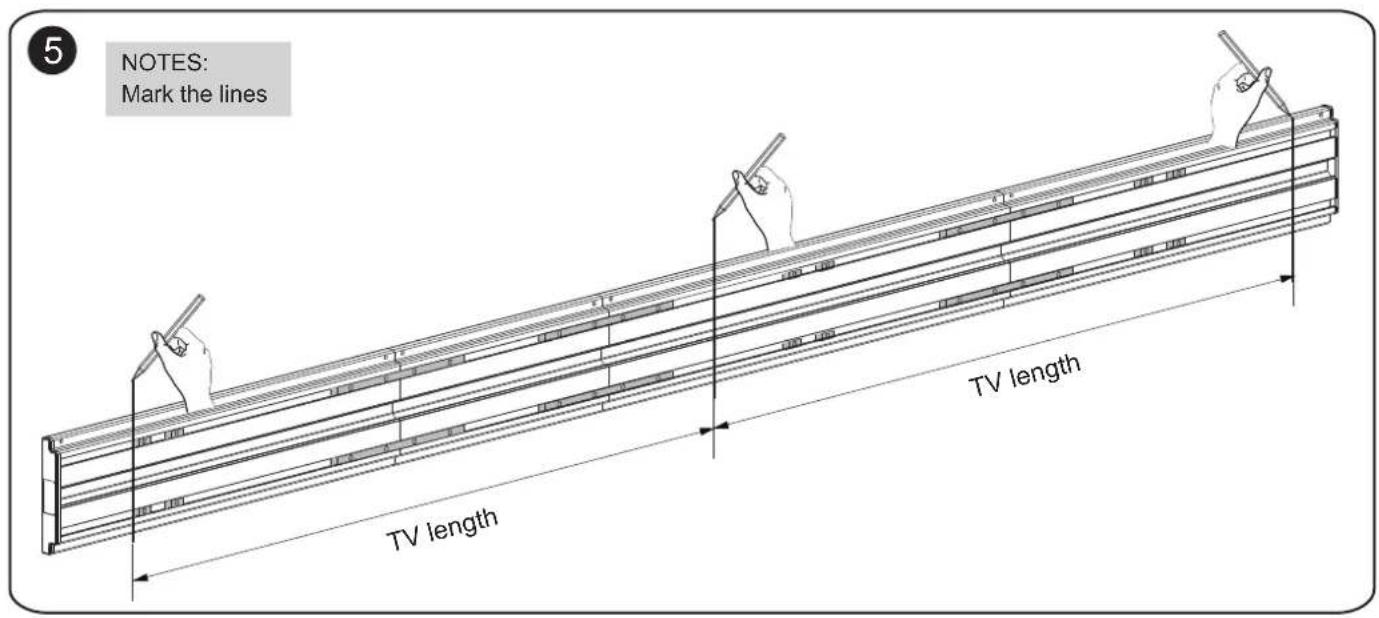
5 NOTES: Mark the lines TV length TV length

6 δmm

7
The marked line B6 D8 B5 B4

Pure electrical circuit lines without any symbols

8
NMPRO-C12
Technical line drawing of a mechanical assembly with a 680mm dimension label (no other text or symbols)

NMPRO-C22
480mm 1000mm 480mm TV length

NMPRO-C32
NMPRO-C33
PRO-C32 PRO-C33 1000mm 480mm 1000mm 1000mm TV length TV length

9
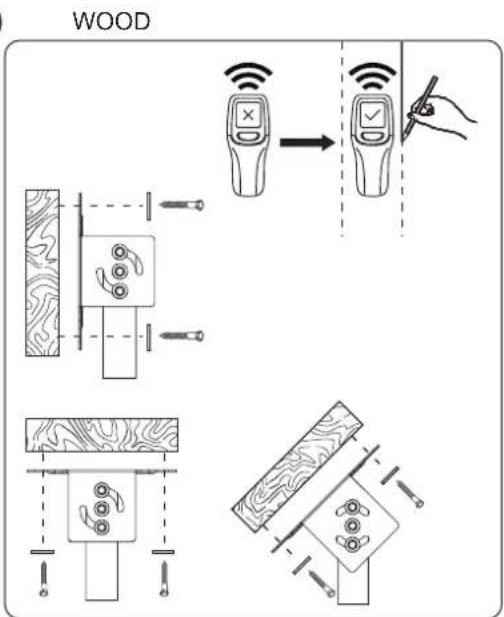
WOOD

C2 C5

BRICK OR CONCRETE C6 x6 C2 C5 70mm Ø10mm

10 C1 C2 C2 C4 6mm

D3 Cover the plastic caps

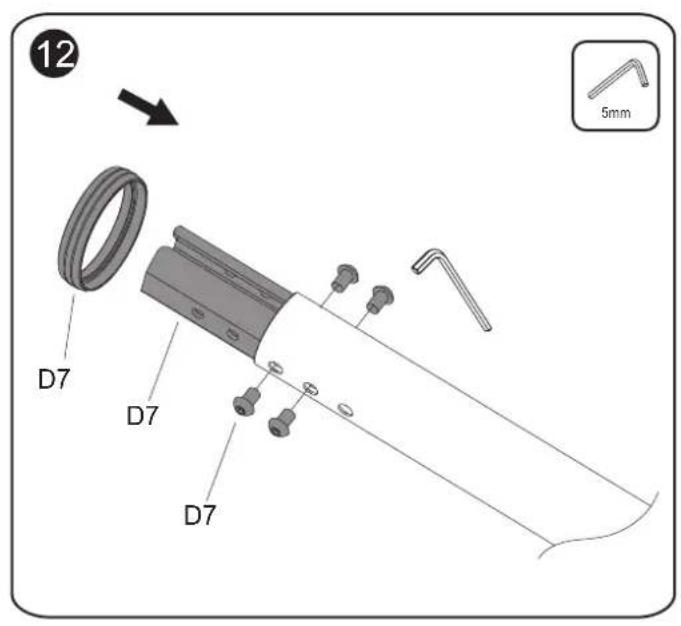
12 D7 D7 D7 5mm

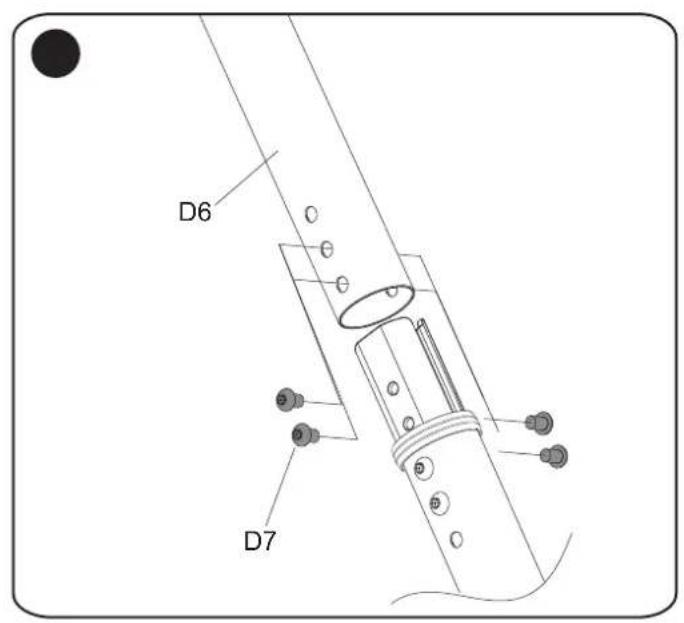
D6 D7

Modular design Extend after specific need NMPRO-EP80/ NMPRO-EP150 6mm NMPRO-EPCONECT

15 TV width NOTES: Mark the lines in same height on the pole

TV Width TV Length

17 TV Width TV Length

18 6mm

18
Cable Management C3 C4 D11

19 A1/A2/A3 A4

Diagram showing structural assembly with three vertical supports and a magnified view of a panel, likely illustrating a mechanical or architectural design.

18
Technical diagram of a multi-panel electrical or mechanical assembly with labeled components including wires and mounting brackets.

Simple line drawing of a pipe or pipe connection with a central oval component and two black lines (no text or symbols)

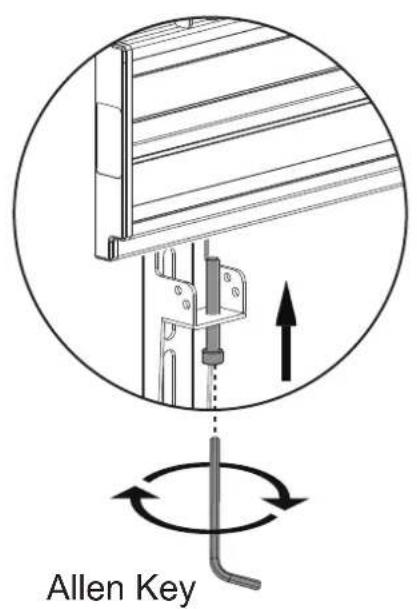
Allen Key

Technical diagram of a mechanical assembly with rotating components and directional arrows (no text or symbols)

Height adjustment 10mm

Manual assistant
Powered by Anthropic
Waiting for your message
Product information

Brand : Newstar

Model : NMPRO-C32

Category : Flat Screen Mount