PLASMA-W115 - Flat Screen Mount Newstar - Free user manual and instructions

Find the device manual for free PLASMA-W115 Newstar in PDF.
Newstar PLASMA-W115 - Flat Screen Mount
📄 5 pages English EN Download 💬 AI Question 10 questions ⚙️ Specs
Notice Newstar PLASMA-W115 - page 1
Pick your language and provide your email: we'll send you a specifically translated version.
Product Type Flat Screen Mount
Brand Newstar
Model PLASMA-W115
Compatible Screen Sizes 32 to 65 inches
VESA Hole Patterns 200x200, 300x300, 400x200, 400x400 mm
Maximum Load Capacity 50 kg (110 lb)
Tilt Adjustment -5° to +15°
Level Adjustment ±3°
Distance from Wall 25 to 45 mm
Material Cold-rolled steel
Finish Black
Mounting Type Wall-mounted
Installation Single stud mount
Box Contents Mount, screws, spacers, anchors, template, manual
Recommended Tools Drill, screwdriver, stud finder, spirit level
Cleaning and Maintenance Wipe with a soft, dry cloth
Safety Features Rugged steel construction, secure locking brackets

Frequently Asked Questions - PLASMA-W115 Newstar

How do I know if my TV is compatible with the PLASMA-W115 mount?
Check your TV's VESA hole pattern (typically 200x200, 300x300, 400x400) and its weight. The PLASMA-W115 supports VESA patterns up to 400x400 and a maximum load of 50 kg, so your TV must fall within these limits.
What tools are required for installation?
You will need a stud finder, a drill with appropriate masonry or wood bits, a screwdriver, and a spirit level. All mounting hardware is included.
Can I install this mount on drywall?
It is recommended to mount into solid wood studs or concrete. If using drywall, ensure the wall can support at least 4 times the combined weight of the mount and TV, and use appropriate anchors.
How do I adjust the tilt angle after installation?
Loosen the tilt adjustment screws on both sides, set the desired angle between -5° and +15°, then re-tighten.
Does the mount come with screws for my TV?
Yes, the package includes a selection of M4, M6, and M8 screws with spacers to accommodate different TV back panel sizes.
Is it possible to swivel the TV left and right?
The PLASMA-W115 is a fixed tilt mount; it does not provide side-to-side swiveling. It keeps the TV close to the wall for a sleek profile.
What is the minimum and maximum distance from the wall?
The mount sits between 25 mm and 45 mm from the wall, depending on spacer usage.
How much weight can this mount safely hold?
The maximum load capacity is 50 kg (110 lb). Always verify your TV's weight.
Can I level the TV after mounting?
Yes, there is a ±3° level adjustment to correct small unevenness.
How do I clean and maintain the mount?
Wipe with a soft, dry cloth. Avoid harsh chemicals. Periodically check the screws for tightness.

User questions about PLASMA-W115 Newstar

0 question about this device. Answer the ones you know or ask your own.

Ask a new question about this device

Your email remains private: it is only used to notify you if someone answers your question.

No questions yet. Be the first to ask one.

Download the instructions for your Flat Screen Mount in PDF format for free! Find your manual PLASMA-W115 - Newstar and take your electronic device back in hand. On this page are published all the documents necessary for the use of your device. PLASMA-W115 by Newstar.

USER MANUAL PLASMA-W115 Newstar

LCD/PLASMA TV WALLMOUNT

Illustration of a mechanical assembly with metal brackets and a black crack, no text or symbols present

22"-52" 35kgs 77lbs

Diagram of a mechanical assembly with a broken crack, showing no text or symbols

This product is designed to mount flat panel televisions weighing up to 77lb to a vertical wall. It allows you to effortlessly tilt your new television up or down without using tools.

Safety Warning: Be careful to make sure there are no missing or defective parts. Never use defective parts. Improper installation may cause damage or serious injury. Note The included hardware is for mounting on walls with wood stud construction. If you are uncertain about the nature of your wall, consult an expert. Please consult your hardware or installation professional for proper mounting to other types or walls. The supplied hardware is not for steel.

Woman sitting on a sofa watching television in a modern living room (no visible text or symbols)

What is included?

Newstar PLASMA-W115 - What is included? - 1

C. 4pcs

Newstar PLASMA-W115 - What is included? - 2

I. 6pcs

Newstar PLASMA-W115 - What is included? - 3

J.

Newstar PLASMA-W115 - What is included? - 4

D. 4pcs

Newstar PLASMA-W115 - What is included? - 5

M4x16 6pcs

K. 4pcs

Newstar PLASMA-W115 - What is included? - 6

E. 12pcs

Newstar PLASMA-W115 - What is included? - 7

M5x16 6pcs

Newstar PLASMA-W115 - What is included? - 8

F. 10pcs

Newstar PLASMA-W115 - What is included? - 9

M6x16 6pcs

Technical line drawing of a mechanical assembly with mounting brackets and a central cylindrical component (no text or symbols)

Newstar PLASMA-W115 - What is included? - 11

G. 2pcs

Newstar PLASMA-W115 - What is included? - 12

H. 1pc

B. 2pcs

B. 2pcs

A. 1pc

1. H C Option: H D

2. I J E 3~5mm

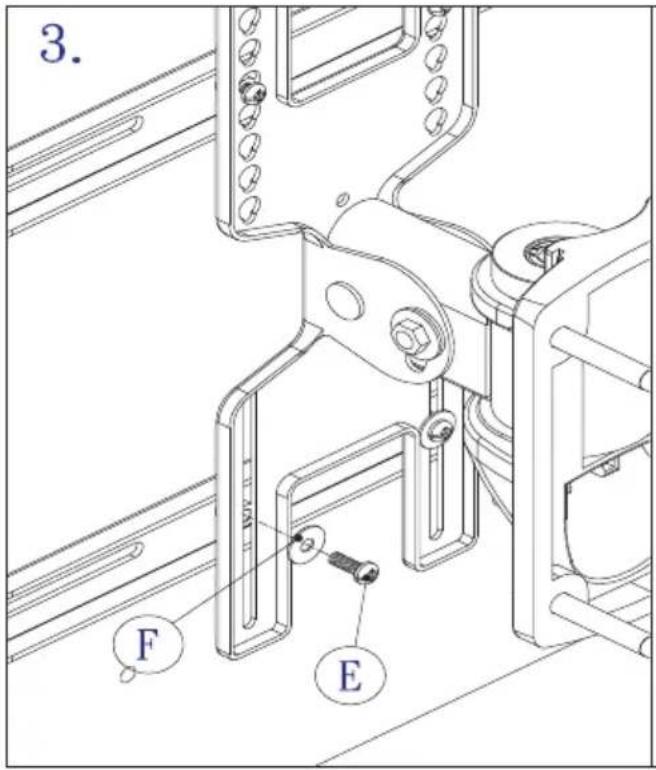
3. F E

Option: K F E

Adjust height F E

Adjust torque ... if necessary G

LCD/PLASMA TV WALLMOUNT

Illustration of a mechanical assembly with metal brackets and a crack, no text or symbols present

Table of contents Click a title to access it
Manual assistant
Powered by Anthropic
Waiting for your message
Product information

Brand : Newstar

Model : PLASMA-W115

Category : Flat Screen Mount