ACM2072TR - Washing machine Profilo - Free user manual and instructions
Find the device manual for free ACM2072TR Profilo in PDF.


Pick your language and provide your email: we'll send you a specifically translated version.
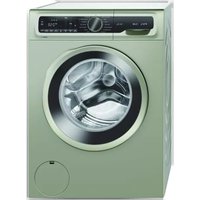
| Product Type | Washing Machine |
| Brand | Profilo |
| Model | ACM2072TR |
| Load Capacity | 7 kg |
| Maximum Spin Speed | 1200 rpm |
| Dimensions (H x W x D) | 85 cm x 60 cm x 60 cm |
| Net Weight | 65 kg |
| Energy Efficiency Class | A+++ |
| Water Consumption per Cycle | 45 L |
| Power Supply | 220-240 V, 50 Hz |
| Number of Washing Programs | 15 |
| Display Type | LED |
| Drum Material | Stainless steel |
| Door Type | Chrome glass door |
| Noise Level (Wash/Spin) | 60 dB / 75 dB |
| Special Programs | Quick Wash, Delicate, Wool, Cotton, Synthetics |
| Delayed Start | Yes |
| Child Lock | Yes |
| Water Leak Protection | Yes |
| Drum Cleaning Reminder | Yes |
| Maintenance | Clean detergent drawer and pump filter regularly |
| Safety Features | Anti-vibration system, door lock |
| Spare Parts Availability | Door seal, filter, pump, belt |
| Repairability | Modular design, easy access to components |
Frequently Asked Questions - ACM2072TR Profilo
How do I clean the detergent drawer?
Remove the drawer by pulling it out, rinse it under warm water, and use a soft brush to remove residue. Clean the recess with a cloth. Perform this maintenance task every few months.
What should I do if the washing machine doesn't drain?
Check the pump filter for blockages, make sure the drain hose is not kinked, and verify that the pump is not obstructed. Clean the filter regularly to avoid this issue.
How can I activate the child lock?
Press and hold the Child Lock button for 3-5 seconds. The indicator light will turn on. To deactivate, repeat the same procedure. This prevents accidental setting changes.
How do I run a drum cleaning cycle?
Select the Drum Cleaning program (or use 90°C cotton cycle), add a descaling agent or washing machine cleaner, and start the machine. Let it complete the cycle. Repeat monthly.
How can I reduce vibration during spinning?
Ensure the machine is level by adjusting its feet, remove all transport bolts, and do not overload it. Also, distribute laundry evenly inside the drum.
What does error code E01 mean?
E01 usually indicates a water supply issue. Check that the tap is open, the inlet hose is not kinked, and the water pressure is sufficient. Consult the manual for other codes.
How should I install the washing machine?
Place the machine on a hard, level surface. Keep a minimum 1 cm clearance on sides and 15 cm from the wall. Connect the water inlet hose and drain hose securely, then plug in.
How do I clean the door gasket?
Wipe the door seal with a damp cloth after each wash, and check for debris. Leave the door open slightly to allow air circulation and prevent mold.
Can I wash delicate fabrics with this machine?
Yes, use the Delicate program, which uses lower spin speeds and gentler action. Put small items in a laundry bag for extra protection.
Why does the laundry come out too wet after the spin cycle?
Check that the selected program has a sufficient spin speed, ensure the load is balanced, and verify that the drain filter is clean. Also, avoid overloading.
User questions about ACM2072TR Profilo
0 question about this device. Answer the ones you know or ask your own.
Ask a new question about this device
No questions yet. Be the first to ask one.
Download the instructions for your Washing machine in PDF format for free! Find your manual ACM2072TR - Profilo and take your electronic device back in hand. On this page are published all the documents necessary for the use of your device. ACM2072TR by Profilo.
USER MANUAL ACM2072TR Profilo

Manual assistant
Powered by Anthropic
Waiting for your message
Product information
Brand : Profilo
Model : ACM2072TR
Category : Washing machine