Daily Collection HD2599 - Toaster PHILIPS - Free user manual and instructions
Find the device manual for free Daily Collection HD2599 PHILIPS in PDF.


Pick your language and provide your email: we'll send you a specifically translated version.
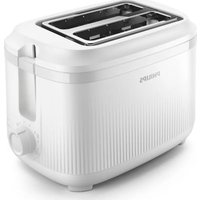
| Product Type | Toaster |
| Brand | Philips |
| Model | Daily Collection HD2599 |
| Color | White |
| Housing Material | Plastic |
| Number of Slots | 2 |
| Bread Slot Size | Standard |
| Controls | Lever with variable browning control dial |
| Browning Control | Variable dial (1-6) |
| Defrost Function | Yes |
| Reheat Function | Yes |
| Cancel Function | Yes (stop button) |
| Power | 900 W |
| Voltage | 220-240 V |
| Cord Length | 0.85 m |
| Dimensions (W × H × D) | 28 × 20 × 18 cm |
| Weight | 1.2 kg |
| Removable Crumb Tray | Yes |
| Auto Shut-off | No (manual lever pops up) |
| Safety Features | Cool-touch housing, non-slip feet |
| Cleaning | Wipe with damp cloth; empty crumb tray regularly |
| Accessories | None (manual only) |
| Warranty | 2 years |
Frequently Asked Questions - Daily Collection HD2599 PHILIPS
How do I use the Philips Daily Collection HD2599 toaster?
Plug in the toaster, place bread slices in the slots, set the browning control dial to your desired level, then press the lever down. The toaster will pop up when the toast is ready. You can press the Cancel button at any time to stop toasting.
Can I toast frozen bread with this toaster?
Yes, the HD2599 has a Defrost function. Simply place the frozen bread, select the defrost setting, and lower the lever. The toaster will adjust the toasting time to ensure evenly browned results.
How do I clean the toaster?
Always unplug the toaster and wait for it to cool down. Remove the crumb tray at the bottom, empty it, and wipe with a damp cloth. The exterior can be cleaned with a soft, dry cloth. Never immerse the toaster in water.
What safety precautions should I follow?
Do not use the toaster near water or with wet hands. Avoid covering the toaster while in use. Do not insert metal objects into the slots. The cool-touch housing helps prevent burns, but always supervise children.
What should I do if toast gets stuck in the toaster?
Unplug the toaster and let it cool completely. Gently shake the toaster upside down to dislodge the toast. Never use a knife or fork, as this can damage the heating elements and cause electric shock.
How can I reheat toast that has gone cold?
Use the Reheat function. Place the cold toast in the slots, press the Reheat button, and lower the lever. The toaster will warm the bread without over-browning it.
How do I achieve even browning?
Select the same bread thickness and freshness for both slices. Adjust the browning control dial to a middle setting first, then fine-tune based on your preference. Clean the crumb tray regularly to maintain even heat distribution.
Is the crumb tray removable and dishwasher safe?
Yes, the crumb tray is removable for easy cleaning. It is not dishwasher safe; wash it by hand with warm soapy water and dry it thoroughly before placing it back.
What is the power cord length?
The power cord is approximately 0.85 meters long. This allows flexible placement on your kitchen counter while keeping the toaster at a safe distance from water sources.
Does the toaster have auto shut-off?
The HD2599 does not have an automatic shut-off timer. However, the lever automatically pops up when the toasting cycle is complete. For safety, always unplug the toaster when not in use.
User questions about Daily Collection HD2599 PHILIPS
0 question about this device. Answer the ones you know or ask your own.
Ask a new question about this device
No questions yet. Be the first to ask one.
Download the instructions for your Toaster in PDF format for free! Find your manual Daily Collection HD2599 - PHILIPS and take your electronic device back in hand. On this page are published all the documents necessary for the use of your device. Daily Collection HD2599 by PHILIPS.
USER MANUAL Daily Collection HD2599 PHILIPS


Manual assistant
Powered by Anthropic
Waiting for your message
Product information
Brand : PHILIPS
Model : Daily Collection HD2599
Category : Toaster