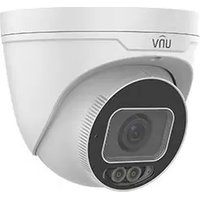
IPC3634SS-ADZK-I1 - Camera UniView - Free user manual and instructions
Find the device manual for free IPC3634SS-ADZK-I1 UniView in PDF.


Pick your language and provide your email: we'll send you a specifically translated version.
| Product type | IP security camera |
| Brand | UniView |
| Model | IPC3634SS-ADZK-I1 |
| Resolution | 4 MP (2560 x 1440) |
| Lens type | Fixed 2.8 mm |
| Night vision | IR LEDs up to 30 m |
| Power supply | PoE (802.3af) / 12V DC |
| Power consumption | Max 5 W |
| Protection rating | IP67 |
| Operating temperature | -30°C to 60°C |
| Main functions | Motion detection, H.265+ compression, two-way audio, microSD slot |
| Dimensions | 170 × 70 × 70 mm |
| Weight | 500 g |
| Maintenance and cleaning | Clean lens with a soft dry cloth; avoid water and solvents |
| Safety | Use a strong password and keep firmware updated |
| Spare parts and repairability | Spare parts available from manufacturer or authorized dealers |
| General information | Online manual and technical support available |
Frequently Asked Questions - IPC3634SS-ADZK-I1 UniView
How do I reset the camera to factory defaults?
Press and hold the Reset button for 10 seconds while the camera is powered on. The camera will reboot and restore all settings to factory defaults.
How can I access the camera remotely?
Set up port forwarding on your router or use the UniView P2P service via the mobile app. Configure DDNS for a stable connection.
What is the default IP address?
The factory default IP is 192.168.1.20. Use the UniView IP utility to discover the camera on your network.
Can I use the camera with a microSD card?
Yes, the camera supports local recording on a microSD card up to 256 GB. Insert the card into the slot and format it via the web interface.
How do I enable motion detection?
Go to the camera's web interface, select Motion Detection in the settings menu, draw detection zones, and set sensitivity. You will receive alerts on your phone.
What are the mounting instructions?
Use the included mounting bracket and screws. Install the camera on a solid wall or ceiling at a height of 2-3 meters. Adjust the angle for the desired field of view.
How do I update the firmware?
Download the latest firmware from the UniView website. Access the camera, go to Maintenance, and upload the file. Do not disconnect power during the update.
The camera is not showing video, what should I do?
Check the network connection, verify the IP address, and ensure the Power over Ethernet switch is working. Restart the camera and try a different browser.
Is the camera weatherproof?
Yes, the IPC3634SS-ADZK-I1 has an IP67 rating, meaning it is protected against dust and temporary immersion in water. It is suitable for outdoor installation.
Does the camera support two-way audio?
Yes, it has a built-in microphone and speaker. Enable two-way audio in the app to listen and talk through the camera.
User questions about IPC3634SS-ADZK-I1 UniView
0 question about this device. Answer the ones you know or ask your own.
Ask a new question about this device
No questions yet. Be the first to ask one.
Download the instructions for your Camera in PDF format for free! Find your manual IPC3634SS-ADZK-I1 - UniView and take your electronic device back in hand. On this page are published all the documents necessary for the use of your device. IPC3634SS-ADZK-I1 by UniView.
USER MANUAL IPC3634SS-ADZK-I1 UniView
Manual assistant
Powered by Anthropic
Waiting for your message
Product information
Brand : UniView
Model : IPC3634SS-ADZK-I1
Category : Camera