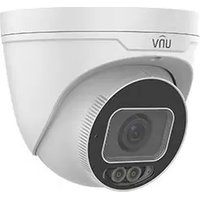
IPC3635SS-ADZK-I1 - Camera UniView - Free user manual and instructions
Find the device manual for free IPC3635SS-ADZK-I1 UniView in PDF.


Pick your language and provide your email: we'll send you a specifically translated version.
| Product Type | IP Camera |
| Model | IPC3635SS-ADZK-I1 |
| Brand | UniView |
| Resolution | 3 Megapixels (2048 x 1536) |
| Lens | 2.8mm Fixed Lens |
| Angle of View | 103° (Horizontal) |
| Night Vision | Up to 30m IR Distance |
| Power Supply | PoE (802.3af) or 12V DC |
| Power Consumption | Max 7W |
| Dimensions (W x D x H) | 80mm x 80mm x 190mm |
| Weight | 0.6 kg |
| IP Rating | IP67 |
| Operating Temperature | -30°C to +60°C |
| Video Compression | H.265, H.264, MJPEG |
| Main Functions | Motion Detection, Smart IR, WDR (120dB), Privacy Mask |
| Storage | MicroSD Slot (up to 256GB), NVR Support |
| Network Interface | RJ45 10/100Mbps |
| Maintenance | Clean lens with soft, dry cloth; check connections periodically |
| Safety | Do not expose to rain; install indoors or under eave |
| Spare Parts | Mounting bracket, screws, power adapter (sold separately if not included) |
Frequently Asked Questions - IPC3635SS-ADZK-I1 UniView
How do I reset the UniView IPC3635SS-ADZK-I1 camera to factory defaults?
Press and hold the reset button (located near the network port) for at least 10 seconds using a pointed object. The camera will reboot and restore factory settings.
Can this camera work without a PoE switch?
Yes, the camera supports 12V DC power supply. You can use a standard 12V power adapter (not included) to power the camera independently.
How do I access the camera remotely?
Connect the camera to your network via PoE or power. Use the UniView NVR or the UniView Discover software to find the camera IP address. Then open a web browser and enter the IP address to access the camera interface.
What is the maximum memory card capacity supported?
The camera supports microSD cards up to 256GB. Ensure the card is formatted as FAT32 or exFAT before use.
How far can the infrared night vision see?
The IR distance is up to 30 meters (98 feet) in total darkness. Actual range may vary depending on environmental conditions.
Can I use this camera outdoors?
Yes, the camera has an IP67 rating, meaning it is dust-tight and can withstand water immersion up to 1 meter for 30 minutes. It is suitable for outdoor use.
What is the field of view?
The camera has a horizontal angle of view of approximately 103° with the 2.8mm lens, providing a wide coverage area.
How do I update the camera firmware?
Download the latest firmware from the UniView support website. Access the camera web interface, go to Maintenance > Upgrade, and upload the firmware file. Do not power off during upgrade.
Can the camera record continuously?
Yes, continuous recording is possible when using a microSD card or network video recorder (NVR). You can set the recording schedule via the camera web interface.
What mobile app supports this camera?
UniView offers the 'UniView Pro' app for iOS and Android. You can use it to view live feed, playback recordings, and manage camera settings remotely.
User questions about IPC3635SS-ADZK-I1 UniView
0 question about this device. Answer the ones you know or ask your own.
Ask a new question about this device
No questions yet. Be the first to ask one.
Download the instructions for your Camera in PDF format for free! Find your manual IPC3635SS-ADZK-I1 - UniView and take your electronic device back in hand. On this page are published all the documents necessary for the use of your device. IPC3635SS-ADZK-I1 by UniView.
USER MANUAL IPC3635SS-ADZK-I1 UniView

Manual assistant
Powered by Anthropic
Waiting for your message
Product information
Brand : UniView
Model : IPC3635SS-ADZK-I1
Category : Camera