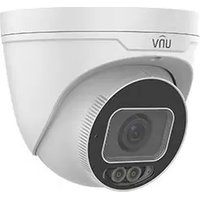
IPC3232SA-DZK - Camera UniView - Free user manual and instructions
Find the device manual for free IPC3232SA-DZK UniView in PDF.


Pick your language and provide your email: we'll send you a specifically translated version.
| Product Type | Outdoor PTZ IP Camera |
| Image Sensor | 1/2.8" Progressive Scan CMOS |
| Resolution | 2 MP (1920 x 1080) |
| Optical Zoom | 32x |
| Night Vision | IR up to 100 m |
| Video Compression | H.265, H.264, MJPEG |
| Pan & Tilt Range | 360° endless, -15° to 90° tilt |
| Power Supply | DC 12V or PoE (802.3af) |
| Power Consumption | ≤18 W |
| Dimensions | Φ150 x 200 mm |
| Weight | 1.2 kg |
| Weatherproof Rating | IP66 |
| Storage Support | MicroSD card (up to 256 GB), NVR |
| Audio | Built-in mic, audio input/output |
| Alarm Triggers | Motion detection, tampering, network disconnection |
| Environmental | -30°C to 60°C, humidity ≤95% |
| Cleaning | Wipe gently with a dry, soft cloth. Avoid using solvents. |
| Safety | Use only certified power adapters. Mount securely to prevent falls. |
| Spare Parts & Repairability | Contact authorized UniView service center for genuine parts. |
| Warranty | Standard 2-year warranty (may vary by region) |
Frequently Asked Questions - IPC3232SA-DZK UniView
How do I reset the camera to factory defaults?
Press and hold the reset button on the camera for about 10 seconds until the indicator blinks. Alternatively, you can reset via the web interface under Maintenance > Factory Default.
What is the maximum supported microSD card size?
The IPC3232SA-DZK supports microSD cards up to 256 GB. For reliable recording, use a high-endurance card.
Can I use PoE with this camera?
Yes, the camera supports PoE (802.3af) for both power and data over a single Ethernet cable. Alternatively, you can use a 12V DC adapter.
How do I access the camera remotely?
Download the UniView app or use the web browser. Ensure the camera is connected to the network, then add it by scanning the QR code or entering its IP address. Port forwarding may be required for remote access.
What is the night vision range?
The camera has IR LEDs with a range of up to 100 meters in complete darkness, providing clear black-and-white images.
Can I tilt the camera beyond 90 degrees?
The tilt range is -15° to 90°, so it cannot point straight down. However, the 360° endless pan allows full coverage.
Does the camera support audio?
Yes, it has a built-in microphone for audio capture and also supports external audio input/output via the terminal block for two-way communication.
How do I clean the camera lens?
Use a soft, dry microfiber cloth to gently wipe the lens. For stubborn dirt, lightly dampen the cloth with water. Do not use alcohol or abrasive cleaners.
What video compression formats are supported?
The camera supports H.265, H.264, and MJPEG. H.265 offers the best compression efficiency to save bandwidth and storage.
Is the camera suitable for outdoor use?
Yes, it has an IP66 weatherproof rating, meaning it is dust-tight and protected against heavy rain. Operating temperature range is -30°C to 60°C.
User questions about IPC3232SA-DZK UniView
0 question about this device. Answer the ones you know or ask your own.
Ask a new question about this device
No questions yet. Be the first to ask one.
Download the instructions for your Camera in PDF format for free! Find your manual IPC3232SA-DZK - UniView and take your electronic device back in hand. On this page are published all the documents necessary for the use of your device. IPC3232SA-DZK by UniView.
USER MANUAL IPC3232SA-DZK UniView

Manual assistant
Powered by Anthropic
Waiting for your message
Product information
Brand : UniView
Model : IPC3232SA-DZK
Category : Camera