Sonaris - Scale Cardinal Detecto - Free user manual and instructions
Find the device manual for free Sonaris Cardinal Detecto in PDF.


Pick your language and provide your email: we'll send you a specifically translated version.
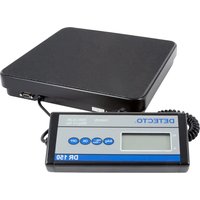
| Product Type | Digital Scale |
| Brand | Cardinal Detecto |
| Model | Sonaris |
| Category | Scale |
| Platform Material | Stainless Steel |
| Capacity | 150 kg / 330 lb |
| Readability | 0.05 kg / 0.1 lb |
| Platform Dimensions | 400 x 500 mm |
| Display | LCD with Backlight |
| Power Supply | AC Adapter or Rechargeable Battery |
| Battery Life | Up to 40 hours |
| Auto-Off | Programmable |
| Tare Function | Yes |
| Unit Options | kg, lb, oz |
| Calibration | External Calibration with Weights |
| Overload Protection | Yes |
| Operating Temperature | -10°C to 40°C |
| Net Weight | 12 kg |
| Gross Weight | 13.5 kg |
| Package Dimensions | 500 x 600 x 200 mm |
| Included Accessories | AC Adapter, Owner's Manual |
| Certification | OIML Class III |
| Waterproof Rating | IP65 |
| Repair | User-replaceable battery and fuses |
| Maintenance | Clean with damp cloth |
Frequently Asked Questions - Sonaris Cardinal Detecto
How do I calibrate the Cardinal Detecto Sonaris scale?
To calibrate, turn on the scale and press the CAL key (or hold the mode key for 3 seconds). Follow the on-screen prompts to place the required calibration weights on the platform. Ensure the scale is on a stable, level surface and warm up for 10 minutes before calibrating.
What does the tare function do on the Sonaris scale?
The tare function allows you to zero out the weight of a container or other item placed on the scale. Simply place the empty container on the platform, press the TARE button, and the display will return to zero. Then add the material you wish to weigh; the display will show only the net weight.
How can I switch between kilograms and pounds?
Press the UNITS key to cycle through the available weight units: kg, lb, and oz. The selected unit will appear on the LCD display. This feature allows you to weigh in your preferred unit without manual conversion.
Why does the display show 'OL' or 'Overload'?
The OL message indicates that the weight placed on the scale exceeds its maximum capacity (150 kg / 330 lb). Remove the excess weight immediately to prevent damage to the load cells. Do not exceed the rated capacity, as this may cause permanent calibration errors.
How should I clean and maintain the Sonaris scale?
Use a soft, damp cloth with a mild detergent to wipe the platform and body. Avoid abrasive cleaners, solvents, or high-pressure water jets. For IP65-rated models, you can rinse with water, but always dry the scale afterward. Do not immerse the indicator or electrical components.
Can the Sonaris scale be used in wet or dusty environments?
Yes, the scale features an IP65 protection rating, meaning it is protected against dust ingress and low-pressure water jets from any direction. This makes it suitable for food processing, industrial, and outdoor environments. However, avoid prolonged submersion and always disconnect the power before cleaning.
How do I replace the battery in my Sonaris scale?
Locate the battery compartment on the underside of the scale. Remove the screw and slide off the cover. Disconnect the old battery and connect the new rechargeable battery (6V 4.5Ah). Ensure the polarity matches, then reassemble. Charge the battery with the supplied AC adapter for a full charge before first use.
What is the maximum capacity and readability of the Sonaris scale?
The Sonaris model offers a maximum capacity of 150 kg (330 lb) with a readability of 0.05 kg (0.1 lb). This high resolution ensures accurate measurements for industrial and commercial applications, providing consistent results within 1/3000 of the capacity.
How do I set the auto-off timer to save power?
Press the MODE button to access the setup menu. Navigate to the Auto-Off option and select the desired timeout: 5, 10, 15, 30, or 60 minutes. If you want to disable auto-off, choose 'OFF'. The setting will be saved automatically and the scale will shut down after the specified idle period.
How can I ensure accurate weighing results with the Sonaris scale?
Place the scale on a stable, vibration-free surface and level it using the adjustable feet. Allow the scale to warm up for at least 5 minutes before use. Calibrate periodically with certified calibration weights. Avoid impacts or overloads, and keep the platform clean. Also, position the item centrally on the platform to prevent errors.
User questions about Sonaris Cardinal Detecto
0 question about this device. Answer the ones you know or ask your own.
Ask a new question about this device
No questions yet. Be the first to ask one.
Download the instructions for your Scale in PDF format for free! Find your manual Sonaris - Cardinal Detecto and take your electronic device back in hand. On this page are published all the documents necessary for the use of your device. Sonaris by Cardinal Detecto.
USER MANUAL Sonaris Cardinal Detecto
Manual assistant
Powered by Anthropic
Waiting for your message
Product information
Brand : Cardinal Detecto
Model : Sonaris
Category : Scale