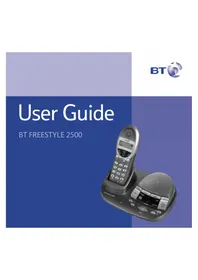
Freestyle 2500 - Telephone BT - Free user manual and instructions
Find the device manual for free Freestyle 2500 BT in PDF.


Pick your language and provide your email: we'll send you a specifically translated version.
| Product Type | Cordless Telephone (DECT) |
| Brand | BT |
| Model | Freestyle 2500 |
| Display | Monochrome LCD with backlight |
| Frequency Range | 1.88 GHz (DECT) |
| Range (Indoor) | Up to 50 meters |
| Range (Outdoor) | Up to 300 meters |
| Battery Type | 2 x AAA NiMH rechargeable |
| Talk Time | Up to 10 hours |
| Standby Time | Up to 100 hours |
| Charging Time | Approximately 15 hours |
| Phonebook Capacity | Up to 50 contacts |
| Caller ID | Yes |
| Hands-Free Speakerphone | Yes |
| Number of Ringtones | 10 polyphonic |
| Wall Mountable | Yes |
| Dimensions (Handset) | 170 x 55 x 30 mm |
| Dimensions (Base) | 100 x 80 x 60 mm |
| Weight (Handset) | 140 g |
| Power Supply | 220-240 V AC adapter, 9 V DC |
| Main Functions | Make/receive calls, redial, mute, intercom |
| Care and Cleaning | Wipe with a soft dry cloth; avoid liquids |
| Safety | Use only approved power adapter; keep away from water |
| Spare Parts and Repairability | Batteries replaceable; servicing by qualified personnel |
| General Information | 12-month warranty; user manual available online |
Frequently Asked Questions - Freestyle 2500 BT
How do I set up the BT Freestyle 2500 for the first time?
Place the handset on the base unit to charge for at least 15 hours before first use. Connect the base unit to the telephone line and power adapter, then insert the batteries into the handset. After charging, the handset will register automatically.
How can I change the battery in the handset?
Slide off the battery compartment cover on the back of the handset. Remove the old batteries and insert two new AAA NiMH rechargeable batteries, ensuring correct polarity. Replace the cover and charge the handset.
Why is there no signal or dial tone?
Check that the handset is properly charged and within range of the base unit. Ensure the telephone line is connected securely. If the problem persists, try resetting the phone by disconnecting the power and line for a few seconds.
How do I store contacts in the phonebook?
Press the phonebook button, then select 'Add New Entry'. Enter the number using the keypad, then the name. Press the save button to confirm. You can store up to 50 contacts.
How do I use the caller ID feature?
When you receive a call, the number and name (if available) will appear on the display. Unanswered calls are stored in the call log. You can scroll through the call log by pressing the 'Calls' key.
Can I adjust the ringtone volume?
Yes, while in idle mode, press the volume up/down keys on the side of the handset to adjust the ringtone volume. You can also select from 10 different ringtones via the menu settings.
How do I set the date and time?
Press the menu button, select 'Settings', then 'Date & Time'. Enter the current date and time using the keypad and confirm. This date and time will show on the display and on caller ID records.
Is the BT Freestyle 2500 hands-free compatible?
Yes, the handset has a built-in speakerphone. During a call, press the speakerphone button to activate hands-free mode. You can continue talking while the handset is placed on a table.
How do I clean and maintain the telephone?
Use a soft, slightly damp cloth to wipe the handset and base. Avoid using abrasive cleaners or submerging the device in water. Ensure the charging contacts are dry to prevent corrosion.
Can I expand the system with additional handsets?
Yes, the Freestyle 2500 supports the registration of up to 5 additional handsets (if they are DECT compatible). To register a new handset, place it in pairing mode and follow the base unit's registration procedure described in the manual.
User questions about Freestyle 2500 BT
0 question about this device. Answer the ones you know or ask your own.
Ask a new question about this device
No questions yet. Be the first to ask one.
Download the instructions for your Telephone in PDF format for free! Find your manual Freestyle 2500 - BT and take your electronic device back in hand. On this page are published all the documents necessary for the use of your device. Freestyle 2500 by BT.
USER MANUAL Freestyle 2500 BT



Manual assistant
Powered by Anthropic
Waiting for your message
Product information
Brand : BT
Model : Freestyle 2500
Category : Telephone