
Freestyle 70 - Telephone BT - Free user manual and instructions
Find the device manual for free Freestyle 70 BT in PDF.


| Product Type | Corded Telephone |
| Brand | BT |
| Model | Freestyle 70 |
| Category | Telephone |
| Display | LCD with backlight |
| Dimensions (W x D x H) | 200 x 220 x 70 mm (approx) |
| Weight | 850 g (approx) |
| Power Supply | Mains AC adapter (9V DC) |
| Backup Batteries | 2 x AAA (for clock/memory) |
| Dialling | Tone and pulse selectable |
| Caller ID | Yes, with 50 number memory |
| Answering Machine | Digital, up to 15 minutes recording |
| Speakerphone | Yes, full duplex |
| Phonebook | 50 names and numbers |
| Memory Keys | 10 redial/memory keys |
| Ringer Volume | Multi-level control |
| Handset | Corded, coiled, with hearing aid compatibility |
| Wall Mountable | Yes |
| Maintenance | Clean with soft dry cloth |
| Safety | Use only supplied adapter, keep dry |
| Repair | No user-serviceable parts inside, return to qualified service |
| Spare Parts | Handset cord, line cord, power adapter |
Frequently Asked Questions - Freestyle 70 BT
User questions about Freestyle 70 BT
0 question about this device. Answer the ones you know or ask your own.
Ask a new question about this device
Download the instructions for your Telephone in PDF format for free! Find your manual Freestyle 70 - BT and take your electronic device back in hand. On this page are published all the documents necessary for the use of your device. Freestyle 70 by BT.
USER MANUAL Freestyle 70 BT
Freestyle 70

User Guide
This equipment is not designed for making emergency telephone calls when the power fails. Alternative arrangements should be made for access to emergency services.
At a glance Handset
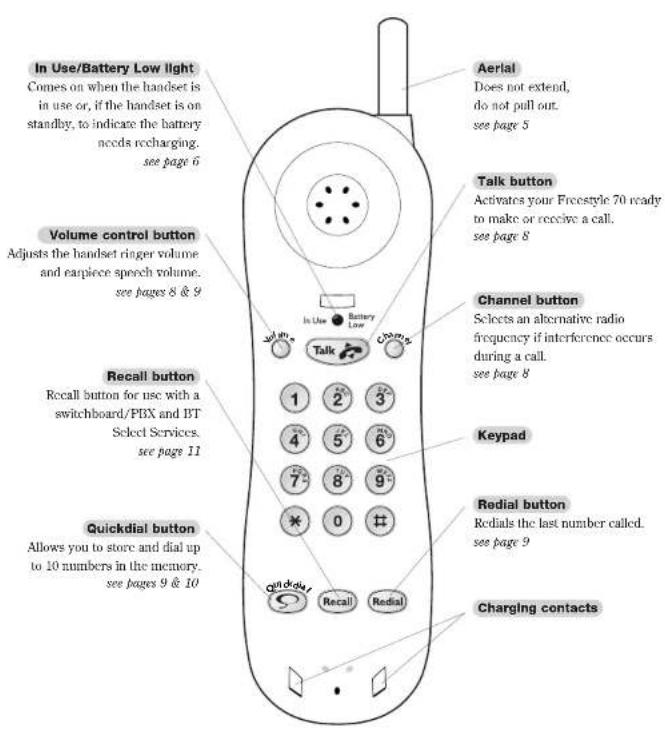
At a glance Base unit

Contents
At a glance 1
Introduction 4
Setting up 5
Safety instructions 7
Using your Freestyle 70
telephone 8
Help and advice 12
Technical information 14
Maintenance 16
Wall mounting 17
Index 19
Introduction
Your Freestyle 70 is designed for ease of use and made to the high standards set by BT.
Thank you for making the right choice. You can expect your Freestyle 70 to provide many years of quality service. Please read the instructions carefully before use and keep this user guide for future reference.
For your records
| Date of purchase: |
| Place of purchase: |
| Serial number:(on the underside of the base unit) |
| Purchase price: |
For warranty purposes, proof of purchase is required, so please keep your receipt.
EMERGENCY CALLS
The emergency services can be contacted in the UK by dialling 999. You may also dial 112, which is valid in any country that is a member of the European Community.
As the Freestyle 70 is a mains-powered cordless telephone, you may not be able to make emergency calls in certain situations:
- If there is severe radio interference.
- If the handset battery fails.
- If there is a power cut.
If your Freestyle 70 is connected to a PBX (switchboard), you may have to dial an access number before 999 to contact the emergency services.
Some switchboards cannot dial out during a power failure.
Unpacking your Freestyle 70
Check that your Freestyle 70 is complete. When you unpack, you should have:
•Freestyle 70 handset.
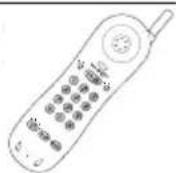

• Freestyle 70 base unit with telephone line cord attached.
• Mains power adaptor plug.
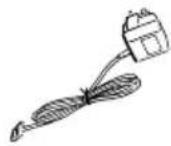
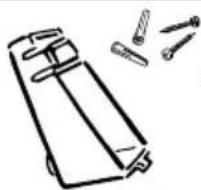
• Wall mounting bracket with screws.
CUSTOMER HELPLINE
If you have problems with your phone, call the Freestyle 70 Helpline Service on 0845 7697146.
ELECTRICAL STORM WARNING
1 During periods of electrical storm, you are advised to disconnect your apparatus because damage may occur.
2 If a fault occurs during the 12-month warranty period and it is due to accidental or wilful damage (including lightning and electrical damage), BT will not replace or repair free of charge.
Setting up
Follow these steps to set up your Freestyle 70 ready for use.
1Handset aerial
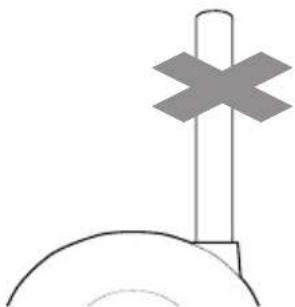
Your Freestyle 70 uses a compact aerial which does not pull out.
2 Check your BT socket
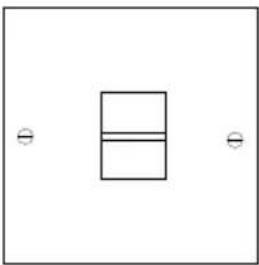
If you do not have a modern-style telephone socket, call Freefone 0800 800 150 and ask for a BT engineer to come and fit the correct socket. This is a chargeable service.
3 Plug the mains adaptor cord into the back of the base unit

WARNINGS
1 Your Freestyle 70 should not be fitted in wet or damp conditions, for example in a bathroom. Also, the handset should not be left out in the rain.
2 There is a slight chance that your phone could be damaged by an electrical storm. We recommend that you unplug the base unit from the mains during storms.

Connect the base unit three-pin adaptor to a power socket

When the power is switched on at the mains, the red POWER light on the base unit will light up.
MAINS POWER ADAPTOR
The Freestyle 70 must only be used with the adaptor supplied.
Using any other adaptor will result in non-compliance with EN60950:1992, and will invalidate the approval given to this apparatus.
⑤ Charge the handset
When you first use your Freestyle 70, the rechargeable battery in the handset needs charging for 24 hours.
Make sure you have connected your Freestyle 70 to the mains power supply; see steps 3 and 4.
Make sure the red POWER light is on.
Place the handset on the base unit, ensuring the contacts are touching. The red CHARGING light comes on.
The charging light will remain constantly lit while the handset is placed on the base unit.


PLEASE NOTE
When fully charged and in good condition, the handset battery will provide up to 7 hours continuous talk time or 72 hours standby.
If the handset battery is running low, the IN USE/BATTERY LOW light will flash every 10-15 seconds.
In Use

Battery Low
If you are making a call and the handset battery is running low, the phone will beep every 10-15 seconds.
Place the handset on the base unit to recharge.
BATTERY CARE
The battery cannot be overcharged. However, leaving the handset on the base unit all the time can deteriorate a rechargeable battery. To get the longest possible life from your battery, take the handset off the base unit for a few hours each day.

Plug the phone into the BT socket


Extend the base unit telescopic aerial
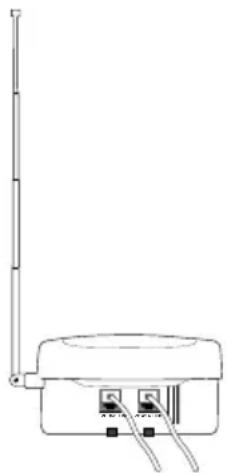
Extend the base unit telescopic aerial on your Freestyle 70 (as shown above) to ensure the best possible signal and reception.

To plan the location of the base unit
Your Freestyle 70 works by sending and receiving radio signals between the base unit and the handset.
The strength of the signal depends on where you site the base unit and how the aerial is deployed.
The higher the base unit is located, the better. An upstairs room is ideal.
The following points should be considered:
- It should be within easy reach of a mains socket and a telephone socket. A new-style telephone socket is needed for this product. If you do not have one, call us on Freefone 0800 800 150.
- Try to avoid locations near metallic obstructions or electrical appliances, such as TV sets, fridges, computers, fluorescent lights, radiators, metal pipes and metal window frames.
- The Freestyle 70 can be wall mounted by using the bracket and screws supplied; see page 17.
Your Freestyle 70 is now ready for use
Safety instructions

Use only the power adaptor supplied and the handset battery pack supplied.
There is a slight chance that your phone could be damaged by an electrical storm. We recommend that you unplug your Freestyle 70 from the mains power and telephone line socket during storms.
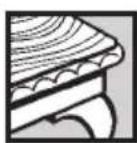
The Freestyle 70 base station, handset and charging units produce a small amount of heat during use. Therefore, we advise against placing these products on antique, veneered or wooden surfaces as damage may occur.

Do not use your Freestyle 70 in damp, humid conditions such as bathrooms.

Do not expose the equipment to fire or water.
Using your Freestyle 70 telephone
Making and receiving calls
To make a call
Press the buttons in the order shown:
Lift the handset off the base unit.

Press the TALK button. The TALK light comes on. The POWER / IN USE light on the base unit flashes.
Listen for the dialling tone.
KEYPAD
Dial the number you want.
PLEASE NOTE
If you do not hear a dialling tone after pressing the TALK button, wait a few seconds. On a few exchanges, there may be a delay.
To end a call
Press the TALK button.
Or
Replace the handset on the base unit.
To receive a call
When the phone rings:
If your handset is on the base unit, simply pick it up to answer the call.
Or

If your handset is off the base unit, press the TALK button to answer the call.
PLEASE NOTE
The handset range is up to 200 metres from the base unit in ideal conditions. If you start to go out of range while using the phone, you will hear warning beeps. If you do not come back in range, your call will be disconnected.
PLEASE NOTE
An Inductive Coupler has been built into the handset to improve sound quality for people using hearing aids. Switch your hearing aid to T and adjust the position of the handset until you get the best reception.
To use the channel button
Your Freestyle 70 automatically scans the available radio channels for quality of reception, and selects the best one to use.
If you experience interference during your call, press the CHANNEL button to select a different channel.

To adjust the handset ringer volume
When the handset is not in use you can adjust the ringer volume.
The handset ringer volume has 3 settings, HIGH, LOW and OFF.
To switch the ringer volume to OFF, press and hold the VOLUME button until you hear a confirmation beep.
The Freestyle 70 is pre-set to HIGH.
To change the volume on the handset press and release the VOLUME button.
On each press you will hear a sample ring.


To adjust the speech volume
During a conversation you can adjust the volume of the incoming caller's voice, by pressing and releasing the VOLUME button on the handset.
It has 2 settings, High, and Low.
Last number redial
Freestyle 70 remembers the last number called and enables easy redialling.
To redial the last number called

Press the TALK button and wait for a dialling tone.

Press the REDIAL button. The number is dialled automatically.
PLEASE NOTE
If the length of the last number called is more than 32 digits, then the whole number will not be redialled.
If REDIAL is not the first button pressed in sequence, it will then function as a PAUSE button.
Using the memory to store and dial numbers
Your Freestyle 70 handset can store up to ten separate phone numbers in the memory.
You can then dial each number by pressing just two buttons.
To store a number in the memory


Press the QUICKDIAL button.
Press one of the 0-9 buttons to set the location code under which the phone number will be stored.
Dial the number you want to store. A maximum of 20 digits can be stored in each location.

Press the QUICKDIAL button. You hear a confirmation beep. The number is stored.

Repeat these steps for any other numbers you want to store, using a different 0-9 location code for each one.
PLEASE NOTE
Storing a number in the memory automatically overwrites any previous number stored under the same location code.
Stored numbers can include switchboard and network services that use the * and # buttons as well as PAUSE and RECALL functions.

Use the handset's Quickdial directory label to keep a record of which 0-9 location code you have used for each number.
You can take out the label by removing the handset battery compartment cover and sliding out the label's clear plastic cover.
To dial a memory number

Press the TALK button.

Press the QUICKDIAL button.

Press the 0-9 location code under which the number you want is stored. The number is dialled automatically.
To store a number of more than 20 digits

Press the QUICKDIAL button.
Press one of the 0-9 buttons to set the location code under which your phone number will be stored.

Dial the first 20 digits.

Press the QUICKDIAL button. You hear a confirmation beep. The number is stored.

Press the QUICKDIAL button again.

Press another 0-9 button to select a second location code under which to store the remaining digits.

Dial the remaining digits.

Press the QUICKDIAL button. You hear a confirmation beep. The rest of the number is stored.
To dial a stored number of more than 20 digits

Press the TALK button.

Press the QUICKDIAL button, then the first 0-9 location code number. The number begins dialling automatically.


When the first part of the number has been dialled press the QUICKDIAL button again, then the second 0-9 location code number. The rest of the number is dialled.
PLEASE NOTE
You can mix manual and memory dialling as required. For example, you can dial the area code 0181 380 from the memory and then complete the number manually.
To change a stored number
Any existing number stored in the memory can be overwritten by entering a new number under the same location code. Simply follow the steps shown in 'To store a number in the memory', page 9.
To clear a stored number

Press the QUICKDIAL button.
Press the 0-9 location code.
Press the QUICKDIAL button again.
You hear a confirmation beep.
Paging the handset
You can page the handset from the base unit to let the handset user know they are wanted. You cannot hold a conversation between the base unit and the handset.
To page the handset

Press the PAGE button on the base unit. The handset will ring.
Please note, when the handset ringer volume is set to OFF the handset will not ring.
Your Freestyle 70 automatically returns to standby after approximately one minute.
You cannot page the handset while it is being used on a call.
An incoming call will override a page call and the handset will ring as normal.
To set the dialling mode

Press the QUICKDIAL button during standby mode.

Press the * button.

Press 1 for Tone dialling.

Press 2 for Pulse dialling.

Press the QUICKDIAL button to finish the setting (you will hear a confirmation tone).
If no instruction is received during this process within 8 seconds, there will be a beep and the process will be cancelled before returning to standby mode.
To switch from Pulse to Tone dialling during a call
If you are connected to a pulse dialling exchange, you can still use services such as phone banking that require tone dialling.
KEYPAD
Call the telephone number you require in pulse mode as usual.

When you have been connected, press the ✠ button on the keypad to set your telephone to tone dialling for the duration of the call.
When you hang up, your Freestyle 70 will automatically switch back to pulse dialling.
To insert a pause
With some switchboards, after dialling the access code you may have to wait for a moment while the switchboard picks up an outside line. If so, press the REDIAL button to insert a pause before keying in the telephone number.

To use the recall button

You may need to use the RECALL button if you are connected to a switchboard/PBX (Private Branch Exchange), contact your PBX supplier for further information. The RECALL button, when set to time break recall, is also used for BT Select Services.
Help and advice
If you have any problems using your Freestyle 70, this section will give you the most common, easy-to-follow solutions.
Telephone problems Possible cause Solution
| No dialling tone.Telephone will not dial out.Telephone cannot receive calls.Beeps six times and drops calls. | Telephone not connected to telephone line.Mains disconnectedHandset battery is discharged. | Replace the handset on the base unit for 10 seconds and try again.If this does not work, disconnect the handset battery from the handset for 10 minutes.Plug the telephone into the telephone line.Connect the mains power supply.Place the handset on the base unit and recharge it for 24 hours ensuring the CHARGING light is on. |
| You have a dialling tone but the telephone will not dial out. | You may be trying to use tone dialling on a pulse dialling exchange.You are connected to a switchboard/PBX and are not dialling the access code. | See page 11 to switch from tone to pulse diallingUse the switchboard/PBX access code. |
| Handset does not ring.No lights on handset. | Handset battery is discharged. Place the handset on the base unit and recharge it for 24 hours. | |
| Handset does not ring, a light shows on the handset. | The handset ringer may be set to OFF.Check the REN (see page 14). If you connect too many telephones or devices to your line they may not all operate correctly.If your telephone is connected to an extension socket, it may have been connected incorrectly. | Increase the handset ringer volume.If the REN exceeds 4 disconnect one or more telephones or devices.Check with your telephone engineer that the extension socket has been installed correctly. |
Telephone problems Possible cause Solution
| • Callers are faint.• Interference.• Buzzing.• Whooshing. | The base unit telescopic aerial is not extended as high as possible.You are moving out of range.Radio channel interference. | Extend the base unit telescopic aerial as far as possible.Move closer to the base unit.Press the CHANNEL button on the handset, to select a clearer channel. |
| • Echoing. | Radio channel interference. | Press the CHANNEL button on the handset, to select a clearer channel. |
| • Tinniness. | The base unit or the handset are too close to electrical equipment or metal obstructions. | Relocate the base unit or move around with the handset until reception improves. |
| • No Quickdial store. | You may be trying to store the number with the TALK light on. | Ensure that the TALK light is off before storing the number. |
| • No Charging light on the base unit. | Dirty contacts on base unit or handset. | Clean the contacts with a dry cloth. Heavy soiling can be removed with a pencil eraser. |
NEED MORE HELP?
Call the BT Cordless Phone Helpline on Lo-call 0845 7697146 where fully trained staff can help you from 9.00am to 5.30pm Monday to Friday (calls charged at local BT rate).
Technical information
Approval for use
Your Freestyle 70 is tested and approved for connection to public networks, provided it is used in accordance with the guidelines in this user guide.
You may connect it:
- To direct exchange lines.
- To extensions with new plug and socket arrangements provided with these direct exchange lines.
- To compatible switchboards.
You may NOT connect it:
- To shared service (party) lines.
- As an extension to a payphone.
This phone is designed for UK use only. Using it abroad may violate local radio laws.
The base unit is intended for use when powered from the 9V mains adaptor supplied, which conforms to EN60950. Any other usage will invalidate the approval given to this apparatus if, as a result, it ceases to comply with EN60950.
Environment
Your Freestyle 70 should be kept free of dust, moisture, high temperature and vibration, and should not be exposed to direct sunlight. Do not stand it on carpets or other surfaces which generate fibres, or place it in locations which prevent the free flow of air over its surfaces.
WARNING
The apparatus is only designed to be operated in a normal office or domestic environment where the relative humidity does not exceed 60%. It should not be used in bathrooms or near water.
How many phones can you have?
All items of telephone equipment have a Ringer Equivalence Number (REN), which is used to calculate the number of items which may be connected to any one telephone line. Your Freestyle 70 has a REN of 1. A total REN of 4 is allowed. If the total REN of 4 is exceeded, the telephones may not ring. With different telephone types there is no guarantee of ringing, even when the REN is less than 4.
Connecting to a switchboard
Your Freestyle 70 may be connected to compatible switchboards. If in doubt, your switchboard supplier or maintainer should be able to offer help. Advice on connection to BT switching systems can be obtained by dialling BT on 152.
If you do not have a compatible switchboard, it cannot be guaranteed that your Freestyle 70 will operate correctly under all possible conditions of connection.
Call security
Your Freestyle 70 has its own digital security code that prevents other cordless phone owners from using your phone line. This ensures that you are charged only for calls using your phone. However, all approved cordless phones use radio signals to communicate between the base unit and cordless handset units. It is therefore possible that your conversations could be overheard by other people, on their cordless phones, or on radios that use the same radio frequencies.
As this problem applies equally to all similar cordless phones currently available in the UK, call privacy cannot be guaranteed. However, the security coding prevents unauthorised use of your line.
In the unlikely event of your Freestyle 70 picking up conversations from other cordless phones being used nearby, try changing channels using the CHANNEL button on the handset.
Transmission frequencies
This cordless telephone has been designed to operate on radio frequencies which have been assigned to the exclusive use of cordless telephones. As the use of cordless telephones becomes more widespread, the quality of service obtained from this apparatus may lessen.
Transmission frequencies of available channels
| Channels Base Unit Tx Handset Tx Freq./MHz Freq./MHz |
| 1 31.0375 39.9375 |
| 2 31.0625 39.9625 |
| 3 31.0875 39.9875 |
| 4 31.1125 40.0125 |
| 5 31.1375 40.0375 |
| 6 31.1625 40.0625 |
| 7 31.1875 40.0875 |
| 8 31.2125 40.1125 |
Safety advice
Don't use your Freestyle 70 in the open air during thunderstorms. Unplug it from the telephone line and the mains socket when there are storms in your area.
Don't use your Freestyle 70 outdoors in the rain, or handle it with wet hands.
Don't install the base unit near a sink, bath or shower. Electrical appliances can cause serious injury if used when you are wet or standing in water.
Don't install the base unit where the various leads can be tripped over or walked on. This may cause injury, or damage to the leads and your Freestyle 70.
In the event of a power failure
In the event of a mains power failure you will not be able to make or receive calls from your Freestyle 70. Alternative arrangements should be made for access to emergency services.
Guarantee
Your Freestyle 70 is under guarantee for a year, provided that:
- The goods have only been used for their intended purpose, and have not been subjected to misuse, or been wilfully or accidentally damaged.
- The goods have not been tampered with or repaired by anyone other than BT, its staff or agents.
If you are having problems with your Freestyle 70, you can contact the BT product helpline on Lo-call 0845 7697146 where fully trained staff can help you from 9.00am to 5.30pm Monday to Friday.
If the unit is faulty within the guarantee period, return it with proof of purchase to your supplier, for repair or replacement.
If your Freestyle 70 needs repair outside the guarantee period, take the complete Freestyle 70 to any BT shop for forwarding to the repair department (there will be a carriage charge for this service).
Alternatively you can call the repair centres on 01325 304346 or 01672 564444 between 9.00am and 4.30pm, Monday to Friday.
The terms of this guarantee do not affect your statutory rights.
Maintenance
Installing a handset battery pack and recharging
The handset battery compartment is located at the back of the handset at the lower end.
To change the handset battery pack
Replacing the handset on the base unit to recharge overnight should keep the Freestyle 70 operative for normal use. In time the handset battery pack will no longer hold a sufficient charge and should be replaced.
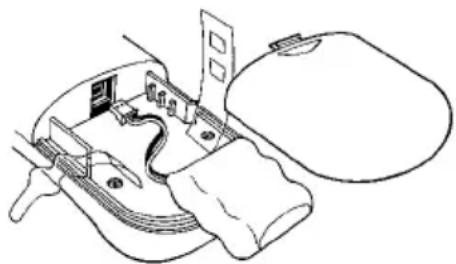
- Firmly hold the handset in both hands with the back towards you and the bottom end away from you.
● Push the depression in the battery compartment cover, inward and away from you with both thumbs, to remove it. - Undo the plastic belt securing the battery pack.
- Remove the old battery pack by unplugging the small white plug that connects it to the handset.
- Insert the small white plug of the new battery pack. (If you look at the shape of the plug and socket you will see that it can only be inserted one way).
-
Place the battery pack in the recess, secure it with the plastic belt and refit the compartment cover.
-
Replace the handset on the base unit and charge for a full 24 hours.
● The battery pack must be recycled or disposed of properly. - Do not burn or puncture as it could release toxic material which may cause injury.
Care of rechargeable battery pack
- When you first setup the Freestyle 70, or replace the battery pack, the handset must be fully charged for 24 hours before use.
● To maintain optimum charge and battery condition, the handset should be allowed to fully discharge about every four months. - Dispose of Ni-Cad battery packs safely. Do not puncture or burn them. They contain toxic materials which could cause injury.
Cleaning the charging contacts
● Wipe the casing clean with a damp, not wet cloth.
- Check that the charging contacts on the base and the handset are clean. If necessary wipe them with a dry cloth.
- Do not use spray or abrasive cleaners as damage to the internal components or polished surfaces could result.
Spare parts for your Freestyle 70 are available from your BT shop or supplier, or you can contact us on Lo-call 0845 7697146 between 9.00am and 5.30pm Monday to Friday.
Wall mounting
Your Freestyle 70 can be wall-mounted by using the bracket provided. You can use the bracket as a template to mark where the screws should go into the wall.
Before you wall-mount your Freestyle 70, check that:
- the wall can support the weight of the base unit and handset.
- the position you choose leaves sufficient space so that the base unit (which is larger than the bracket) is clear of any obstruction on the wall, such as a shelf or cupboard. Room should be left so that the handset can be placed on charge without touching any obstructions.
- leave enough room for the aerial to be extended when wall mounted.

1 Drill 2 holes for the screws and insert the wall-plugs provided (if required).
2 Drive the screws into the wall, leaving about 4mm free on which to mount the bracket and base unit.
3 Make sure that the power supply and the telephone cables are connected to the base unit, then fit the cables into the channels on the bottom of the base unit.
4 Clip the bracket onto the base unit as shown below.
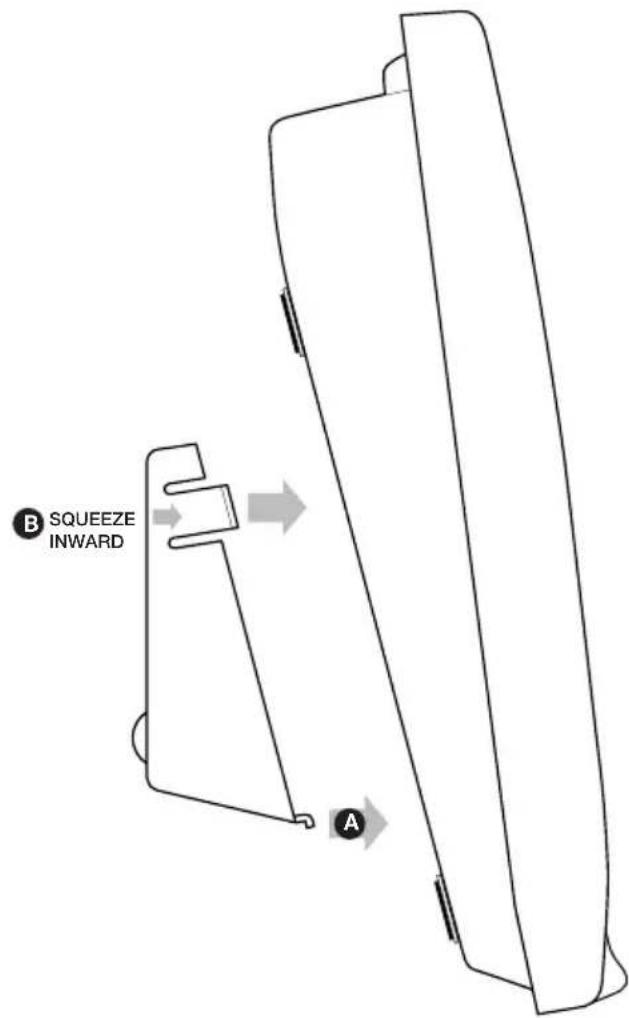
5

Attach the bracket and base unit by hooking them over the screws protruding from the wall.
Wall mounting template

Index
Adaptor 5
Aerial
base 6
handset 5
Base Unit 2
Battery
care 6, 16
changing 16
charging 5
Calls
ending 8
making 8
receiving 8
Channel button 8
Cleaning 16
Dialling mode 11
Directory label 9
Emergency calls 4
Ending a call 8
Environment 14
Guarantee 15
Handset 1
Help and advice 12, 13
Helpline 4
Inductive coupler 8
Location 6
Maintenance 16
Making calls 8
Memory/Quickdial numbers
change a number 10
clear a number 10
dialling 10
storing 9,10
Paging the handset 11
Pause 11
Power adaptor 5
Power failure 15
Pulse dialling 11
| Quickdial memory | |
| change a number | 10 |
| clear a number | 10 |
| dialling numbers | 10 |
| directory label | 9 |
| storing numbers | 9,10 |
Recall 11
Receiving calls 8
Redialling last number 9
Ringer equivelance number (REN) 14
Safety instructions 7,15
Security 14
Setting up 5
Switchboards 11,14
Technical information 14
Telephone socket 5
Tone dialling 11
Transmission frequencies 15
Unpacking your Freestyle 70 4
| Volume | |
| handset ringer | 8 |
| speech | 9 |
| Wall mounting | 17 |
| template | 18 |
| Warnings | 4,5 |
Offices in Europe, North America, Japan and Asia Pacific.
The telecommunications services described in this publication are subject to availability and may be modified from time to time. Services and equipment are provided subject to British Telecommunications plc's respective standard conditions of contract. Nothing in this publication forms any part of any contract.
TouchTone™ is a registered trade mark of British Telecommunications plc in the UK.
© British Telecommunications plc 1999. Registered Office: 81 Newgate Street, London EC1A 7AJ. Registered in England No. 1800000. Produced by: HB Europe. Designed by: The Art & Design Partnership Limited. Printed in China. Freestyle 70 Issue 1 (06/99) 3
Printed on paper which meets international environmental standards.
CE
CE compliant to 89/336/EEC (EMC Directive) & 73/23/EEC (Low Voltage Directive)
APPROVED for connection to telecommunication systems specified in the instructions for use subject to the conditions set out in them

610064


- FREESTYLE 70
- USER GUIDE
- AT A GLANCE HANDSET
- AT A GLANCE BASE UNIT
- CONTENTS
- INTRODUCTION
- EMERGENCY CALLS
- UNPACKING YOUR FREESTYLE 70
- CUSTOMER HELPLINE
- ELECTRICAL STORM WARNING
- SETTING UP
- 1HANDSET AERIAL
- 2 CHECK YOUR BT SOCKET
- 3 PLUG THE MAINS ADAPTOR CORD INTO THE BACK OF THE BASE UNIT
- WARNINGS
- CONNECT THE BASE UNIT THREE-PIN ADAPTOR TO A POWER SOCKET
- MAINS POWER ADAPTOR
- ⑤ CHARGE THE HANDSET
- PLEASE NOTE
- BATTERY CARE
- PLUG THE PHONE INTO THE BT SOCKET
- EXTEND THE BASE UNIT TELESCOPIC AERIAL
- TO PLAN THE LOCATION OF THE BASE UNIT
- SAFETY INSTRUCTIONS
- USING YOUR FREESTYLE 70 TELEPHONE
- MAKING AND RECEIVING CALLS
- TO MAKE A CALL
- TO END A CALL
- TO RECEIVE A CALL
- TO USE THE CHANNEL BUTTON
- TO ADJUST THE HANDSET RINGER VOLUME
- TO ADJUST THE SPEECH VOLUME
- LAST NUMBER REDIAL
- TO REDIAL THE LAST NUMBER CALLED
- USING THE MEMORY TO STORE AND DIAL NUMBERS
- TO STORE A NUMBER IN THE MEMORY
- TO DIAL A MEMORY NUMBER
- TO STORE A NUMBER OF MORE THAN 20 DIGITS
- TO DIAL A STORED NUMBER OF MORE THAN 20 DIGITS
- TO CHANGE A STORED NUMBER
- TO CLEAR A STORED NUMBER
- PAGING THE HANDSET
- TO PAGE THE HANDSET
- TO SET THE DIALLING MODE
- TO SWITCH FROM PULSE TO TONE DIALLING DURING A CALL
- KEYPAD
- TO INSERT A PAUSE
- TO USE THE RECALL BUTTON
- HELP AND ADVICE
- NEED MORE HELP
- TECHNICAL INFORMATION
- APPROVAL FOR USE
- ENVIRONMENT
- WARNING
- HOW MANY PHONES CAN YOU HAVE
- CONNECTING TO A SWITCHBOARD
- CALL SECURITY
- TRANSMISSION FREQUENCIES
- TRANSMISSION FREQUENCIES OF AVAILABLE CHANNELS
- SAFETY ADVICE
- IN THE EVENT OF A POWER FAILURE
- GUARANTEE
- MAINTENANCE
- INSTALLING A HANDSET BATTERY PACK AND RECHARGING
- TO CHANGE THE HANDSET BATTERY PACK
- CARE OF RECHARGEABLE BATTERY PACK
- CLEANING THE CHARGING CONTACTS
- WALL MOUNTING
- WALL MOUNTING TEMPLATE
- INDEX
- ADAPTOR 5
- AERIAL
- BASE UNIT 2
- BATTERY
- CALLS
- CHANNEL BUTTON 8
- CLEANING 16
- DIALLING MODE 11
- DIRECTORY LABEL 9
- EMERGENCY CALLS 4
- ENDING A CALL 8
- ENVIRONMENT 14
- GUARANTEE 15
- HANDSET 1
- HELP AND ADVICE 12, 13
- HELPLINE 4
- INDUCTIVE COUPLER 8
- LOCATION 6
- MAINTENANCE 16
- MAKING CALLS 8
- MEMORY/QUICKDIAL NUMBERS
- PAGING THE HANDSET 11
- PAUSE 11
- POWER ADAPTOR 5
- POWER FAILURE 15
- PULSE DIALLING 11
- RECALL 11
- RECEIVING CALLS 8
- REDIALLING LAST NUMBER 9
- RINGER EQUIVELANCE NUMBER (REN) 14
- SAFETY INSTRUCTIONS 7,15
- SECURITY 14
- SETTING UP 5
- SWITCHBOARDS 11,14
- TECHNICAL INFORMATION 14
- TELEPHONE SOCKET 5
- TONE DIALLING 11
- TRANSMISSION FREQUENCIES 15
- UNPACKING YOUR FREESTYLE 70 4
- OFFICES IN EUROPE, NORTH AMERICA, JAPAN AND ASIA PACIFIC
- CE
Brand : BT
Model : Freestyle 70
Category : Telephone