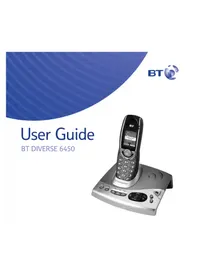
Diverse 6450 - Telephone BT - Free user manual and instructions
Find the device manual for free Diverse 6450 BT in PDF.


Pick your language and provide your email: we'll send you a specifically translated version.
| Product type | DECT cordless telephone |
| Brand | BT |
| Model | Diverse 6450 |
| Display | Backlit LCD display |
| Answering machine | Digital answering machine with time and date stamp |
| Caller ID | Caller ID and call waiting |
| Phonebook | Up to 200 names and numbers |
| Hands-free | Hands-free speakerphone |
| Talk time | Up to 10 hours |
| Standby time | Up to 100 hours |
| Multi-handset capacity | Expandable up to 5 handsets |
| Ringtones | 10 polyphonic ringtones |
| Intercom | Internal call between handsets |
| Power supply | 220-240V AC adapter |
| Battery type | Rechargeable AAA NiMH batteries |
| Dimensions (handset) | Approximately 165 x 45 x 30 mm |
| Dimensions (base) | Approximately 90 x 90 x 50 mm |
| Weight (handset) | Approximately 150 g |
| Weight (base) | Approximately 200 g |
| Range | Up to 50 m indoors, 300 m outdoors |
| Maintenance | Clean with soft dry cloth; do not use solvents |
| Safety | Keep away from water and high temperatures |
| Spare parts | Replacement batteries and power adapters available |
| Repairability | Designed for easy battery replacement |
Frequently Asked Questions - Diverse 6450 BT
How do I set the date and time on my BT Diverse 6450?
Press the Menu button, select Date/Time, enter the correct time using the keypad, then press Save to confirm.
How do I record an outgoing message for the answering machine?
Press the Ans Machine button, then select Record greeting. Speak clearly after the beep and press Stop to finish.
Why is there no dial tone on my handset?
Check that the handset is correctly registered to the base station. Place it on the base to charge, wait 30 seconds, then try again. Also ensure the base is connected to the telephone line.
How can I register an additional handset to the base?
On the base, press and hold the Paging button for about 5 seconds. Then on the new handset, go to Menu > Registration and follow the instructions.
How do I access my voicemail messages?
Press the Ans Machine button and select Play messages. You can also call your answering machine remotely using your PIN code.
How do I replace the batteries in my handset?
Slide off the battery cover, remove the old AAA NiMH batteries, insert new ones observing correct polarity, and replace the cover. Then charge the handset for at least 16 hours.
How do I set the ringtone volume?
While in idle mode, press the Volume Up/Down keys on the side of the handset to adjust the ringtone volume. Alternatively, go to Menu > Ringtone.
Can I use the intercom to talk between handsets?
Yes, if you have more than one handset registered, press the Intercom button, select the target handset, and wait for it to answer.
What should I do if the screen shows 'Searching' or 'No base'?
Move the handset closer to the base station. If the problem persists, re-register the handset with the base as described in the manual.
How do I set a speed dial number?
From the phonebook, select a contact, press Options, then choose Assign speed dial and press a number key (1-9) to assign.
User questions about Diverse 6450 BT
0 question about this device. Answer the ones you know or ask your own.
Ask a new question about this device
No questions yet. Be the first to ask one.
Download the instructions for your Telephone in PDF format for free! Find your manual Diverse 6450 - BT and take your electronic device back in hand. On this page are published all the documents necessary for the use of your device. Diverse 6450 by BT.
USER MANUAL Diverse 6450 BT



Manual assistant
Powered by Anthropic
Waiting for your message
Product information
Brand : BT
Model : Diverse 6450
Category : Telephone