DCS-5211L - Surveillance Camera D-LINK - Free user manual and instructions
Find the device manual for free DCS-5211L D-LINK in PDF.


Pick your language and provide your email: we'll send you a specifically translated version.
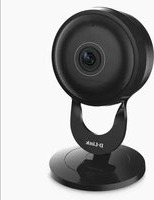
| Product type | Indoor IP surveillance camera |
| Brand | D-Link |
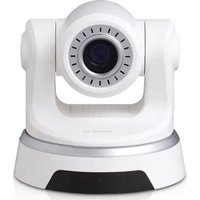
| Model | DCS-5211L |
| Video resolution | 720p (1280 x 720) |
| Frame rate | Up to 30 fps |
| Lens angle | Diagonal 67°, horizontal 54°, vertical 38° |
| Pan / Tilt range | Pan 270°, tilt 120° |
| Night vision | IR LEDs for up to 5 meters |
| Audio | Two-way audio with built-in microphone and speaker |
| Connectivity | Wi-Fi 802.11b/g/n on 2.4 GHz |
| Supported devices | Windows, Mac, iOS and Android devices |
| Cloud service | mydlink Cloud for remote access and alerts |
| Local storage | Micro SD card slot up to 128 GB |
| Power input | 5V DC, 1A via micro USB |
| Dimensions (approx.) | 98 x 62 x 62 mm |
| Weight (approx.) | 130 g |
| Wireless security | WEP, WPA/WPA2 encryption supported |
| Motion detection | Yes, with push notifications |
| Operating temperature | 0°C to 40°C |
| Cleaning and maintenance | Wipe with a soft dry cloth; avoid liquids |
Frequently Asked Questions - DCS-5211L D-LINK
How do I install the D-Link DCS-5211L?
Download the mydlink app, create an account, power the camera, press and hold the reset button until the LED flashes, then follow the in-app instructions to connect to your Wi-Fi network.
How do I reset the camera to factory defaults?
Insert a pin or paperclip into the reset hole on the back of the camera and hold it for 10 seconds. The camera will reboot and restore default settings.
Can I access the camera remotely?
Yes, the DCS-5211L supports remote access through the mydlink app or web portal, allowing you to view live video from anywhere with an internet connection.
Does the camera have night vision?
Yes, it is equipped with automatic IR LEDs that provide night vision up to 5 meters, delivering clear black-and-white video in low-light conditions.
Can I record video locally?
Absolutely. Insert a microSD card up to 128 GB to enable continuous or motion-triggered recording directly on the camera.
Is the DCS-5211L compatible with third-party software?
Yes, the camera supports ONVIF Profile S, which means it can be integrated with many third-party video management systems and software like Blue Iris.
What power adapter is required?
The camera requires a 5V DC, 1A power supply via a micro USB connection. The adapter is not always included, so check the package contents.
Can I talk through the camera?
Yes, the built-in microphone and speaker enable two-way audio, so you can listen and speak to family members or pets via the app.
How many devices can view the feed at once?
Up to 4 simultaneous video streams are supported, but the actual number depends on your available upload bandwidth and network conditions.
What should I do if the Wi-Fi signal is weak?
For best results, place the camera closer to your router or use a Wi-Fi extender. Since the DCS-5211L uses 2.4 GHz Wi-Fi, avoid interference from other devices.
User questions about DCS-5211L D-LINK
0 question about this device. Answer the ones you know or ask your own.
Ask a new question about this device
No questions yet. Be the first to ask one.
Download the instructions for your Surveillance Camera in PDF format for free! Find your manual DCS-5211L - D-LINK and take your electronic device back in hand. On this page are published all the documents necessary for the use of your device. DCS-5211L by D-LINK.
USER MANUAL DCS-5211L D-LINK
Manual assistant
Powered by Anthropic
Waiting for your message
Product information
Brand : D-LINK
Model : DCS-5211L
Category : Surveillance Camera