TUV18BK2 - Drill Tryton - Free user manual and instructions
Find the device manual for free TUV18BK2 Tryton in PDF.


Pick your language and provide your email: we'll send you a specifically translated version.
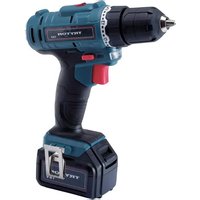
| Product type | Cordless drill driver |
| Brand | Tryton |
| Model | TUV18BK2 |
| Power source | 18 V lithium-ion battery |
| Battery capacity | 2.0 Ah |
| Chuck type | Keyless, single sleeve |
| Chuck capacity | 1.5 - 13 mm |
| Number of torque settings | 21 + 1 drill mode |
| Maximum torque | 30 Nm |
| Gears | 2-speed mechanical gearbox |
| No-load speed | 0 - 500 / 0 - 1500 rpm |
| Drilling capacity (wood) | 25 mm |
| Drilling capacity (steel) | 10 mm |
| Weight | 1.6 kg (with battery) |
| Dimensions (L x W x H) | 240 x 200 x 70 mm |
| LED work light | Yes |
| Charger included | Yes, fast charger 1.5 A |
| Charging time | Approx. 1 hour |
| Safety features | Overload protection, electronic cell protection |
| Maintenance and cleaning | Keep ventilation slots clean, wipe with a dry cloth |
| Spare parts availability | Spare batteries and chargers available from authorized service centers |
Frequently Asked Questions - TUV18BK2 Tryton
How do I change a drill bit?
To change a drill bit, loosen the keyless chuck by turning it counterclockwise. Insert the new bit, then tighten securely by turning clockwise until it grips firmly. Always disconnect the battery before changing accessories.
What are the torque settings for?
The torque selector ring adjusts the clutch slip when screwdriving. Lower settings are for delicate screws, while higher settings deliver more force. Use the drill mode for drilling operations.
How long does the battery take to charge?
The included fast charger (1.5 A) charges an empty 2.0 Ah battery in roughly 1 hour. Charging time may vary slightly depending on the remaining charge and battery temperature.
What speed should I use for drilling metal?
For drilling metal, use the high gear (0-1500 rpm) with a lower speed trigger setting and apply steady pressure. Always use a metal twist drill bit and cutting lubricant if needed.
Can I use the drill for driving screws?
Yes, the TUV18BK2 features a 2-speed gearbox and adjustable torque clutch, making it suitable as an electric screwdriver. Select the appropriate torque setting and use a screwdriver bit.
How do I maintain and clean the drill?
Keep the drill's ventilation slots clear of dust and debris using a soft brush. Wipe the exterior with a dry cloth. Never use water or solvents, as they can damage the motor and electronics.
What safety precautions should I take?
Always wear safety goggles and hearing protection. Keep the battery away from heat and water. Do not use the drill if the battery is damaged, and disconnect it during maintenance or when not in use.
Why does the drill stop suddenly?
Sudden stopping could be caused by an overload or a tripped thermal protector. Release the trigger, allow the tool to cool for a few minutes, and restart. If in metal, reduce pressure or check for a jammed bit.
How can I increase battery runtime?
Use the lower speed gear for less demanding tasks, avoid prolonged stall situations, and keep the battery fully charged. Storing the battery at moderate temperatures also helps preserve its capacity.
Is the drill suitable for DIY projects?
Absolutely. With 30 Nm of torque, 2-speed transmission, and a 13 mm keyless chuck, the TUV18BK2 handles most DIY drilling and screwdriving jobs in wood, metal, and plastic.
User questions about TUV18BK2 Tryton
0 question about this device. Answer the ones you know or ask your own.
Ask a new question about this device
No questions yet. Be the first to ask one.
Download the instructions for your Drill in PDF format for free! Find your manual TUV18BK2 - Tryton and take your electronic device back in hand. On this page are published all the documents necessary for the use of your device. TUV18BK2 by Tryton.
USER MANUAL TUV18BK2 Tryton

Manual assistant
Powered by Anthropic
Waiting for your message
Product information
Brand : Tryton
Model : TUV18BK2
Category : Drill