Onda 3HX - Headphones Ozone - Free user manual and instructions
Find the device manual for free Onda 3HX Ozone in PDF.


Pick your language and provide your email: we'll send you a specifically translated version.
| Product Type | Gaming Headset |
| Brand | Ozone |
| Model | Onda 3HX |
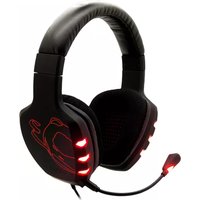
| Headphone Type | Over-ear, closed-back |
| Connection Type | USB wired |
| Compatibility | PC, PlayStation 4, Xbox One |
| Driver Size | 50 mm |
| Impedance | 32 Ω |
| Frequency Response | 20 Hz - 20 kHz |
| Surround Sound | Virtual 7.1 channel |
| Microphone | Noise-cancelling, omnidirectional |
| Cable Length | 2.2 m |
| Weight | 360 g |
| Dimensions (LxWxH) | 220 x 190 x 80 mm |
| Power Supply | USB powered (5V, 500mA) |
| Main Functions | Volume control, mic mute, bass enhancement |
| Included Software | Ozone Gaming Software (equalizer, virtual 7.1) |
| Cleaning and Maintenance | Wipe with soft dry cloth |
| Safety | Avoid prolonged listening at high volume |
| Spare Parts | Replaceable ear cushions and microphone |
| Repairability | Do not disassemble; contact support for repairs |
| General Information | Warranty 2 years |
Frequently Asked Questions - Onda 3HX Ozone
Is the Ozone Onda 3HX compatible with PS4?
Yes, the Ozone Onda 3HX is compatible with PlayStation 4. Simply plug the USB connector into the console and the headset will be recognized automatically.
Can I use the Onda 3HX with Xbox One?
Yes, it works with Xbox One via the USB port. However, be aware that some virtual surround features may require the Ozone software on a PC for full functionality.
How to enable 7.1 surround sound?
To activate virtual 7.1 surround, install the Ozone Gaming Software on your PC, then select the 7.1 mode in the audio settings. The headset must be connected via USB.
How to change the ear cushions?
The ear cushions are replaceable. Gently pull the old cushion away from the ear cup, then press the new one into place. Ensure it is firmly secured.
Does the headset have a mute microphone button?
Yes, the microphone mute function is located on the in-line control module. Press the button to mute/unmute the microphone quickly during gameplay.
How to clean the headset?
Use a soft, dry cloth to wipe the ear cups, headband, and microphone. For stubborn dirt, you can slightly dampen the cloth with water, but avoid moisture entering the interior.
Can the microphone be detached?
Yes, the microphone is detachable. Pull it out from the left ear cup to remove it for music listening or storage, and plug it back in securely when needed.
Does the headset work with Nintendo Switch?
The Onda 3HX can be used with Nintendo Switch in handheld or docked mode if the console supports USB audio. Connect via USB and select the headset as the audio output device.
How to update the firmware?
Download the latest Ozone Gaming Software from the official website. Connect the headset, open the software, and follow the prompts to update the firmware if an update is available.
What should I do if the headset is not detected by the PC?
First, try connecting to another USB port. Check the Device Manager for drivers issues. Uninstall the device and restart your PC. If the problem persists, test on another computer or contact Ozone support.
User questions about Onda 3HX Ozone
0 question about this device. Answer the ones you know or ask your own.
Ask a new question about this device
No questions yet. Be the first to ask one.
Download the instructions for your Headphones in PDF format for free! Find your manual Onda 3HX - Ozone and take your electronic device back in hand. On this page are published all the documents necessary for the use of your device. Onda 3HX by Ozone.
USER MANUAL Onda 3HX Ozone

Manual assistant
Powered by Anthropic
Waiting for your message
Product information
Brand : Ozone
Model : Onda 3HX
Category : Headphones