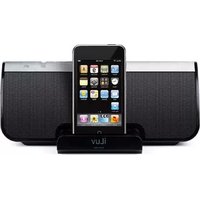
i604 - Loudspeaker ILUV - Free user manual and instructions
Find the device manual for free i604 ILUV in PDF.


Pick your language and provide your email: we'll send you a specifically translated version.
| Product Type | Portable Bluetooth Speaker |
| Brand | iLuv |
| Model | i604 |
| Connectivity | Bluetooth 4.0, 3.5mm AUX input |
| Output Power | 6W RMS |
| Battery Capacity | 1200mAh Lithium-ion |
| Playback Time | Up to 8 hours (50% volume) |
| Charging Time | Approximately 3 hours |
| Charging Port | Micro-USB |
| Driver Size | 45mm |
| Frequency Response | 100Hz - 20kHz |
| Dimensions (L x W x H) | 8.5 x 8.5 x 9.5 cm |
| Weight | 320 g |
| Hands-free Calling | Yes, built-in microphone |
| Control | Volume, Play/Pause, Track skip |
| Indicator Light | LED status indicator |
| Maintenance | Wipe with soft dry cloth; avoid moisture |
| Safety Warning | Do not disassemble or expose to water |
| Repair Information | Contact iLuv support for service or parts |
| Manual Access | Free PDF download at notice-facile.com |
Frequently Asked Questions - i604 ILUV
How do I pair the speaker with my phone?
Turn on the speaker and put it in pairing mode by pressing and holding the Bluetooth button until the LED flashes. On your phone, search for available Bluetooth devices and select 'iLuv i604'.
How long does the battery last?
The built-in 1200mAh battery provides up to 8 hours of continuous playback at 50% volume. Battery life varies with volume and audio content.
Can I use the speaker while it is charging?
Yes, the i604 supports pass-through charging, so you can keep using the speaker while it charges via the Micro-USB cable.
How do I charge the speaker?
Connect the included Micro-USB cable to the charging port on the back of the speaker and plug the other end into a USB power adapter. A red LED indicates charging; the light turns off when fully charged.
How do I connect a non-Bluetooth device using the AUX port?
Use a 3.5mm audio cable to connect the device to the AUX input on the speaker. The speaker will automatically switch to AUX mode when a cable is inserted.
How do I answer an incoming call while using the speaker?
When connected via Bluetooth, press the multi-function button to accept an incoming call. Press it again to hang up. The built-in microphone enables hands-free calling.
What does the LED indicator flashing mean?
A blinking blue LED indicates pairing mode; a solid blue LED indicates a successful connection. A red LED flashing with low battery warns that the speaker needs recharging.
Is the speaker water-resistant?
The iLuv i604 does not have an official IP rating. It should be protected from excessive moisture, rain, and splashes to avoid damage.
Can I pair two i604 speakers for stereo sound?
No, the i604 does not support True Wireless Stereo (TWS). It operates as a single mono speaker, although you can play audio through one additional speaker via an AUX splitter.
How do I reset the speaker if it malfunctions?
To reset, first power off the speaker, then press and hold the Bluetooth button for 5 seconds to clear the paired device list. If the issue persists, charge the battery or contact iLuv support.
User questions about i604 ILUV
0 question about this device. Answer the ones you know or ask your own.
Ask a new question about this device
No questions yet. Be the first to ask one.
Download the instructions for your Loudspeaker in PDF format for free! Find your manual i604 - ILUV and take your electronic device back in hand. On this page are published all the documents necessary for the use of your device. i604 by ILUV.
USER MANUAL i604 ILUV

Manual assistant
Powered by Anthropic
Waiting for your message
Product information
Brand : ILUV
Model : i604
Category : Loudspeaker