
BP7470 W - Built-in oven GORENJE - Free user manual and instructions
Find the device manual for free BP7470 W GORENJE in PDF.



| Product Type | Built-in oven |
| Brand | GORENJE |
| Model | BP7470 W |
| Interior volume | 59 liters |
| Dimensions (W x D x H) | 440 x 390 x 340 mm |
| Supply voltage | 230 V ~ 50 Hz |
| Maximum power consumption | 3.1 kW |
| Lower heating element power | 1.3 kW |
| Upper heating element power | 0.9 kW |
| Grill power | 1.6 kW |
| Fan heating element power | 2.3 kW |
| Cooking functions | Conventional cooking, grill, semi-forced convection, defrosting, bottom heat only, pyrolysis |
| Cleaning | Pyrolytic (self-cleaning) at 475 °C, cycles of 90 or 180 minutes |
| Timer/Programmer | Electronic with 24h clock, timer, automatic and semi-automatic cooking |
| Interior lighting | Replaceable lamp (rotating cover) |
| Safety | Automatic door locking during pyrolysis, automatic shut-off, mandatory grounding |
| Removable door | Yes, with lever hinges for easy cleaning |
| Supplied accessories | Side runners, drip tray, rotisserie support, rotisserie spit |
| Weight (approx.) | Not specified in the manual |
| Energy consumption | Not specified |
Frequently Asked Questions - BP7470 W GORENJE
User questions about BP7470 W GORENJE
0 question about this device. Answer the ones you know or ask your own.
Ask a new question about this device
Download the instructions for your Built-in oven in PDF format for free! Find your manual BP7470 W - GORENJE and take your electronic device back in hand. On this page are published all the documents necessary for the use of your device. BP7470 W by GORENJE.
USER MANUAL BP7470 W GORENJE
The symbol on the product or on its packaging indicates that this product may not be treated as household waste. Instead it shall be handed over to the applicable collection point for the recycling of electrical and electronic equipment. By ensuring this product is disposed of correctly, you will help prevent potential negative consequences for the environment and human health, which could otherwise be caused by inappropriate waste handling of this product. For more detailed information
about recycling of this product, please contact your local city office, your household waste disposal service or the shop where you purchased the product.

Installation Instruction
Warning and safety instructions Before using the oven for the first time, read these operating instructions carefully for full information on the safe installation, use and care of your new appliance.
This unit must be correctly installed in accordance with the manufacturer's instructions by a suitably qualified person.
The manufacturers decline responsibility for damage to persons or items due to poor or incorrect installation of this appliance.
Make sure that the voltage and frequency of the mains supply correspond to the details on the rating plate which can be found on the lower part of the front of the oven.
Warning: this appliance must be earthed.
Our company declines any liability for failures in the earth connection or for earth connection that is not in compliance with the regulations in force.
Maintenance and servicing work must only be carried out after the power supply has been disconnected by switching off at the wall socket or removing the mains fuse.
Due to our policy of continuous innovation, we reserve the right to adjust or modify our product without prior notification.
Do not let children near the oven during use as external surfaces including glass will become hot so, to avoid the danger of burns or injury, and this appliance is not intended for use by young children or infirm persons without supervision. Young children should be supervised to ensure that they do not play with the appliance.
Supervise the use of the oven by the elderly or infirm.
Where an oven is built-under with a drawer beneath, this must be made non functioning with a 'dummy' front.
On no account should flammable materials be stored in a drawer beneath a built-under oven as there is a risk of fire.
Do not place heavy objects on the open door or sit on it as this could cause damage to the hinging.
When cooking with oil or fat, do not leave the oven unattended as there is a risk of fire.
To avoid damage to the interior enamel, do not place the oven pan or baking trays on the bottom of the oven and do not line the base of the oven with aluminium cooking foil.
During cooking, food naturally produces steam which is vented away to prevent an excessive build-up within the oven. As this steam can condense to water droplets on the cool outer trim of the oven, it may be necessary during cooking to wipe away any moisture with a soft cloth. This will also help to prevent soiling and discoloration of the oven exterior by cooking vapours.
Before using for the first time
Switch off the oven at the wall socket or remove the mains fuse before cleaning. Remove any packaging and the oven accessories from the oven. Wipe the oven interior using hot water and a mild detergent.
Rinse carefully using a damp cloth. Wash the oven shelves and accessories in a dishwasher or using hot water and a mild detergent, and dry thoroughly.
Technical details
This appliance conforms to the standard 73/23 CEE and 93/68 CEE EMC 89/336 CEE.
Voltage regulations
Approximately 230 V phase + neutral.
Built-in oven dimensions:
Length: 440
Depth: 390
Height: 340
Volume: 59 L
Wattage of heating elements
Lower heating element: 1.3 kW
Top oven heating element: 0.9 kW
Grill element: 1.6 kW
Fan element (internal front part): 2.3 kW
Maximum intake of oven: 3.1 kW
Built-in installation
IMPORTANT: The unit must be correctly installed in accordance with the manufacturer's instructions and by a qualified person. Maintenance and service must be carried out after the power supply has been disconnected.
ELECTRICAL CONNECTION: Before connecting the appliance to the mains, ensure that:
- The voltage corresponds to the voltage specified on the rating plate at the bottom of the surround.
- The overload cut-off device and the domestic system can withstand the load of the appliance (see rating plate).
- The power supply system is provided with an efficient earth connection and that the socket or omnipolar switch, with minimum contact opening of 3 mm, is easily accessible once the appliance has been installed.
- If the plug is not easily accessible, the installation personnel must provide an omnipolar switch with contact opening distance equal to or greater than 3 mm.
If further mains cable is needed, it must have a minimum cross-sectional area of 1.5 mm² and be of type H05RR-F.
Sufficient cable must be left for easy maintenance of the appliance.
Warning: this appliance must be earthed.
Proper earthing is mandatory for the appliance.
Our company declines any liability for failures in the earth connection that is not in compliance with the regulations in force.
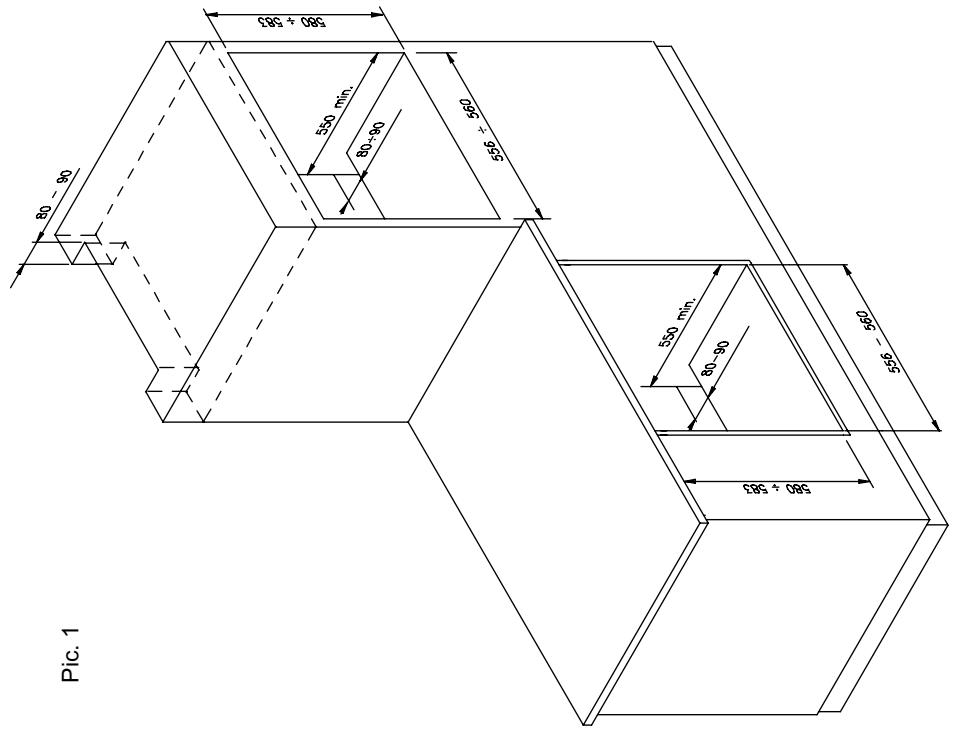
This appliance is designed for building into a standard 600 mm wide oven housing.
The housing, adjacent furniture, and all materials used in installation must be able to withstand a minimum temperature of 85°C plus ambient temperature during periods of operation. In addition, adjacent furniture cabinet doors must be at least 4 mm from the appliance at all points. Certain types of vinyl or laminate kitchen furniture cabinetry
are particularly prone to heat damage and discoloration. Any delamination or discoloration of materials that occurs below 85°C plus ambient temperature, or where materials are less than 4 mm from the appliance, will be the liability of the owner.
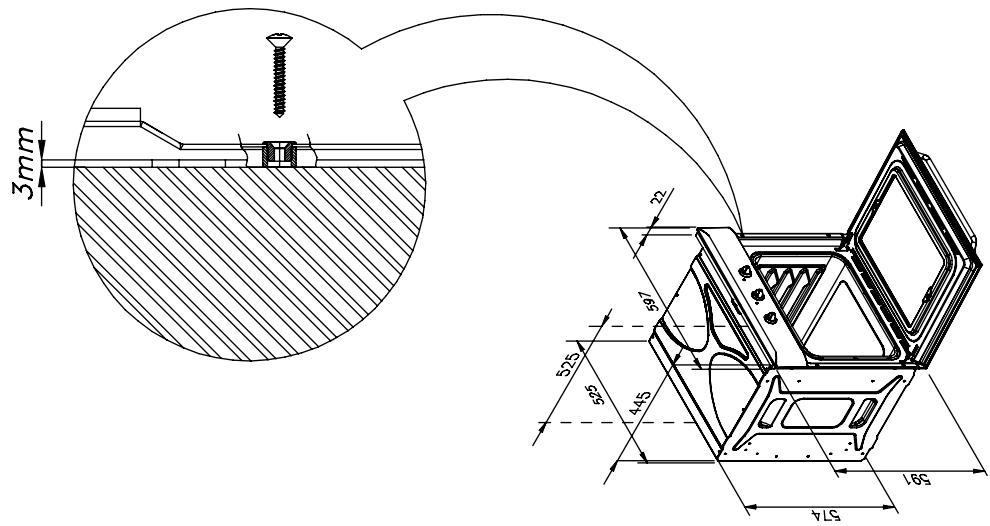
For building under a worktop, the installation dimensions are as follows.
Attention: when the qualified person installs the oven near other electrical appliances, the power cable must not be near or contact the side of the hot oven.
Oven operation
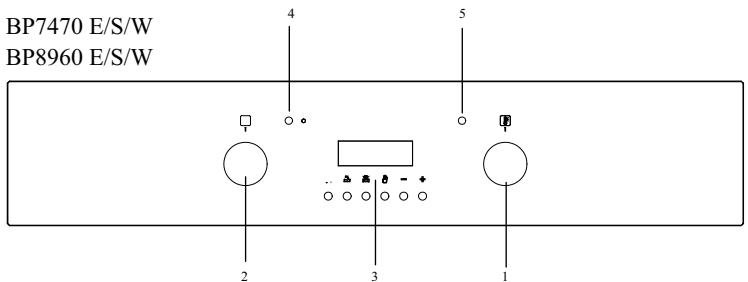
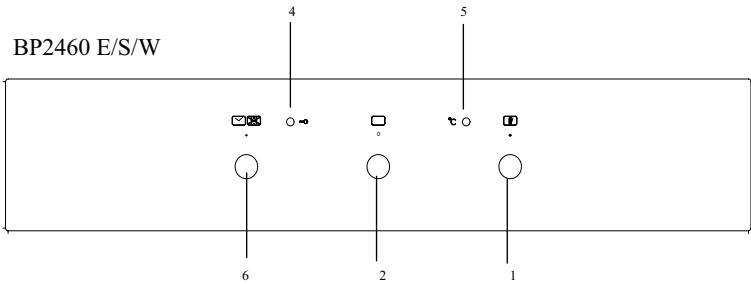
1 - Thermostat 2 - Selector 3 - Electronic programmer
4 - Red light 5 - Yellow light 6 - End of cooking timer
Your new oven incorporates a multifunction cooking system, enabling you to select the most appropriate heating method for the type of food you are preparing.
The required function is selected by turning the oven function selector knob clockwise to the appropriate symbol. The oven interior light will illuminate and the 'On' indicator light will glow. The oven functions and their symbols are:
Oven operation

Light only (BP2460 - BP7470 - BP8960)
The oven interior light comes on.

Conventional heating (BP2460 - BP7470 - BP8960)
The elements in the roof and floor operate to give a conventional static oven heating system. The oven should be preheated before use until the temperature indicator light goes out.
It is recommended that food is only placed on one shelf position when cooking with the conventional heating function. Do not use the lowest or highest shelf positions or the food may overcook.

Lower/upper resistance + ventilation (BP7470 - BP8960)
Semi forced air convection (with the door closed). The thermostat has to be set to desired temperature between 50°C to 250°C.
Recommended use: for food which needs to be cooked on the outside as well as the inside (confectionery, roasted meat).

Full grill (BP2460 - BP7470 - BP8960)
The element under the floor of the oven operates on its own. The oven should be preheated for 15 minutes before use.
This function is ideal for 'blind baking' pastry cases for quiches and tarts. In this case, the food should be cooked with the oven shelf on the lowest shelf position.

Semi forced air convection (BP7470 - BP8960)
The fan operates with the infra-red grill element in the roof of the oven. The oven should be pre-heated for 5-10 minutes before use.
When roasting meats, this function will crisp the outside of the food whilst the circulating hot air ensures even cooking.
Semi forced air convection can also be used for grilling, so that food does not need to be turned so often.
Grilling must always take place with the oven door closed.
Do not use aluminium foil to cover the grill pan or heat items wrapped in aluminium foil under the grill - the high reflectivity of the foil can damage the grill element.
Keep the oven door closed when using the GRILL.

Forced air convection (BP7470 - BP8960)
The fan and an element behind the rear wall of the oven circulate hot air to give an even temperature throughout the oven.
The oven should be pre-heated before use until the temperature indicator light goes out. Food can be cooked on several shelf positions at once, saving both time and energy.
The oven temperature should be reduced by approximately 10% compared to conventional oven heating systems.

Defrosting (BP7470 - BP8960)
The fan operates but without its element, so the oven is not directly heated. The oven door must remain closed.
Frozen food can be quickly defrosted by placing in the oven pan and sliding onto the lowest shelf position. Defrosting time will be reduced by up to one third using this system.

Lower heating element only (BP2460 - BP7470 - BP8960)
The element under the floor of the oven operates on its own. The oven should be preheated for 15-20 minutes before use.
This function is ideal for 'blind baking' pastry cases for quiches and tarts. In this case, the food should be cooked with the oven shelf on the lowest shelf position.

Oven self-clean mode (BP2460 - BP7470 - BP8960)
Turn the selector knob to this function, which can only be set via the timer. The cleaning cycle lasts 1.5 hours.
All internal oven accessories must be removed before using the pyrolytic function. During the pyrolytic function, the oven light is disabled.
Helpful hints
- Before cooking, check that any unused accessories are removed from the oven.
- Preheat the oven to the cooking temperature before use.
- Place cooking trays in the centre of the oven and allow gaps when using more than one tray for air to circulate.
- Try to open the door as little as possible to view food (the oven light remains on during cooking).
- Be careful when opening the door to avoid contact with hot parts and steam.
End of Cooking
The function of the programming timer is to make the oven turn on for a pre-determined amount of time.
1. To operate.
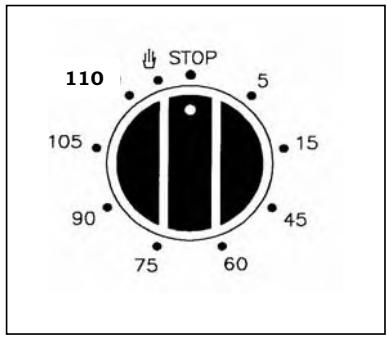
After having set the oven switch knob to the desired temperature, turn the timer knob in a clockwise direction to the desired cooking time (maximum 110 minutes).
After the set time runs out, the timer will have returned to position "O" and the oven will automatically turn off.
2. Manual position.
If the cooking time is longer than the hours programme, or if you wish to use the oven manually, to turn it off when you desire, turn the knob to position
3. Automatic pyrolytic cleaning.
The self-cleaning function
After setting the oven switch knob, turn the timer knob clockwise to 90 minutes of cooking time (it is possible to turn the timer knob to 110 minutes if the oven is very dirty).
During the pyrolytic function, the oven light is disabled.
ELECTRONIC PROGRAMMER
(fig. 3)
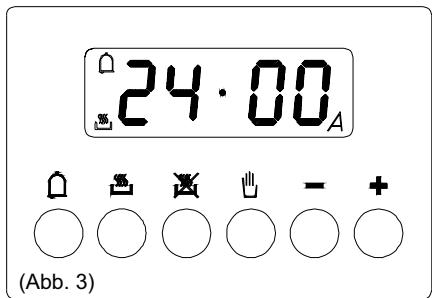
The electronic programmer is a device that groups together the following functions:
- 24-hour clock with illuminated display
- Timer (up to 23 hours and 59 min.)
- Program for automatic beginning and end of cooking
- Program for semi-automatic cooking (either start or finish only).
- Displaying the required temperature
(fig. 3)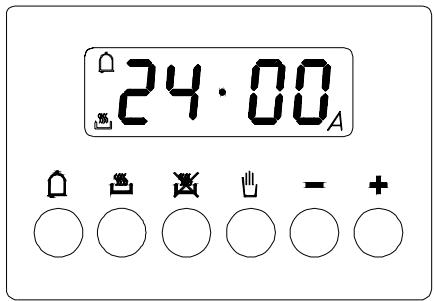
Description of buttons

"TIMER"

"COOKING TIME"

"END OF COOKING TIME"

"MANUAL POSITION"

"ADVANCEMENT OF THE NUMBERS OF ALL PROGRAMS - CHECK THE INSERTED TEMPERATURE"

"TURNING BACK OF THE NUMBERS OF ALL PROGRAMS - CHECK THE INSERTED TEMPERATURE"
Description of lighted symbols
"AUTO" - (flashing) - Programmer in automatic position but not programmed. "AUTO" - (always lighted) - Programmer in automatic position with inserted program.

Manual cooking taking place

- Automatic cooking taking place

- Timer in operation
NOTE: After having selected the operation, a period of time will pass (about 3-4 seconds) before confirmation, during which the data may be modified.
Digital clock
Clock numbers show hours (0-24) and minutes.
Upon immediate hooking up of the oven or after a blackout, three zeros will flash on the programmer panel.
To set the hour it is necessary to push simultaneously the and buttons or button and AT THE SAME TIME to push the “+” button or “-” until you have set the exact hour. When the actual time is inserted, release the buttons in order to make function the clock.
Manual cooking without using the programmer
To use manually the oven, that is, without the auxiliary programmer, it is necessary to cancel the flashing «A» by pushing the button.
If the «A» message is displayed in permanent mode, indicating that the oven is programmed, it is impossible to set the timer to manual function and therefore the oven cannot be switched on. In this case the program must be firstly cancelled by pressing , then the manual function can be set.
Timer
The timer can be used to measure a time period between 1 minute and 23 hours & 59 minutes.
1) Automatic cooking (start and end)
Set the length of cooking time by pushing the button. Set the end of cooking time by pushing the button. - Set temperature and cooking program by using the thermostat knob and the selector knob.
After this setting the symbol «A» will light.
An example: cooking lasts 45 minutes and is expected to stop at 14.00.
Push until having set 0.45.
Push until having set 14.00.
After having finished the setting, the clock hour will appear on the panel and «A» symbol will light. This means the cooking program has been memorized.
At 13.15 h. (14.00 h. minus 45 minutes) the oven turns on automatically.
At 14.00 h the oven turns off automatically, and a buzzer sounds until it is stopped by pressing the button.
The symbol ⟨A⟩ will flash.
2) Semi-automatic cooking
A. Set the length of cooking time
B. Set the end of cooking time
A) Set the length of cooking time by pressing the button.
The oven will turn on immediately, and the symbol ⟨A⟩ will light up.
When the set cooking time has elapsed, the oven will turn off, and a buzzer will ring until it is stopped as described above.
The symbol ⟨A⟩ will flash.
B) Set the end of cooking time by pressing the button.
The oven will turn on immediately, and the symbol «A» will light up.
At the set time, the oven will turn off and a buzzer will ring until it is stopped as described above.
The cooking program may be cancelled at any moment by pressing the ↓ button; the oven can then work manually.
NOTE: Functions 1) and 2) or 1)+2) are active only if a cooking function has been selected.
Timer = buzzer
The timer program consists only of a buzzer which may be set for a maximum period of 23 hours and 59 minutes.
To set the timer, push the button and, at the same time, press + or - until you read the desired time on the display.
After the setting, the clock hour and the symbol will appear.
The countdown will start immediately and may be seen at any moment on the display by simply pressing the button.
At the end of the set time, the symbol will turn off and the buzzer will ring until it is stopped by pressing the button.
It is possible to change the sound (3 levels: low - medium - high): when it sounds, press the "-" button.
NOTE: At the end of cooking time, the sound beeps every second for a maximum of 7 minutes.
Cancelling an automatic cooking program
An automatic cooking program can be cancelled at any time by pressing the button and the or button simultaneously. Now the oven can work manually.
Pyrolytic cleaning
Select the self-cleaning function. When selected, this will automatically set a cleaning duration of 90 minutes (it is possible to change it to 180 minutes if the oven is very dirty).
This function cleans by raising the oven temperature to 475°C. The resultant ash deposits can be wiped away with a moist cloth when the oven has cooled down but is still slightly warm.
If an increased cleaning duration is required, it can be increased in the following manner. Select the self-cleaning function as above.
Press the manual button on the electronic timer; 1:30 will appear in the display.
For safety reasons, the oven door automatically locks at temperatures above 300°C. When this occurs, the oven emits an acoustic signal and the 'lock' indicator on the fascia panel becomes illuminated.
During the pyrolytic function, the oven light is disabled.
WARNING
- All internal oven accessories must be removed before using the pyrolytic function.
- It is strongly recommended that the oven be used in pyrolytic mode only with persons in attendance.
- All large food items remaining in the oven must be removed before using the pyrolytic function.
Replacing the oven light
ATTENTION: Disconnect the appliance from the power supply.
If the oven light needs to be replaced, the protective cover "A" must be removed by turning it anticlockwise. After the light has been replaced, refit the protective cover "A".
(Pic. 4)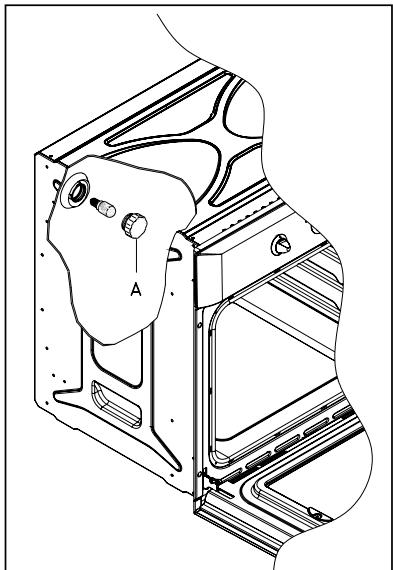
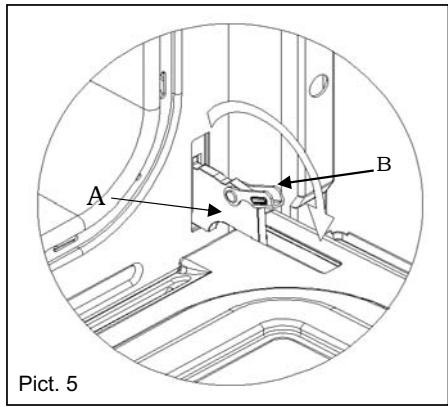
Removing the oven door (Pict. 5)
To aid cleaning and make access to the oven interior easier, both oven doors can be simply removed (see diagram).
To facilitate cleaning of the oven, the door can be removed via the hinges as follows:
Hinges with movable bolts
The hinges A are provided with two movable bolts B.
When bolt B is raised, the hinge is released from its housing. Having done this, the door must be lifted upwards and removed, sliding it towards the outside.
Grip the sides of the door near the hinges when performing these operations.
To refit the door, firstly slide the hinges into their slots.
Before closing the door, remember to rotate the two movable bolts B used to hook the two
hinges.
Do not immerse the door in water.
Clean the enamelled interior surface and the glass using a damp cloth and a proprietary mild cream cleaner, rinse, then dry carefully using a soft cloth.
If necessary, the inner door glass can be removed by unscrewing the two lateral fixing screws. Make sure that the glass is dried thoroughly before re-fitting. Take care not to over tighten the fixing screws when re-fitting.
Oven accessories
The oven shelves, oven pans and trivets should be washed in hot water with a mild detergent then dried carefully, or they can be washed in a dishwasher.
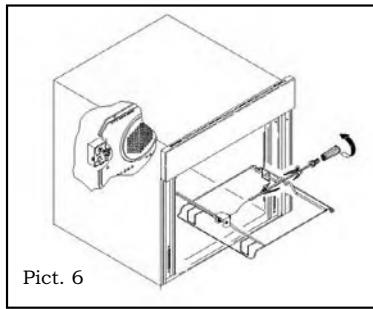
How to use the turningspit (Pict.6)
In same ovens it is possible to use the turningspit and the grill together. Meat has to be inserted onto the skewers and blocked by the two clamps.
Proceed now as follows:
A. Place oven tray on the lowest position of the oven. B. Place one of the forks support along the stainless steel rod and secure. Insert the meat onto the skewer and then put the other fork support on, securing it firmly into the meat. C. The spit handle made of isolating material must be used for extracting the stainless steel rod from the oven and must be taken off when cooking.
For example the chicken weighing about 1,3Kg will take approximately 85-90 minutes to cook.
Oven cooking chart
| Food | Temp. °C | Shelf Position (*) | Cooking time (mins). | Cooking Function |
| Cake | ||||
| Bun | 180 | 2 | 55-65 | |
| Fruit Cake | 200 | 1 | 30-40 | |
| Buttermilk curd cake | 180 | 2 | 35-40 | |
| Mould leaven cake | 200 | 1 | 25-35 | |
| Choux pastry | 190 | 2 | 20-30 | |
| Puff or flaky pastry | 200 | 2 | 15-25 | |
| Biscuits | 190 | 3 | 15-20 | |
| Lasagna | 225 | 2 | 40-50 | |
| Meat | ||||
| Fillet beef | 225 | 2-3 | 50-80 | |
| Roast beef | 225 | 2-3 | 50-80 | |
| Roast veal | 225 | 2-3 | 60-80 | |
| Roast pork | 170-180 | 2 | 45-60 | |
| Roast lamp | 225 | 2 | 45-55 | |
| Roast beef | 225 | 2-3 | 50-60 | |
| Roast hare | 200 | 2 | 60-90 | |
| Roast turkey | 180 | 2 | 240ca. | |
| Roast goose | 200 | 2 | 150-210 | |
| Roast duck | 200 | 2 | 120-180 | |
| Roast chicken | 200 | 2 | 60-90 | |
| Thigh roe deer | 200 | 2-3 | 90-150 | |
| Thigh stag | 180 | 2-3 | 90-180 | |
| Fish | 180 | 2-3 | 10-40 | |
| Vegetable | ||||
| Stewing vegetable | 170-190 | 2-3 | 40-50 | |
| Pizza | 240 | 1 | 15-25 | |
| Grill cooking | ||||
| Chop | 4 | 8-12 | ||
| Pork sausage | 4 | 10-13 | ||
| Grill chicken | 3 | 25-35 | ||
| Spit chicken | 50-65 | |||
| Spit roast veal | 50-65 | |||
| Note :(*)= The start shelf position number is button oventhe oven should be preheated before use.This functions should cook with delicate food and/or preheated dish.It's possible cook same dish in different shelf position (the cooking time is the same). | ||||
MANUAL OPERATION

NUMBERS ON THE DISPLAY INCREASING

NUMBERS ON THE DISPLAY DECREASING
Convection air force (BP7470 - BP8960)
MANUAL POSITION

SCROLLING THROUGH THE NUMBERS OF ALL PROGRAMS - CHECKING THE PROGRAMMED TEMPERATURE

REVERSE SCROLLING THROUGH THE NUMBERS OF ALL PROGRAMS - CHECKING THE PROGRAMMED TEMPERATURE
Cooking and preparation
Set the hours (0-24) and minutes.
Immediately after connection (as well as after a power interruption), the display shows three flashing digits. To enter the exact time, press
Release the key
Then use the [+] or [-] keys to set the exact time. The speed of digit change on the display increases noticeably after a few seconds of holding down the [+] or [-] keys.
Preparation in manual mode (without programming device)
CLEANING WITH THE LEVER
The device is equipped with two levers with handles B.
The door can be lifted up and removed from its hinges. To do this, grasp the door by the sides, next to the hinges.
Cooking guide table for preparing dishes and meals.


- INSTALLATION INSTRUCTION
- WARNING: THIS APPLIANCE MUST BE EARTHED
- BEFORE USING FOR THE FIRST TIME
- TECHNICAL DETAILS
- VOLTAGE REGULATIONS
- BUILT-IN OVEN DIMENSIONS
- WATTAGE OF HEATING ELEMENTS
- BUILT-IN INSTALLATION
- OVEN OPERATION
- LIGHT ONLY (BP2460 - BP7470 - BP8960)
- CONVENTIONAL HEATING (BP2460 - BP7470 - BP8960)
- LOWER/UPPER RESISTANCE + VENTILATION (BP7470 - BP8960)
- FULL GRILL (BP2460 - BP7470 - BP8960)
- SEMI FORCED AIR CONVECTION (BP7470 - BP8960)
- GRILLING MUST ALWAYS TAKE PLACE WITH THE OVEN DOOR CLOSED
- FORCED AIR CONVECTION (BP7470 - BP8960)
- DEFROSTING (BP7470 - BP8960)
- LOWER HEATING ELEMENT ONLY (BP2460 - BP7470 - BP8960)
- OVEN SELF-CLEAN MODE (BP2460 - BP7470 - BP8960)
- HELPFUL HINTS
- END OF COOKING
- TO OPERATE
- MANUAL POSITION
- AUTOMATIC PYROLYTIC CLEANING
- ELECTRONIC PROGRAMMER
- DESCRIPTION OF BUTTONS
- DESCRIPTION OF LIGHTED SYMBOLS
- DIGITAL CLOCK
- MANUAL COOKING WITHOUT USING THE PROGRAMMER
- TIMER
- AUTOMATIC COOKING (START AND END)
- SEMI-AUTOMATIC COOKING
- SET THE LENGTH OF COOKING TIME
- SET THE END OF COOKING TIME
- NOTE: FUNCTIONS 1) AND 2) OR 1)+2) ARE ACTIVE ONLY IF A COOKING FUNCTION HAS BEEN SELECTED
- TIMER = BUZZER
- CANCELLING AN AUTOMATIC COOKING PROGRAM
- PYROLYTIC CLEANING
- WARNING
- REPLACING THE OVEN LIGHT
- REMOVING THE OVEN DOOR (PICT. 5)
- HINGES WITH MOVABLE BOLTS
- DO NOT IMMERSE THE DOOR IN WATER
- OVEN ACCESSORIES
- HOW TO USE THE TURNINGSPIT (PICT.6)
- CONVECTION AIR FORCE (BP7470 - BP8960)
- PREPARATION IN MANUAL MODE (WITHOUT PROGRAMMING DEVICE)
Brand : GORENJE
Model : BP7470 W
Category : Built-in oven