
BO636E11X - Built-in oven GORENJE - Free user manual and instructions
Find the device manual for free BO636E11X GORENJE in PDF.


| Product Type | Built-in oven |
| Brand | Gorenje |
| Model | BO636E11X |
| Electrical Supply | 220-240 V ~, 50/60 Hz, 3.5 kW |
| Cooking Modes | Fan-assisted, Grill (large/small), Bottom heat + fan, Eco cooking, Defrost, Plate warming, Pyrolysis, Rotisserie (depending on model), Baking, Pizza |
| Cleaning | Pyrolytic (automatic) and manual |
| Number of Cooking Levels | 4 (wire guides or telescopic) |
| Interior Lighting | Yes, automatic activation |
| Cooling Fan | Yes, extended operation after shutdown |
| Timer | Yes, with adjustable alarm (3 levels) |
| Delayed Start Function | Yes |
| Child Safety | Yes, key lock |
| Door Lock During Pyrolysis | Yes, automatic |
| Soft Close Door (GentleClose) | Yes, depending on model |
| Number of Door Glass Panes | Up to 3 (third protective pane) |
| Temperature Probe | Yes, recommended |
| Lighting (Bulb) | Halogen G9 25W 230V or E14 25W 230V depending on model |
| Supplied Accessories | Grid, baking tray, drip pan, glass dish, rotisserie support (depending on model), telescopic guides (depending on model) |
| Repairability Index | Not specified |
Frequently Asked Questions - BO636E11X GORENJE
User questions about BO636E11X GORENJE
0 question about this device. Answer the ones you know or ask your own.
Ask a new question about this device
Download the instructions for your Built-in oven in PDF format for free! Find your manual BO636E11X - GORENJE and take your electronic device back in hand. On this page are published all the documents necessary for the use of your device. BO636E11X by GORENJE.
USER MANUAL BO636E11X GORENJE
DETAILED INSTRUCTIONS
OF THE ELECTRIC PYROLYTIC OVEN
gorenje
natural_image
Simple line drawing of a kitchen appliance with two circular handles and a rectangular top (no text or symbols)We thank you for your
trust and the purchase of our appliance.
This detailed instruction manual is supplied to make the use of this product easier. The instructions should allow you to learn about your new appliance as quickly as possible.
Make sure you have received an undamaged appliance. If you do find transport damage, please contact the seller from which you purchased the appliance, or the regional warehouse from which it was supplied. The telephone number can be found on the invoice or on the delivery note.
Instructions for installation and connection are supplied on a separate sheet.
Instructions for use are also available at our website:
www.gorenje.com / < http://www.gorenje.com />
| 4 IMPORTANT SAFETY INSTRUCTIONS6 Before connecting the appliance......7 THE ELECTRIC PYROLYTIC OVEN11 Technical specifications12 Control unit | INTRODUCTION |
| 14 BEFORE USING THE APPLIANCE FOR THE FIRST TIME | PREPARING THE APPLIANCE FOR THE FIRST USE |
| 15 STEPS OF THE COOKING PROCESS (1-6)15 Step 1: SWITCHING ON AND SETTINGS16 Step 2: CHOOSING THE COOKING SYSTEM18 Step 3: CHOOSING THE SETTINGS21 Step 4: SELECTING ADDITIONAL FUNCTIONS/EXTRAS23 Step 5: STARTING THE COOKING PROCESS23 Step 6: SWITCHING OFF THE OVEN......24 DESCRIPTIONS OF SYSTEMS (COOKING MODES) AND COOKING TABLES | COOKING STEPS |
| 39 MAINTENANCE & CLEANING40 Conventional oven cleaning41 Automatic oven cleaning - pyrolysis43 Removing and cleaning wire and telescopic extendible guides44 Installing the catalytic inserts45 Removing and inserting the oven door (depending on the model)48 Removing and inserting the oven door glass pane49 Replacing the bulb | MAINTENANCE & CLEANING |
| 50 TROUBLESHOOTING TABLE......51 DISPOSAL | TROUBLE-SHOOTING |
CAREFULLY READ THE INSTRUCTIONS AND SAVE THEM FOR FUTURE REFERENCE.
This appliance can be used by children aged from 8 years and above and persons with reduced physical, sensory or mental capabilities or lack of experience and knowledge if they have been given supervision or instruction concerning use of the appliance in a safe way and understand the hazards involved. Children shall not play with the appliance. Cleaning and user maintenance shall not be made by children without supervision.
WARNING: The appliance and its accessible parts become hot during use. Care should be taken to avoid touching heating elements. Children less than 8 years of age shall be kept away unless continuously supervised.
WARNING: Accessible parts will become hot when in use. To avoid burns and scalds children should be kept away.
During use the appliance becomes hot. Care should be taken to avoid touching heating elements inside the oven.
Only use the temperature probe recommended for use in this oven.
WARNING: Ensure that the appliance is switched off before replacing the lamp to avoid the possibility of electric shock.
Do not use harsh abrasive cleaners or sharp metal scrapers to clean the oven door glass/ the glass of hinged lids of the hob (as appropriate), since they can scratch the surface, which may result in shattering of the glass.
Do not use steam cleaners or high pressure cleaners to clean the appliance as this may result in an electric shock.
Means for disconnection must be incorporated in the fixed wiring in accordance with the wiring rules.
If the supply cord is damaged, it must be replaced by the manufacturer, its service agent or similarly qualified persons in order to avoid a hazard (only for appliances supplied with connection cord).
The appliance must not be installed behind a decorative door in order to avoid overheating.
The appliance is intended for household use. Do not use it for any other purpose, such as room heating, drying of pets or other animals, paper, fabrics, herbs etc. As this may lead to injury or fire hazard.
The appliance may only be connected to the power mains by an authorized service technician or expert. Tampering with the appliance or nonprofessional repair thereof may result in risk of severe injury or damage to the product.
If the power cords of other appliances located near this appliance are caught in the oven door, they may be damaged, which may in turn result in a short circuit. Therefore, keep the power cords of other appliances at a safe distance.
Do not line the oven walls with aluminium foil and do not place baking trays or other cookware on the oven bottom. Aluminium foil would prevent air circulation in the oven, hinder the cooking process, and ruin the enamel coating.
Oven door become very hot during operation. A third glass is installed for extra protection, reducing the temperature of the outside surface (only with some models).
Oven door hinges may be damaged when under excessive load. Do not place heavy pans on open oven door and do not lean against open oven door when cleaning the oven cavity. Never stand on the open oven door and do not let children to sit on it.
Do not lift the appliance by holding it by the door handle.
Appliance operation is safe with and without tray guides.
Make sure the vents are never covered or obstructed in any other way.
Safe use of the oven during pyrolytic cleaning
Before activating automatic cleaning, remove all accessories from the oven: grill, rotisserie kit, all baking trays, meat probe, wire and telescopic guides and dishes that are not part of the oven accessories.
All the spillage and all removable parts inside the cavity must be removed before cleaning process.
During the automatic cleaning process, the oven gets very hot from the outside. Risk of burns! Keep children away from the oven.
Before activating the automatic cleaning process, carefully read and follow the instructions in the chapter Cleaning and Maintenance where correct and safe use of this function is described.
Do not place anything directly onto the oven cavity bottom.
Pieces of food, grease, and roast juice may ignite during the automatic pyrolytic cleaning process.
Danger of fire! Remove larger food residues and other impurities from the oven each time before the automatic cleaning process.
Do not attempt to open the oven door while the automatic pyrolytic cleaning process is in progress.
Make sure no impurities enter the door guide lock opening, which could prevent automatic locking of oven door during the automatic cleaning procedure.
In case of a power outage during the pyrolytic cleaning process, the program is terminated after two minutes and the oven door remains locked. The door will be unlocked approximately 30 minutes after power supply is restored, regardless of whether the appliance has cooled down in the meantime. Do not touch any metal part of the appliance during the automatic cleaning process!
Pyrolytic cleaning involves very high temperatures that may cause smoke and fumes to be released from food residues. We recommend that you ensure thorough ventilation of the kitchen during the pyrolytic cleaning process. Small animals, or pets, are highly sensitive to any fumes released during pyrolytic cleaning of ovens. We recommend removing them from the kitchen during pyrolytic cleaning and ventilating the kitchen thoroughly after the cleaning process.
As a result of the automatic cleaning, the oven cavity and oven equipment cleaned in such way may discolour and loose some shine.
Caution - hot surface during pyrolytic cleaning
BEFORE CONNECTING THE APPLIANCE:

Carefully read the instructions for use before connecting the appliance. Repair or any warranty claim resulting from incorrect connection or use of the appliance shall not be covered by the warranty.
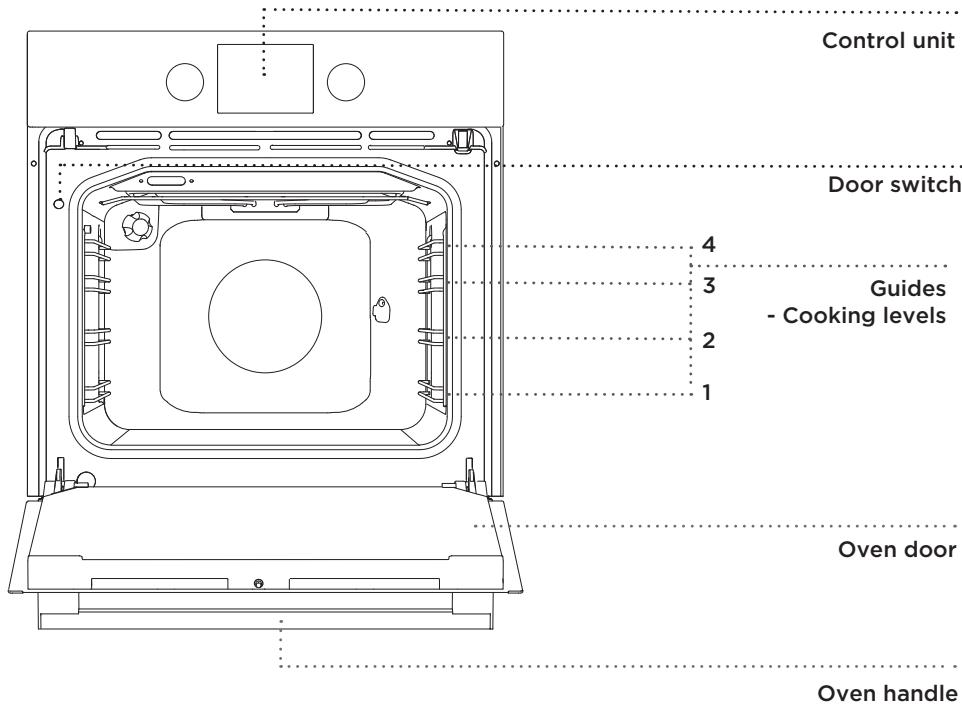
The figure represents one of the built-in appliance models. Since the appliances for which these instructions were drawn up may have different equipment, some functions or equipment may be described in the manual that may not be present in your appliances.
PUSH-PULL KNOB
Slightly push the knob until it pops out; then, rotate it.

After each use, rotate the knob back to the "off" position and push it back in. The h-pull knob can only be pushed back when the switch is in the "off" position.
WIRE GUIDES
The wire guides allow preparation of the food on four levels (please note that the levels/guides are counted from the bottom up).
Guides 3 and 4 are intended for grilling.
TELESCOPIC PULL-OUT GUIDES
Telescopic pull-out guides may be fitted for the 2nd, 3rd, and 4th level.
Pull-out guides can be partly or fully extendible.
OVEN DOOR SWITCH
The switch deactivates oven heating and the fan when the oven door is opened during the cooking process. When the door is closed, the switch turns the heaters back on.
COOLING FAN
The appliance is fitted with a cooling fan that cools the housing and the appliance control panel.
After the oven is switched off, the cooling fan continues to operate for a short while in order to cool the oven.
OVEN EQUIPMENT AND ACCESSORIES

Before pyrolytic cleaning, remove all equipment from the oven (including the telescopic guides).

natural_image
Line drawing of a rectangular basin or container with no text, numbers, or symbols
natural_image
Line drawing of a rectangular metal grate with evenly spaced slots and two protruding clips (no text or symbols)GLASS BAKING DISH is used for cooking with all oven systems. It can also be used as a serving tray.
The GRID is used for grilling or as support for a pan, baking tray or baking dish with the food.

There is a safety latch on the grid.
Therefore, lift the grid slightly at the front when pulling it out from the oven.

natural_image
Simple line drawing of a rectangular tray or container with no text, numbers, or symbols
natural_image
Simple line drawing of a rectangular container or basin (no text or symbols)The SHALLOW BAKING SHEET is used for baking pastry and cakes.
The DEEP BAKING TRAY is used for roasting meat and baking moist pastry. It can also be used as a drip tray.

Never place the deep baking tray in the first guide during the cooking process, except when grilling food or using the roasting spit and you are only using the deep tray as a drip tray.

As baking accessories heat up, their n may change. This does not affect r functionality and their original form be restored when they cool down.
natural_image
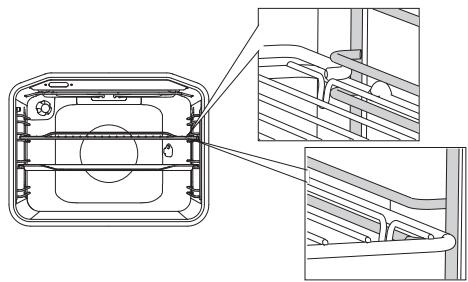
Technical line drawing of a mechanical component with cross-sectional views (no text or symbols)The grid or the tray should always be inserted into the groove between the two wire profiles.
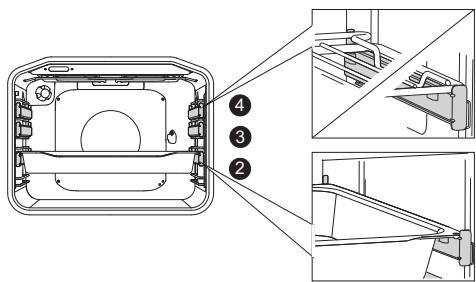
With telescopic extendible guides, first pull out the guides of one level and place the grid or the baking tray onto them. Then, push them in with your hand as far as they will go.

Close the oven door when the telescopic guides are retracted all the way into the oven.
natural_image
Technical line drawing of a device housing with internal components and an inset view showing a rectangular component (no text or symbols)
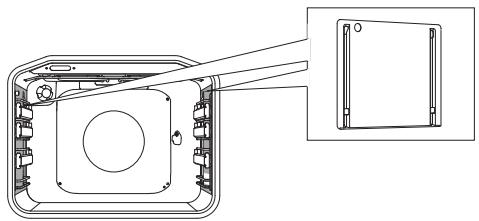
CATALYTIC INSERTS prevent the spraying fat from sticking to sides of the oven cavity.
The ROTISSERIE (meat skewer) is used for roasting meat. The set consists of a skewer support, skewer with screws, and a removable handle.

The appliance and some of the accessible parts tend to heat up during cooking. Use oven mitts.
TECHNICAL SPECIFICATIONS
(DEPENDING ON THE MODEL)
| XXXXXX | 220-240V ~ | Pn_max : 3.5 kW | XXX |
| TYPE: XXXXXX | 220V-240V, 50/60Hz | XXX | |
| ART. Nr: | TN | ||
| SER. Nr: XXXXXX |
The rating plate indicating the basic information about the appliance is located at the edge of the oven and it is visible when the oven door is opened.
CONTROL UNIT
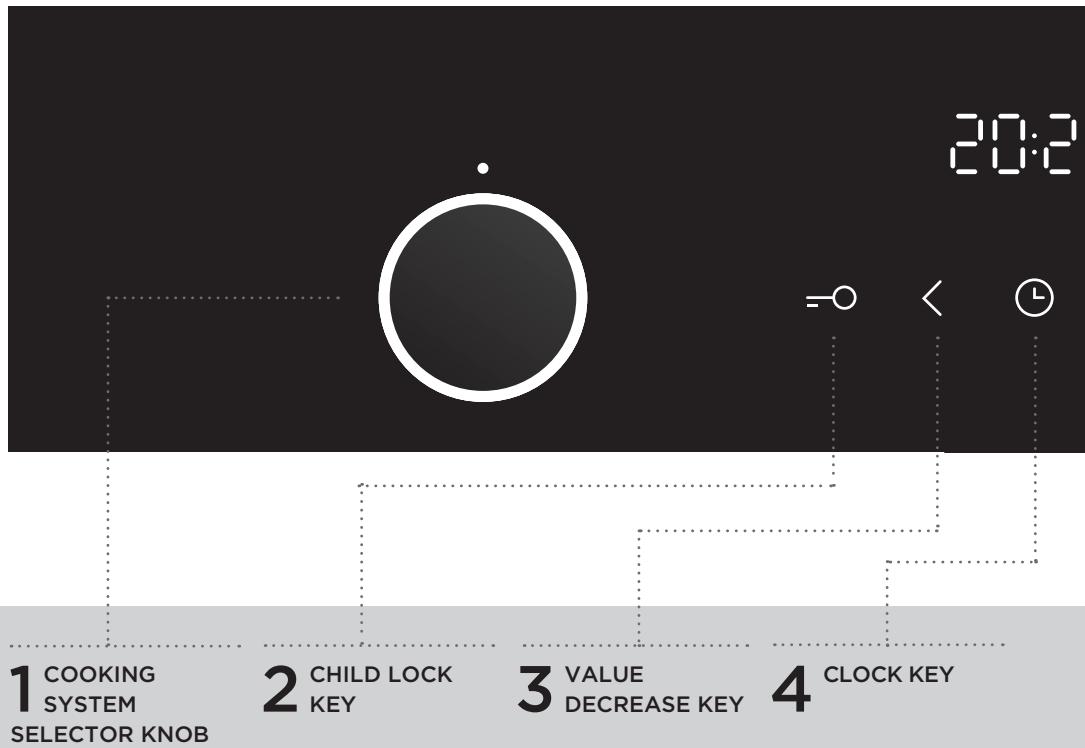
flowchart
graph TD
    A["1 COOKING SYSTEM SELECTOR KNOB"] --> B["2 CHILD LOCK KEY"]
    B --> C["3 VALUE DECREASE KEY"]
    C --> D["4 CLOCK KEY"]
NOTE:
Symbols of cooking systems may be located on the knob or on the front panel (depending on the appliance model).
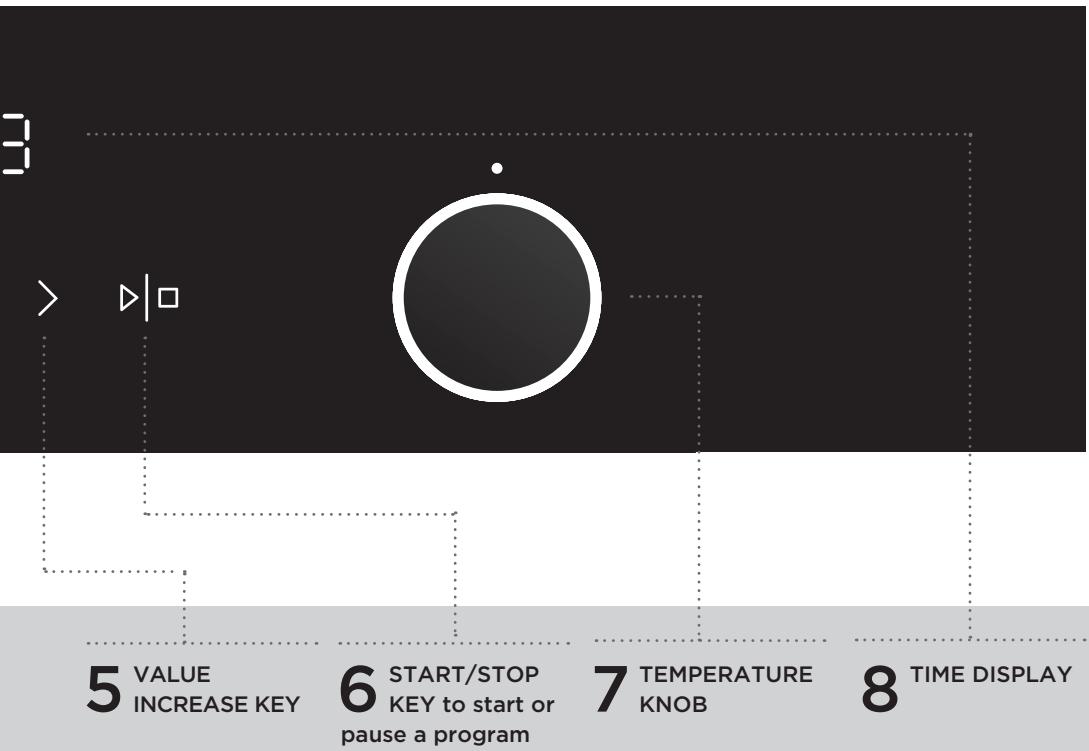
flowchart
graph TD
    A["3"] --> B["> ▶□"]
    B --> C["5 VALUE INCREASE KEY"]
    C --> D["6 START/STOP KEY to start or pause a program"]
    D --> E["7 TEMPERATURE KNOB"]
    E --> F["8 TIME DISPLAY"]
NOTE:
The keys will respond better if you touch them with a larger area of your fingertip. Each time you press a key, a short acoustic signal will be sounded.
BEFORE USING THE APPLIANCE FOR THE FIRST TIME
Upon receiving the appliance, remove all parts, including any transport equipment, from the oven.
Clean all accessories and utensils with warm water and regular detergent. Do not use any abrasive cleaners.
When the oven heats up for the first time, the characteristic smell of a new appliance will be emitted. Ventilate the room thoroughly during the first use.
STEPS OF THE COOKING PROCESS (1-6)
STEP 1: SWITCHING ON AND SETTINGS
After connecting your appliance or after an extended power outage, 12:00 will flash on the display and the symbol will light up ⏻.
Set the time of day.
SETTING THE CLOCK

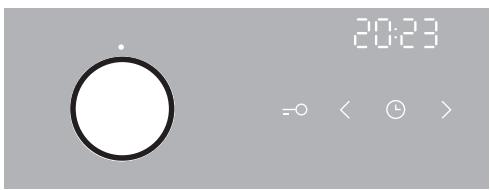
1 Set the clock by touching the < or > keys, and confirm the setting by touching the ⏻ key.
If you press and hold the value adjustment key, the rate at which the set value is being changed will increase.
CHANGING THE CLOCK SETTING
Clock settings may be changed when no timer function is activated. To set the current time (clock), touch the CLOCK key several times to select the ⏻ symbol.
STEP 2: CHOOSING THE COOKING SYSTEM
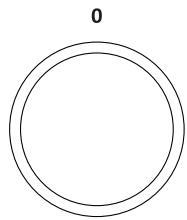
Rotate the knob (left and right) to select 0
COOKING SYSTEM (see program table, depending on the model).
The selected icon will appear on the display.

Settings can also be changed during the cooking process.
^1) It is used for determining the energy efficiency class pursuant to the EN 60350-1 standard.
In this mode, the actual temperature in the oven is not displayed due to a special appliance operation algorithm and use of residual heat.
| SYSTEM | DESCRIPTION | SUGGESTED TEMPERATURE °C |
| COOKING SYSTEMS | ||
| »»»»»»»»»»»»»»»»»»»»»»»»»»»»»»»»»»»»»»»»»»»»»»»»»»»»»»»»»»»»»»»»»»»»»»»»»»»»»»»»»»»»»»»»»»»»»»»»»»»» | ||
| [YSXW] | BOTTOM HEATER AND FANThis is used for baking leavened but low-rising pastry and for preserving fruit and vegetables. | 180 |
| [ZX46] | PLATE WARMERUse this function to reheat your dinnerware (plates, cups) before serving food in it to keep the food warm longer. | 60 |
| [SH00] | ECO COOKING 1)In this mode, power consumption during the cooking process is optimized.This mode is used for roasting meat and baking pastry. | 160 |
 | DEFROSTINGThe air circulates with no heaters activated. Only the fan will be activated. This is used to slowly thaw frozen food. Automatic programs also allow defrosting with microwaves (A1 to A5). | - |
| [tawed] | PYROLYSISThis function allows automatic cleaning of the oven interior by high temperature that incinerates the fat residues and other impurities to reduce them to ashes. | - |
STEP 3: CHOOSING THE SETTINGS
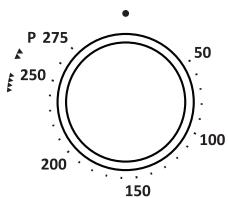
ADJUSTING THE COOKING TEMPERATURE
radar
| Angle (°) | Value | |-----------|-------| | 0 | 275 | | 15 | 250 | | 30 | 200 | | 45 | 150 | | 60 | 100 | | 75 | 50 | The chart displays a single data point at 275 on the circular axis. There are no labels or additional data series in this image.When using the oven system with the large grill and grill, set the temperature knob to position

natural_image
Simple diagram with clock, play, and circle symbols on a gray background (no text or labels)Rotate the knob to set the desired TEMPERATURE.
After switching on the appliance by touching the START key, the temperature icon is displayed on the display unit.
To switch on the appliance, press the START key and hold it for a while - about 1 second.
TIMER FUNCTIONS
First rotate the COOKING SYSTEM SELECTOR KNOB; then, set the temperature.
Touch the TIMER key several times to select the desired timer function.
The icon for the selected timer function will light up and the adjustable cooking start/end time will flash on the display.
Press START to start the cooking process. ELAPSED COOKING TIME will be displayed.

Timer function display
Setting the cooking time
In this mode, you can define the duration of oven operation (cooking time). Set the desired cooking time. First set the minutes, then the hours. Icon and cooking time are displayed on the display unit.
Setting the delayed start
In this mode, you may specify the duration of the cooking process (cooking time) and the time when you wish the cooking process to stop (end time). Make sure the clock is accurately set to current time.
Example:
Current time: noon
Cooking time: 2 hours
End of cooking: 6 pm
First set the OPERATION DURATION (2 hours). Touch the CLOCK button twice to select the END OF OPERATION. The display automatically shows a flashing sum of the time of day and duration of operation of the oven (14:00).
Set the time for the end of baking (18:00).
Press START to start the cooking process. The timer will wait for the time to start the cooking process and the symbol will be lit up. The oven automatically switches on (at 4 pm) and stops operating and the selected time (at 6 pm).

Setting the minute minder
The minute minder can be used independently of the oven operation. The longest possible setting is 24 hours.
During the last minute, the minute minder is displayed in seconds.

After the set time expires, the oven will automatically stop operating (end of cooking).
An acoustic signal will be heard which you may turn off by touching any key. After one minute, the acoustic signal will be switched off automatically.
Timer functions can be cancelled by setting the time to "0". Any timer function may also be quickly cancelled by simultaneously pressing the > and () key and holding them for a while.
STEP 4: SELECTING ADDITIONAL FUNCTIONS/EXTRAS

Activate/deactivate the functions by pressing the desired key or a combination of keys.
=○ CHILD LOCK!
Activate it by touching the CHILD LOCK key. "Loc" will appear on the display unit for 5 seconds. Touch the key again to deactivate the child lock.
If the child lock is activated with no timer function engaged (only clock is displayed), then the oven will not operate. If the child lock is activated after a timer function has been set, then the oven will operate normally; however, it will not be possible to change the settings.
When the child lock is activated, the systems can be changed, but it is not possible to change the extra functions. The cooking process can be ended by rotating the selector knob to "0".
Child lock will remain active after the oven is switched off. To select a new system, the child lock must first be deactivated.
OVEN LIGHTING
Oven lighting will be switched on automatically each time a cooking system is selected.
5sek < ACOUSTIC SIGNAL
Loudness of the acoustic signal can be set when no timer function is activated (only the time of day is displayed). Press the < key and hold it for five seconds. First, "Vol" will appear on the display unit, followed by two fully lit bars. Touch the < and > keys to choose one of the three volume levels (one, two, or three bars). After three seconds, the setting will be automatically stored and the time of day will appear.
5sek > DECREASING THE DISPLAY CONTRAST
The cooking system selector knob has to be in position "O". Hold the > key for 5 seconds. First, "Vol" will appear on the display unit, followed by two fully lit bars. Touch the < and > keys to adjust the display dimmer (one, two, or three bars). After three seconds, the setting will be automatically saved.
=○ Ⓛ SWITCHING ON/OFF THE CLOCK DISPLAY
To switch off the clock display, simultaneously touch the "key" and "clock" keys and hold them for 5 seconds. "OFF" will appear for a few seconds; then, the Ⓤ icon will light up.
To reactivate the clock display, simultaneously press the "key" and "clock" keys again while no timer function is active.

After a power outage or after the appliance is switched off, the additional function settings will remain stored for no more than a few minutes. Then, all settings, except for the acoustic signal, display dimmer, and child lock will be reset to factory defaults.
STEP 5: STARTING THE COOKING PROCESS
Start the cooking process by pressing the START/STOP key and holding it for a while.
Temperature and operation symbols will be lit up.
If no timer function is selected, the cooking duration time, cooking time will appear on the display unit.
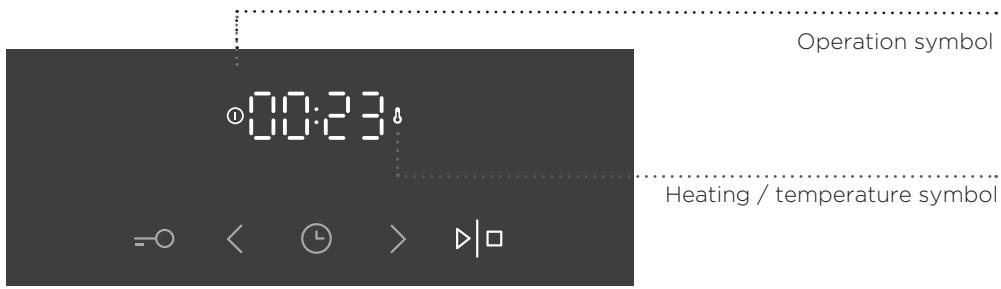
While the oven is heating up, the temperature symbol will flash. When the oven reaches the set temperature, the symbol will light up and a short beep will be sounded.
STEP 6: SWITCHING OFF THE OVEN
To stop the cooking process, press and hold the START/STOP key.
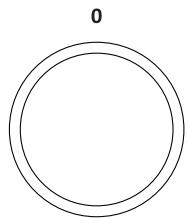
Turn the COOKING SYSTEM SELECTOR and TEMPERATURE KNOB to position "O".
natural_image
Simple diagram of two concentric circles with a label '0' above (no text or symbols within the circles)
After the cooking process, all timer settings are also paused and cancelled, except for the minute minder. Time of day (clock) will be displayed. The cooling fan will continue to operate for a while.

After the use of the oven, some water may be left in the condensate channel (underneath the door). Wipe the channel with a sponge or a cloth.
DESCRIPTIONS OF SYSTEMS (COOKING MODES) AND COOKING TABLES
If your desired food cannot be found in the cooking table, find information for similar food. The information displayed applies to cooking in a single level.
An interval of suggested temperature is indicated. Start with a lower temperature setting and increase it if you find the food is not browned sufficiently.
Cooking times are rough estimates and may vary subject to some conditions.
Only preheat the oven if required by the recipe of in the tables in this instruction manual. Heating an empty oven consumes a lot of energy. Hence, baking several types of pastry or several pizzas successively will save a lot of energy as the oven will already have been preheated.
Use dark, black silicon-layered or enamel-coated baking sheets and trays as they conduct the heat very well.
When using parchment paper, make sure it is resistant to high temperatures.
When cooking larger chunks of meat or pastry, a lot of steam will be generated inside the oven, which in turn may condense on the oven door. This is a normal phenomenon which will not affect the operation of the appliance. After the cooking process, wipe the door and the door glass dry.
Switch off the oven approximately 10 minutes before the end of the cooking process to save energy by making use of the accumulated heat.
Do not cool the food in a closed oven to prevent condensation (dew).
Standard doneness levels and recommended final core temperature for different types of meat
| Type of food | Food core temperature (°C) | Meat colour on cross-section, and colour of juices |
| BEEF | ||
| Rare | 40-45 | meaty red, like raw meat, little juice |
| Medium rare | 55-60 | light red, a lot of light red juice |
| Medium | 65-70 | pink, small amount of pale pink juice |
| Well done | 75-80 | evenly greyish brown, little colourless juice |
| VEAL | ||
| Well done | 75-85 | red-brown |
| PORK | ||
| Medium | 65-70 | light pink |
| Well done | 75-85 | yellow-brown |
| LAMB | ||
| Well done | 79 | grey, pinkish juice |
| MUTTON | ||
| Rare | 45 | meaty red |
| Medium rare | 55-60 | light red |
| Medium | 65-70 | pink in the middle |
| Well done | 80 | grey |
| GOAT MEAT | ||
| Medium | 70 | pale pink, pink juices |
| Well done | 82 | grey, juices only slightly pink |
| POULTRY | ||
| Well done | 82 | light grey |
| FISH | ||
| Well done | 65-70 | white to grey-brown |
UPPER AND BOTTOM HEATER
natural_image
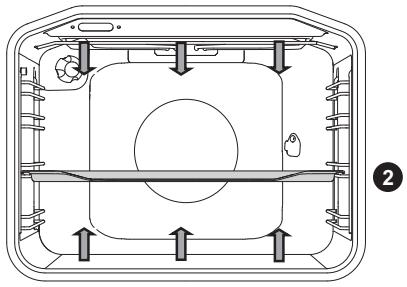
Cross-sectional diagram of a mechanical or electrical component with internal channels and mounting features (no text or symbols)The heaters in the bottom and in the ceiling of the oven cavity will radiate heat evenly into the oven interior.
Roasting meat:
Use enamel coated, tempered glass, clay, or cast iron pan or tray. Stainless steel trays are not suitable as they strongly reflect the heat.
Use enamel coated, tempered glass, clay, or cast iron pan or tray. Stainless steel trays are not suitable as they strongly reflect the heat.
| Type of food | Weight (g) | Guide (from the bottom) | Temperature (°C) | Cooking time (minutes) |
| MEAT | ||||
| Pork roast | 1500 | 2 | 180-200 | 90-110 |
| Pork shoulder | 1500 | 2 | 180-200 | 100-120 |
| Pork roulade | 1500 | 2 | 180-200 | 120-140 |
| Meat loaf | 1500 | 2 | 200-210 | 60-70 |
| Beef roast | 1500 | 2 | 170-190 | 120-140 |
| Veal roulade | 1500 | 2 | 180-200 | 90-120 |
| Lamb sirloin | 1500 | 2 | 180-200 | 80-100 |
| Rabbit loin | 1500 | 2 | 180-200 | 50-70 |
| Deer shank | 1500 | 2 | 180-200 | 100-120 |
| Pizza* | / | 2 | 200-220 | 20-30 |
| Chicken | 1500 | 2 | 190-210 | 70-90 |
| FISH | ||||
| Braised fish | 1000 | 2 | 210 | 50-60 |
Use this system to roast chicken, if the appliance does not have the 🎨 system.
Use this system to bake pizza, if the appliance does not have the ⚙️ system.
The symbol * means that the oven should be preheated using the selected cooking system.
Baking pastry
Only use one level and dark baking sheets or trays. In light-coloured baking sheets or trays, the browning of the pastry will be poorer, as such equipment will reflect the heat. Always place the baking trays on the grid. If you are using the supplied baking sheet, remove the grid. Cooking time will be shorter if the oven is preheated.
| Type of food | Guide (from the bottom) | Temperature (°C) | Cooking time (minutes) |
| PASTRY | |||
| Vegetable soufflé | 2 | 190-200 | 30-35 |
| Sweet soufflé | 2 | 190-200 | 30-35 |
| Rolls* | 2 | 190-210 | 20-30 |
| White bread* | 2 | 180-190 | 50-60 |
| Buckwheat bread* | 2 | 180-190 | 50-60 |
| Whole grain bread* | 2 | 180-190 | 50-60 |
| Rye bread* | 2 | 180-190 | 50-60 |
| Spelt bread* | 2 | 180-190 | 50-60 |
| Walnut cake | 2 | 170-180 | 50-60 |
| Sponge cake* | 2 | 160-170 | 25-30 |
| Cheesecake | 2 | 170-180 | 65-75 |
| Cupcakes | 2 | 170-180 | 25-30 |
| Small pastries made with yeast dough | 2 | 200-210 | 20-30 |
| Cabbage pirozhki | 2 | 185-195 | 25-35 |
| Fruitcake | 2 | 150-160 | 40-50 |
| Meringue cookies | 2 | 80-90 | 120-130 |
| Jelly-filled rolls (Buchtel) | 2 | 170-180 | 30-40 |
The symbol * means that the oven should be preheated using the selected cooking system.
| Tip | Use |
| Is the cake done? | ·Pierce the cake at the top with a wooden toothpick or skewer. If there are no traces on the pick or the skewer when pulled out, the cake is done. |
| Did the cake collapse? | ·Check the recipe.·Next time, use less liquid.·Note the mixing time when using small mixers, blenders etc. |
| The cake is too light at the bottom? | ·Use a dark-coloured baking sheet or tray.·Place the baking sheet one guide lower and switch on the lower heater towards the end of the cooking progress. |
| Cake with moist stuffing is underdone? | ·Increase temperature and extend baking time. |

Do not insert the deep baking tray into the first guide.
LARGE GRILL, GRILL
natural_image
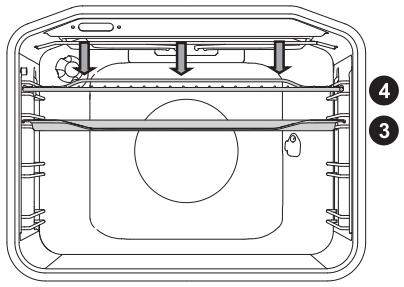
Technical line drawing of a mechanical device interior with no visible text or symbolsWhen grilling food with the large grill, the upper heater and the grill heater fitted on the ceiling of the oven cavity will operate.
When grilling food, the upper heater and the grill heater fitted on the ceiling of the oven cavity will operate.
Max allowed temperature : 240°C
Preheat the infrared (grill) heater for five minutes.
Supervise the cooking process at all times. The meat may burn quickly due to high temperature.
Roasting with the grill heater is suitable for crispy and low-fat cooking of bratwurst, cuts of meat and fish (steaks, escalopes, salmon steaks or fillets etc.) or toasted bread.
When grilling directly on the grid, smear it with oil to prevent the meat from sticking onto it and insert it into the 4th guide. Insert the drip tray in to the 1st or 2nd guide. When grilling in a baking tray, make sure there is enough liquid in the tray to prevent burning.
Turn the meat during cooking.
After grilling, clean the oven, the accessories, and the utensils.
Grilling table - small grill
| Type of food | Weight (g) | Guide (from the bottom) | Temperature (°C) | Cooking time (minutes) |
| MEAT | ||||
| Beefsteak, rare | 180 g/piece | 3 | 230 | 15-20 |
| Pork neck fillet | 150 g/piece | 3 | 230 | 18-22 |
| Cutlets/chops | 280 g/piece | 3 | 230 | 20-25 |
| Grill sausages | 70 g/piece | 3 | 230 | 10-15 |
| TOASTED BREAD | ||||
| Toast | / | 4 | 230 | 3-6 |
| Open sandwiches | / | 4 | 230 | 3-6 |
Grilling table - large grill
| Type of food | Weight (g) | Guide (from the bottom) | Temperature (°C) | Cooking time (minutes) |
| MEAT | ||||
| Beefsteak, rare | 180 g/piece | 3 | 230 | 15-20 |
| Beefsteak, well done | 180 g/piece | 3 | 230 | 18-25 |
| Pork neck fillet | 150 g/piece | 3 | 230 | 20-25 |
| Cutlets/chops | 280 g/piece | 3 | 230 | 20-25 |
| Veal escalope | 140 g/piece | 3 | 230 | 20-25 |
| Grill sausages | 70 g/piece | 3 | 230 | 10-15 |
| Spam (Leberkäse) | 150 g/piece | 3 | 230 | 10-15 |
| FISH | ||||
| Salmon steaks/fillets | 200 g/piece | 3 | 230 | 15-25 |
| TOASTED BREAD | ||||
| Toast | / | 4 | 230 | 1-3 |
| Open sandwiches | / | 4 | 230 | 2-5 |
When grilling in a baking tray, make sure there is enough liquid in the tray to prevent burning. Turn the meat during cooking.
When baking trout, pat the fish dry with a paper towel. Season on the inside; coat with oil on the outside and place on the grid. Do not turn the fish when grilling.

Always keep the oven door closed when using the grill (infrared) heater.
Grill heater, grid, and other oven accessories get very hot during grilling. Therefore, use oven mitts and meat tongs.
Cooking with the rotisserie (depending on the model)
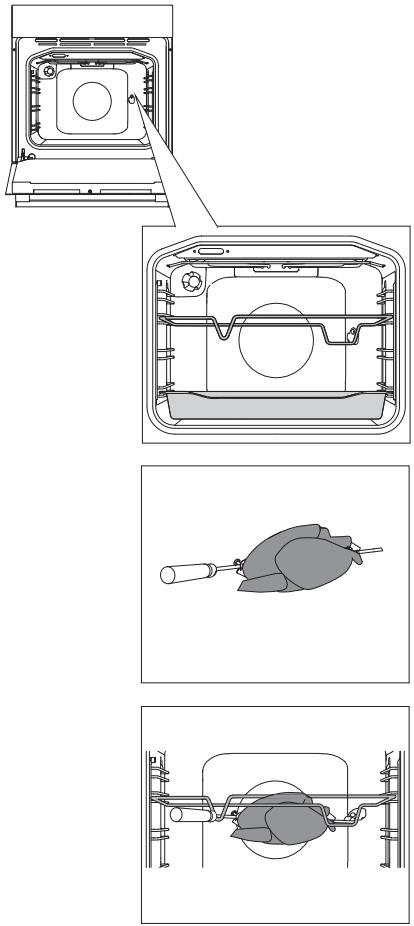
Maximum temperature when using the rotisserie is 240^ C.
natural_image
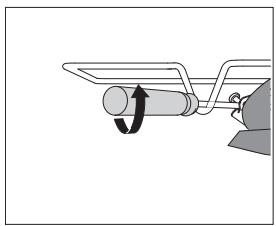
Diagram of a mechanical lever mechanism with a rotating shaft and lever (no text or symbols)1 Insert the skewer support into the 3rd guide from the bottom and place the deep tray into the bottom (1st) guide to serve as a drip tray.
2 Impale the meat on the skewer and tighten the screws.
3 Place the skewer handle on the front skewer support and insert the tip into the opening in the right hand side of the rear oven cavity wall (the opening is protected with a rotating cover).
4 Undo the skewer handle and close the oven door.
Switch on the oven and select the LARGE GRILL system.

The grill will only operate when the oven door is closed.
natural_image
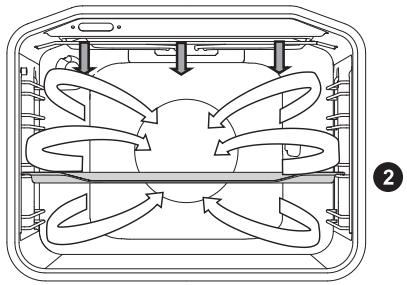
Diagram of a multi-layered air conditioning unit with directional flow arrows (no text or labels)In this operating mode, the grill heater and the fan operate simultaneously. Suitable for grilling meat, fish, and vegetables.
(See descriptions and tips for GRILL.)
| Type of food | Weight (g) | Guide level (from the bottom) | Temperature (°C) | Cooking time (min) |
| MEAT | ||||
| Duck | 2000 | 2 | 150-170 | 80-100 |
| Pork roast | 1500 | 2 | 160-170 | 60-85 |
| Pork shoulder | 1500 | 2 | 150-160 | 120-160 |
| Pork shank | 1000 | 2 | 150-160 | 120-140 |
| Half of chicken | 700 | 2 | 190-210 | 50-60 |
| Chicken | 1500 | 2 | 190-210 | 60-90 |
| FISH | ||||
| Trout | 200 g/piece | 2 | 200-220 | 20-30 |
natural_image
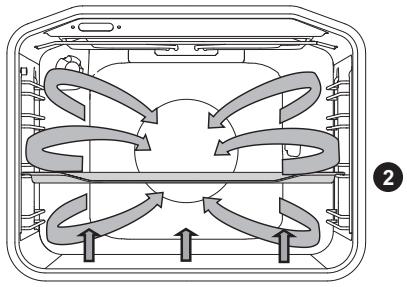
Diagram of a multi-panel air conditioning unit with directional arrows indicating airflow or circulation (no text or labels)The bottom heater, the round heater, and the hot air fan will operate. Suitable for baking pizzas, apple pies, and fruitcakes.
(See descriptions and tips for UPPER and BOTTOM HEATER.)
| Type of food | Guide (from the bottom) | Temperature (°C) | Cooking time (minutes) |
| Cheesecake, short crust | 2 | 150-160 | 65-80 |
| Pizza * | 2 | 200-210 | 15-20 |
| Quiche Lorraine, shortcrust | 2 | 180-200 | 35-40 |
| Apple pie, leavened dough | 2 | 150-160 | 35-40 |
| Apple strudel, phyllo dough | 2 | 170-180 | 45-65 |
The symbol * means that the oven should be preheated using the selected cooking system.
natural_image
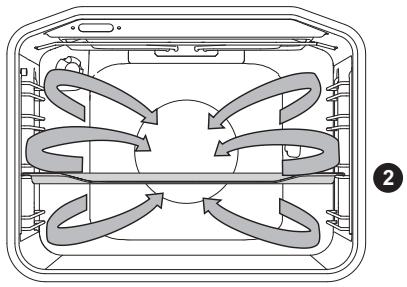
Diagram of a four-way air flow system inside a rectangular housing (no text or labels)Round heater and the fan will operate. The fan installed in the back wall of the oven cavity makes sure the hot air constantly circulates around the roast or pastry.
Roasting meat:
Use enamel coated, tempered glass, clay, or cast iron pan or tray. Stainless steel trays are not suitable as they strongly reflect the heat.
Provide enough liquid during the cooking process to prevent the meat from burning. Turn the meat during roasting. The roast will remain juicier if you cover it.
| Type of food | Weight (g) | Guide (from the bottom) | Temperature (°C) | Cooking time (minutes) |
| MEAT | ||||
| Pork roast, including skin | 1500 | 2 | 170-180 | 140-160 |
| Duck | 2000 | 2 | 160-170 | 120-150 |
| Goose | 4000 | 2 | 150-160 | 180-200 |
| Turkey | 5000 | 2 | 150-170 | 180-220 |
| Chicken breast | 1000 | 3 | 180-200 | 60-70 |
| Stuffed chicken | 1500 | 2 | 170-180 | 90-110 |
Baking pastry
Preheating is recommended.
Biscuits and cookies can be baked in shallow baking sheets on several levels simultaneously (2nd and 3rd).
Note that baking time can differ even with if the baking sheets used are the same. The biscuits in the upper baking sheet may be ready sooner than those in the lower one.
Always place the baking trays on the grid. If you are using the supplied baking sheet, remove the grid.
For even browning, make sure the biscuits are of the same thickness.
| Type of food | Guide (from the bottom) | Temperature (°C) | Cooking time (minutes) |
| PASTRY | |||
| Sponge cake | 2 | 150-160 | 25-35 |
| Crumble cake | 2 | 160-170 | 25-35 |
| Fruit cake, sponge | 2 | 150-160 | 45-65 |
| Sponge roll* | 2 | 160-170 | 15-25 |
| Fruit cake, short crust | 2 | 160-170 | 50-70 |
| Apple strudel | 2 | 170-180 | 40-60 |
| Biscuits, short crust* | 2 | 150-160 | 15-25 |
| Biscuits, pressed* | 2 | 140-150 | 15-25 |
| Cookies, leavened | 2 | 170-180 | 20-35 |
| Cookies, phyllo dough | 2 | 170-180 | 20-30 |
| PASTRY - FROZEN | |||
| Apple and cottage cheese strudel | 2 | 170-180 | 50-70 |
| Pizza | 2 | 170-180 | 20-30 |
| Fried potatoes, oven-ready | 2 | 170-180 | 20-35 |
| Croquettes, oven-baked | 2 | 170-180 | 20-35 |
The symbol * means that the oven should be preheated using the selected cooking system.

Do not insert the deep baking tray into the first guide.
natural_image
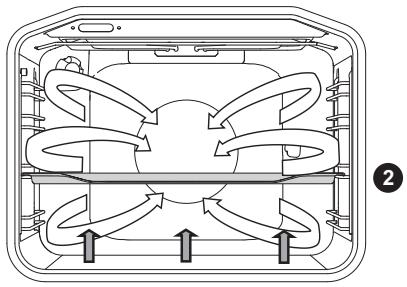
Diagram of a multi-chamber air conditioning unit with airflow arrows indicating circulation (no text or labels)This is used for baking leavened but low-rising pastry and for preserving fruit and vegetables. Use the second guide from the bottom and a rather shallow baking tray to allow the hot air to circulate across the upper side of the dish.
PRESERVATION
Prepare the food to be preserved and jars as usual. Use jars with a rubber sealing ring and a glass cover. Do not use jars with threaded or metal caps or metal tins. Make sure the jars are of equal size, filled with the same contents, and tightly sealed.
Pour 1 litre of hot water into the deep tray (approx. 70^ C) and place 6 1-litre jars into the tray. Place the tray into the oven on the second guide.
During preservation, observe the food and cook until the liquid in the jars starts to simmer – when bubbles appear in the first jar.
| Type of food | Guide (from the bottom) | Temperature (°C) | Time to simmer (min) | Temperature and time after the start of simmer | Resting time in the oven (min) |
| FRUIT | |||||
| Strawberries | 2 | 160-180 | 30-45 | / | 20-30 |
| Stone fruits | 2 | 160-180 | 30-45 | / | 20-30 |
| Fruit mush | 2 | 160-180 | 30-45 | / | 20-30 |
| VEGETABLES | |||||
| Pickled gherkins | 2 | 160-180 | 30-45 | / | 20-30 |
| Beans/carrots | 2 | 160-180 | 30-45 | 120°C, 45-60 min | 20-30 |
natural_image
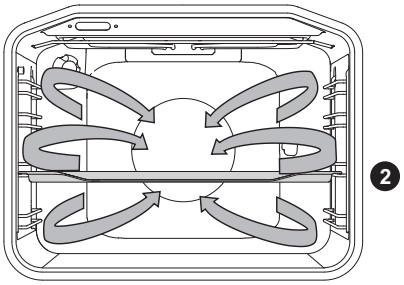
Diagram of a multi-panel air conditioner unit with airflow arrows indicating circulation (no text or labels)Round heater and the fan will operate. The fan installed in the back wall of the oven cavity makes sure the hot air constantly circulates around the roast or pastry.
| Type of food | Guide (from the bottom) | Temperature (°C) | Cooking time (min.) |
| MEAT | |||
| Pork roast, 1 kg | 2 | 180 | 140-160 |
| Pork roast, 2 kg | 2 | 180 | 150-180 |
| Beef roast, 1 kg | 2 | 190 | 120-140 |
| FISH | |||
| Whole fish, 200 g/piece | 2 | 180 | 40-50 |
| Fish fillet, 100 g/piece | 2 | 190 | 25-35 |
| PASTRY | |||
| Piped cookies | 2 | 160 | 20-25 |
| Small cupcakes | 2 | 170 | 25-35 |
| Sponge roll | 2 | 170 | 25-30 |
| Fruit cake, short crust | 2 | 170 | 55-65 |
| GRATINS | |||
| Potatoes au gratin | 2 | 170 | 40-50 |
| Lasagne | 2 | 180 | 40-50 |
| FROZEN FOOD | |||
| French fries, 1 kg | 2 | 200 | 25-40 |
| Chicken nuggets, 0.7 kg | 2 | 200 | 25-35 |
| Fish sticks, 0.6 kg | 2 | 200 | 20-30 |

Do not insert the deep baking tray into the first guide.
DEFROSTING
In this mode, the air will circulate without any heaters operating.
Food suitable for defrosting includes cakes with heavy cream or butter-based cream, cakes and pastry, bread and rolls, and deep-frozen fruit.
natural_image
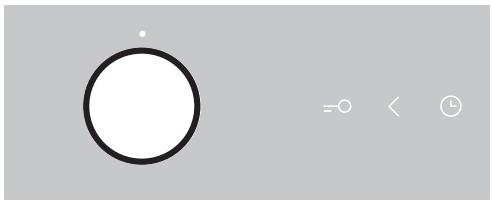
Simple diagram with a circle and control icons (no text or labels)Turn the COOKING SYSTEM SELECTOR KNOB to defrosting. Touch the START/STOP key to start the defrosting process.
In most cases, it is recommended to remove the food from the packaging (do not forget to remove any metal clamps or clips).
Halfway through the defrost time, the pieces should be turned over, stirred and separated if they were frozen together.

Be sure to unplug the appliance from the power supply and wait for the appliance to cool down.
Children should not clean the appliance or perform maintenance tasks without proper supervision.
Aluminium finish
Clean the aluminium finish with non-abrasive liquid cleaners intended for such surfaces. Apply the cleaner onto a wet cloth and clean the surface. Then, rinse the surface with water. Do not apply the cleaner directly onto the aluminium finish.
Do not use abrasive cleaners or sponges.
Note: The surface should not come into contact with oven cleaning sprays as this may result in visible and permanent damage.
Stainless steel sheet front side of the housing
(depending on the model)
Clean this surface only with a mild detergent (soapsuds) and a soft sponge that will not scratch the finish. Do not use abrasive cleaners or cleaners containing solvents as they may damage the housing finish.
Lacquer-coated surfaces and plastic parts
(depending on the model)
Do not clean the knobs and buttons, door handles, stickers, and rating/type plates with abrasive cleaners or abrasive cleaning materials, alcohol-based cleaners, or with alcohol. Immediately remove any stains with a soft non-abrasive cloth and some water, in order to avoid damaging the surface.
You may also use cleaners and cleaning materials intended for such surfaces as instructed by their respective manufacturers.
Control unit:
Do not clean the surface with abrasive cleaners or harsh cleaning tools.

The aluminium-coated surfaces should not come into contact with oven cleaning days as this may result in visible and permanent damage.
CONVENTIONAL OVEN CLEANING
You may use the standard cleaning procedure to clean stubborn dirt in the oven (using cleaners or an oven spray). After such cleaning, rinse the cleaner residues thoroughly.
Clean the oven and the accessories after each use to prevent the dirt from burning into the surface. The easiest way to remove fat is by using warm soapsuds while the oven is still warm.
With stubborn dirt and grime, use conventional oven cleaners. Rinse the oven thoroughly with clean water to remove all cleaner residue.
Never use aggressive cleaners, abrasive cleaners, abrasive sponges, stain and rust removers etc.
Clean the accessories (baking sheets and trays, grids etc.) with hot water and detergent.
The oven, the oven cavity and the baking trays are lined with a special enamel coating for a smooth and resistant surface. This special coating makes cleaning at room temperature easier.
AUTOMATIC OVEN CLEANING - PYROLYSIS
This function allows automatic cleaning of the oven interior and the deep and shallow baking tray, by means of high temperature that incinerates the fat residues and other impurities to reduce them to ashes.
During the pyrolysis process, food and fat residues may ignite. Therefore, remove any visible dirt and food residues from the oven interior before starting the program.

Before pyrolytic cleaning, remove all equipment from the oven (including the telescopic guides).
1 Turn the COOKING SYSTEM SELECTOR KNOB to "P".

2 Rotate the TEMPERATURE ADJUSTMENT KNOB all the way to the right to the "P" sign. "Pyro" will flash on the display unit, along with the indication of pyrolytic cleaning duration.

3 After a certain period of time, oven door will be automatically locked for your safety. "Loc" will appear on the display unit (for 3 seconds).
During cleaning, the appliance becomes very hot on the outside. Never hang flammable objects like kitchen cloths or similar on the front panel of the appliance.

Do not attempt to open the oven door while the automatic cleaning process is in progress. The program may be terminated. Risk of burns!
During pyrolysis, unpleasant odours may be released from the appliance. Therefore, we recommend ventilating the room.
When the pyrolytic cleaning program is completed and the oven has cooled down, use a damp cloth or a soft sponge to wipe the ashes from the oven cavity. Do not rub the gasket.
For average use of the oven, we recommend running the pyrolytic cleaning function once per month.
CLEANING THE DEEP AND SHALLOW TRAY IN THE OVEN:

Before the start of pyrolytic cleaning, use the supplied guide rails (depending on the model).
After use, clean the baking trays with hot water and detergent, then wipe them with a cloth and place them into the 2nd or 3rd guide rail. Do not place a baking sheet or tray into the 1st guide rail.

During pyrolytic cleaning, the baking sheets and trays may partly discolour and loose the shine. This does not affect the use of the equipment.

When using the pyrolytic cleaning process to clean the baking trays, the oven cavity is not be completely clean at the end of the cycle.
REMOVING AND CLEANING WIRE AND TELESCOPIC EXTENDIBLE GUIDES
Only use conventional cleaners to clean the guides.
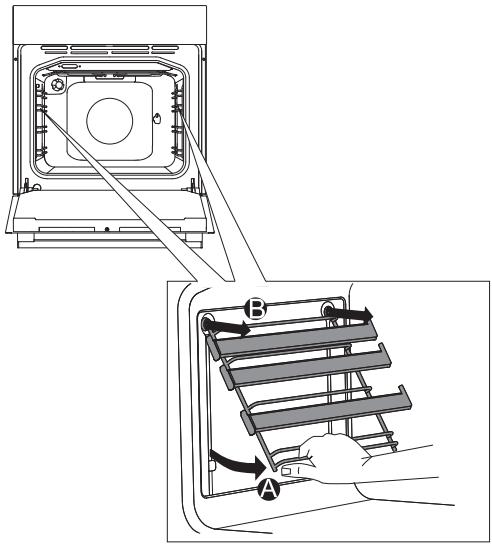
A Hold the guides by the bottom side and pull them towards the center of the oven cavity.
B Remove them from the openings at the top.
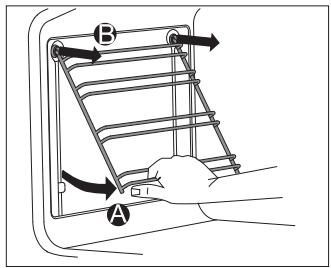

Do not clean the extendible guides in the dishwasher.
INSTALLING THE CATALYTIC INSERTS
Only use conventional cleaners to clean the guides.
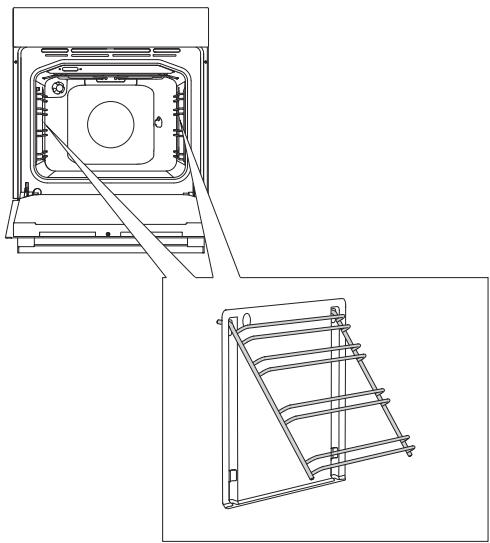
natural_image
Technical line drawing of a mechanical device with two views: top shows internal components, bottom shows a rack structure (no text or symbols)Remove the wire guides or extendible guides.
1 Mount the guides onto the catalytic insert.
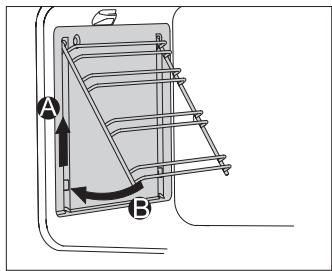
2 Hang the inserts with guides attached using the holes provided, and pull upwards.
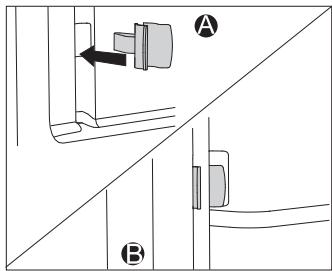
When installing fully extendible guides with catalytic inserts, insert one end of the supplied snap locks into the openings at the bottom of the oven cavity wall and insert the other end of the snap locks into the guides.
The purpose of the snap locks is to hold the guides in place more firmly.

Do not wash the catalytic inserts in the dishwasher.
REMOVING AND INSERTING THE OVEN
DOOR (depending on the model)
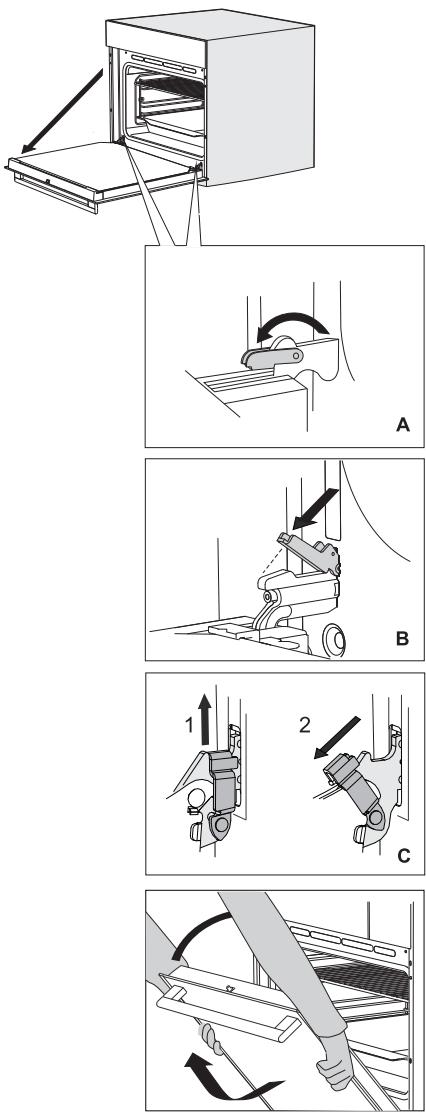
1 First, fully open the door (as far as it will go).
2 A Rotate the stoppers all the way back (in case of conventional closing).
B If the appliance is fitted with the GentleClose system, flip the door latches back to a 90°angle (Figure 2).
C If the appliance is fitted with the GentleClose system, slightly lift the door latches and pull them towards you.
3 Slowly close the door until the latches are aligned with the slots. Slightly lift the door and pull it out from both hinge slots on the appliance.
To replace the door, observe the reverse order. If the door does not open or close properly, make sure the notches on the hinges are aligned with the hinge beds.

When replacing the door, always make sure the hinge retainers are correctly placed in the hinge beds to prevent sudden closing of the main hinge which is connected to a strong main spring. If the main spring is engaged, there is a risk of injury.
DOOR LOCK (depending on the model)
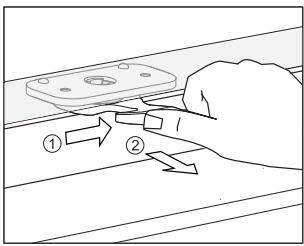
To open it, gently push it to the right with your thumb and pull the door outwards at the same time.
When the oven door is closed, the door lock automatically returns to the initial position.
DEACTIVATING AND ACTIVATING THE DOOR LOCK
The oven should be cooled down completely.
First, open the oven door.

Push the door lock to the right by 90° with your thumb until you feel a click. The door lock is not deactivated.
To reactivate the door lock, open the oven door and use your right-hand index finger to pull the lever towards you.
SOFT DOOR CLOSING (depending on the model)
Oven door is fitted with a system that dampens the door closing force, starting at the 75-degree angle. It allows simple, quiet, and smooth closing of the door. A gentle push (to a 15-degree angle relative to the closed door position) is enough for the door to close automatically and softly.

If the force applied to close the door is too strong, the effect of the system is reduced or the system will be bypassed for safety.
REMOVING AND INSERTING THE OVEN DOOR GLASS PANE
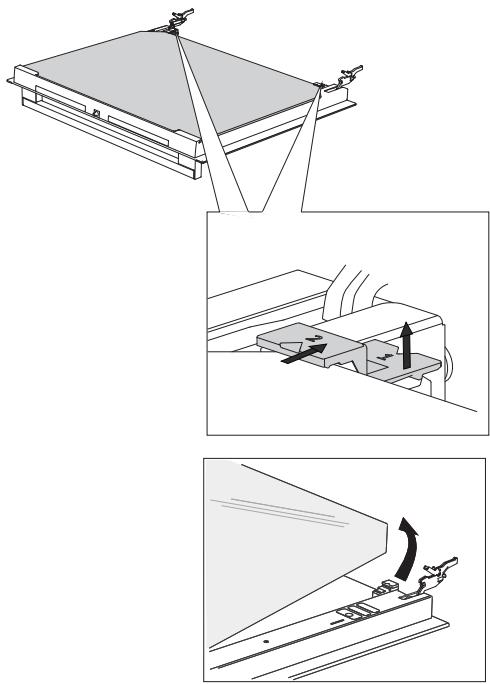
Oven door glass pane can be cleaned from the inside, but it has to be removed first. Remove the oven door (see chapter "Removing and replacing the oven door").
natural_image
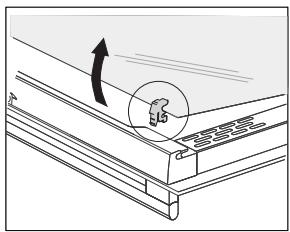
Technical line drawing of a mechanical assembly with an arrow indicating direction (no text or symbols)1 Slightly lift the supports on the left and right side of the door (marking 1 on the support) and pull them away from the glass pane (marking 2 on the support).
2 Hold the door glass pane by the lower edge; slightly lift it so that it is no longer attached to the support; and remove it.
3 To remove the third glass pane (only with some models), lift and remove it. Also remove the rubber seals on the glass pane.
To replace the glass pane, observe the reverse order. The markings (semicircle) on the door and the glass pane should overlap.
REPLACING THE BULB
The bulb is a consumable and therefore not covered by warranty. Before changing the bulb, remove the trays, the grid, and the guides.
(Halogen lamp: G9, 230 V, 25 W; regular bulb E14, 25 W, 230 V)
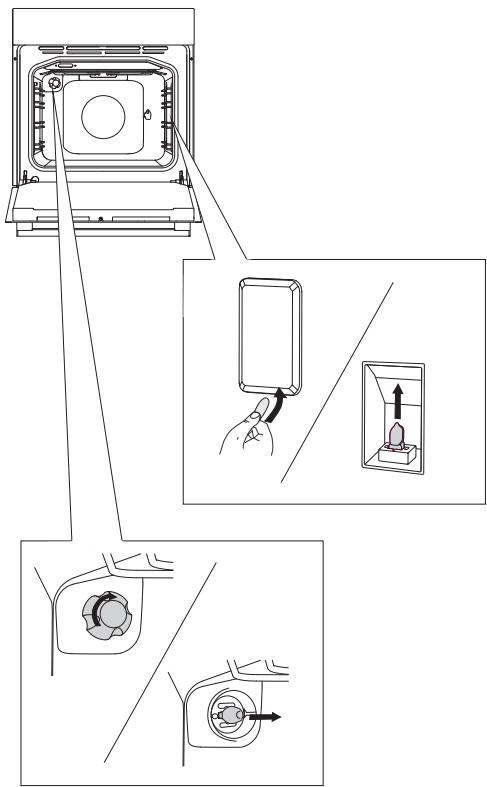
Use a flat screwdriver to release the bulb cover and remove it. Remove the bulb.

Be careful not to damage the enamel.
Undo the bulb cover and remove the bulb.

Use protection to avoid burs.
TROUBLESHOOTING TABLE
| Problem/error | Cause |
| There is no response of the sensors; the display is frozen. | Disconnect the appliance from the power mains for a few minutes (undo the fuse or switch off the main switch); then, reconnect the appliance and switch it on. |
| The main fuse in your home trips often. | Call a service technician. |
| The oven lighting does not work. | The process of changing the light bulb is described in the chapter Cleaning and Maintenance. |
| The pastry is underdone. | Did you choose the right temperature and heating system?Is the oven door closed? |
| An error code is displayed (E1, E2, E3 etc.). | There is an error in the electronic module operation.Disconnect the appliance from the power mains for a few minutes. Then, reconnect it and set the time of day.If the error is still indicated, call a service technician. |
If the problems persist despite observing the advice above, call an authorized service technician. Repair or any warranty claim resulting from incorrect connection or use of the appliance shall not be covered by the warranty. In this case, the user will cover the cost of repair.

Before the repair, disconnect the appliance from the power mains (by removing the fuse or by removing the plug from the wall outlet).
Packaging is made of environmentally friendly materials that can be recycled, disposed of, or destroyed without any hazard to the environment. To this end, packaging materials are labelled appropriately.
The symbol on the product or its packaging indicates that the product should not be treated as normal household waste. The product should be taken to an authorized collection center for waste electric and electronic equipment processing.
Correct disposal of the product will help prevent any negative effects on the environment and health of people which could occur in case of incorrect product removal. For detailed information on removal and processing of the product, please contact the relevant municipal body in charge of waste management, your waste disposal service, or the store where you bought the product.
We reserve the right to any changes and errors in the instructions for use.