COM-5490 - Mouse Steren - Free user manual and instructions
Find the device manual for free COM-5490 Steren in PDF.


Pick your language and provide your email: we'll send you a specifically translated version.
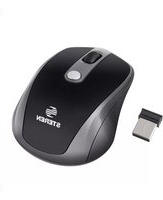
| Product Type | Optical Mouse |
| Brand | Steren |
| Model | COM-5490 |
| Connectivity | Wired USB |
| Interface | USB 2.0 |
| Resolution | 1000 DPI |
| Number of Buttons | 3 (left, right, middle scroll) |
| Scroll Wheel | Yes |
| Cable Length | 1.5 m |
| Compatibility | Windows, Mac, Linux |
| Dimensions (L x W x H) | 115 x 62 x 38 mm |
| Weight | 85 g |
| Power Source | USB power (5V, 100mA) |
| Operating Temperature | 0°C to 40°C |
| Storage Temperature | -10°C to 60°C |
| Color | Black |
| Surface Compatibility | Works on most surfaces |
| Plug and Play | Yes |
| Maintenance | Clean with dry cloth |
| Safety | Do not expose to liquids |
| Repairability | No user-serviceable parts |
| Package Contents | Mouse, user manual |
Frequently Asked Questions - COM-5490 Steren
How do I connect the Steren COM-5490 mouse to my computer?
Simply plug the USB connector into an available USB port on your computer. The mouse is plug and play, so no additional drivers are needed for most operating systems.
Is the Steren COM-5490 compatible with Mac computers?
Yes, the mouse works with Windows, macOS, and Linux without requiring special software.
What does the DPI resolution mean for this mouse?
The 1000 DPI resolution determines the sensitivity of the cursor. It provides a good balance between precision and speed for everyday tasks and moderate gaming.
Can I use the mouse on a glass surface?
The optical sensor may struggle on transparent or reflective glass. For best performance, use a non-reflective surface or a mouse pad.
How do I clean the mouse?
Disconnect the mouse and wipe it with a soft, dry cloth. Avoid using harsh chemicals or submerging it in water.
What should I do if the cursor is not moving smoothly?
Make sure the sensor lens is clean and the surface is suitable. You can also try restarting your computer or connecting to a different USB port.
Is the mouse compatible with gaming?
While not designed specifically for gaming, the 1000 DPI sensor and three buttons make it adequate for casual gaming and office use.
Does the mouse require batteries?
No, the Steren COM-5490 is USB-powered, so it draws power directly from the computer, eliminating the need for batteries.
What is the cable length?
The cable is approximately 1.5 meters long, providing enough flexibility for most desk setups.
How do I replace the scroll wheel if it breaks?
The scroll wheel is not user-replaceable. If it malfunctions, contact Steren customer support for repair options or consider purchasing a new mouse.
User questions about COM-5490 Steren
0 question about this device. Answer the ones you know or ask your own.
Ask a new question about this device
No questions yet. Be the first to ask one.
Download the instructions for your Mouse in PDF format for free! Find your manual COM-5490 - Steren and take your electronic device back in hand. On this page are published all the documents necessary for the use of your device. COM-5490 by Steren.
USER MANUAL COM-5490 Steren

Manual assistant
Powered by Anthropic
Waiting for your message
Product information
Brand : Steren
Model : COM-5490
Category : Mouse